Version
1.35.2 win64
Operating system type + version
Win 10 64 home
Behavior
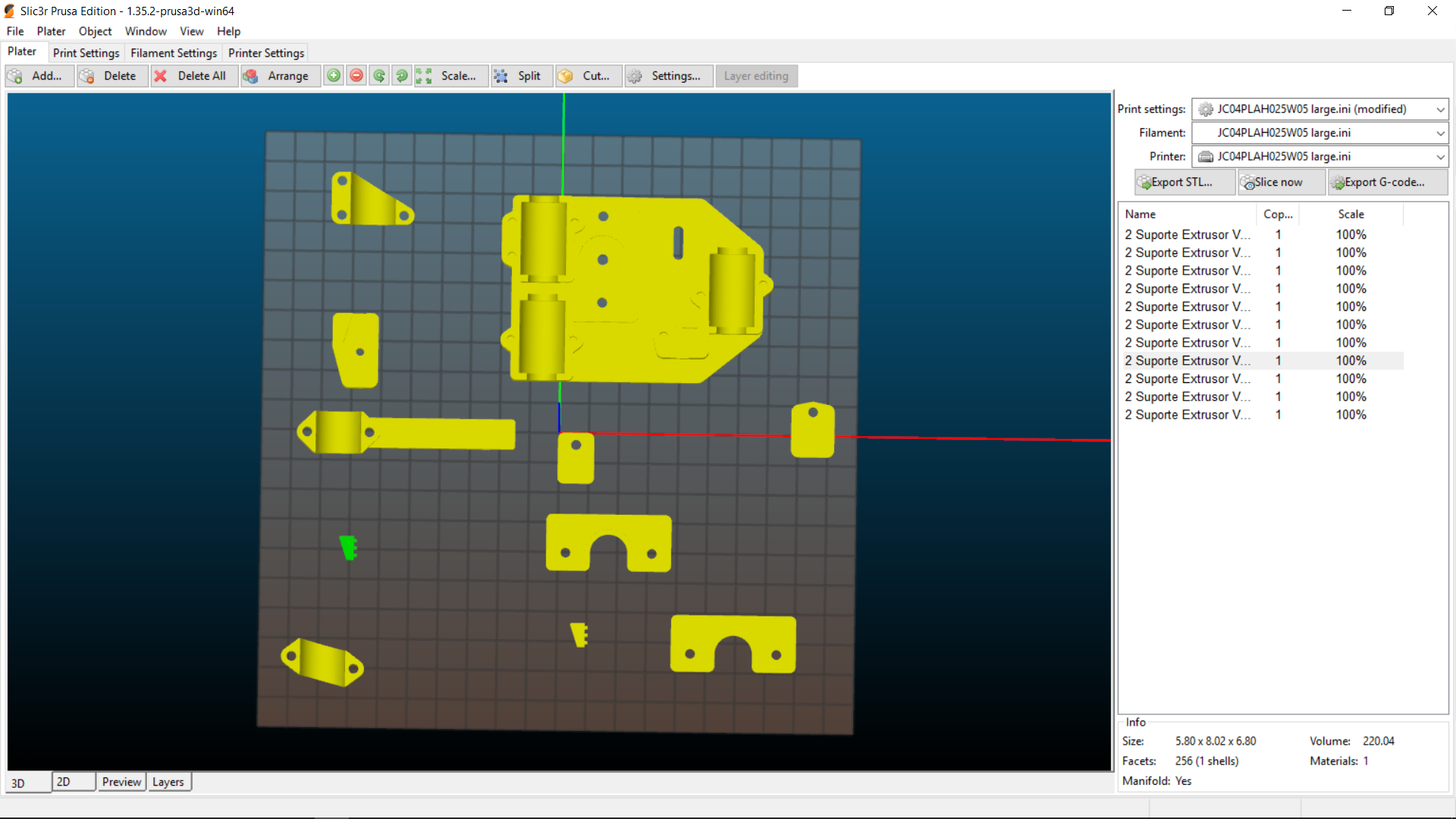
After messing around with several parts on the plate, seleting auto Arrange (3D view) does not do nothing.
 cerdeira
All 11 comments
May it be a duplicate of https://github.com/prusa3d/Slic3r/issues/285 ?
 bubnikv
on 6 Jun 2017
bubnikv
on 6 Jun 2017
It seems to be different.
I was moving parts around to get the best distribution on the plate to minimise printing time and tried Arrange but parts do not move.
cerdeira
on 7 Jun 2017
This is really a different issue. The algorithm for automatic placement Slic3r uses is very limited: It measures the biggest object, then it draws a regular grid with cells as big as the biggest object, and then it places the objects into this regular grid. Because of the large object on the bed, the grid has big cells and there are not enough cells on the bed.
I will have to rewrite the placement algorithm one day.
bubnikv
on 8 Jun 2017
If it helps and following what I said on slic3r #4008, Auto arrange has a great potential.
It could be used to just laydown parts on plate, close toghether and aligned, or to move them around to minimise print time, or to group them by height to allow the user to aply mesch modifiers by height or layers, to group them by size or area, etc.
cerdeira
on 9 Jun 2017
I have ported the change made by @alexrj to do at least something if the objects do not fit the print bed.
That is not ideal, but it may be better than nothing for some.
https://github.com/prusa3d/Slic3r/commit/a4992602eef7e19721efebf145a3361af227978e
bubnikv
on 13 Jun 2017
Coming back to this subject, I noticed that other software do not do much either, they just align the objects by X and Y axes keeping them apart by 5mm or so.
A good improvement for Arrange could be align objects also by Z eight, avoiding a short object placed in between two tall ones.
cerdeira
on 16 Jun 2017
FYI, when you revisit redesigning the placement algo, you may want to review this project to see if it is something you want to invest the time to leverage:
https://github.com/Rhoban/Plater
I often use it myself to auto-arrange full plates and it is quite convenient.
 fiveangle
on 17 Jul 2017
fiveangle
on 17 Jul 2017
Thanks for heads up, Dave. It is C++, so we can hopefully use it straight
away.
On Mon, Jul 17, 2017 at 4:33 PM, Dave Johnson notifications@github.com
wrote:
FYI, when you revisit redesigning the placement algo, you may want to
review this project to see if it is something you want to invest the time
to leverage:https://github.com/Rhoban/Plater
I often use it myself to auto-arrange full plates and it is quite
convenient.—
You are receiving this because you commented.
Reply to this email directly, view it on GitHub
https://github.com/prusa3d/Slic3r/issues/336#issuecomment-315773596, or mute
the thread
https://github.com/notifications/unsubscribe-auth/AFj5I1KmbBODwLBvibPmFFE7hrV4g5Rsks5sO3DNgaJpZM4Nx8kN
.
bubnikv
on 17 Jul 2017
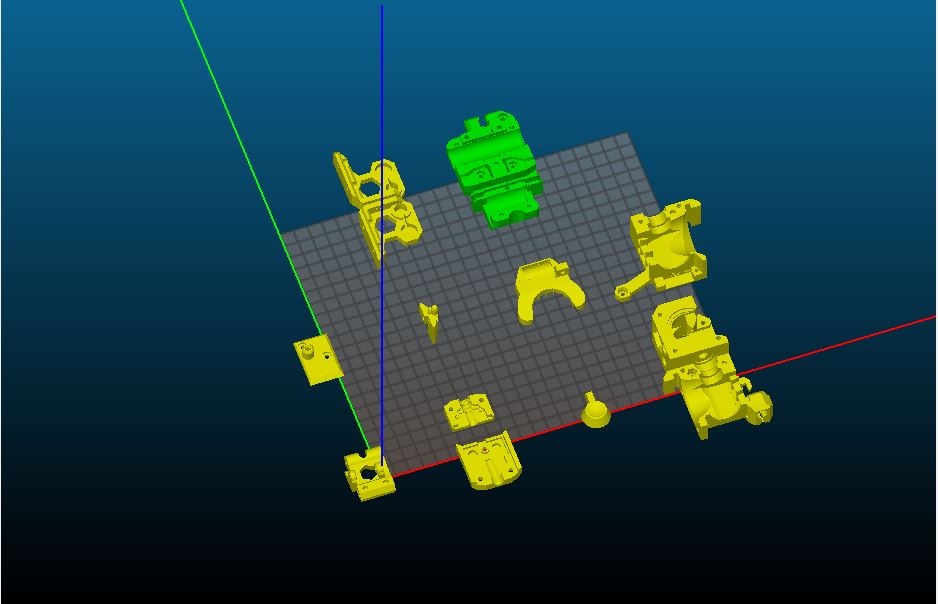
Arrange doesn't seem to adhere to buildplate space, it just scatters the parts all over the place with huge gaps between them, so that some objects end up outside the buildplate.
 nospoon
on 11 May 2018
nospoon
on 11 May 2018
We have @tamasmeszaros working on a new placement algorithm. Tamas follows the papers referenced by http://svgnest.com/ , so we should get similar results in Slic3r.
bubnikv
on 14 May 2018
@tamasmeszaros implemented an advanced placement algorithm into Slic3r 1.41.0-alpha, which is due in a couple of days. Closing.
bubnikv
on 17 Jul 2018
Related issues
 Tirpitz93
·
3Comments
Tirpitz93
·
3Comments
 pricedev
·
4Comments
pricedev
·
4Comments
 rackley096794
·
3Comments
rackley096794
·
3Comments
 guestisp
·
3Comments
guestisp
·
3Comments
 alexiri
·
4Comments
alexiri
·
4Comments
Most helpful comment
This is really a different issue. The algorithm for automatic placement Slic3r uses is very limited: It measures the biggest object, then it draws a regular grid with cells as big as the biggest object, and then it places the objects into this regular grid. Because of the large object on the bed, the grid has big cells and there are not enough cells on the bed.
I will have to rewrite the placement algorithm one day.