Prusa-firmware: [BUG]Pause on 3.9.0 RC1
Printer type - MK3S
Printer firmware version- 3.9.0 RC1
Describe the bug
In firmware 3.8.1 the M601 pause had a bug that was fixed on this version, but now the pause doesn't move the extruder away from the print zone.
To Reproduce
- Slice the 3D file on Prusa Slic3r 2.2.0
- Insert a M601 pause wherever
Expected behavior
When the printer pause the extruder should move away from the print zone, giving the opportunity to place the magnets or whatever on the printed object (as done on firmware version 3.8.1)
 samuelemarazzita
All 23 comments
@samuelemarazzita Thanks for the BUG report.
Do you print via SD card or Octoprint/USB?
What message exactly did you enter for the M601 pause?
Does it lift the Z?
Does it moves X/Y?
It should lift the Z axis (+20 if it can) and move to X_PAUSE_POS=50 and Y_PAUSE_POS=190
 3d-gussner
on 11 Apr 2020
3d-gussner
on 11 Apr 2020
I print via Octoprint and with the 3.8.1 firmware everything was working, instead the resume after the pause (nozzle was cooling down and when resuming with octoprint, it was resuming the print without hotting the nozzle).
It does lift the Z but doesn't move the X/Y axes.
I'll try to print using SD card and will let you know.
samuelemarazzita
on 11 Apr 2020
I run a tiny test print with M601 added by PrusaSlicer 2.2.0 and printed it via Pronterface USB.
- got the message shown on the LCD
- it moved 20mm up and to X50 Y190
- showed me that it is paused
- I could resume the print via LCD menu
I have to say that i run the "latest" self compiled firmware and not FW3.9.0-RC1 official one.
3d-gussner
on 11 Apr 2020
Ok, I've just tried using SD Card instead Octoprint and it works perfectly. I guess Octoprint is not compiling correctly the command. Anyway, on the Gcode there is no command telling the printer to move Z axis (+20 if it can) and X_PAUSE_POS=50 and Y_PAUSE_POS=190.
This is the part of my Gcode where the printer should pause:
G1 X124.020 Y98.304 E0.27940
;BEFORE_LAYER_CHANGE
G92 E0.0
;4.2
G1 E-0.80000 F3000.00000
G1 Z4.300 F10800.000
;AFTER_LAYER_CHANGE
;4.2
M117 Place bearings in slots and resume printing
M601
G1 X118.182 Y98.182
G1 Z4.200
G1 E0.80000 F1500.00000
M204 S800
I've just found this reported issue: https://github.com/prusa3d/Prusa-Firmware/issues/825
samuelemarazzita
on 11 Apr 2020
@samuelemarazzita Thanks for the feedback.
Octoprint
Check in Octoprint if you got the message // action:paused in the terminal during the print or in the serial.log
You might need to search a bit how to use the action in Octoprint.
Firmware M601 improvement
We had a short chat about improving the M601 gcode:
- Adding extra pause X Y parameters to M601 would need Slicer development and could be overwhelming for users.
- Adding kind of "intelligence" to the firmware has to be discussed in the team
- My idea is to set the x parking
X_PAUSE_POStoX_MAX_POS-default X_PAUSE_POSif the print pauses at<=X_MAX_POS/2.
This would mean in your case it would move to X205 Y190 and lift Z+20 (if possible) as your x position is X118 <= 255/2
Otherwise use the default value defined.
- My idea is to set the x parking
3d-gussner
on 11 Apr 2020
@samuelemarazzita Every firmware that supports M601 does something with it.
PrusaFirmware has defined X_PAUSE_POS=50, Y_PAUSE_POS=190 and Z_PAUSE_LIFT=20 in the variants files.
If the current height is low enough then the firmware
- moves the Z axis additional
Z_PAUSE_LIFT(there is a check in the firmware) - moves to
X_PAUSE_POSandY_PAUSE_POS
....
3d-gussner
on 11 Apr 2020
@samuelemarazzita Test with Octoprint 1.4.0 and latest self compiled FW3.9.0-RC1.9
1st pause
- print paused
- moved up +20mm
- moved to X50 Y190
- in Octoprint i got the message
// action:paused(see below). - It took a while until Octoprint showed
Pausedstatus and added theResumebutton - Resumed the print via Octoprint
- Hotend heated up
- moved back to the last position
- continued with the print
As you can see from the Terminal output the Communication timed out
You can add the M601 in Octoprint to be a long running command or so ... search for it.
2nd pause
During the 2nd stop I din't touch anything:
- print paused
- moved up +20mm
- moved to X50 Y190
- in Octoprint i got the message
// action:paused(see below). - It took a while until Octoprint showed
Pausedstatus and added theResumebutton - BUT compared to 1st pause it moved the extruder back to previous xy position.
- And waits with hotend target temp 0°C BUT the BED is still at 60/60°
- After pressing
Resumein Octoprint it starts to heat up the hotend. - Continues to print at the right spot.
Here a short output of the Octoprint Terminal
1st pause
Send: N915 M117 Place something in slots and resume printing*41
Recv: ok
Send: N916 M601*42
Recv: echo:enqueing "G1 E-1.000 F2700"
Recv: // action:paused
Printer signalled that it paused, switching state...
Changing monitoring state from "Printing" to "Pausing"
Communication timeout while printing, trying to trigger response from printer. Configure long running commands or increase communication timeout if that happens regularly on specific commands or long moves.
Changing monitoring state from "Pausing" to "Paused"
[...]
Changing monitoring state from "Paused" to "Resuming"
[...]
Send: N917 M602*40
[...]
Recv: echo:busy: processing
[...]
Recv: echo:busy: processing
[...]
Recv: echo:busy: processing
[...]
Recv: echo:busy: processing
[...]
Recv: echo:busy: processing
[...]
Recv: echo:busy: processing
[...]
Recv: echo:busy: processing
[...]
Recv: echo:busy: processing
[...]
Recv: echo:busy: processing
[...]
Recv: echo:busy: processing
[...]
Recv: echo:busy: processing
[...]
Recv: echo:busy: processing
[...]
Recv: echo:busy: processing
Recv: echo:busy: processing
Recv: echo:busy: processing
Recv: Resend: 917
Recv: ok
Send: N917 M602*40
Recv: ok
Changing monitoring state from "Resuming" to "Printing"
Send: N918 G1 X115.632 Y95.632*16
Recv: // action:resumed
Printer signalled that it resumed, switching state...
Recv: ok
Recv: ok
Send: N919 G1 Z1.000*124
Recv: ok
Send: N920 G1 E0.80000 F2100.00000*27
Recv: ok
Send: N921 M204 S800*100
Recv: ok
Send: N922 G1 F1184*75
Recv: ok
Send: N923 G1 X134.368 Y95.632 E0.63419*83
Recv: ok
Send: N924 G1 X134.368 Y114.368 E0.63419*102
Recv: ok
Send: N925 G1 X115.632 Y114.368 E0.63419*110
Recv: ok
Send: N926 G1 X115.632 Y95.692 E0.63216*92
Recv: ok
2nd pause
Changing monitoring state from "Printing" to "Pausing"
Communication timeout while printing, trying to trigger response from printer. Configure long running commands or increase communication timeout if that happens regularly on specific commands or long moves.
Send: N3024 G1 X134.389 Y114.671 F10800.000*93
Recv: ok
Send: N3025 G1 F8640.000*110
Recv: ok
[...]
Changing monitoring state from "Pausing" to "Paused"
Octoprint Tip:
Look in Settings -> Serial Connection -> Firmware & protocol
and open all Advanced options . You will find possible option to fine tune your Octoprint with your printer.
3d-gussner
on 11 Apr 2020
Ok here what happened:
Send: N2460 G1 X124.020 Y98.304 E0.27940*105
Recv: ok
Send: N2461 G92 E0.0*104
Recv: ok
Send: N2462 G1 E-0.80000 F3000.00000*15
Recv: ok
Send: N2463 G1 Z4.300 F10800.000*9
Recv: ok
Send: N2464 M117 Place bearings in slots and resume printing*127
Recv: ok
**Send: N2465 M601*17**
Recv: echo:enqueing "G1 E-1.000 F2700"
**Recv: // action:paused**
Printer signalled that it paused, switching state...
Changing monitoring state from "Printing" to "Pausing"
Communication timeout while printing, trying to trigger response from printer. Configure long running commands or increase communication timeout if that happens regularly on specific commands or long moves.
Send: N2466 G1 X118.182 Y98.182*38
Recv: ok
Changing monitoring state from "Pausing" to "Paused"
I saw the extruder move to the pause position and, after some seconds, go back over the 3D printed peace. Then the hotend temperature dropped down. When I resumed using octoprint button, the printer started moving only XYZ axes while the E was just not moving. The hotend temperature still was settled to 0°C.
Here the terminal code from Octoprint after resuming:
Changing monitoring state from "Paused" to "Resuming"
Changing monitoring state from "Resuming" to "Printing"
Send: N2467 G1 Z4.200*77
Recv: ok
Send: N2468 G1 E0.80000 F1500.00000*47
Recv: echo: cold extrusion prevented
Recv: ok
This is my Octoprint Settings>Serial Connections>Firmware & Protocol>Long running commands value.

samuelemarazzita
on 11 Apr 2020
I also saw that when I resume the print via Octoprint, the hotend doesn't warm up and the cold extrusion prevented message is shown. By the way if I resume using Prusa LCD, the hotend turns on before starting printing.
samuelemarazzita
on 11 Apr 2020
The default octoprint profile doesn't include the special gcodes for Pause and Resume that can be found in PrusaFirmware.
At the gcode scripts, you must have M601 for pause and M602 for resume for the Resume button to work in the UI. Otherwise, it will just start sending commands without the printer actually going back to the "resumed" state
 leptun
on 11 Apr 2020
leptun
on 11 Apr 2020
And where should I place the command in Octoprint?
samuelemarazzita
on 11 Apr 2020
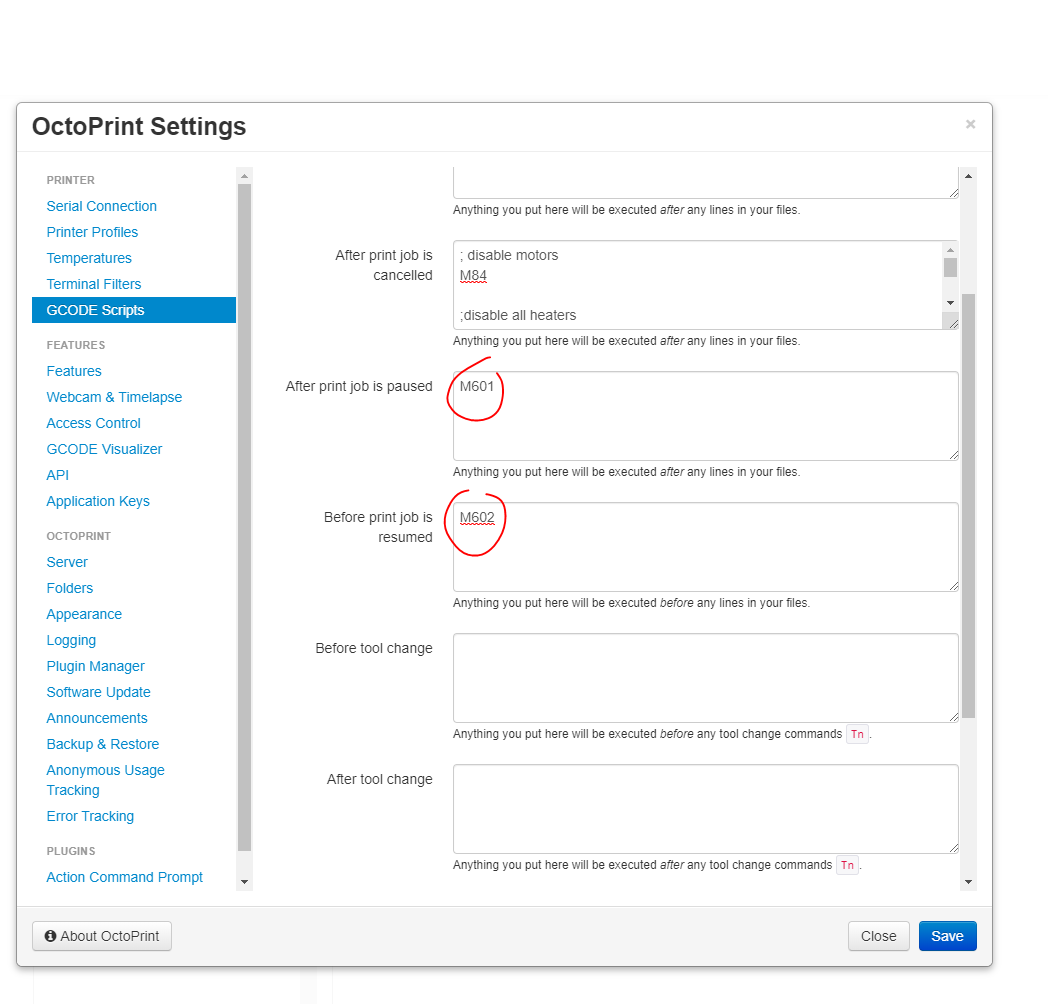
leptun
on 11 Apr 2020
I'll give it a try and let you know. Thank you.
samuelemarazzita
on 11 Apr 2020
Ok, seem that the resume now works fine, the hotend warms up when I click on "resume" button on Octoprint UI. The problem is still on the pause.
I noticed that the extruder moves back to its position (XY) after this:
Recv: // action:paused
Printer signalled that it paused, switching state...
Changing monitoring state from "Printing" to "Pausing"
I think I know what is happening. When the M601 is processed, it tells octoprint to switch to the paused state, but that doesn’t happen instantly. In the meantime, octoprint sends another command, but it is ignored since it is pausing. Octoprint times out and it resends the command. This results in moving the extruder close to where the print was paused. I’ll try to think of a solution to this issue and post an updated firmware. Is that ok?
leptun
on 11 Apr 2020
Good morning,
I tried some settings in Otoprint and with latest FW3.9.0-RC1.9 it works.
But I also found in the serial.log / terminal output (disabled "Suppress wait responses") :
Send: N916 M117 Place something in slots and resume printing*42
Recv: ok
Changing monitoring state from "Printing" to "Pausing"
Send: N917 M400*40
Recv: ok
Send: N918 M601*36
Recv: echo:enqueing "G1 E-1.000 F2700"
Recv: // action:paused
Printer signalled that it paused, switching state...
**Did not receive parseable position data from printer within 10.0s, continuing without it**
Communication timeout while printing, trying to trigger response from printer. Configure long running commands or increase communication timeout if that happens regularly on specific commands or long moves.
Send: N919 M114*38
Recv: X:50.00 Y:190.00 Z:21.40 E:-1.71 Count X: 50.53 Y:191.58 Z:21.37 E:-1.71
Recv: ok
Send: N920 M105*44
Recv: ok T:188.9 /0.0 B:60.5 /60.0 T0:188.9 /0.0 @:0 B@:0 P:30.4 A:36.5
Send: N921 M105*45
Recv: ok T:188.9 /0.0 B:60.5 /60.0 T0:188.9 /0.0 @:0 B@:0 P:30.4 A:36.5
Send: N922 M601*45
Recv: ok
Changing monitoring state from "Pausing" to "Paused"
So Octoprint is waiting for 10 seconds if it doesn't get feedback from printer. I am not sure what Octoprint expects from the printer.
You can see in the 0738_serial.log that Octoprint sends M114 after it timed out. But it get's the pause position.
0738_serial.zip
3d-gussner
on 12 Apr 2020
Also found this https://community.octoprint.org/t/m400-unknown-m-code/8720
3d-gussner
on 12 Apr 2020
Looks like this is an Octoprint issue then, not a firmware one, right?
samuelemarazzita
on 12 Apr 2020
It's more complicated than that. You could say that octoprint shouldn't send another command after the pause state is activated, but the firmware could also try to act sooner. Right now the firmware waits for all movements to finish and only after that does octoprint know that it must pause.
We could also try to see what would happen if the printer sent an extra ok, but without actually processing the command sent by octoprint.
leptun
on 12 Apr 2020
News on this issue?
samuelemarazzita
on 16 May 2020
@samuelemarazzita Sorry we have been quite busy with FW3.9.0 and FW3.9.1.
Your issue isn't forgotten.
I will create a new branch and let's see if that makes it into next firmware release FW3.10.x
3d-gussner
on 3 Jun 2020
Related issues
 austaquio32
·
3Comments
austaquio32
·
3Comments
 NoNme1
·
4Comments
NoNme1
·
4Comments
 erikcramerjr
·
4Comments
erikcramerjr
·
4Comments
 KarlZeilhofer
·
4Comments
KarlZeilhofer
·
4Comments
 Siwat2545
·
4Comments
Siwat2545
·
4Comments