Prusa-firmware: [BUG] 3.9.0-RC1 Multi-material print stops extruding after prime line, works fine in 3.8.1
MK3S fw 3.9.0-RC1 (w/ non-stock geared extruder)
MMU2S fw 1.0.6
PrusaSlicer 2.1.0 release or 2.2.0-beta
Describe the bug
This problem started after flashing to 3.9.0-RC1. Flashing back to 3.8.1 resolved the issue, so I'm pretty sure it's firmware related.
Note that I'm using a non-stock geared extruder with 490 E-steps and 16 microsteps on the E axis. I don't know if this is related to the issue or not; I haven't tried it on a stock extruder.
After printing the initial prime line, the printer moves to start printing the wipe tower. Other than a small blob, the printer stops extruding altogether for the rest of the print. The printer goes through all the motions of printing the rest of the print (moving in X/Y/Z axes), but the E axis only turns back and forth very slightly, instead of trying to extrude. It isn't a clog or jam, as it happens every time at exactly the same place (start of the wipe tower), and stopping & restarting will print a successful prime line every time. Single color prints work fine with no issues.
This happens with files sliced by both PrusaSlicer 2.1.0 final, and 2.2.0 beta. It happens regardless of whether I have "Prime all printing extruders" enabled or disabled. If enabled, all 5 filaments will successfully prime, but extrusion stops as soon as it moves to start printing the wipe tower.
I tried changing many different slicer settings, including the M900 K value in the filament gcode (tried K30 or K0.05) but there was no difference.
Wild guess: Some problem with the new LA1.5 code with a geared extruder?
3MF: https://www.dropbox.com/s/ks3unyqcbznwkb9/worf%20and%20geordi.3mf?dl=0
Video: https://www.dropbox.com/s/drd7xngjc3nwap1/IMG_4689.mov?dl=0
To Reproduce
Print the gcode file using fw 3.9.0-RC1. If the issue doesn't happen on stock, you may need to set E-steps to 490 and E microstepping to 16 to reproduce it.
Expected behavior
Print should succeed just like when using fw 3.8.1.
 jettoblack
All 25 comments
I"m running a similar setup as you (Skelestruder here) and I haven't observed anything like this with regular prints or a few small colour change test prints I did. I've been running the 3.90 branch for months.
Your video looks like the extruder is stuck in absolute mode.
That said, I wonder if it is a combo of #2514 and an issue I observed previously but could not reproduce with an M code being queued but somehow skipped. (For reference, I had a file I was trying to print that simply would not print, it would sit at 0% and never start - watching the serial console in Pronterface showed that the file was getting added with M23, and M24 was getting queued but never executing. Running M24 manually made it start printing. It would happen reliably with the same file. It went away after flashing stock firmware. I will dive in a bit deeper and see if I can cause it to recur).
I suspect in your case the printer is somehow passing over the M83 command.
Your sliced g-code does not correspond to the video though; the gcode given has "prime all printing extruders" checked, but the video shows only a single prime line. Do you have the code for the file printing in the video?
 vintagepc
on 2 Mar 2020
vintagepc
on 2 Mar 2020
Thanks @vintagepc . I agree, it looks like the M83 is getting skipped or the extruder somehow gets stuck in absolute mode despite the M83.
I was testing several different gcodes so I'm not sure if this is the exact one from the video, but they all showed identical behavior. Extrusion always stopped between the prime line and the start of the wipe tower. I do see a G90 and M83 in the gcode between the prime line and the start of the wipe tower, so that makes sense.
I don't have a video for the prime all extruders version but again, the extruder behavior was identical.
jettoblack
on 3 Mar 2020
This might have been caused by #2381
jettoblack
on 3 Mar 2020
Lets try to confirm that theory.
First, does it start working right if you insert, e.g.
G4 S0
M83
after the existing M83? That would basically confirm it's skipping the M command for some reason.
Did not have time to check again on the file I was having issues with before. Hopefully tomorrow.
Since you have a skelestruder, I'm betting you're familiar with rolling your own firmware. There's a line you can uncomment that makes the printer log the planner queue/dequeue commands - uncomment //#define CMDBUFFER_DEBUG in cmdqueue.h and recompile/flash. Note the extra serial traffic can bog down your printer slightly; don't be surprised if you see it stuttering during short rapid moves, so disable it/revert firmware before doing any serious prints. I'm not entirely certain but I think it might also bypass if no serial client is connected, but don't hold me to it)
You can stop the print as soon as you see it either show or not show the problem.
Log the output with something that supports writing straight to file (don't user pronterface, it doesn't have enough history, and it also messes with things by not respecting the "busy" command for temp queries) - I've used minicom and miniterm successfully on Linux, most terminal programs support file output).
Run the affected print and post the log - that should tell us if the M83 is getting mangled somehow. If you have the time and the G4 S0/M83 addition above worked for you, then please do try logging that one as well for easier comparison.
vintagepc
on 3 Mar 2020
Also, what filaments and materials does your g-code expect? I might also try queueing up the same print here to see if I can reproduce it.
vintagepc
on 3 Mar 2020
@vintagepc It's all Prusament PLA. I have a ~3 day print running now, but I'll try your suggestions as soon as it's done.
jettoblack
on 3 Mar 2020
~There's something janky going on here. I think there is buffer corruption that would explain both this issue and the one I was having with my own file. In my case it seems to be completely ignoring the first handful of lines in the file...~ Edit: Nevermind, the issue with my file was a missing newline at the end; it made it look like the M24 was never getting executed.
vintagepc
on 4 Mar 2020
So I just pruned off all but the first 1000 lines of your file and tried printing that after commenting out the T-code commands. It started printing the brim and base of the wipe tower without issue.
I tried doing it with the T-codes but I think during the unload part of the tip broke off and jammed near my heat break; I'll have to remove and clear my PTFE tube before I can do another print. :-/
@leptun Do you know of something that might have broken #define CMDBUFFER_DEBUG? I tried re-enabling it to do some testing for this issue and it just soft-resets the printer every time, even with known good prints. The first gcode it actually mentions is about 120 lines into the file, too.
reset.txt
vintagepc
on 4 Mar 2020
I feel bad that I neglected to mention I'm using OctoPrint and Octolapse to take time lapse videos. I didn't think it was relevant until just now. I started looking through the settings and found these...
It appears that by default, OctoPrint expects G90/G91 to NOT reset the extruder relative mode. The option for telling it that it does is under Settings > Features and is labeled "Smoothieware":
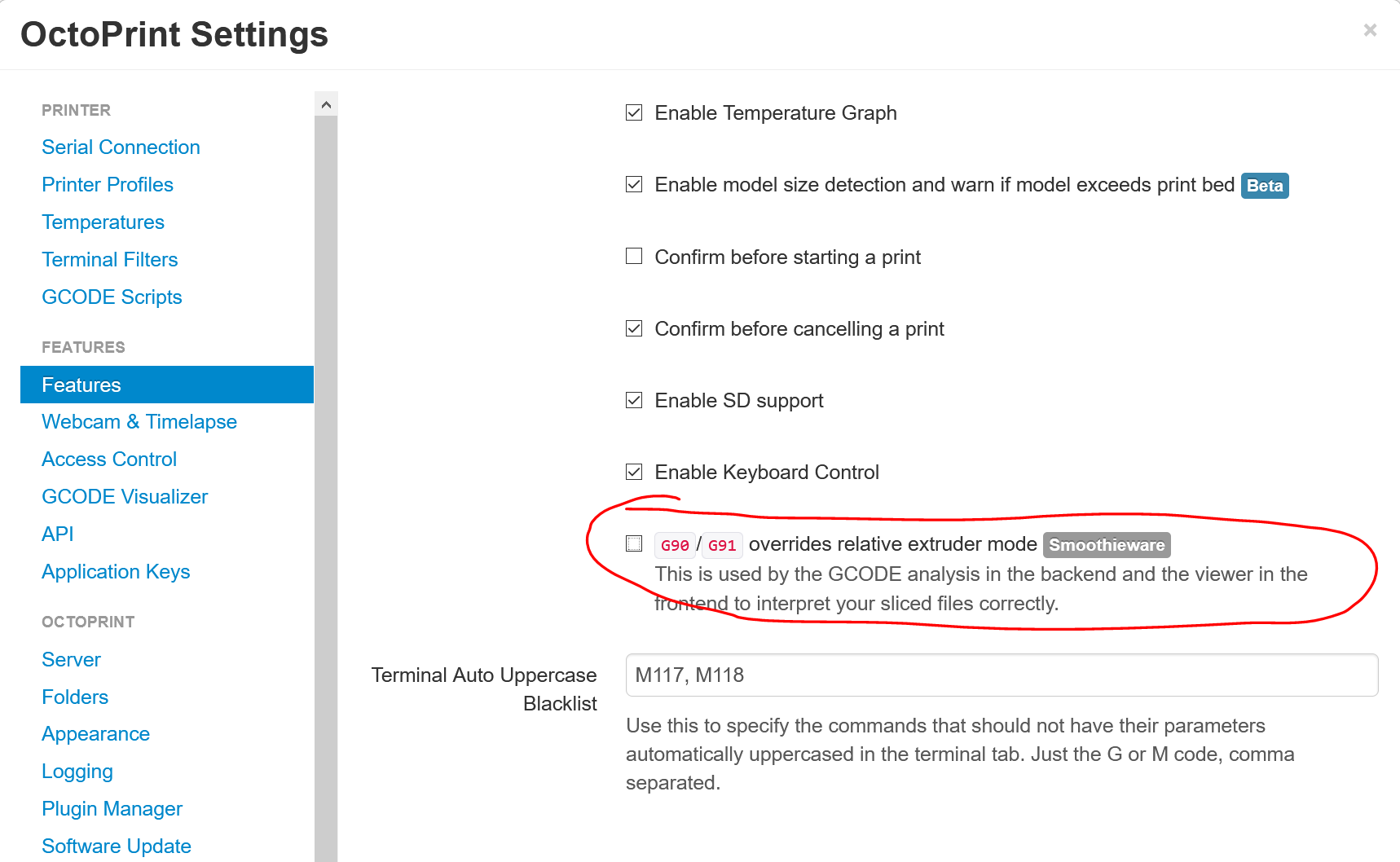
(Unfortunately this is a OctoPrint-wide setting and not a printer profile setting, which it probably should be if it's specific to certain firmwares.)
Octolapse can inherit this setting from OctoPrint by default, or override it:
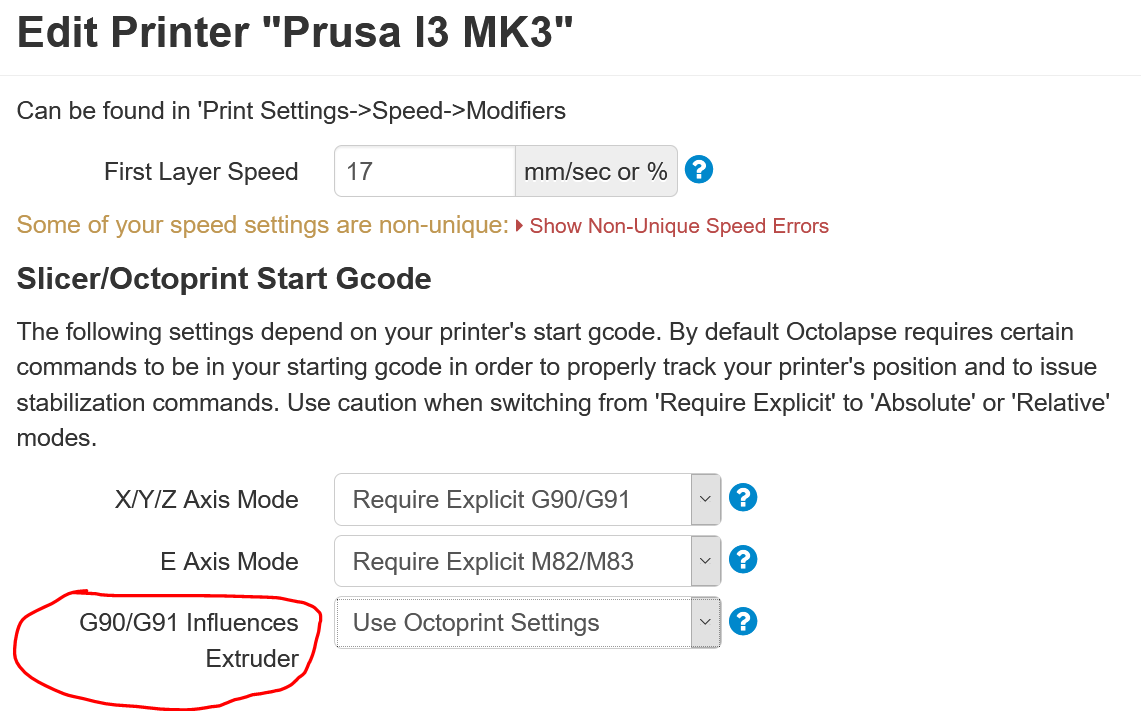
I suspect now that Octolapse was changing the gcode in the background to take a snapshot, and either sending a new G91 (not expecting it to affect the extruder mode), or omitting the M83, or something along those lines.
As soon as my printer is free I'll retest this theory. If this turns out to be correct, OctoPrint / Octolapse users will need to know about this firmware change in 3.9.0 so they can update their settings.
jettoblack
on 4 Mar 2020
That's probably it then.
This isn't the first time this sort of stealth gcode manipulation has caused issues. It creates support headaches exactly like this where something works until it doesn't.
vintagepc
on 4 Mar 2020
Good news: Disabling Octolapse and printing with OctoPrint works, as does printing from SD. So the problem has something to do with the gcodes Octolapse is changing. (However, keep in mind, it worked fine in 3.8.1).
Bad news: Changing the above settings in OctoPrint/Octolapse did not solve the problem, even when I set "G90/G91 Influences Extruder" to TRUE in the Octolapse settings.
Attached is a serial log from a print attempt with Octolapse enabled. I see one M83 is sent to the printer, but there are subsequent G90/G91 commands sent after that without any more M83s. After Octolapse takes the first snap after the purge line, the extruder is stuck in absolute mode and fails to print the wipe tower. Would this point to a bug in Octolapse?
jettoblack
on 4 Mar 2020
Quite possibly. I have no experience with it so I can't say for sure what might be wrong, but you're right - good news in that it's not a firmware bug.
I don't know if there's a way to get octoprint to show you the processed g-code output - if you can get that and diff it before/after changing the circled setting to see what it changes it might be insightful.
Side thought- are there any "custom" or "manual g-code" fields when setting up the timelapse settings? Any chance something got entered there previously that doesn't account for the new behaviour?
vintagepc
on 4 Mar 2020
The bug in handling G90/G91 within Octolapse has been fixed in V0.4.0+.
However, changing the way the printer interprets G90/G91 will break some features for all Octoprint installations as well as a lot plugins, resulting in a whole lot of confusion (including all of my pre-configured prusa profiles for Octolapse, which would now require a firmware version to know which one to pick instead of just a make/model). This is a pretty major change in how gcode is interpreted, and I would recommend reconsidering including this change in the final release. It will cause a lot of headaches.
 FormerLurker
on 4 Mar 2020
FormerLurker
on 4 Mar 2020
My understanding is that this has also been changed upstream in Marlin 2.0 (see discussion in #2514) so this is not unique to Prusa firmware, and the cat is out of the bag, as it were.
Is the new "proper" behaviour not also backwards compatible? i.e a G90/91 coupled with an M83 should behave as expected regardless of firmware (whether the G affects E or not).
vintagepc
on 4 Mar 2020
@vintagepc, It's not about creating gcode, it's about reading and interpreting it. It is possible to generate gcode that will work in both cases, but it is NOT possible to read gocde and know what will happen without understanding that setting. It's quite unfortunate that there is no way to query the printer for the current axis mode, else a test could be ran to figure out what this setting would be, but alas there is not as far as I am aware. I expect a lot of havoc once that new firmware drops. I've been getting lots of reports of 'bugs' from marlin 2.0 already. I just hate knowing that things are going to be more difficult for the users now, at least for a while now.
FormerLurker
on 4 Mar 2020
Thanks for the explanation - I made some wrong assumptions about what exactly it was doing.
It's always painful when something like this gets fixed as a long-standing quirk when things have come to rely heavily on the existing (even if technically incorrect) behaviour.
I can't imagine the decision was made lightly though since it was likely readily apparent what the result would be, so someone had to have made a call and considered the benefits of the change to outweigh the issues it would cause to continue to support the legacy implementation.
vintagepc
on 4 Mar 2020
I’m discussing about this compatibility quirk with the other developers. I’ll let you know when a decision has been made.
 leptun
on 4 Mar 2020
leptun
on 4 Mar 2020
PR with the changes submitted. Please check if you can find any case that results in incompatibility. The decision was that compatibility is more important than following the Marlin gcode standard. In any case, the Marlin standard was the exception since all other firmware have XYZ relativity decoupled from E relativity.
https://github.com/prusa3d/Prusa-Firmware/pull/2526
leptun
on 5 Mar 2020
@leptun, oh man you made my day! Will G90/G91 influence the extruder still on the mini? I'm totally fine if it does, but I want to make sure my mini profiles are configured correctly. Either way is fine (though the whole notion of G90/G91 influencing the extruder seems a bit off to me), so long as it remains consistent.
FormerLurker
on 5 Mar 2020
@FormerLurker I think the Mini behaves just like Marlin and I don't think that will change.
In any case, a gcode made for the Mini will work on the Mk3, but the reverse is not always true. The way PrusaFirmware generates gcodes should work on both printers right now, but it would be best if the Marlin standard was used for print profiles.
If your profile worked for 3.8, it will also work with this PR.
leptun
on 5 Mar 2020
I think this is just one of those cases where it's not so good to be at the forefront. I suspect we'll end up revisiting this in the future when 2.0 is more widespread and the change is more widely known about.
Though from a design perspective I can definitely agree it sucks to be bogged down by a historical implementation quirk that has become a de-facto norm that is not "technically" correct behaviour.
vintagepc
on 5 Mar 2020
@leptun, it makes sense to stay close to Marlin for a new printer, as there is no backwards compatibility concerns. Thanks for the info!
Wouldn't it make sense to implement something like M360 that reports the firmware configuration?
Getting things like build volume, Min/Max absolute coordinates, current axis modes, G90/G91 influences extruder settings, number of extruders, etc, would be an absolute gold mine of info, and would completely eliminate the need to even store any configuration for printers that support this. I would absolutely love to add an auto-configuration option to my programs. In theory, even slicers could use this to configure many of the settings assuming you could get a serial/network connection to the printer. Perhaps this should be a feature request?
FormerLurker
on 5 Mar 2020
I'm not sure that I know what M360 does.
Letting the host know the axis relative compatibility is not needed. Just assume that the host is Marlin and it will be supported on both firmwares. If the host doesn't know Marlin compatibility, then only the MK3 firmware will work correctly (not Marlin 2.0 derivatives)
leptun
on 5 Mar 2020
@leptun, check out this link regarding M360. There was some discussion about adding this to Marlin, but I guess it was low priority. One of the biggest challenges developing software for general 3d printers is knowing the firmware configuration. This is not as important for MFGs that control both the firmware and the slicer, but it is terribly important if you are trying to write hardware/firmware agnostic software. Anyway, I have enjoyed making sure things work well for Prusa printers (the only printer I own), but something like M360 would be a godsend, both from my perspective and from the user's perspective.
Anyway, thanks for the conversation, and for taking the original issue so seriously. I'm very happy with your decision about backwards compatibility regarding the G90/G91 gcodes. I would have understood if you went the other way, but my life will be a little easier now :)
I may post a feature request both here and in the Marlin 2.0 repo regarding M360, since it may be a workaround regarding future compatibility issues from the perspective of hardware/firmware agnostic programs like Octolapse.
FormerLurker
on 5 Mar 2020
I don't think that M360 can be implemented on the 8bit fw, but it might be doable in the Mini fw and in Marlin 2.0.
I'm happy that the community acted this quickly. It would have been a shame if this change reached the final fw since it would have made compatibility a lot harder.
leptun
on 5 Mar 2020
Related issues
 AnHardt
·
3Comments
AnHardt
·
3Comments
 Siwat2545
·
4Comments
Siwat2545
·
4Comments
 3d-gussner
·
4Comments
3d-gussner
·
4Comments
 anilrobo90
·
3Comments
anilrobo90
·
3Comments
 NoNme1
·
4Comments
NoNme1
·
4Comments
Most helpful comment
I don't think that M360 can be implemented on the 8bit fw, but it might be doable in the Mini fw and in Marlin 2.0.
I'm happy that the community acted this quickly. It would have been a shame if this change reached the final fw since it would have made compatibility a lot harder.