Prusa-firmware: Mk3 3.8.1 Firmware Crashing
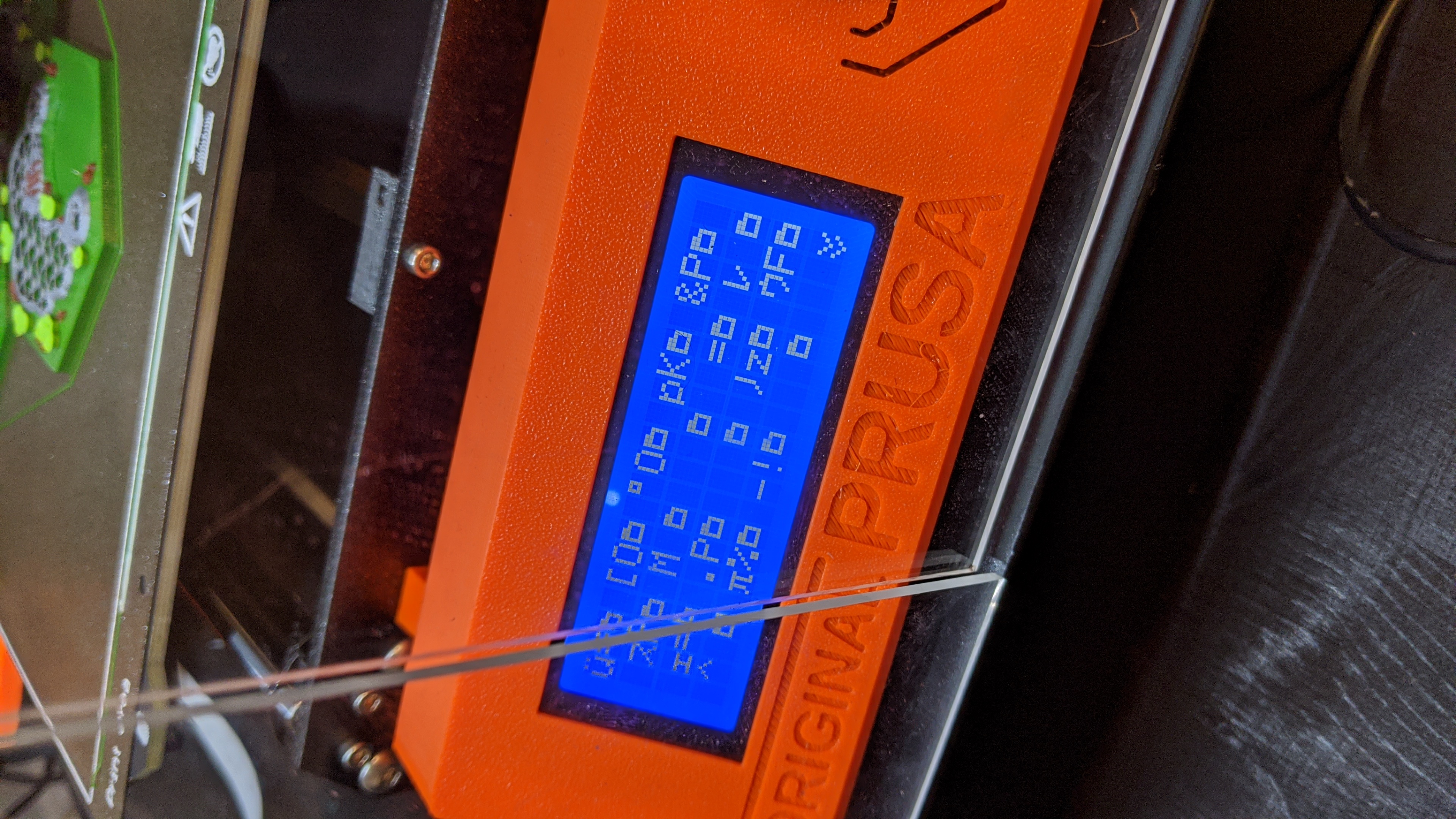
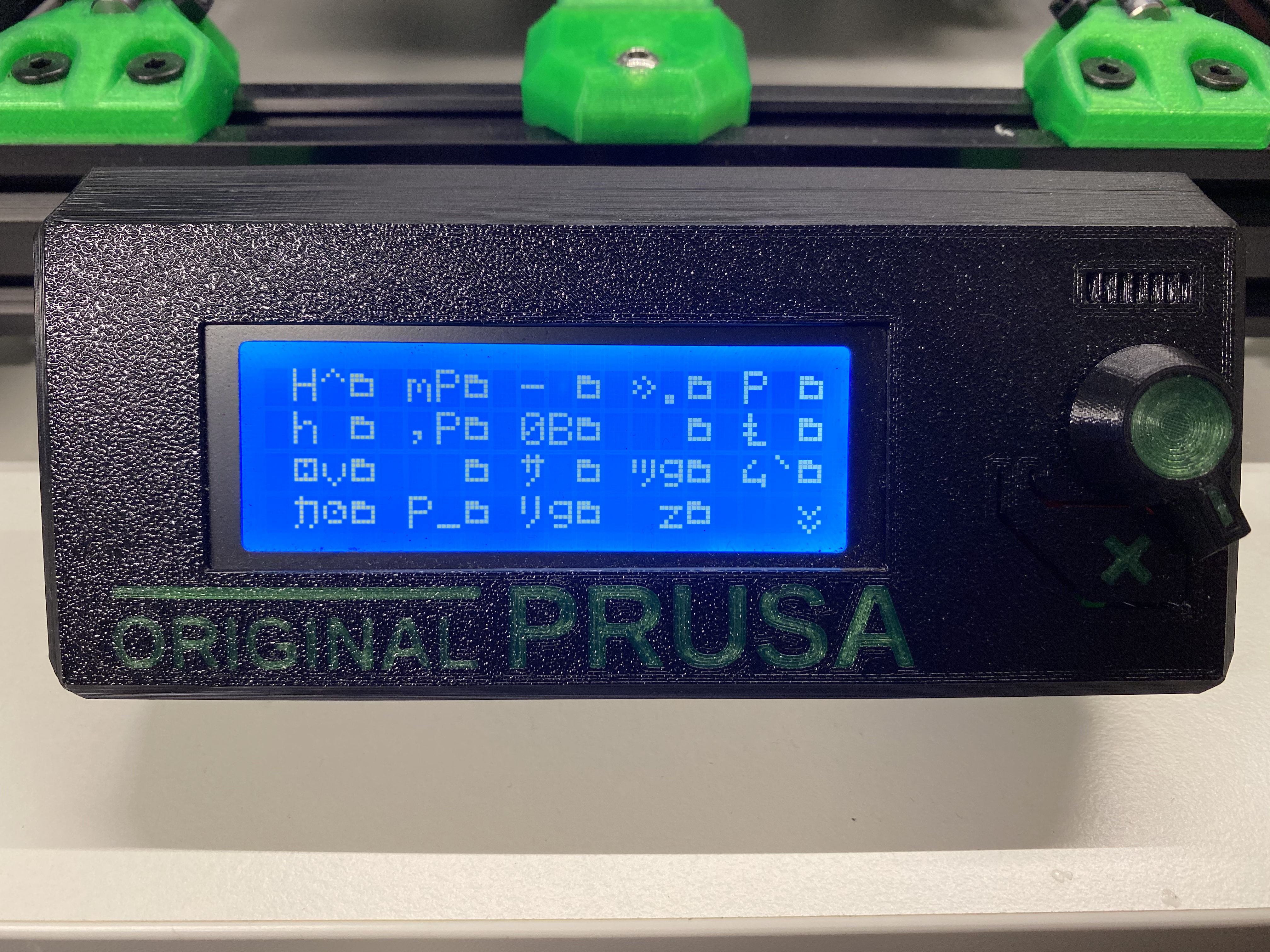
Issue: I have started having frequent crashes today today where the screen is garbled. The only thing that got changed recently is the bed sheet profile in the firmware. I got a new textured sheet and setup a new profile using ABS. This happened once yesterday and I have been printing on an off for the last 48hrs.
Restarting the printer or Octoprint has no effect. It started happening when I was using Cura so I tested it in PrusaSlicer and it still happens. Power cycling didn't do anything. It's happening during the heating process. It has not happened during printing.
Printer Specs: Prusa Mk3 3.8.1 Firmware
Slicer: Cura 4.4 or PrusaSlicer 2.1
Control: OctoPrint: 1.3.12

I saw on the forum someone mentioned this may be a known issue with the firmware? It wasn't happening before 3.8.1 and I was using the beta before this.

 Deneteus
All 68 comments
Hmmm... could you please post a link with the forum post.
Since it is happening during heating I suspect there might be some interference from the power cables with the lcd data cables. I suggest that you try to sepparate the high current cables (for heaters) from the lcd cables as much as possible. Please also post a picture with the cable routing for the lcd that goes around/through the Y axis extrusions.
I have not experienced this kind of issue at all on any of my printers with the latest firmware. There were some changes to the lcd implementation in the firmware in 3.8. You might want to give 3.7.2 a try and see if the issue persists.
 leptun
on 24 Nov 2019
leptun
on 24 Nov 2019
My power and data cables are separated as the PSU is not mounted to the printer frame. It hasn't been for over a year. I read about the LCD issue but back in 2018 when the refresh issues were happening.

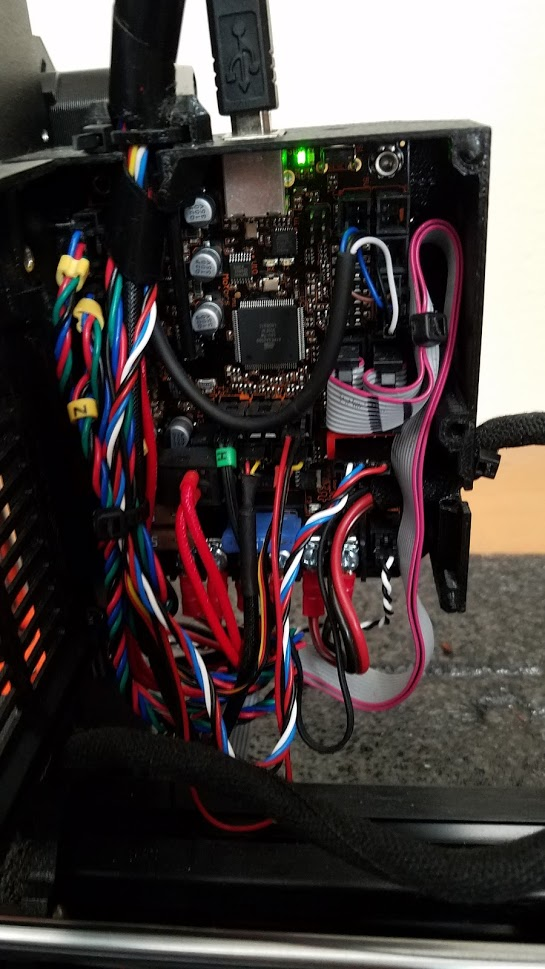
Deneteus
on 24 Nov 2019
BTW I took some aluminum tape covered in clear packaging tape and isolated the LCD cable near the bottom of the control board and under the printer. Still crashed. Just looking at the screen made me think it was a translation problem. So then I went back into the firmware settings and made sure the language was set to English and now it prints. I am going to do several more prints to see if the problem reoccurs.
Deneteus
on 25 Nov 2019
Well, this changes everything.
If it crashes because of translations, then it has nothing to do with the lcd.
Read this. The same applies here. https://github.com/prusa3d/Prusa-Firmware/issues/2258#issuecomment-538728201
leptun
on 25 Nov 2019
Well, this changes everything.
If it crashes because of translations, then it has nothing to do with the lcd.Read this. The same applies here. #2258 (comment)
How do you know it has nothing to do with the LCD compiled language? Nothing in the post you referenced applies to me. I wasn't having an issue with the language. It's been set to english the entire time, its been reset multiple times. I only use Prusa Slicer to flash firmware.
Deneteus
on 25 Nov 2019
" I suggest that you try to separate the high current cables" Seems hard to believe power switching could suddenly totally garble a display that had previously been running OK.
Assuming you'd previously set the display language to english, when you checked it was it still set to english?
Seems to me (on the back of absolutely no knowledge of Marlin) that random data was being accessed for the translation.
 towlerg
on 25 Nov 2019
towlerg
on 25 Nov 2019
Didn't you say the issue was fixed after you switched to English?
Does the firmware really crash (completely unresponsive) or is it only the display which shows garbled data?
leptun
on 25 Nov 2019
I should add that I came home today to find the same garbage on the LCD, after the printer had finished printing, so was idle for around 8 hours. If it was language related for me, wouldn't it be crashing all of the time? FYI I always use octoprint to perform the firmware upload. I'm pretty sure I didn't do a factory reset (I assume I'll loose my smooth/textured z-level profiles, if I do so).
Texy
 Texy
on 25 Nov 2019
Texy
on 25 Nov 2019
I can confirm this. Since 3.8.1 i got the same issue. When i reset the printer with the X button it happens immediately. Then i need to reset the printer again to get it boot up.
In 2 of 20 prints it happen during the print. the print stops. so its not a problem with the LCD the printer completely crash.
never had this before 3.8.1
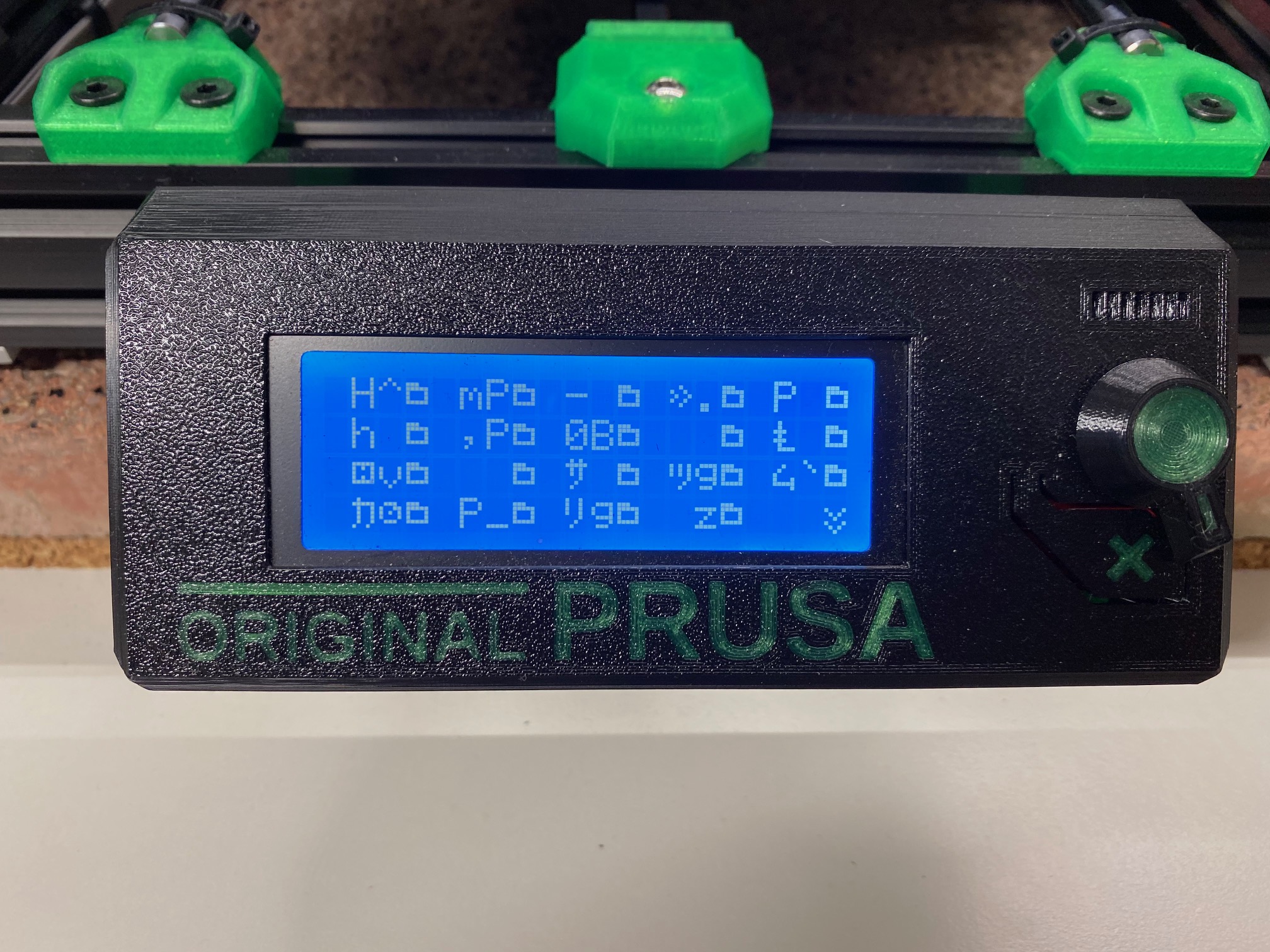
 lordnibbler22
on 25 Nov 2019
lordnibbler22
on 25 Nov 2019
@Deneteus I've looked through the logs and found something interesting. The printer actually triggers a temperature related error, then it crashes. Unfortunately the log is cut off right before it shows what the error is. Either the firmware is frozen at that point, or Octoprint disconnected after the first error message.
@Texy can you please confirm if you also get Error:Printer stopped due to errors. Fix the error and use M999 to restart. (Temperature is reset. Set it after restarting) from the printer over serial? Can you please try something other than Octoprint so that it doesn't disconnect.
leptun
on 26 Nov 2019
Not done any log viewing before. I assume you mean the next time it crashes?
Texy
on 26 Nov 2019
@Texy Yes. For example, let’s use Arduino IDE.
Open the app, connect the printer to the pc/laptop, set the correct serial port to use and open serial monitor. Leave it open and wait until the firmware crashes. After that copy the last lines from the window and post them here.
If you want, I can make a video with what you should do.
leptun
on 26 Nov 2019
OK, but it wont be for some days yet, as I have orders to print. Not only that but my laptop doesn't reside in the same room as the printer, but I will try.
Texy
Texy
on 26 Nov 2019
@Texy Thanks. I'll try to reproduce it myself, but so far I was unable to do so.
leptun
on 26 Nov 2019
Maybe its related to Octoprint. I switched to SD card and so far it has not crashed.
lordnibbler22
on 28 Nov 2019
So I was printing some parts and I came back to the printer crashed. It was close to the end of the print. So I cleared the bed plate and went to pre-heat again. The bed light was blinking so I left it alone. Came came back in the room and the heating had failed. Tried it again but this time the temp wasn't going anywhere. I didn't see the bed power light blink so I restarted the printer and tried again.
I smelled smoke so turned off the printer fast. Opened up the case and checked to connectors and when I looked at power cables the Bed In + power cable looked like it had melted. The 15A fuse has not blown but the V+ screw looks like it has heated up but only on the board side. The PSU side is fine. I took some pics.
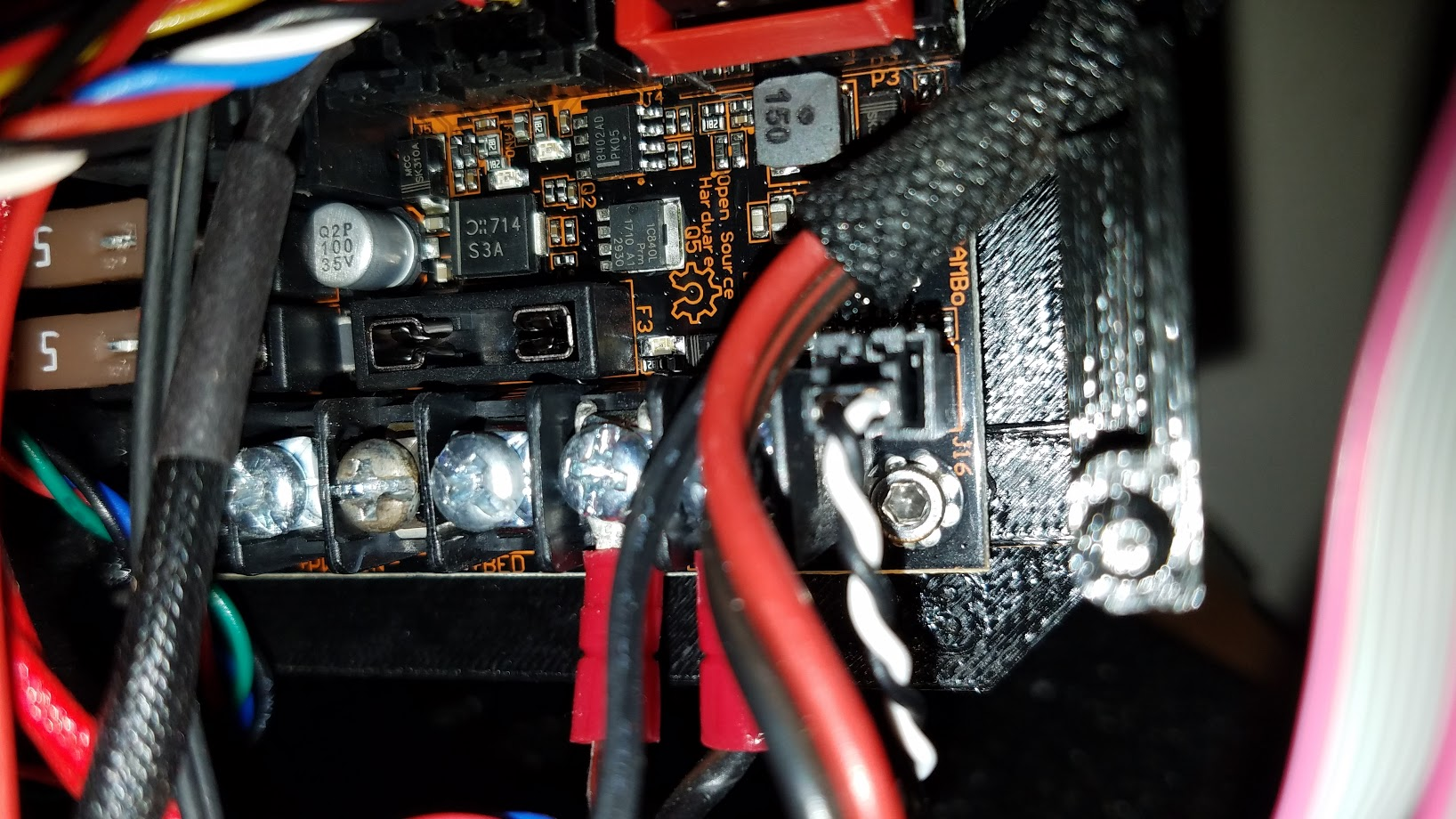
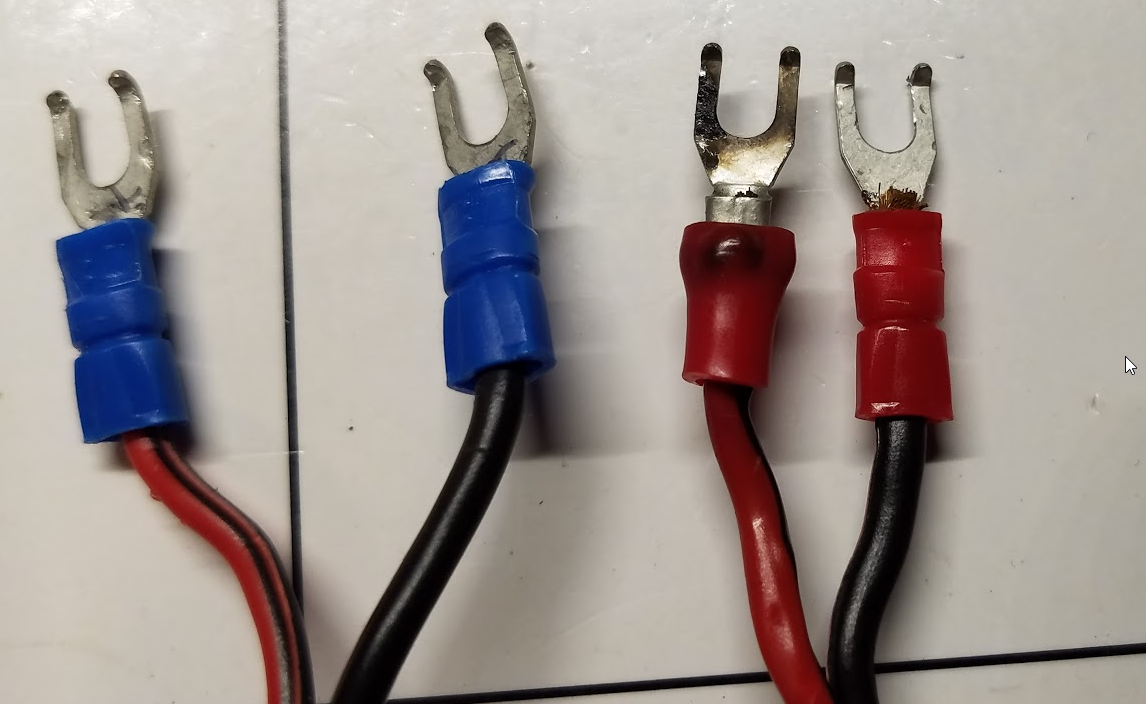
I didn't see any damage to the caps or the regulator. What should I be looking for?
The bed resistance is showing between 2.8-3Ω. at the screws under the bed. Expected is 3.5-4Ω.
The PSU voltage is 24.32V.
Deneteus
on 28 Nov 2019
The screws weren’t tight enough, but in any case, this is the wrong place to be asking.
Texy
on 28 Nov 2019
The screws weren’t tight enough, but in any case, this is the wrong place to be asking.
On yours? I had my screws on tight. No way it was coming loose. I redid my bed screws when that issue with the firmware not heating up the bed fast enough was happening in a previous release.
Deneteus
on 28 Nov 2019
No on yours - at least the 3 third one from left looks like arc scars.
Texy
on 28 Nov 2019
No on yours - at least the 3 third one from left looks like arc scars.
It was completely tight. And look at my other pic at the top for reference. What you are seeing is the smoke damage from the insulator melting.
Deneteus
on 28 Nov 2019
you should make a new post deneteus
 william14235
on 29 Nov 2019
william14235
on 29 Nov 2019
For your garbled screen it looks like it is showing folders, maybe code. Maybe that is the code on every prusa printer that runs the printer, and it is just showing it for some reason and is not a traslation issue. Can you click on the icons or no? or can you scroll down?
william14235
on 29 Nov 2019
I have a similar issue. just had two 15 hour prints fail after ~ 12 hours. I printed from octoprint, not the sd-card. This is maybe the 5th time this happend, however only in the last two cases during printing. I don't remember when exactly the other 3 instances happend, but a reset resolved the issue.
The last time I had serial logging on. Octoprint complained about the printer requesting the same line over and over again.
2019-11-29 16:48:38,138 - Recv: ok
2019-11-29 16:48:38,140 - Send: N563917 G1 X145.691 Y142.232 E-0.14384112
2019-11-29 16:48:38,143 - Recv: Error:No Line Number with checksum, Last Line: 563916
2019-11-29 16:48:38,145 - Send: N563918 G1 X145.775 Y142.120 E-0.03233127
2019-11-29 16:48:38,145 - Recv: Resend: 563917
2019-11-29 16:48:38,147 - Recv: ok
2019-11-29 16:48:38,148 - Send: N563917 G1 X145.691 Y142.232 E-0.14384112
2019-11-29 16:48:38,152 - Recv: Error:No Line Number with checksum, Last Line: 563916
2019-11-29 16:48:38,153 - Send: N563918 G1 X145.775 Y142.120 E-0.03233127
2019-11-29 16:48:38,153 - Recv: Resend: 563917
2019-11-29 16:48:38,155 - Recv: ok
2019-11-29 16:48:38,156 - Recv: Error:No Line Number with checksum, Last Line: 563916
2019-11-29 16:48:38,156 - Send: N563917 G1 X145.691 Y142.232 E-0.14384112
2019-11-29 16:48:38,158 - Send: N563918 G1 X145.775 Y142.120 E-0.03233127
2019-11-29 16:48:38,160 - Recv: Resend: 563917
2019-11-29 16:48:38,161 - Recv: ok
2019-11-29 16:48:38,162 - Send: N563917 G1 X145.691 Y142.232 E-0.14384112
2019-11-29 16:48:38,164 - Recv: Error:No Line Number with checksum, Last Line: 563916
2019-11-29 16:48:38,165 - Send: N563918 G1 X145.775 Y142.120 E-0.03233127
2019-11-29 16:48:38,168 - Recv: Resend: 563917
2019-11-29 16:48:38,169 - Printer keeps requesting line 563917 again and again, communication stuck
2019-11-29 16:48:38,170 - Changing monitoring state from "Printing" to "Error: Printer keeps requesting line 563917 again and again, communication stuck"
2019-11-29 16:48:38,180 - Send: M112
2019-11-29 16:48:38,196 - Send: N563920 M11226
2019-11-29 16:48:38,198 - Send: N563921 M104 T0 S027
2019-11-29 16:48:38,200 - Send: N563922 M104 T1 S025
2019-11-29 16:48:38,201 - Send: N563923 M104 T2 S027
2019-11-29 16:48:38,202 - Send: N563924 M104 T3 S029
2019-11-29 16:48:38,203 - Send: N563925 M104 T4 S027
2019-11-29 16:48:38,204 - Send: N563926 M140 S0*88
2019-11-29 16:48:38,218 - Changing monitoring state from "Error: Printer keeps requesting line 563917 again and again, communication stuck" to "Offline (Error: Printer keeps requesting line 563917 again and again, communication stuck)"
2019-11-29 16:48:38,226 - Connection closed, closing down monitor
2019-11-29 16:48:38,727 - Closing down send loop
 sebastian-tschen
on 29 Nov 2019
sebastian-tschen
on 29 Nov 2019
Soooo... I have some updates on the issue.
The random text on the screen is actually the printer engaging Emergency stop, but the code had a bug and it just filled the screen with random characters. I've filled a PR addressing the random characters. As for the cause of the emergency stop, it's more complicated.
@Deneteus In the first log, the error was temperature related where the printer errored during heatup and sent an error to octoprint. In response, octoprint sent M112 (Emergency stop), hence why the firmware froze. Sorry for the confusion with the other issue.
In @sebastian-tschen case, there was a communication error between octoprint and the firmware. The response from octoprint was just like before.
As for the other people encountering the error, how many of you are using octoprint? I'm curious if this is an octoprint issue only. Also, I think they've recently changed the way octoprint handles errors since I've never had it send M112 on error from printer before.
Thanks everyone for reporting
leptun
on 29 Nov 2019
Octoprint all the time.
Texy
Texy
on 29 Nov 2019
Soooo... I have some updates on the issue.
The random text on the screen is actually the printer engaging Emergency stop, but the code had a bug and it just filled the screen with random characters. I've filled a PR addressing the random characters. As for the cause of the emergency stop, it's more complicated.@Deneteus In the first log, the error was temperature related where the printer errored during heatup and sent an error to octoprint. In response, octoprint sent M112 (Emergency stop), hence why the firmware froze. Sorry for the confusion with the other issue.
In @sebastian-tschen case, there was a communication error between octoprint and the firmware. The response from octoprint was just like before.
As for the other people encountering the error, how many of you are using octoprint? I'm curious if this is an octoprint issue only. Also, I think they've recently changed the way octoprint handles errors since I've never had it send M112 on error from printer before.
Thanks everyone for reporting
You might want to get logs from people using octoprint where it crashes idling. The logs are not turned on by default though. I enabled them because I am beta testing different releases of Octoprint. The next version is going through testing now.

Deneteus
on 30 Nov 2019
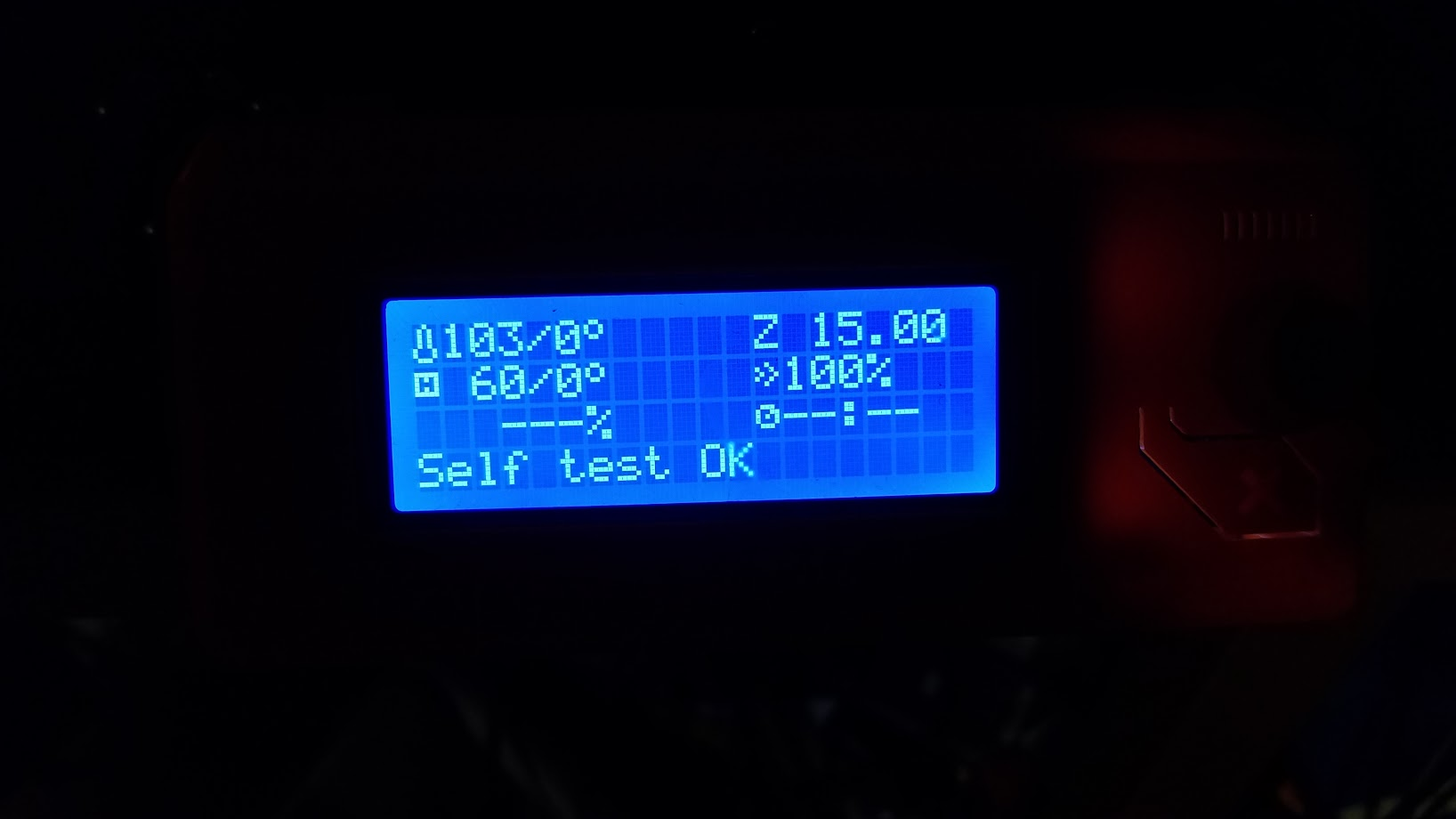
Alright so I cleaned the connector and replaced the two power cables with some 14/4 SJOOW.
Self test passed.
Deneteus
on 1 Dec 2019
@Deneteus ... I can reproduce this on my printer (3 times in a row). I have a MK3S, using latest firmware and octoprint versions. No mods. I used to have a MMU2S attached but have taken it off because of load fail issues that was eating up more of my time than it was worth.
To reproduce, I start the printer up fresh, go into OctoPrint and set the bed temp to be 90 Celcius. A few seconds later I have the garbled display and printer is not responding to input from the button presses, etc. on the LCD.
If I set bed temp to 90 from the LCD menu, it heats up fine and no problem.
I have attached the logs and hope this helps :)
octoprint (9).log
 noppej
on 1 Dec 2019
noppej
on 1 Dec 2019
@noppej I think that you are getting a mintemp error on the extruder. The bed temperature climbes at an ok rate, but the hotend sits below the 15C mark where mintemp triggers.
Anyways, in all of the provided logs in this issue, none really tell the real cause since octoprint disconnects and sends M112.
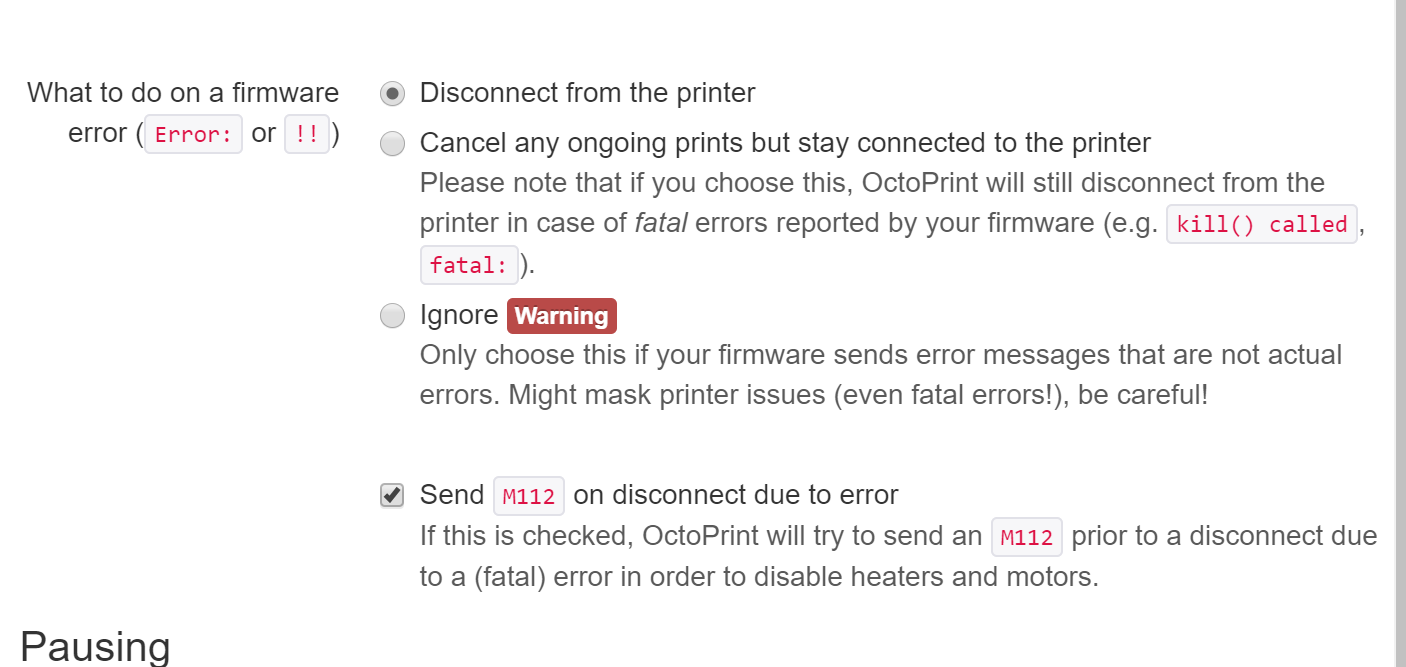
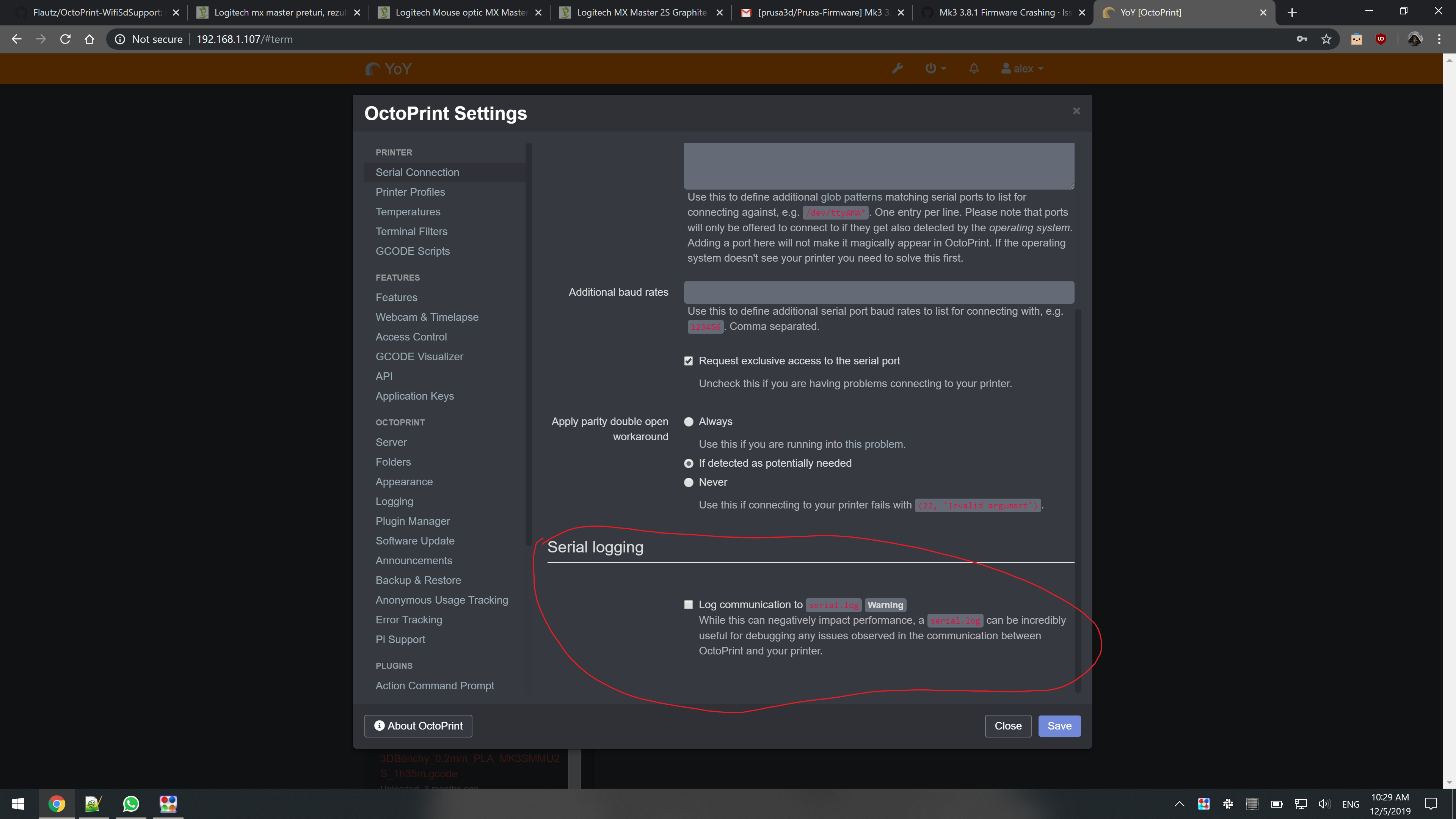
In the photo you can see the normal settings for octoprint for error handling. Send M112 is triggered (which shouldn't need to be for Prusa Firmware). Normally you would want to disconnect on an error, but this is a special case since we want to see the full log. If you can simulate the issue reliably, please try to set that to "Cancel ongoing print" or "Ignore" for the moment so we can get a full log.
The M112 after error is the one causing the garbled screen anyway, otherwise we might also see the error on the screen.
leptun
on 3 Dec 2019
The PR that fixes the garbled screen is https://github.com/prusa3d/Prusa-Firmware/pull/2348
leptun
on 3 Dec 2019
I had two more instances recently. The first was due to a head crash detect, leaving the printer idle. This was a sd card print, not initiated by octoprint. The second, from octoprint, was due to a filament tangle on the reel. The room is unheated and ambient is around 10’c. Unfortunately I have orders to get out with only 1 printer so don’t have time to get logs. Is 3.9.x available ?
Texy
on 3 Dec 2019
@Texy It is in the works. Right now there is a problem with the pause-resume functions. I don’t recommend you try it right now.
leptun
on 3 Dec 2019
So just to make sure I understood the issue at hand. The garbled screen is, in fact, not anything that, if fixed, will magically fix the underlying problems. And as it seems different people have different reasons that lead to this garbled screen.
I was actually able to fix mine (unstable serial connection due to bad usb cable/bad cable routing) and have not had any garbled screens since.
sebastian-tschen
on 4 Dec 2019
@noppej I think that you are getting a mintemp error on the extruder. The bed temperature climbes at an ok rate, but the hotend sits below the 15C mark where mintemp triggers.
@Deneteus You were right. I was able to reproduce this with the settings you suggested, and the LCD does show the MINTEMP error. I've attached the log for you ...
octoprint (11).log
noppej
on 4 Dec 2019
@noppej Great. Please fill another issue with the MINTEMP error on hotend when only bed is heated.
leptun
on 4 Dec 2019
@noppej Great. Please fill another issue with the MINTEMP error on hotend when only bed is heated.
Done ... and thanks for helping to diagnose the problem :)
Reference of new issue: [https://github.com/prusa3d/Prusa-Firmware/issues/2355]
noppej
on 4 Dec 2019
In my case I wasn't just heating the hot end only, I was pre-heating the bed and hotend to print ABS.
Deneteus
on 4 Dec 2019
@Deneteus That is correct, however you still got a temperature related error. Maybe you have a malfunctioning thermistor that randomly triggers as broken for a fraction of a second and errors with mintemp. Another possibility would be that you get a thermal runaway, but that seems less likely by looking at your logs.
Unless you post a full log just like @noppej , I can’t help.
leptun
on 4 Dec 2019
It's been 10 days since that I originally posted the issue. Since then I have:
Week 1
- I provided a log with the original post.
- I rechecked the screws and wiring and posted pics of the LCD wire routing. Shielded part of the LCD cable.
- The printer had stopped crashing after I re-selecting english as the language. It's been in English since day 1.
- Continued printing without crashes.
Week 2
- I printed 2/3 of a roll of ABS by this point.
- The printer started crashing again while heating and during testing the + power cable from the PSU to the Bed Heater melted.
- Upgraded RPI 3B+ to OctoPrint: 1.4.0rc2.
- Changed the log settings to cancel and not disconnect and already had the serial log enable.
- Replaced both the printer and heat bed power cables with new SJOOW 14/4 cable with new
- Re-ran the Einsy self-test and it passed.
- I have printed 6hrs of parts since I replaced the wiring.
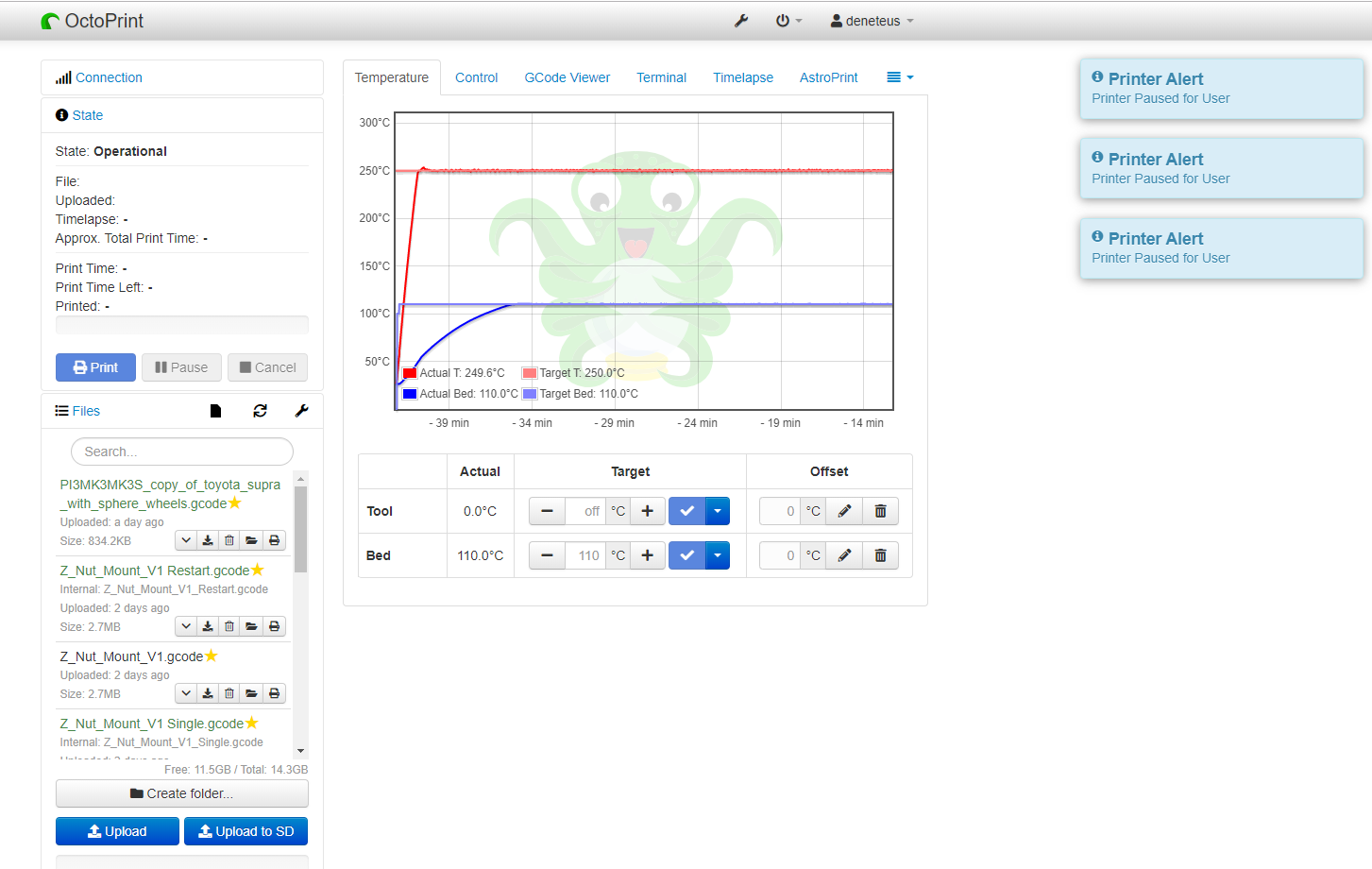
- I had the bed and hot end heating to 250/110 to see if I can get it to crash.
- The printer disabled the heating by a safety timer. Octoprint shows the printer is still heating.
Deneteus
on 5 Dec 2019
@Deneteus I couldn’t see any useful info in the new logs. Can you please post the output of the Terminal tab in octoprint? I’m still unsure if this is a hardware issue or a software one.
I'm mostly interested in the serial stream between the printer and octoprint. You can tick this box and it will create a serial stream log.
Sorry that it takes so long for you to get back to printing... :(
leptun
on 5 Dec 2019
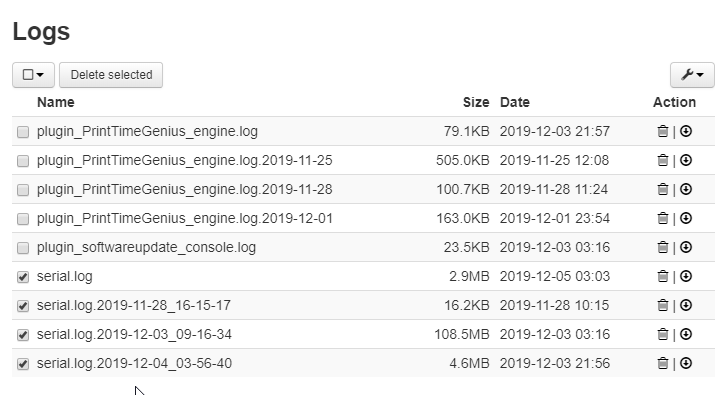
I logged that too.
Logs.zip
Deneteus
on 5 Dec 2019
Hi, I'm sorry about your problems, it looks like a more hardware problem than firmware. Please contact our support, they are good at finding problems.
 michalxfanta
on 5 Dec 2019
michalxfanta
on 5 Dec 2019
Hi, I'm sorry about your problems, it looks like a more hardware problem than firmware. Please contact our support, they are good at finding problems.
@michalxfanta Bro. I don't know how long you have been lurking on here but I already contacted support. Hell I have already done all the troubleshooting. He asked me to send him the logs. I sent him the logs because obviously there was two separate issues going on and I already resolved one of them.
I am just going to wait till the next firmware release. Since I wasn't the only one having the issue hopefully the next update won't have any crashes in this vein as it wasn't a problem in any of the other releases I have tested.
Deneteus
on 5 Dec 2019
@Deneteus Try to roll your Octoprint back to 1.3.11
https://community.octoprint.org/t/how-can-i-roll-back-to-an-earlier-version-after-an-update/234
lordnibbler22
on 5 Dec 2019
@Deneteus Try to roll your Octoprint back to 1.3.11
https://community.octoprint.org/t/how-can-i-roll-back-to-an-earlier-version-after-an-update/234
I was on 1.3.12 when this started. And for quite a while at that.
Deneteus
on 6 Dec 2019
I can confirm the exact same issue with my mk3s/mmu2s + octoprint 1.3.12
Cant be that all our printers are having a defective hardware suddenly. Also i experience reboots of my printer suddenly when no filament is loaded directly into the nozzle. I will create a separate bug for this
 glowfishDE
on 9 Dec 2019
glowfishDE
on 9 Dec 2019
@Deneteus OK, we'll focus on this Octoprint problem. I have it reported by multiple users. And I hope we can find a solution.
michalxfanta
on 9 Dec 2019
I did a upgrade to OctoPrint 1.4.0rc2 and i am printing some days now without an error. But the strange thing is that i can not find anything in the 1.4.0rc2 changelog that is related to this error.
But yesterday i found something interesting.
Started my other printer (with OctoPrint 1.3.12) and after boot up i get the error. After a reset i immediately got the error again.
Then i did a upgrade to OctoPrint 1.4.0rc2 and after reset i get an MIN TEMP error. That is ok because the ambient temperature is about 14 C. After a reset i get the MIN TEMP error... but NOT the firmware crash.
So... maybe its related in some kind to the MIN TEMP Error?
This is the last crash log from OctoPrint 1.3.12 before the upgrade to 1.4.0rc2
Recv: ok T:14.4 /0.0 B:15.2 /0.0 T0:14.4 /0.0 @:0 B@:0 P:14.5 A:24.3
Send: M105
Recv: ok T:14.4 /0.0 B:15.2 /0.0 T0:14.4 /0.0 @:0 B@:0 P:14.5 A:24.8
Recv: Error:0
Changing monitoring state from "Operational" to "Error: 0"
Send: M112
Send: N2 M11235
Send: N3 M104 T0 S034
Send: N4 M104 T1 S036
Send: N5 M104 T2 S038
Send: N6 M104 T3 S036
Send: N7 M104 T4 S034
Send: N8 M140 S0*109
Changing monitoring state from "Error: 0" to "Offline (Error: 0)"
Connection closed, closing down monitor
lordnibbler22
on 11 Dec 2019
And for sure it is NOT a hardware problem. ;) I get this on 2 Printers with 3.8.1 + OctoPrint 1.3.12
lordnibbler22
on 11 Dec 2019
@lordnibbler22 It is not a Mintemp issue causing the garbage display. (it is at fault indirectly)
In the newer versions of octoprint they auto-enabled an option to send M112 and disconnect on any error. M112 is the command that caused the text to get garbled.
It does not crash a second time since octoprint is disconnected and can't send M112 again.
I'm don't know what changed between the older version and 1.4.0rc2.
leptun
on 11 Dec 2019
Hey,
get the same failures on 3 of 4 Prusa i3 MK3s printers with octoprint since a few weeks. All get temp errors. Errors are always Min/Maxtemp of the heatbed or thermal runaway of the hotend. Changing the position of the print object on the printbed in slic3r leads to the same error on the exact layer height / position of the printhead. There is no error for the same object if the object is rotated or the layer height is modified (Or the error occurs on a different position).
OctoPrint 1.3.12 auf OctoPi 0.16.0
Prusa Firmware 3.8.1 and 3.8.0
 BlackJaecky
on 20 Dec 2019
BlackJaecky
on 20 Dec 2019
Have had exactly the same issue with 3.81 with Octopi 0.15.1 and Octoprint 1.3.12. When it happens with the printer doing nothing Octoprint just reports Error 0 and disconnects - probably due to mintemp as it's been cold and I have had some mintemp errors. Had it happen during a print and that appeared to be because the cooling fan started on the second layer and the PID loop failed to keep the temperature up so it triggered thermal runaway
Sent M112 directly and it definitely results in the garbled display so that appears to be the culprit.
Downgraded to 1.3.11 and if I send M112 directly to the printer the garbled display is back but it appears octoprint doesn't send M112 for a mintemp error so when the error happens it just disconnects and reports a fault.
I think the problem is a combined issue of the printer is not handling M112 in a graceful fashion and with the cold weather so we are seeing mintemp errors which lead to the reset and a thermal runaway error during prints as the air being blown onto the hotend when the cooling fan starts is colder than usual. I think a silicone sock should help with the during print errors but the new E3D design seems to be garbage and I can't properly fit them onto the hotend. The cooling fan starting is a known variable though so would it be possible to perform a correction on the hotend heater when the fan starts to actually make it so we don't see such a big temperature drop?
 Borkian
on 23 Dec 2019
Borkian
on 23 Dec 2019
I have the same issue on a MK2.5s+MMU2s. For me the garbled screen happens only shortly after starting the print when warming up. FW: 3.8.1, Octoprint: 1.3.12
Octoprint shows "Offline (Error: Temperature heated bed switched off. MINTEMP triggered ! - Printer stopped due to errors. Fix the error and use M999 to restart. (Temperature is reset. Set it after restarting))"
I turned M112 off just now in octoprint to see if that changes anything.
 chrismathis
on 23 Dec 2019
chrismathis
on 23 Dec 2019
After many successful prints with Octoprint 1.4.0rc3 i got an crash today. Logfile is attached.
lordnibbler22
on 26 Dec 2019
@lordnibbler22 It appears that you have a different issue. The communication between octoprint and the printer broke down and octoprint gave up. There exists another issue talking about this.
If it weren't for the recent octoprint change to send M112 on error, then we wouldn't have discovered this glitch with the M112 text in the first place.
I suggest that you try another cable as some users suggested in that thread (can't find it right now).
leptun
on 26 Dec 2019
@leptun hmm... yes i am with you. the issue is very strange. but my Raspberrys are connected via GPIO to the Einsy Board and not via USB. And i am printing since 1 year on 2 printers with this setup without an issue.
so this are the facts:
happens on 2 different printers (Pi is connected via GPIO and not USB) so it can not be a hardware problem...
printing about a year without issue (via octoprint)
no major changes to the hardware (cables, setup, ...)
first happens with 3.8.1
its really strange...
lordnibbler22
on 26 Dec 2019
I was having this issue up until earlier this week on two of my three printers, I have now had almost non-stop printing for the week and not encountered the issue. I tried a new board, went back to the old firmware, old version of OctoPrint to no avail. Earlier this week I set Octoprint so that it would not send the emergency stop code to the printer and was able to see an actual error on both the printer and Octoprint. It was giving me a MINTEMP error from the head thermistor. I changed it out and then started getting an error from the bed thermistor on one of the printers. I changed that one out and now have no issues on either printer. I have now returned Octoprint to the normal setting and printed since yesterday without issue.
 bradcla
on 10 Jan 2020
bradcla
on 10 Jan 2020
I had the same gibberish display message and crashes two times today.
After some investigation I found that one of the crimp contacts connecting the hotend heating element to the cable going to the controller board was broken. The hotend was not heating up. I fixed the connection and now the crashes are gone. I attached the octoprint logfile and the gcode console output. But it looks more or less like all the other descriptions above.
octoprint.log
OctoprintGCodeConsoleLog.txt
 LarsAmplatzer
on 14 Jan 2020
LarsAmplatzer
on 14 Jan 2020
I can confirm that the problem is related to OctoPrint. Switched 2 Printers from OctoPrint to Repetier and the crashes are gone. The printers are running 24x7 and no problem since 3 weeks.
I love OctoPrint and support the community. But looks like Repetier is currently working better for my usecase.
lordnibbler22
on 14 Jan 2020
I have experienced this issue 3 times now, I was running 3.8.1 and got the garbled screen, happened about 12 hours into a print.
I flashed to the latest HEAD and thanks to @leptun I now get the M112 error instead. It does look like there is some sort of communication issue and Octoprint sends hte M112. I've never experienced this before and now I've experienced it 3 times in a few days, hmm.
 vertigo235
on 9 Feb 2020
vertigo235
on 9 Feb 2020
I have experienced this issue 3 times now, I was running 3.8.1 and got the garbled screen, happened about 12 hours into a print.
I flashed to the latest HEAD and thanks to @leptun I now get the M112 error instead. It does look like there is some sort of communication issue and Octoprint sends hte M112. I've never experienced this before and now I've experienced it 3 times in a few days, hmm.
Sorry, what is the 'HEAD' version?
So it doesn't cause the garbled screen but instead creates the M112 error - is that recoverable, ie you can continue the print?
Texy
on 9 Feb 2020
@Texy the HEAD version is the latest version of the MK3 branch source code.
The M112 screen was the garbled message. Now it is shown correctly. It does not fix the error, though.
In the upcoming 3.9-rc1 there will be some changes to mintemp. Maybe it also helps in your case.
leptun
on 9 Feb 2020
OK thanks - does the HEAD version need compiling, or is the binary available?
Texy
on 9 Feb 2020
@Texy nope. You have to compile it yourself. It is not among the releases.
leptun
on 9 Feb 2020
dropping in to report I'm also getting the garbled display - 3.8.1, Octoprint, mintemp error (after being told to print, bed doesnt heat) - have to reset printer electronics for it all to work again
 castaway
on 4 Mar 2020
castaway
on 4 Mar 2020
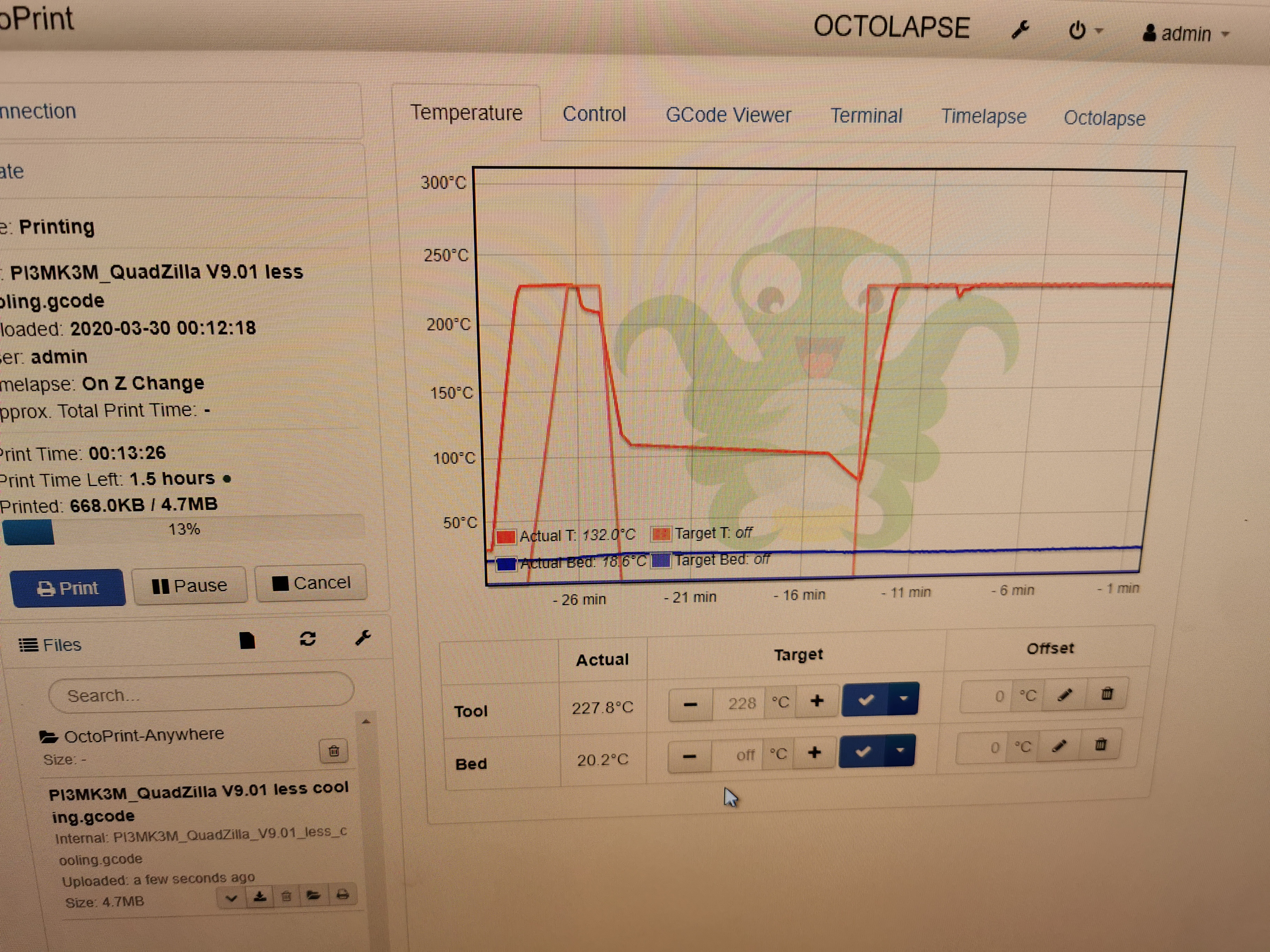
So I have been having the same problem using Octoprint, I have made a few videos to prove that the issue is with OctoPrint and MK3S combo. Octo print reports the correct error but the screen turns to gibberish until OctoPrint reconnects. The underlining problem was the cold surrounding air temperature and the print cooling fan running at 100 percent, when I reduced it to 30 the print worked fine on OctoPrint. The temperature graph attached shows the different cooling fan speeds. There is a slight glitch on the second print but it can recovery from it, unlike the first.
Youtube videos of it happening
Part 1
Part 2
Part 3
I guess difficult to reproduce unless you have a cold room and everything the same.....
Hope this helps nailing down the issue...
 githubpad
on 30 Mar 2020
githubpad
on 30 Mar 2020
Here's my analysis.
- The printer is crashing when reporting an error message.
- In my case, the error message was a MINTEMP warning on the heated bed.
- This was caused by a broken wire in the thermistor wire, which I replaced with some high temp similar gauge wire I had at hand.
- I am doing a trial run now, but so far, things seem stable.
I suspect others are having similar error message related issues, and likely also due to an error detected by the printer.
 skandragon
on 3 Apr 2020
skandragon
on 3 Apr 2020
For me same issue happens when I print with Octoprint and hit reset button (X) on the prusa front panel. Simply hitting it one more time recovers printer and completes reset. It is fairly consistent for me. Occasionally it also says that "GCODE is not for this printer, do you want to continue?" after first reset, and it doesn't show options to choose, just question. Second reset completes the processes.
That makes me think that Octoprint ignores first reset/error from Printer and continues sending GCODES over serial that messes up communication.
P.S.
I have have MK3S MMU2S.
 anton-matosov
on 22 Apr 2020
anton-matosov
on 22 Apr 2020
Related issues
 brettvitaz
·
3Comments
brettvitaz
·
3Comments
 duartemv
·
5Comments
duartemv
·
5Comments
 3d-gussner
·
4Comments
3d-gussner
·
4Comments
 Patronics
·
4Comments
Patronics
·
4Comments
 erikcramerjr
·
4Comments
erikcramerjr
·
4Comments
Most helpful comment
The PR that fixes the garbled screen is https://github.com/prusa3d/Prusa-Firmware/pull/2348