Prusa-firmware: Print temperature drops and THERMAL RUNAWAY on MK2.5S with fan at 100%
Hi,
I have upgraded my printer recently to MK2.5S and also modified it with some TMC2130 drivers, effectively running it at MK3 speeds.
I am having a problem that might not show up on stock MK2.5S, but on MK3S it might. It is related to the R4 extruder. In this revision the print fan blows a lot more on the nozzle and heat block. This probably isn't a real problem on the MK2.5S since it prints at lower speeds.
The issue only manifests itself when printing at high speeds and having the fan on at 100%.
If you lower the fan speed to 50% (M106 S128), it goes back to temperature as can be seen from the picture.

- A solution to this is to set a max fan speed in the configuration so that the speed doesn't exceed ~50% and doesn't overcool the heat block.
- For people that can buy them, a silicone sock from e3d such as this one will help a lot and you could keep the fan to 100%
- Setting the max fan speed in the slicer app.
Hope this gets fixed in R5 or in a quick fix.
Other issues that might be linked to this:
1735
1737 (Might be related, not sure)
 leptun
All 33 comments
I just got a MK2.5S upgrade kit and printer from a friend, I printed all the R4 parts and upgraded, loaded the latest 3.7.0 firmware and the very first print I saw this exact same issue. Slic3r commands the cooling fan to 100% after the first layer (PLA) and the temp drops like a rock and I get the Thermal Runaway.
I ran the blower manually and I noticed what is reported in this ticket: https://github.com/prusa3d/Prusa-Firmware/issues/1779 that above a certain value the RPMs are not constant and it is surging. I doubt this is the cause but I am new to Prusa printers and it was curious.
I ran a temperature PID calibration at my PLA printing temperature and ran the job again and saw the same behavior.
The new cooling fan design blows on the front of the heater block right where the temperature sensor is located. So that is not helping. My friend had a silicone boot in his box of spare parts so I put it over the hot end and am running the print job again.
 boilerbots
on 1 May 2019
boilerbots
on 1 May 2019
Exact same issue here. I upgraded 2.5 -> 2.5S and now after the first layer when the fan turns on (255) it only lasts about 30 second before having lost more than 15 degrees from the target temperature. If you don't catch it and lower the fan speed manually it gives "THERMAL RUNAWAY" error and the print is cancelled. Alternatively, it seems we can change the default cooling settings in slic3r but I would expect the default profiles to be able to deal with this properly. I also ran the PID calibration.
I wonder why the gcode sets the speed of the fan at all; shouldn't the printer just turn the fan on to the max speed until it sees it's cooling too much for the hotend to keep the target temp?
 IntegersOfK
on 4 May 2019
IntegersOfK
on 4 May 2019
This is the part cooling fan so the printer shouldn’t control it’s speed.
I would suggest to get the Silicone cover it is better to have that installed anyway.
On May 3, 2019, at 4:00 PM, Adam James West notifications@github.com wrote:
Exact same issue here. I upgraded 2.5 -> 2.5S and now after the first layer when the fan turns on (255) it only lasts about 30 second before having lost more than 15 degrees from the target temperature. If you don't catch it and lower the fan speed manually it gives "THERMAL RUNAWAY" error and the print is cancelled. Alternatively, it seems we can change the default cooling settings in slic3r but I would expect the default profiles to be able to deal with this properly. I also ran the PID calibration.
I wonder why the gcode sets the speed of the fan at all; shouldn't the printer just turn the fan on to the max speed until it sees it's cooling too much for the hotend to keep the target temp?
—
You are receiving this because you commented.
Reply to this email directly, view it on GitHub, or mute the thread.
boilerbots
on 4 May 2019
I mean fine the gcode sets the fan speed I accept that's how it works, but your logic doesn't really add up. The cooling fan is also "part of the printer” so naturally the system that is "the printer" can reasonably be expected to be able to control all aspects of itself. "The temperature of the bed is part of the heatbed so the printer shouldn't control its temperature." See? That sentence doesn't make sense either.
If the silicone cover is expected to be installed, it would have come with the printer or been explained in documentation somewhere that this is the solution. Since that's not the case, I will continue to say this is a valid issue and we should keep troubleshooting while asking Prusa to create a formally recommended fix, even if that's just changing the slic3r default profiles to use a lower fan speed.
IntegersOfK
on 4 May 2019
Sorry I wasn't giving you an official answer, I suffer from the same problem. I have only had my Prusa for a few days. They probably should update the Slic3r profile for the MK2.5S and limit the maximum fan speed.
boilerbots
on 4 May 2019
In my opinion the issue is connected with the new fan shroud of the MK2.5S. That thing is blowing much more air directly at the nozzle than the one before. And part of that airflow hits the hotend directly. So installing the Silicone cover is a good idea. I did after I got aware of that problem and it improved the situation a bit.
Regarding PID calibration - the calibration is done with the fan off. But when one is printing PLA or similar staff, the fan is at 100%. I'm not sure if this has an influence on the PID calibration but I would think so. So I did the PID calibration with fan at 100%, and that helped a bit as well.
And maybe lowering the fan speed in slicer settings will improve the situation as long as Prusa is not addressing this issue by a redesign of the fan shroud.
 Grismo
on 4 May 2019
Grismo
on 4 May 2019
Update:
I finally got the silicone socks I ordered and installed them. It is much better now. I can finally print at high feedrates without cooling the hotend even a degree. Had to redo the pid tuning though. Would definitely recommend the sock.
Hope prusa can release a quick fix to the fan shroud though. Like R4.5 revision. New printers will have it by default. Old printers should either buy it from prusa shop or maybe get it for free with any order you make. Let’s say you buy a spool of filament, you get the abs part as a bonus. Alternatively you people could print it themselves, but it must be from ABS or PC. Hope they figure out how to push the change smoothly.
leptun
on 13 May 2019
Printing with PLA is no joy at the moment. The original cooling settings for PLA in the Prusa Slicer are 100% for minimum and maximum. This leads from the second layer on to the fact that I have to adjust the speed in the settings during printing. What is wrong here. The default settings in the Prusa Slicer? Of course I can adjust the cooling settings in the Prusa Slicer for PLA. But it's not great. Also, beginners might have a problem with it, because they are expert settings. I had the problem with firmware 3.7.0 and still version 3.7.1.
Translated with www.DeepL.com/Translator
 aboettger-tuhh
on 27 May 2019
aboettger-tuhh
on 27 May 2019
I just upgraded my mk2.5 to 2.5s, and now have this issue. I dropped the max print fan setting to 60% in PrusaSlicer and it seems to be working, but I agree that this is an issue.
 itnAAnti
on 23 Jul 2019
itnAAnti
on 23 Jul 2019
@michalxfanta Are you also fixing this issue in the new R5 design you mentioned two weeks ago?
We carry out final tests of modified plastic parts of the extruder, I hope we publish them next week.
leptun
on 28 Jul 2019
any news? i did the mk2.5s upgrade and i have the same problem...
i will lower the fan speed but i'd prefer a new fan shroud...
 sarinkhan
on 19 Nov 2019
sarinkhan
on 19 Nov 2019
Like @leptun suggested, I was able to avoid this error (on my MK2.5s) by purchasing some of the original E3D silicone socks that leave just a tiny hole for the filament to come out. (The revised socks expose the entire nozzle tip but work almost as well. Mine was old and trying to fall off and I forgot I had a fresh one when I purchased the originals. Both versions are available on Amazon at least in the USA.) Rereading his comment reminded me I still need to retune the PID...
I also made a "Prusa PLA - Less fan" filament setting that disables the fan for the first three layers (the proximity of the bed seemed to make it particularly bad) and drops the minimum speed from 100% to 35% (depends on layer speed). I use a lot of different filaments, so a hardware fix (better aimed fan duct) would be preferable. (I'd export and attach, but it's only two numbers to change and Prusa might change the base profile, so probably better if you tweak it yourself. Need to be in "expert" mode to access those parameters. Depending on the sort of detail in your prints, 35% might be too low.)
(Annoyingly, the thermal issues keep coming: Now that it's winter and the room temperature can be as low as 17C (62F), I keep getting a bed mintemp error when preheating to load filament. Fortunately, it always goes away when I try again.)
 davidhbrown
on 19 Nov 2019
davidhbrown
on 19 Nov 2019
@sarinkhan I just checked and the printable STL files on Prusa's site for the mk3s are still timestamped July 31 '19. The checksum for that fan shroud matches the one mk25 to mk25s and mk3 to mk3s upgrade parts, so no new design yet that I can find.
davidhbrown
on 19 Nov 2019
I broke my thermistor and part of the metal block so I replaced the heater, thermosensor, and that block on my hot end. I put it all back together again and I'm noticing that I don't have this issue anymore. I can see when the fan turns on with the second layer, the hot end temperature starts to fall but it's not going more than 5-8 degrees down before recovering back to the proper temperature. So far I haven't had any "thermal runaway" issue since doing that. As far as I know it's all the same parts configured the same way so I don't get it.
IntegersOfK
on 19 Nov 2019
@IntegersOfK Interesting. Can you please make a photo with the heater and thermistor positions into the block? Maybe it is different in some way from mine. Also, how old was your MK2? On the one I have the problem, it’s ~3 years old.
leptun
on 19 Nov 2019
Well I'm actively printing right now but here's the best snap I could get of that thermistor side for the moment. The thermosensor is still closest to the fan side but I remember being confused about some little change to that block itself (like the little nub was mirrored or something?). Anyway I can't say for sure there's any difference but I think you're onto something, here is the exact block I bought: https://www.voxelfactory.com/products/replacement-prusa-i3-mk3-e3d-heater-block
My printer was bought in late 2017 as an MK2S, which I since upgraded to MK2.5S MMU2S.

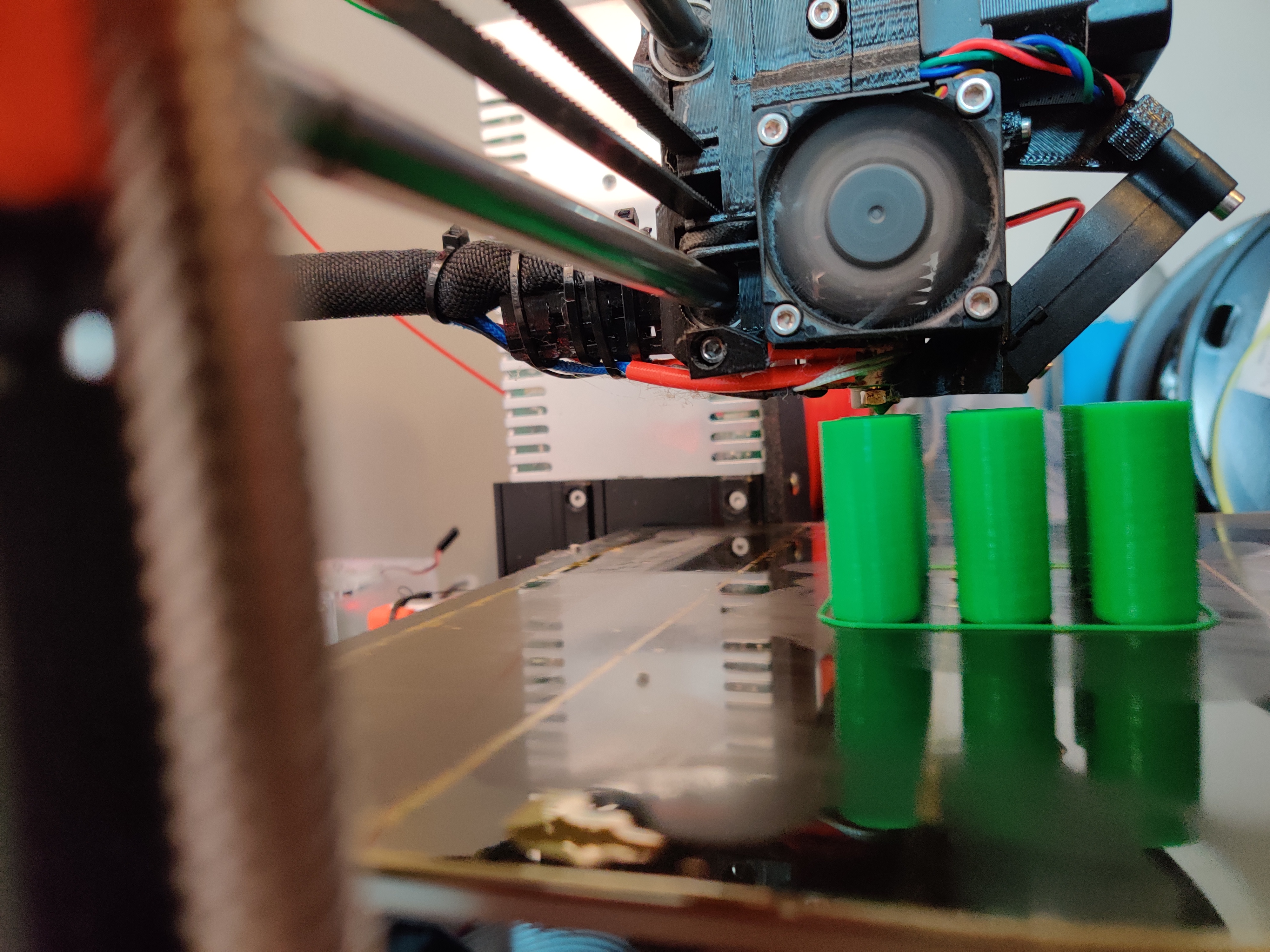
IntegersOfK
on 19 Nov 2019
After the print finishes, please take a picture from under the heat block. I want to see if the cartidge sticks out in any direction.
leptun
on 19 Nov 2019
It really doesn't seem like anything is poking out too much on either side.

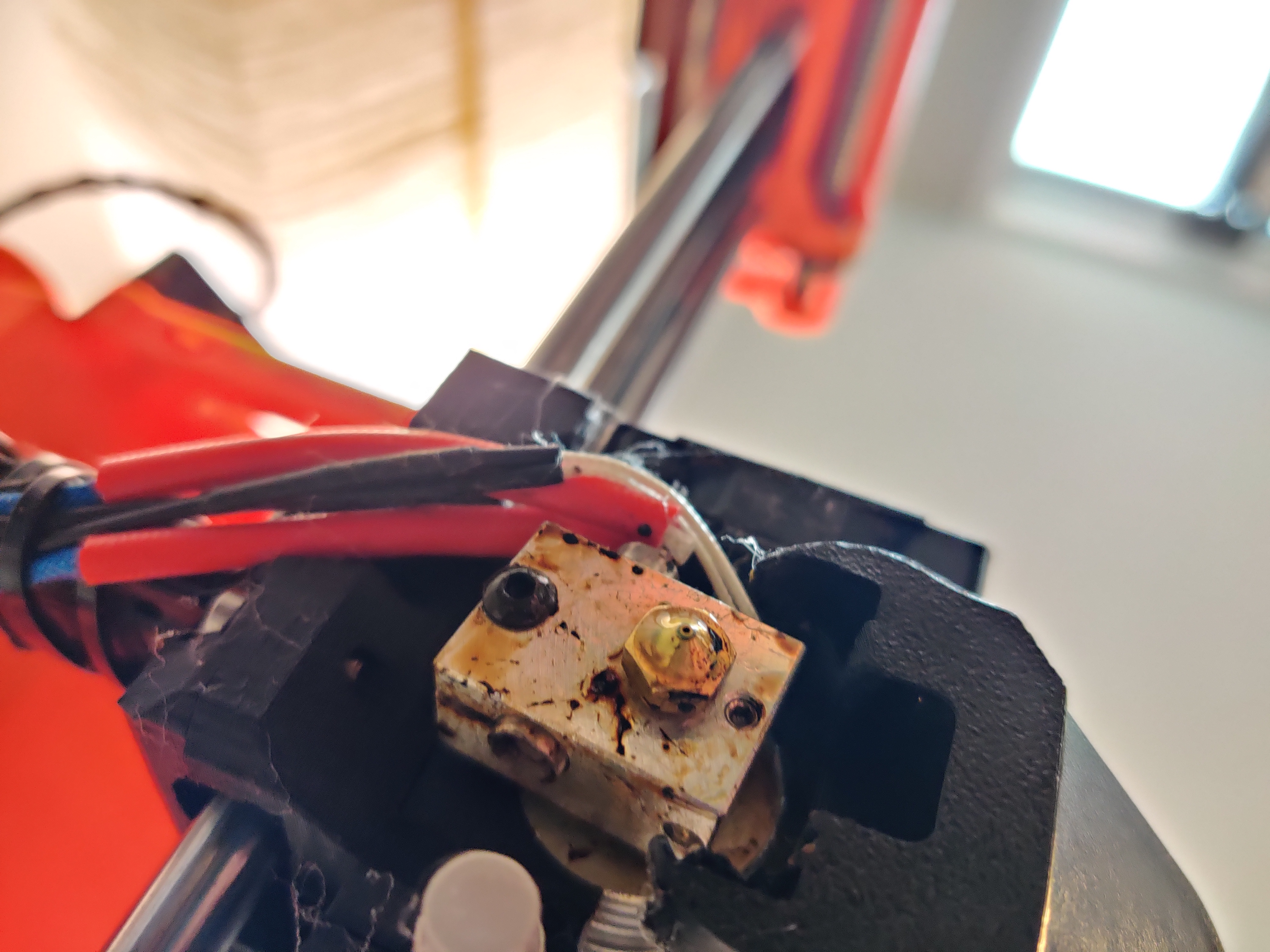
I swear everytime I take this thing apart and put it back together again it solves one problem and comes back with some completely different issue.
IntegersOfK
on 19 Nov 2019
@IntegersOfK After switching heatblock and thermistor did you run PID tuning?
 3d-gussner
on 19 Nov 2019
3d-gussner
on 19 Nov 2019
No, I'm not sure why I didn't think to do that. I haven't had any problem with my print quality but I guess that's a good reminder to run it.
IntegersOfK
on 19 Nov 2019
Hello! interesting solution!
i have made an hardware fix that i'm still testing : i put a little aluminium plate on the main opening of the fan shroud, just in front of the heater block. It is bent so that it will redirect air flow below the heatblock, on the part, or in the worst case the nozzle but not the heater bock.
With this mod, i was able to print my ninjaflex prints that were failing previously; i now have to assess if it impacted print quality, i will print PLA stuff tomorrow (ninjaflex surface quality is not super great, i have quite some stringing, i need to tune in the profile if possible, since i'm using semiflex profile, and ninjaflex is quite softer.)
I took pictures of my mod, i'll post them tomorrow.
My mod is completely eyballed; i didn't measure anything, just looked at the part in place to see if it would deflect the airflow or not.
Later on i'll try to shorten the piece until the thermal runaway comes back, then revert to the previous value that worked (or a bit before for safety). I will then post the results.
I think this could easily be fixed in the source file by adding a little plastic slope similar to what i did (if my mod did not impact print quality, otherwise a better solution will have to be found; still better have a lesser print quality than no print quality at all with interrupted prints...)
sarinkhan
on 20 Nov 2019
Thanks so much for this information. I just completed a brutal upgrade from 2 -> 2.5s, which took literally months because of limited time and problems printing the upgrade parts on my 2, and 15 grueling hours of building and rebuilding and a couple of parts breaking and some chats with support and I finally got it all going and then the thermal runaway hit when the fan cranked up on the whistle gcode after the first layer and killed the whole process.
Re-slicing it with the max fan speed set to 60% completely fixed it and my little whistle is almost done. Benchy next. I can hardly believe it's working. I was about to jump out a window.
First order of business if it continues working: print a better set of spare parts and see if I can replace the broken ones that are hanging on by a thread as I type.
But yes, it would be nice if the printer could realize that the temperature might be plummeting _because it's blasting the fan too hard_ and back it off a little.
 slinberg
on 12 Dec 2019
slinberg
on 12 Dec 2019
So this issue is now 1 year old and still no resolution or better fan shroud? This kinda sucks, at least they fixed the crapy R4 Extruder which broke in pieces even from watching it. 🤣 But I think with every new Version and/or Upgrade, there are more problems which won't get fixed.
 chileocat
on 20 Apr 2020
chileocat
on 20 Apr 2020
Same issue here on a newly upgrade MK2.5 to MK2.5S. Thermal runaway issue right after first layer. Seems several folks are having this problem.
I only have the OLD E3D socks which try to cover the angled part of the nozzle as well, and those introduce too many other issues. I'll try the slicing trick to allow continued PLA printing for PPE (Ear Savers) for now.
 Astrobirder
on 20 Apr 2020
Astrobirder
on 20 Apr 2020

So while I don't have the thermal runaway cancel issue, it does appear as though my temperatures take a huge dive for a short time after the second layer starts and the fan turns on. I took samples every 1 second, check out that dip at the beginning; the extruder temp falls by 15+ degrees but just happens to be able to recover before the firmware freaks out and cancels the print.
Here it is zoomed in a little:
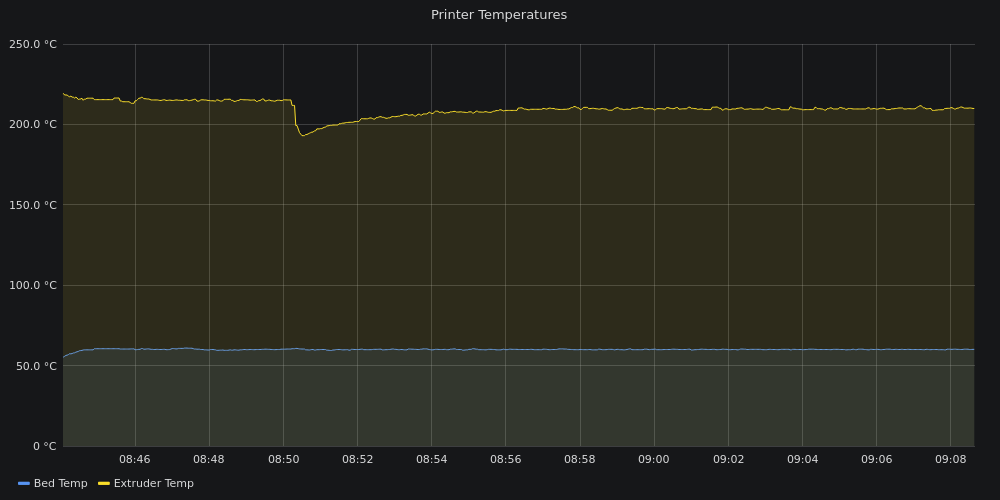
From 215 to 193 in the first 16 seconds of the second layer (when the fan turns on from off to full blast). Therefore I would tend to agree this is still a significant design flaw for the fan shroud and thermosensor placement.
To be fair, the temperature of the second layer is supposed to drop from 215 to 210 according to default PLA settings from Prusa Slicer profile, so let's just say it crashes 10 degrees rather than 15.
http://3d.ajwest.ca:3000/dashboard/snapshot/276JukqaPxCejG02W7xrad3V1YG7l3lP?orgId=1&kiosk&fullscreen&panelId=2
IntegersOfK
on 30 Apr 2020
I am suffering from this also. Using a sock helped, but I would rather not use one if possible...
See my "analysis" in #2644
 oxivanisher
on 30 Apr 2020
oxivanisher
on 30 Apr 2020
I also upgraded from MK2S to MK2.5S with the kit I bought before the new year. I started having thermal runaway issues pretty much right away but it was always with the bed during preheat. Today I started getting them while printing with the hotend temp dropping too much. I don't have any socks. Has there been any feedback from Prusa since this issue was opened? I want my awesome printer back!
 KirkSutherland
on 5 May 2020
KirkSutherland
on 5 May 2020
No, unfortunately you have to turn the fan down (either manually when the second layer starts) to ~50% speed (around 125 on the dial) or change the filament settings in your slicer to output gcode with lower fan speed.
The annoying part of either method is that you can usually turn the fan back up to 100%, it just needs to be done incrementally/slowly so the temperature doesn't tank by more than 10 degrees.
IntegersOfK
on 5 May 2020
I wanted to report that I'm also suffering from this issue, with a newly
upgraded MK2.5S, upgraded from MK2.5. I had already installed the newer E3D
silicone sock, on my heater block, as I was having similar problems with
the MK2.5/R3 parts, before the sock was added.
I'm going to attempt a PID tune with the fan running, as that seems like a
good idea. But, I also think that the cooling duct is the issue.
- Alex
On Tue, May 5, 2020 at 9:56 AM Adam James West notifications@github.com
wrote:
No, unfortunately you have to turn the fan down (either manually when the
second layer starts) to ~50% speed (around 125 on the dial) or change the
filament settings in your slicer to output gcode with lower fan speed.The annoying part of either method is that you can usually turn the fan
back up to 100%, it just needs to be done incrementally/slowly so the
temperature doesn't tank by more than 10 degrees.—
You are receiving this because you are subscribed to this thread.
Reply to this email directly, view it on GitHub
https://github.com/prusa3d/Prusa-Firmware/issues/1746#issuecomment-624070701,
or unsubscribe
https://github.com/notifications/unsubscribe-auth/AFLVO4VDXWA5MG2YTQGFKLTRQALILANCNFSM4HGVVVOA
.
--
Alexander Jacocks, RHCE | Staff Solution Architect
(e) [email protected] | Public Sector Business Development
(c) (240) 447-5974 | Tyson's Corner, VA
(g) CC28 8136 C253 907A B9BB 9EEA D3C8 1A3A 790A 0AB9
 ajacocks
on 7 May 2020
ajacocks
on 7 May 2020
I also have this same problem. To get around it, I have added a silicone sock and also stepped the temperature per layer.
The fan shroud very obviously causes flow against the heat block. There seem to be many options on Thingiverse that may work.
I'm quite disappointed with Prusa on this topic. You'd expect at least a comment beyond the basics to acknowledge a design flaw. I can't see how this couldn't affect other MK2.5S owners...
 sfrappier
on 30 Nov 2020
sfrappier
on 30 Nov 2020
Also giving my experience. I had an "old" fan from the MK2 which worked just fine for me in all my incremental Prusa upgrade steps including the MK2.5S.
However, I recently I changed my fan with a replacement fan bought a month ago from the official prusa store (https://shop.prusa3d.com/en/mk2mk2s/124-mk2-print-fan.html) because the old fan was making noises and I was also installing super PINDA.
After this change (same Slicer settings), I started getting thermal runaway (temperature tanked). I understand what I can do to prevent this, but it would be nice if it just works (TM) :)
 kevinvalk
on 21 Feb 2021
kevinvalk
on 21 Feb 2021
@kevinvalk
I have sort of the same problems
I managed to solve the thermal runaway error by mounting the silicone heatsock on the heatblock
What i really cant wrap my head around is, why the front fan, when turned on after a couple of layers, is running at full speed 255. Sure it can be adjusted down on the display manually, or by adding a gcode for every print.
But when my printer was just a mk2, the front fan would only run periodically and not constant ?
 buenso
on 8 Mar 2021
buenso
on 8 Mar 2021
You can change the min and maximum fan speed in Filament Settings
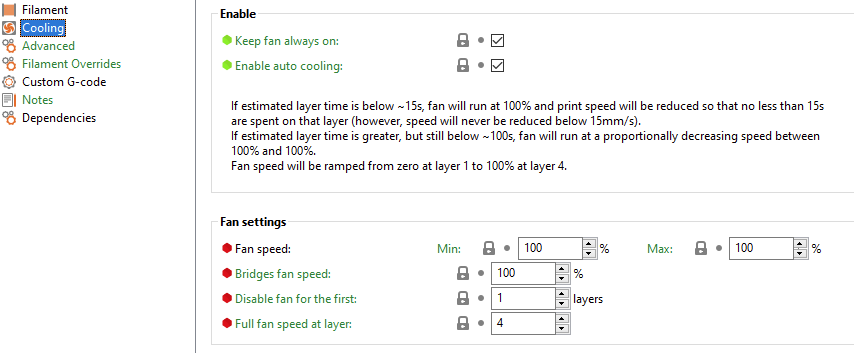
I ended up changing them to 65% (min, max and bridges fan speed).
However, the cooling fan started pulsating with these settings. This combined with the settings I did not like. So I oiled my old fan and restored that one. Back at 100% normal operations.
@buenso I agree, I think having a normalization setting in the firmware would be best. So you can say in the printer that 70% is the maximum the fan should go. So whenever, gcode instructs 100%, the firmware would normalize to 70%.
kevinvalk
on 8 Mar 2021
Related issues
 austaquio32
·
3Comments
austaquio32
·
3Comments
 Pace17881
·
3Comments
Pace17881
·
3Comments
 ulab
·
3Comments
ulab
·
3Comments
 stahlfabrik
·
5Comments
stahlfabrik
·
5Comments
 sarf2k4
·
3Comments
sarf2k4
·
3Comments