Prusa-firmware: Extruder skipping steps after upgrading MK2S to MK2.5 with firmware 3.2.1
Edit I have my printers working now. See my last comment for details. Increasing motor current and refining the machine helped but a different brand of filament made the problem go away entirely. Hopefully MakerGeeks will fix whatever is wrong with their PLA filament but I won't be buying more to find out.
Original Comment:
Because the upgrade from MK2S to MK2.5 includes the Bontech extruder gears, additional friction is being added to the system (both in the interaction between gears and gripping from both sides). The firmware changes between 3.1.0 from before the upgrade and 3.2.1 after the upgrade do not include any change to the current value for the extruder motor. Due to the additional friction in the system my printers have had trouble with the extruder skipping steps. I've been able to decrease this by ensuring everything is perfectly lined and lubricating the gear teeth that contact each other; however it would likely eliminate the skipping entirely if there was a slight increase in motor current to account for the extra friction or binding that may occur with imperfect gears (mine are not perfectly round). This would also reduce the need to have the spring screws tightened precisely.
Can we get a slight increase in the DEFAULT_PWM_MOTOR_CURRENT and DEFAULT_PWM_MOTOR_CURRENT_LOUD values for the extruder to account for the additional friction in the system? (perhaps change from 450 and 500 to 500 and 550) My motors are running cool and topping out at 33C so there seems to be plenty of room to add a bit more power for the MK2.5.
 iAmZuit
All 22 comments
How about adding a M907 command to your gcode file?
For usage, see https://github.com/prusa3d/Prusa-Firmware/issues/58#issuecomment-286121531
 Panayiotis-git
on 24 May 2018
Panayiotis-git
on 24 May 2018
I have been having what sounds like the exact same problem since upgrading to the 2.5. For certain models at random Z heights, the extruder motor will start skipping and it's not due to a nozzle clog since killing the print job and extruding some filament via the Settings menu produces clean straight extruded filament. It sometimes recovers on its own (after missing a layer or two) but most of the time I end up killing the job before waiting. I can provide the GCODE if that helps.
I captured a video:
https://photos.app.goo.gl/hdokoT4ef0QohUu72
I'm using the Linear Advance 100mm/s preset in Slic3r and the only change is changing the infill to 5%
 daveespo
on 25 May 2018
daveespo
on 25 May 2018
Thank you Panayiotis-git for the gcode command, I'm a mechanical guy so coding isn't my forte. I gave it a try and at first it solved all of the problems by going from 500 to 600 for the extruder setting. The extruder motor temp only got as hot as 37 degrees C during a 2 hour print.
daveespo: Yes your video is exactly the problem I'm having.
After about an hour I noticed it was grinding the filament a bit. Playing with the tension it was hard to find a spot where it wouldn't grind but also wouldn't bind and skip steps.
I got 2 out of 5 prints to succeed which is better but I need them functional enough for everyone on the team to use reliably.
Usually after it skips steps I'm able to raise the Z and advance the extruder and it spits out filament fine. I have then been disabling the motors and pushing it thru by hand to see how difficult it is. On one printer it proved to be very difficult even after I removed the bolts for the bondtech gear tensioner. I pulled it out and it had an interesting jagged edge forming on the filament. I'm curious if I did something to the extruder head when I upgraded. I'm ready to start throwing new parts at these printers, it's causing a backlog with our engineering group having them be down.
Any other thoughts are appreciated.
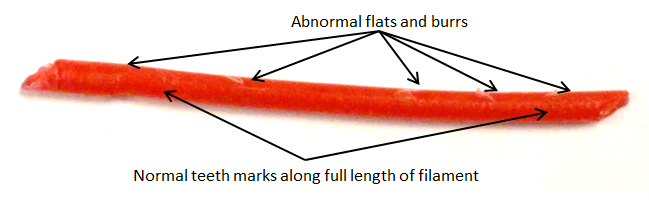
iAmZuit
on 26 May 2018
This reminds me of the problems I have while unloading the filament in my MK2.5. As other members have discovered, at the original PR extruder, the Bondtech motor gear is not placed at the optimal position.
At the first image you can see how misplaced is the gear. I do not show the second gear.

Till PR publish a fix, some members are trying to fix this issue, with custom designs like the bear extruder of gregsaun (Grégoire Saunier). In the below image you can see the much better placement of the gear.

Panayiotis-git
on 26 May 2018
I'm facing the same issue....
if i let the filament through, you can see the idler screws going back and forth repeatedly. i guess that is a gear misalgnment?
https://photos.app.goo.gl/vu6lUuKEuU8r3Fwp2
 giudiceanto
on 2 Jun 2018
giudiceanto
on 2 Jun 2018
Sounds like the issue I'm facing as well. Is there any link to the modified parts?
 tuxmobil
on 4 Jun 2018
tuxmobil
on 4 Jun 2018
Incrementing the current for the extruder motor seems to help. I tried 600, now 580 and so far no more clicking. I'm not sure whether this is the solution since there seem to be several reasons causing the skipping. However from my understanding the MK2.5 firmware has the same current presets than the MK2 although the extruder changed to Bondtech gears.
Temperature seems to be ok in my case with the motor heating up to 42°C at 29°C ambient.
tuxmobil
on 4 Jun 2018
having the same issue. Extruder Motor starts skipping in the middle of prints, usually when there's a change in geometry. Also when I extrude a string of filament with high feed (~500) it can't keep up.
My best Solution so far is to turn the extruder current up to 750 mA (i guess thats the correct unit...)
So far no more skipping steps. Motor gets hot, but that's apparently what they do...
I checked the current firmware for the Mk3 (3.2.1), it uses 750 mA for the extruder current. From what I understand the Stepper Motor (tmc2130) is the same in Mk2/2.5 and Mk3, but I'm still worried this is too much for the Mk2.5
 weinertmos
on 11 Jun 2018
weinertmos
on 11 Jun 2018
Here goes a pretty lengthy post, but hopefully it's more data so we can figure out the problem.
I've been experience similar issues since completing my MK2.5 upgrade a couple months ago. At first I thought it was clogging due my inexperience with PETG and needing to tune my settings until I needed to switched back to PLA for a test print and started seeing the same skipping. Looking back at my Octoprint history, I realized I've only had a handful of successful prints since the upgrade.
I usually see the skipping begin anywhere from 10 minutes to an hour into a print, at which point it is unrecoverable during the print, until I unload, trim and reload the filament. There is no grinding away of the filament and can see the actual skipping of the steps by watching the gear in the side window. I'm using Slic3rPE, with the base printer settings from Prusa, keeping up-to-date with both Slic3r and the settings the whole time. There is a noticeable amount of resistance when pushing the filament through by hand when manually loading that I feel could be related to a misaligned hole as @Panayiotis-git mentioned above.
Here's the list that I can remember of all the things I've tried over the past couple months, none of which improved the situation:
- Adjust hotend temperature up as high as 280°C
- and as low as 220°C
- manually pushing the filament into the extruder during the print
- adjust print speed so no value is higher than 30mm/s
- raise and lower extrusion multiplier
- lower retraction speed
- raise and lower retraction length
- disable retraction
- use M907 to raise extruder current as high as 750mA
- removing filament sensor and PTFE tube
- completely disassemble and clean all parts of the hot end
- swapped out multiple nozzles
- adjusting the tension of the extruder gears higher and lower
I'm open to more suggestions and willing to try some modified parts if someone has an idea of how to tweak it.
 jsatt
on 20 Jun 2018
jsatt
on 20 Jun 2018
Recently I was having issues - the bondtechs were skipping, but there was no significant force on the filament - I could push or pull the filament right past it.
What I decided was that the grub screw holding the driven gear to the stepper was just a HINT proud. I took out said screw, dremeled off about 100 microns around the top edge, stuck it back in.
No more skips. Everything else was well aligned, well greased.
 AbeFM
on 20 Jun 2018
AbeFM
on 20 Jun 2018
I finally got our printers working.
TL;DR The main culprit was the filament we were using.
Here's what I did:
-Cleaned the machine
-Increased the current to the motors
-Filed the side of the path mentioned above on May 25 to minimize the misalignment of the BondTech gear
-Replaced the PTFE tube (it had developed a large chamfer on one side of the inside, likely due to the misalignment mentioned on May 25)
-Greased the BondTech gear
-Reduced the retraction to .4mm
-I ordered some high flow fans but didn't end up installing them.
I suspected the upgrades as we went from no problems before the upgrade to 50% success the first few days after to 100% failure over a weeks time shortly after upgrading. I tried all the filament we had in inventory and ordered more with no success. I didn't suspect the filament as we had been using it successfully for almost a year. Frustrated with falling behind we started having engineers with personal machines take filament home with them to print their parts. They had the same issues so I ordered the Pro filament from MatterHackers. We haven't had a single failure since switching filament. Ugh.
Like I said, the PLA filament from MakerGeeks had worked fine for almost a year but all at once we got two orders (12 rolls) that were horrible. I've banned them as a supplier for my company. They are cheap, but I spent over $2k in time on trying to fix these machines when it was primarily the filament.
Thank you for everyone's help. Turns out I was completely wrong and I'll own that, though I still think that the alignment needs to be fixed and the current could be turned up on the extruder motor. I ran it at a setting of up to 650 with minimal temperature change at the motor and it was a little more forgiving of the poor filament.
iAmZuit
on 6 Jul 2018
Closing due to above comment. Thank you everyone for your input.
iAmZuit
on 6 Jul 2018
@iAmZuit I've been having this exact issue, I've been suspecting the custom heatbreak and decreasing retraction to near zero has gotten me to 75% success rate. But I've always bough MakerGeeks and your comment now has been suspecting them as well. Going to try something else. Thanks for the insight. Thanks!
 bendoerr
on 6 Jul 2018
bendoerr
on 6 Jul 2018
Anytime I have issues, I go back to the roll of Prusa silver PLA that came
with the printer.
And I still get issues. If testing with Prusa PLA isn't good enough, what
is?
Note: I see what you do - tearing it down and rebuilding gets a couple nice
prints so I think that fixed it, but it goes back.
              Thanks!
                      -Abe.
Sent from my "smart"phone, please excuse brevity and Swype-oes
On Fri, Jul 6, 2018, 8:55 AM Ben Doerr notifications@github.com wrote:
@iAmZuit https://github.com/iAmZuit I've been having this exact issue,
I've been suspecting the custom heatbreak and decreasing retraction to near
zero has gotten me to 75% success rate. But I've always bough MakerGeeks
and your comment now has been suspecting them as well. Going to try
something else. Thanks for the insight. Thanks!—
You are receiving this because you are subscribed to this thread.
Reply to this email directly, view it on GitHub
https://github.com/prusa3d/Prusa-Firmware/issues/769#issuecomment-403074411,
or mute the thread
https://github.com/notifications/unsubscribe-auth/AAClkWN86Ke6150p8OQvGAHR3ufeXPLjks5uD4hugaJpZM4UMwzE
.
AbeFM
on 6 Jul 2018
This issue still seems to exist in 3.3.0, which I upgraded to yesterday after updating my hardware to 2.5. It seems to be fixed with a single call of M907 E650 .. now I just need to find how to store this permanently.
I was using Prusa PLA.
 castaway
on 16 Jul 2018
castaway
on 16 Jul 2018
I still had the issue with multiple filaments (including Prusa Silver and MatterHackers Pro) and multiple nozzles. I was mostly successful (+50%) when bringing retraction near and at zero in addition to kicking the extruder current up to 650. But, I just replaced my heatbreak with an original e3d and haven't had issues anymore (about 20hrs now). I've had the issue since I got my MK2S a year ago (10-15% failure rate, and I thought it was just part of the hobby and I didn't have something tuned correctly). After upgrading to MK2.5 I couldn't print a single thing.
The folks on the Prusa users discord really helped me out here. It seems that the Prusa supplied heatbreak is a custom job (by e3d for Prusa) with slightly different internal dimensions than the original. What I think I found was that where the tube and heatbreak met, the filament had a tendency to soften and bunch up, and would end blocking the path or getting jammed in the tube.
bendoerr
on 16 Jul 2018
I've been having this problem for the past couple weeks while using my MMU 1.0. I have struggled with jams and clogging since 'upgrading' from the MK2S to the MMU, but have never had the extruder gear skip so much. It happens with both PLA and ABS. I've done lots of the same things people in this thread have done: raised and lowered hotend temp (190-240), replaced nozzle and pfte tubing, completely replaced the hotend, rebuilt and realigned the extruder gears (didn't think to lubricate, will try some lithium grease tonight). I've over and under-tightened the idler (and everything in between). Yesterday I tried pushing filament through the hotend manually while trying another round of cold-pulls, and it comes out nice and easy and straight. I've tried using other extruders (I have 4 to choose from) and they all seem to have the same problem.
I JUST tried switching from silent to high power mode after reading this thread, and it has definitely helped, but there are still a few clicks here and there on my current print. I'd say it's been reduced by 80%.
I would SWEAR I wasn't having this 'clicking with no jam' issue prior to upgrading to the newest sli3r PE, but I can't see anything obvious that would cause this problem within the gcode. I am running the latest firmware and have been for a long time. I guess it could be a coincidence. I'll try playing with M907 on my next print to see if that helps. I'm also going to try printing out a remixed version of the multiplexer, since there could be some friction there that might exacerbate the problem.
 FormerLurker
on 13 Aug 2018
FormerLurker
on 13 Aug 2018
@FormerLurker What filament brand?
After replacing the the heatbreak, I've had zero issues with MatterHackers and Hatchbox. If I run my MakerGeeks (I have issues with this brand even freshly out of the box) filament in a food dehydrator for 6 hours or so, It will usually be good for a few weeks, but quickly starts having issues again after that.
bendoerr
on 13 Aug 2018
@bendoerr, several different kinds. Prusa silver PLA, Inland ABS and PLA, and Hatchbox ABS. My prusa silver is a bit old, so there could be some humidity issues with it, but the rest have been stored in an airtight box with 2kg of desiccant when not in use.
I printed two things today and the extruder skipped constantly during the first print, and only occasionally during the second print. I applied lithium grease to the extruder gears as was suggested here prior to starting this print, so either it is helping or this particular gcode causes fewer issues. I also switched to full power mode in the middle of the previous print, and that seemed to help quite a bit. I also had to re-adjust the idler after lubricating the gears, so perhaps that also made a difference. The crazy thing is the first print turned out really nice despite the extruder skipping.
I will re-print the first item tomorrow and see if things have improved. It could be that the tension was off on bondtech gears (I've been messing with them a lot due to this issue), and that the switch to full power mode actually did solve my problem.
FormerLurker
on 14 Aug 2018
@bendoerr, a reprint of the previous object is going well. No clicking. It looks like the Extruder really was under-powered. I'm wondering why silent mode reduces the power to the point where the extruder has trouble. The extruder itself is practically silent anyway. I'll mess around with the M907 command to see if I can run in quasi silent mode :)
Thanks for your response on this closed issue!
FormerLurker
on 14 Aug 2018
I have had the exact same issue spent literally 50 solid hours trying to fix it, Filip from Prusa said that the latest Firmware lowered the current to the extruder to cool down the extruder from heating up too much, so he said try a firmware pre 3.20 that had higher current for the mK2.5. it worked then started skipping again, I AM SO FRUSTRATED. Any solutions so far from this group besides what is mentioned above?
 plankton99
on 23 Aug 2018
plankton99
on 23 Aug 2018
Ok, so over the last couple months I've had limited time to work on this issue, but I THINK I might have finally fixed the issue. The following are all the things I did and I suspect they all contributed to success in varying degrees, and they're all good things to be checking anyway.
- During one of the particular wicked jams, I ended up having to completely destroy my PTFE tube from the extruder to the hotend. But there also seemed to be damage that predated this jam and it likely needed to be changed anyway. Once replaced, shorter prints finished more reliably, but longer prints still jammed regularly.
- Upgraded to the new MK3/MK2.5 extruder assembly. The manuals haven't been updated to include this change, but you can eventually to piece it together and you use exactly the same screws and nuts the old one used.
- While assembling the new extruder, I did a complete tear down of the hotend and gave each piece a through cleaning with a heatgun and wire brush, as well as making sure there was no filament lining the heat break and that it did not have the custom heatbreak issue mentioned above. When reassembling the hotend, I made it a point to get all pieces as tight as I could (while hot) without feeling like I was going to break it.
- After the upgrade, cleaning and recalibration, print reliablility again improved, but still occasionally jammed. I also noticed some resistance between the filament sensor chamber and extruder gears when loading. I pulled out my drill and grabbed the bit closest to 2mm I could find and carefully ran it trough the (disassembled) sensor chamber until I saw the tip poke through right above the gears. Now there's no resistance and the sensor immediately detects filament insertion and runout.
I have since completed several hour+ prints with several materials (mostly maker coin samples of MakerBox filaments) as well as a 10 hour print in PETG, all of which have turned out great. Also of note, I am no longer printing using the higher M907 command and am printing in standard "auto" mode rather than high power mode.
jsatt
on 28 Aug 2018
Related issues
 brettvitaz
·
3Comments
brettvitaz
·
3Comments
 duartemv
·
5Comments
duartemv
·
5Comments
 erikcramerjr
·
4Comments
erikcramerjr
·
4Comments
 NoNme1
·
4Comments
NoNme1
·
4Comments
 mike-wi
·
3Comments
mike-wi
·
3Comments
Most helpful comment
How about adding a M907 command to your gcode file?
For usage, see https://github.com/prusa3d/Prusa-Firmware/issues/58#issuecomment-286121531