Prusa-firmware: 3.2.0 Wizard Live-Z "Try Again" bug
Run Wizard on 3.2.0 final and when I repeat Live-Z test the extruder always seem to start from same height, but the shown Z offset stays at the value from previous run. Making the Z offset calibration unusable unless I hit it the very first time correctly?
 phooton
All 12 comments
I guess yes.
Do it only once. Then continue adjusting live z with a normal print. The Prusa Logo is fine for that for example
 stahlfabrik
on 11 May 2018
stahlfabrik
on 11 May 2018
Encountered the same issue
 alhazar313
on 11 May 2018
alhazar313
on 11 May 2018
Same here, with MK2.5 v3.2.0. First run was -650, second -1320, third run was -2050.
 Panayiotis-git
on 11 May 2018
Panayiotis-git
on 11 May 2018
Same bug found here, ended up putting huge scratch and dent on spring steel sheet. Bummer!
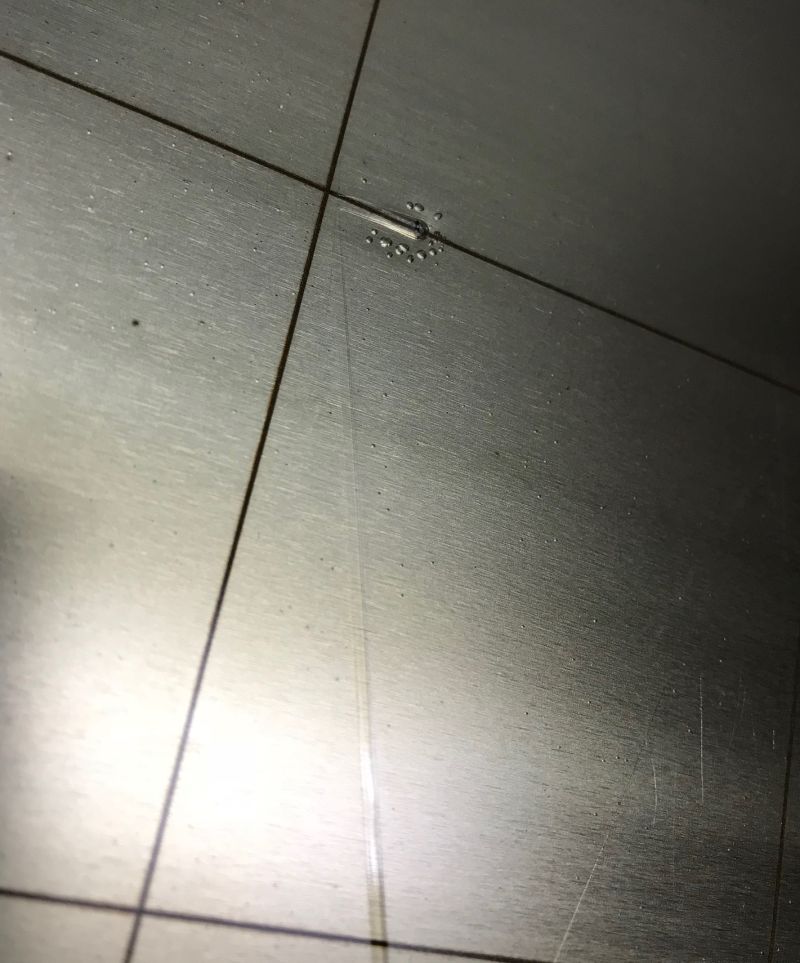
 layneok
on 11 May 2018
layneok
on 11 May 2018
Can you all provide which printer you are using as well? Just wondering if this is isolated to the Mk2/Mk2.5 or if it also affects the Mk3.
 Zaf9670
on 12 May 2018
Zaf9670
on 12 May 2018
Mine is a MK3 and has the issue
alhazar313
on 12 May 2018
Mine is also a MK3.
Get Outlook for iOShttps://aka.ms/o0ukef
From: alhazar313 notifications@github.com
Sent: Saturday, May 12, 2018 7:03:55 AM
To: prusa3d/Prusa-Firmware
Cc: layneok; Comment
Subject: Re: [prusa3d/Prusa-Firmware] 3.2.0 Wizard Live-Z "Try Again" bug (#732)
Mine is a MK3 and has the issue
—
You are receiving this because you commented.
Reply to this email directly, view it on GitHubhttps://github.com/prusa3d/Prusa-Firmware/issues/732#issuecomment-388557437, or mute the threadhttps://github.com/notifications/unsubscribe-auth/AJalZ7v2M5NFSYFOxZJT1gVYQUBfwbDsks5txuvLgaJpZM4T7Iwi.
layneok
on 13 May 2018
Same issue for me in a Mk3, after upgrading to 3.2.0 final.
 josepvm
on 13 May 2018
josepvm
on 13 May 2018
Thank you for reporting this bug. PR https://github.com/prusa3d/Prusa-Firmware/pull/747 should fix this.
 PavelSindler
on 15 May 2018
PavelSindler
on 15 May 2018
I have the same issue with a MK2.5 upgrade. When using the Wizard to calibrate the printer I've been asked if I want to retry the Live Z adjust and I said "Yes". The operation started from the beginning with the nozzle height unadjusted, but the value remained from the first try. I had to double the value effectively to get the results. On the first print the nozzle dragged across the bed scraping it. I've had to reset XYZ calibration and start over.
 ram64
on 17 May 2018
ram64
on 17 May 2018
I tested with the 3.2.1-576 release and I confirm that the issue has been fixed.
Please close the issue.
Panayiotis-git
on 21 May 2018
It was fixed in 3.2.1: https://github.com/prusa3d/Prusa-Firmware/releases/tag/v3.2.1
PavelSindler
on 22 May 2018
Related issues
 RacingHell
·
4Comments
stahlfabrik
·
5Comments
RacingHell
·
4Comments
stahlfabrik
·
5Comments
 AnHardt
·
3Comments
AnHardt
·
3Comments
 erikcramerjr
·
4Comments
erikcramerjr
·
4Comments
 austaquio32
·
3Comments
austaquio32
·
3Comments
Most helpful comment
Thank you for reporting this bug. PR https://github.com/prusa3d/Prusa-Firmware/pull/747 should fix this.