Prusa-firmware: Led display timer does not work anymore after installing 3.0.12
Hi,
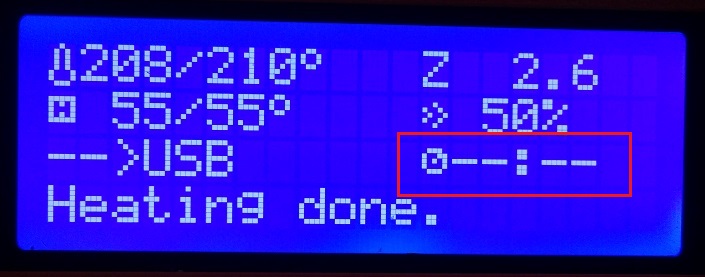
I'm experiencing some problems after installing the 3.0.12 over the 3.0.10
When I start to print the timer doesn't work anymore.
1_75_MK2
RAMBo13a
E3Dv6FULL
 m85forcer
All 20 comments
I'm seeing the same issue, so it is not only you :-)
 GurliGebis
on 6 Aug 2017
GurliGebis
on 6 Aug 2017
Just a guess, after comparing all the changes between 3.0.10 and 3.0.12:
Open Marlin_Main.cpp, search for //starttime=millis(); around line 4200. Delete the "//" and upload the FW.
Does it work now?
Note: This change was done in commit 7b962d666f839ab36abc1ad64694568b99690407. No reason why it was commented out at first glance. At least I think it might got broken with this one.
 Sebastianv650
on 6 Aug 2017
Sebastianv650
on 6 Aug 2017
That might be the case.
Another thing that I have been noticing with the older version where it works - if printing from USB, the counter keeps counting, even though the print is done.
Shouldn't the print timer stop when the printer isn't printing anymore?
GurliGebis
on 6 Aug 2017
I never had an eye on the timer on my MK2, and I never run something else than the .12. So I can't tell, but it would be logical that the timer stops when the heat is turned off.
If the propesed change enables the timer again, I will have a look at the timer stopping. Might be related.
Sebastianv650
on 6 Aug 2017
An easy way might be to have the M75 gcode in the start script, and the M77 gcode in the stop script, that way it would always match, or am I misunderstanding how those two works?
GurliGebis
on 6 Aug 2017
Nevermind, M75 and M77 is not supported by the prusa firmware :(
GurliGebis
on 6 Aug 2017
Yes that's the way M75 and M77 work. I'm using them in the start / end gcode on my TAZ 5 with is running a recent Marlin version.
Nevermind, M75 and M77 is not supported by the prusa firmware :(
True, no direct control over it in Prusa FW. That's the drawback of a diverging fork, everything has to be implemantated by hand. But at last for me timer control is nothing critical. Use Pronterface time preview after slicing, and as soon as the print has realy started it's "out of control" - it will need the time it needs, timer or not.
Sebastianv650
on 6 Aug 2017
I use octoprint, so I have a timer there, so it is not critical for me :)
GurliGebis
on 6 Aug 2017
That's the drawback of a diverging fork, everything has to be implemantated by hand.
I wonder how many other features from Marlin that we are missing out on.
GurliGebis
on 6 Aug 2017
We were focusing almost purely on SD card printing so far. One of the goals is now improve printer behaviour for users who use host softwares such as Octoprint for printer remote control (for example time-out issues when printer is busy and blocks serial communication) so we will also fix this timer issue.
@GurliGebis : This timer really keeps counting after print is done. When print is done, there is print time shown on last LCD row, so there is no need to have this information twice and from what I know, time from starting last print is handy for some users who wants to know also how effectively they use their printer.
 PavelSindler
on 7 Aug 2017
PavelSindler
on 7 Aug 2017
I tested uncommenting the above stated line and it starts the timer on a M109 as expected. Detection and handling of a finished print is missing of course.
But I also think porting (or rewriting) a timout control for USB printing is more important than timer control..
I wonder how many other features from Marlin that we are missing out on.
Have a look at https://github.com/MarlinFirmware/Marlin/releases, read 1.1.0 and up changes. But if you realy miss them might be another story. As we only need to think about an MK2, some extensions in the abilities might not be relevant.
In fact if I would realy miss something, I would give Marlin a try. As long as you have built your MK2 carefuly and you don't need the skew compensation, I think there is nothing you will miss in Marlin.
Sebastianv650
on 7 Aug 2017
Regarding the timeout for USB printing, I remember seeing some discussion on the octoprint repo (or Marlin, can't remember) regarding this.
I think it ended up with them agreeing on the printer reporting it's status every two seconds, that it is still processing the command.
GurliGebis
on 7 Aug 2017
That was this one: https://github.com/MarlinFirmware/Marlin/issues/3068
GurliGebis
on 7 Aug 2017
Thank you. We did some research and also we recently contacted Gina Häußge, who is Octoprint creator/main developer and she explained to us what prefered behavior is.
PavelSindler
on 7 Aug 2017
I have ported the functionality added by to the Marlin firmware, and created a pull request for it here: #166
GurliGebis
on 7 Aug 2017
@PavelSindler @GurliGebis @Sebastianv650
Is there any chance to merge Prusa firmware with Marlin again? So things developed by others would get implemented faster?
 3d-gussner
on 8 Aug 2017
3d-gussner
on 8 Aug 2017
@3d-gussner I don't work for Prusa, but looking at how far the two branches have diverged, I think it would be quiet difficult to rebase the Prusa code on top of the Marlin code base.
GurliGebis
on 8 Aug 2017
I also guess they won't try that. Beside the divergence @GurliGebis mentioned, Prusa FW and Marlin FW have different goals:
Marlin runs on all kind of printers and it want's to be quite at the top regarding new features and supporting new sensors, extruders and such things.
Prusa FW on the other hand is a FW for a small family of printers, so things like improved support for delta and Core machines is useless at the moment. For the normal printing users, it's also not important to have a lot of experimental features. For them, the most important thing is to have a stable, solid working system. Choose a Slic3r profile, adjust some small settings and print it.
A look at the LCD menu tells you the idea behind Prusa FW: There is nothing you want to tune in it, except the Z adjustment. Some informations, some ways to control the printer and start printing from SD, it's not much more. On a pure Marlin LCD you can change anything from jerk, different kinds of acceleration (for each axis) and so on which, if not adjusted properly, will even lead to an unusable printer.
Sebastianv650
on 8 Aug 2017
Just to link the 2 issues together, #97 is the same basic problem as the original post on this issue. I came to the same conclusion as @Sebastianv650 . Would it be reasonable to make a pull request to uncomment the starttime=millis() line?
 njcrawford
on 26 Aug 2017
njcrawford
on 26 Aug 2017
I don't think so, as it is only a part of the cake. The timer will continue running even when the print has finished, so you don't know how long it took also with the running timer..
To do it right, some more coding is necessary where the Marlin way of handling it might be a good reference.
Sebastianv650
on 27 Aug 2017
Related issues
 brettvitaz
·
3Comments
brettvitaz
·
3Comments
 sgoll
·
3Comments
sgoll
·
3Comments
 anilrobo90
·
3Comments
3d-gussner
·
4Comments
anilrobo90
·
3Comments
3d-gussner
·
4Comments
 stahlfabrik
·
5Comments
stahlfabrik
·
5Comments
Most helpful comment
I also guess they won't try that. Beside the divergence @GurliGebis mentioned, Prusa FW and Marlin FW have different goals:
Marlin runs on all kind of printers and it want's to be quite at the top regarding new features and supporting new sensors, extruders and such things.
Prusa FW on the other hand is a FW for a small family of printers, so things like improved support for delta and Core machines is useless at the moment. For the normal printing users, it's also not important to have a lot of experimental features. For them, the most important thing is to have a stable, solid working system. Choose a Slic3r profile, adjust some small settings and print it.
A look at the LCD menu tells you the idea behind Prusa FW: There is nothing you want to tune in it, except the Z adjustment. Some informations, some ways to control the printer and start printing from SD, it's not much more. On a pure Marlin LCD you can change anything from jerk, different kinds of acceleration (for each axis) and so on which, if not adjusted properly, will even lead to an unusable printer.