Prusa-firmware-buddy: [BUG] 4.2.1 + SuperPINDA - MBL is not compensating fully
At the request in #636 I am starting a new issue for this.
Printer type - [MINI]
Printer firmware version- 4.2.1
Original or Custom firmware Stock
Optional upgrades - Filament sensor
USB drive or USB/Octoprint
USB/Pronterface
Describe the bug
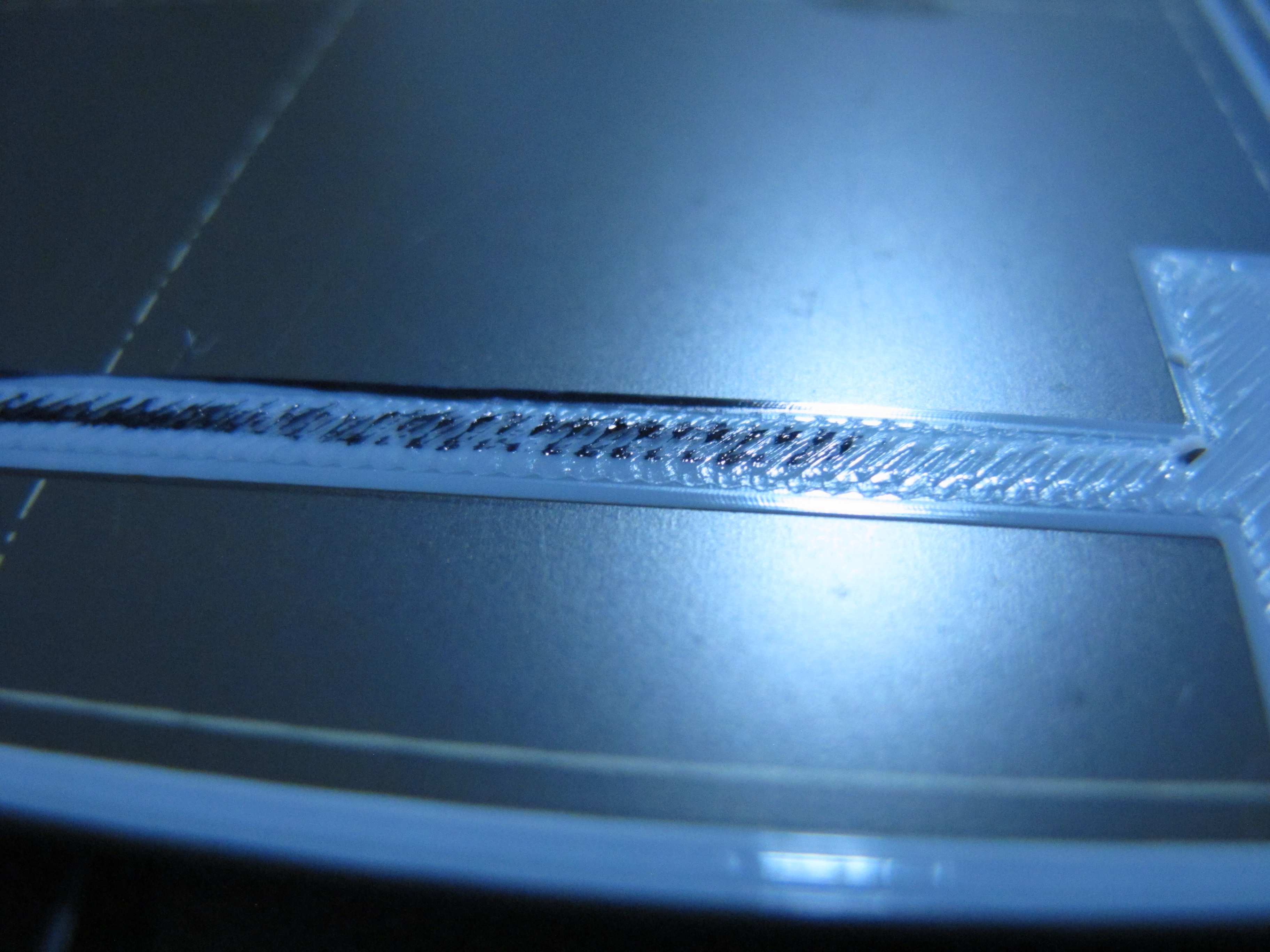
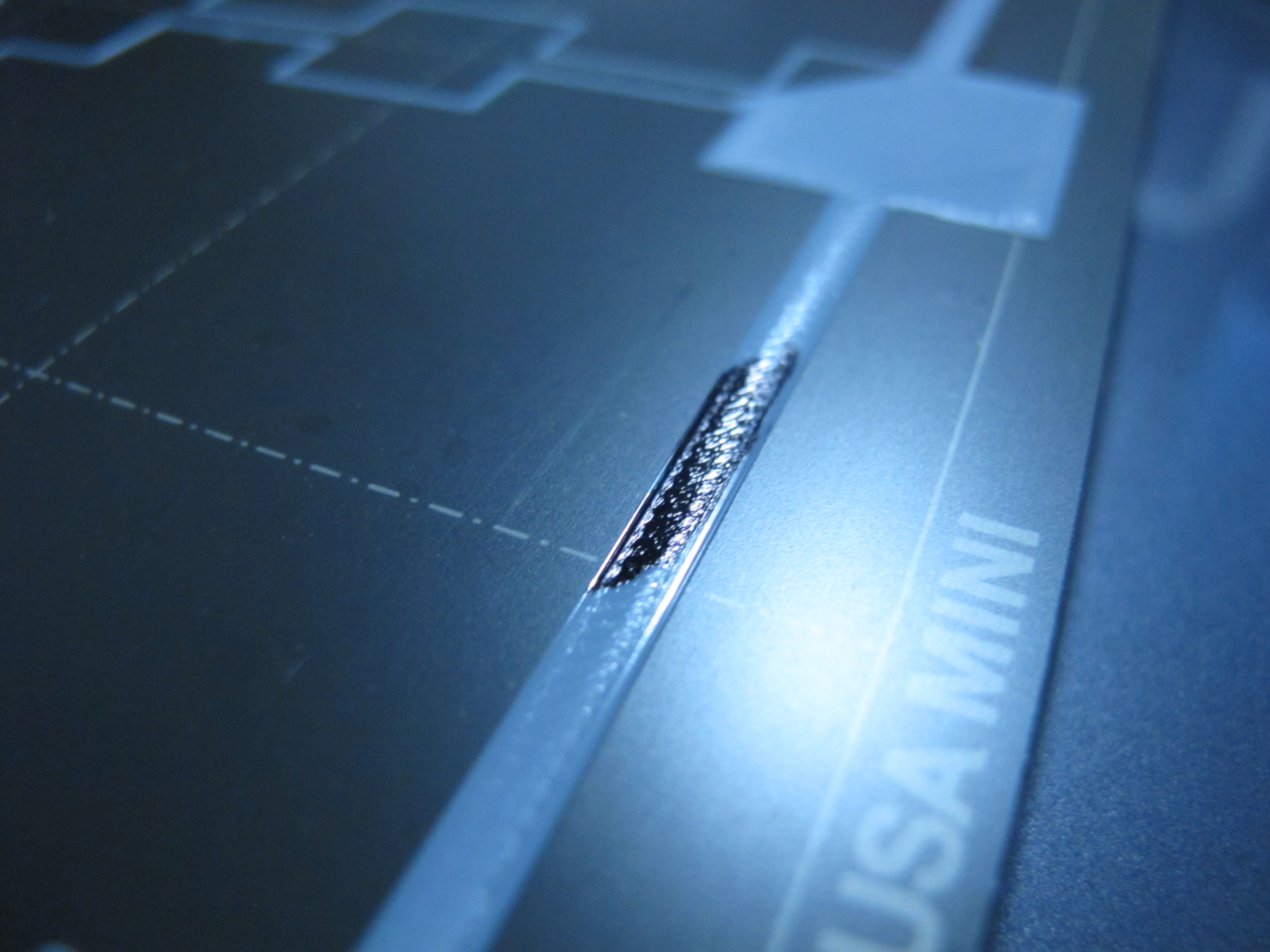
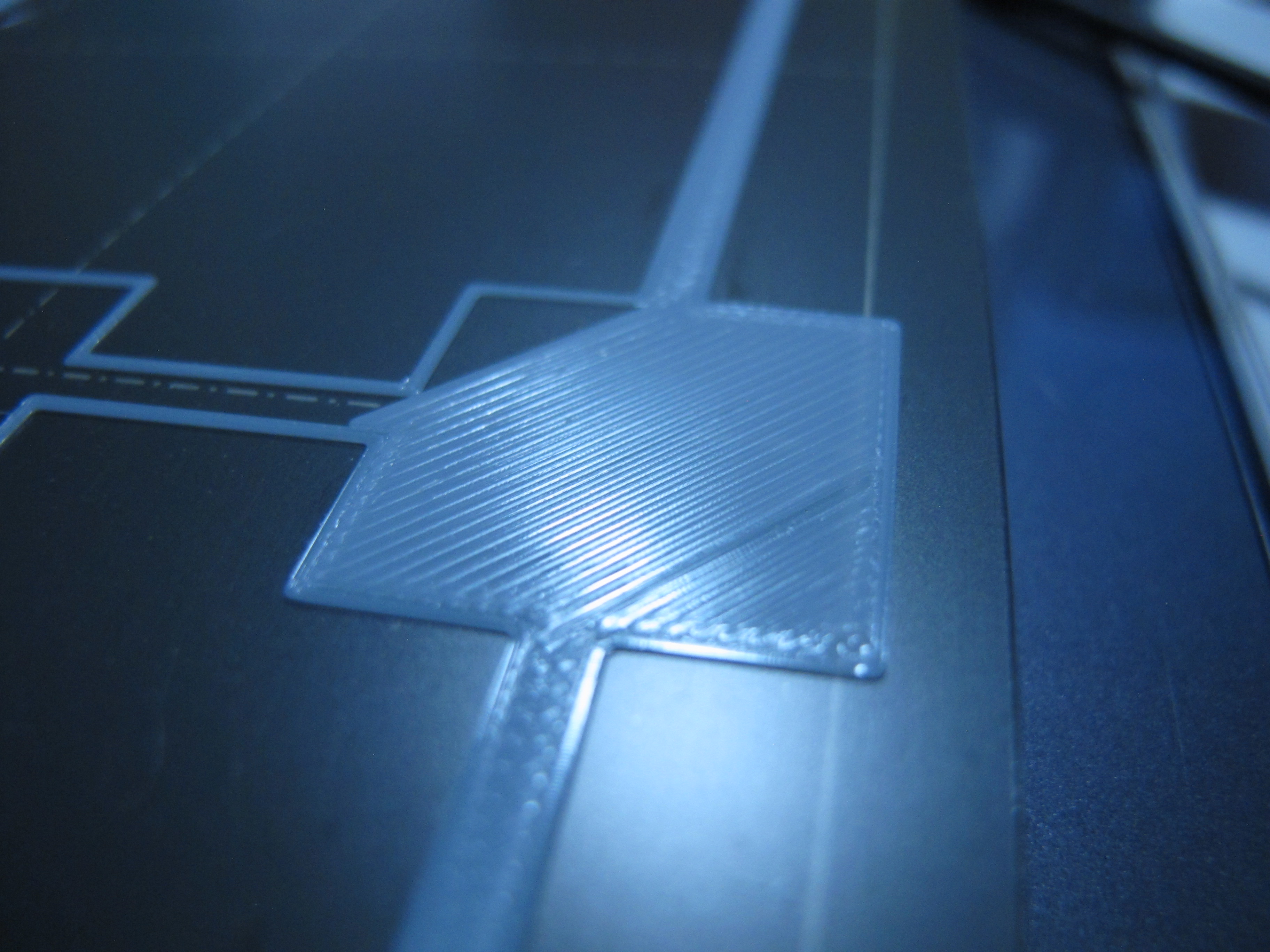
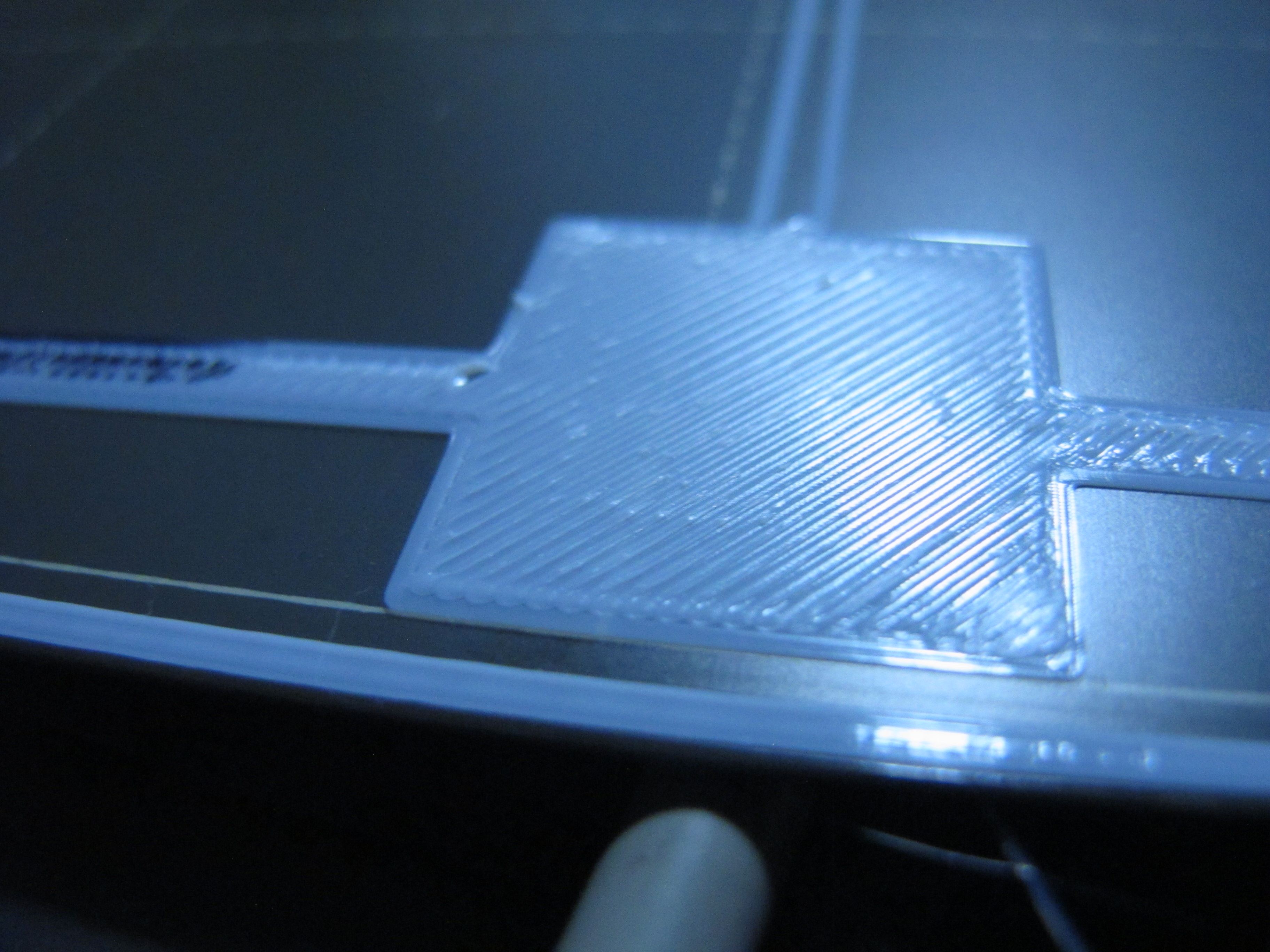
Mesh bed levelling does not appear to be fully compensating for the bed level. The amount of "squish" differs noticably from the left side of the bed to the right side.
As noted in the linked issue, I have checked that the X rods are coplanar with the bed, and I do have a superpinda (so this issue should now be decoupled from any temperature effects.)
Bilinear levelling grid reported for this print is as follows:
Bilinear Leveling Grid:
0 1 2 3
0 +0.034 +0.061 +0.058 -0.045
1 -0.058 +0.166 +0.137 +0.056
2 -0.042 +0.089 +0.153 +0.167
3 -0.119 +0.066 +0.201 +0.256
Notice the difference in line widths for 2 extrusions on the left and right side of the plate:
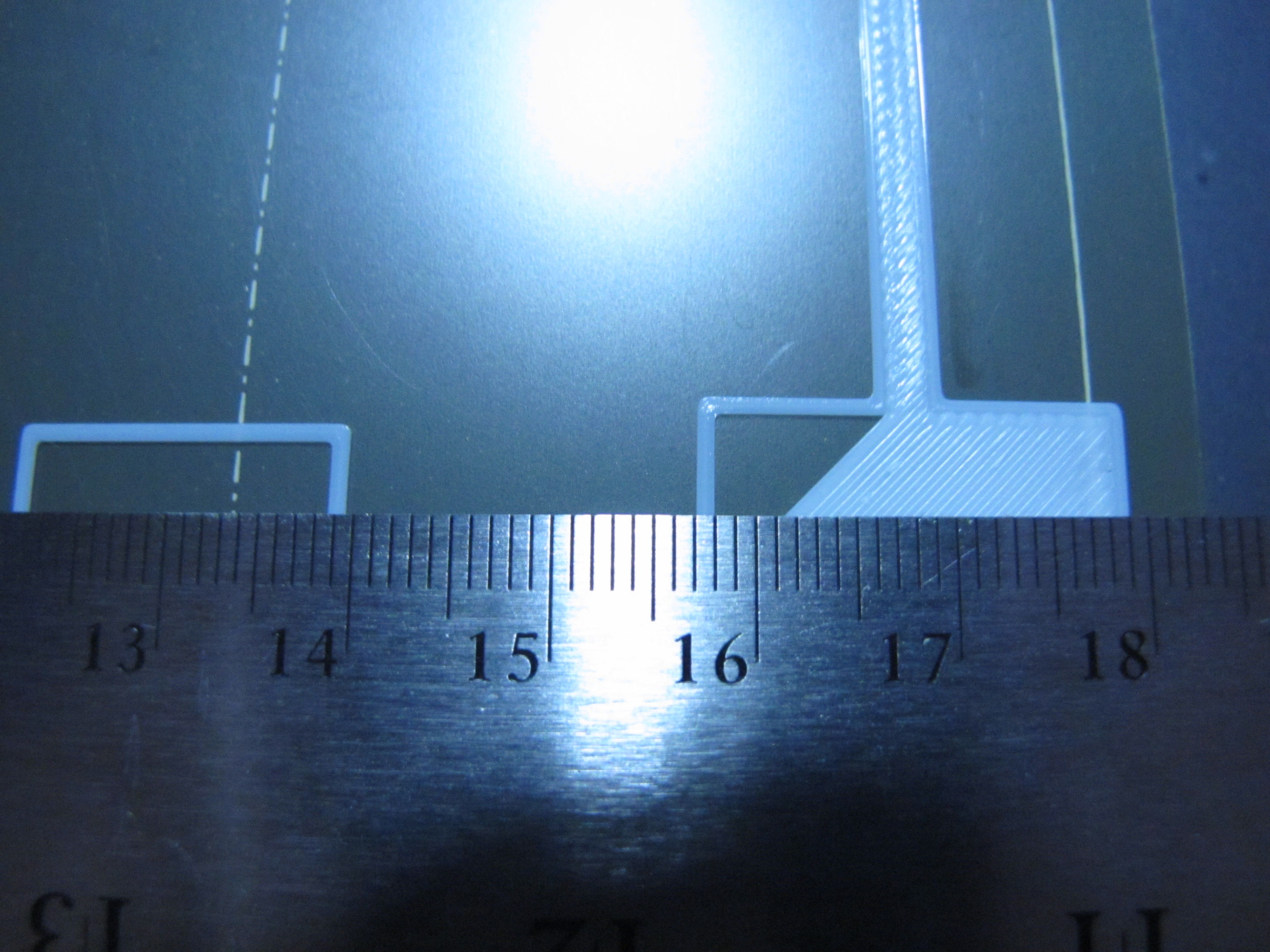
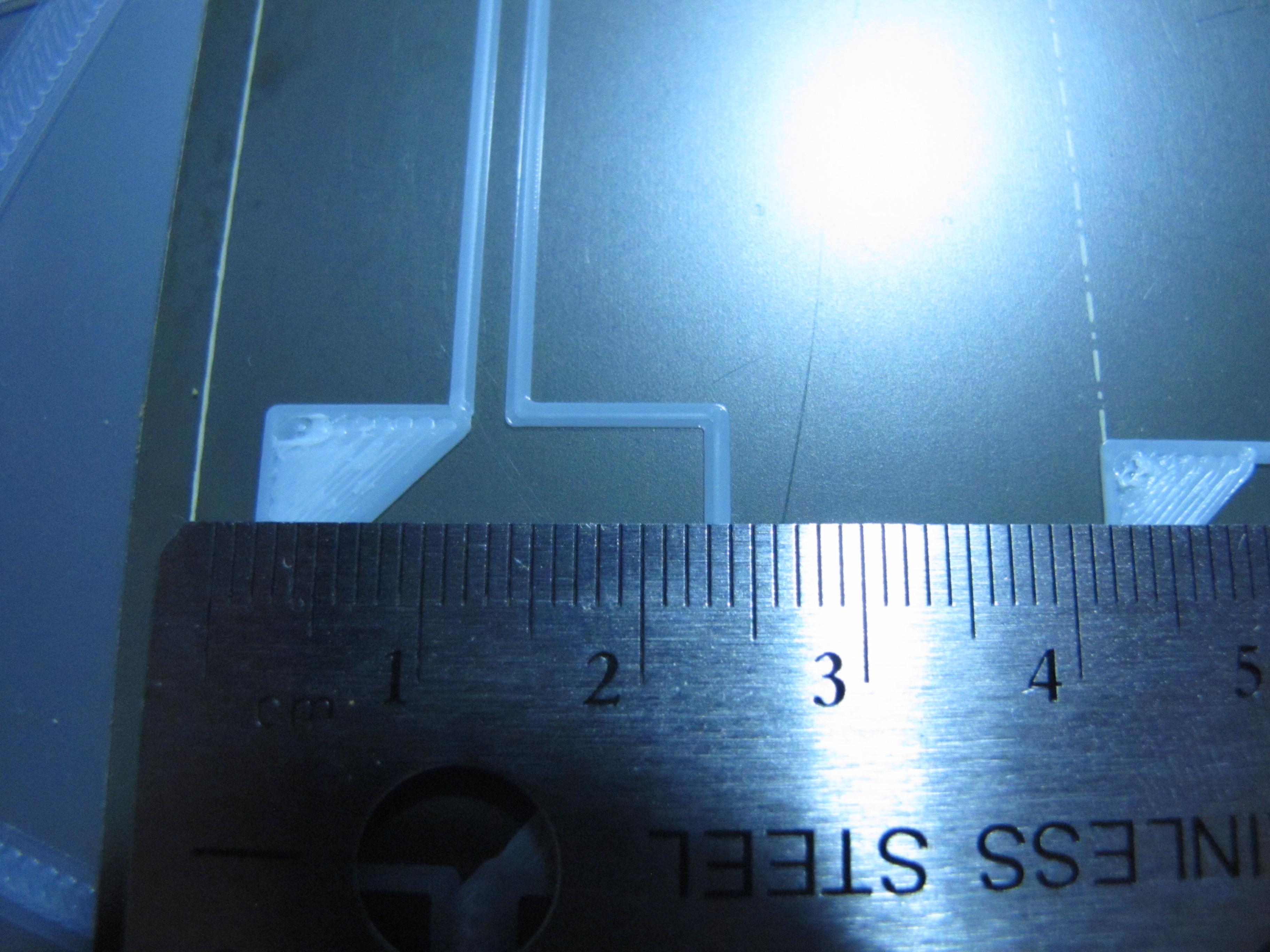
as well as the "plowing" on the left (and relatively smooth surface on the right) Black marker added for clarity/texture help.
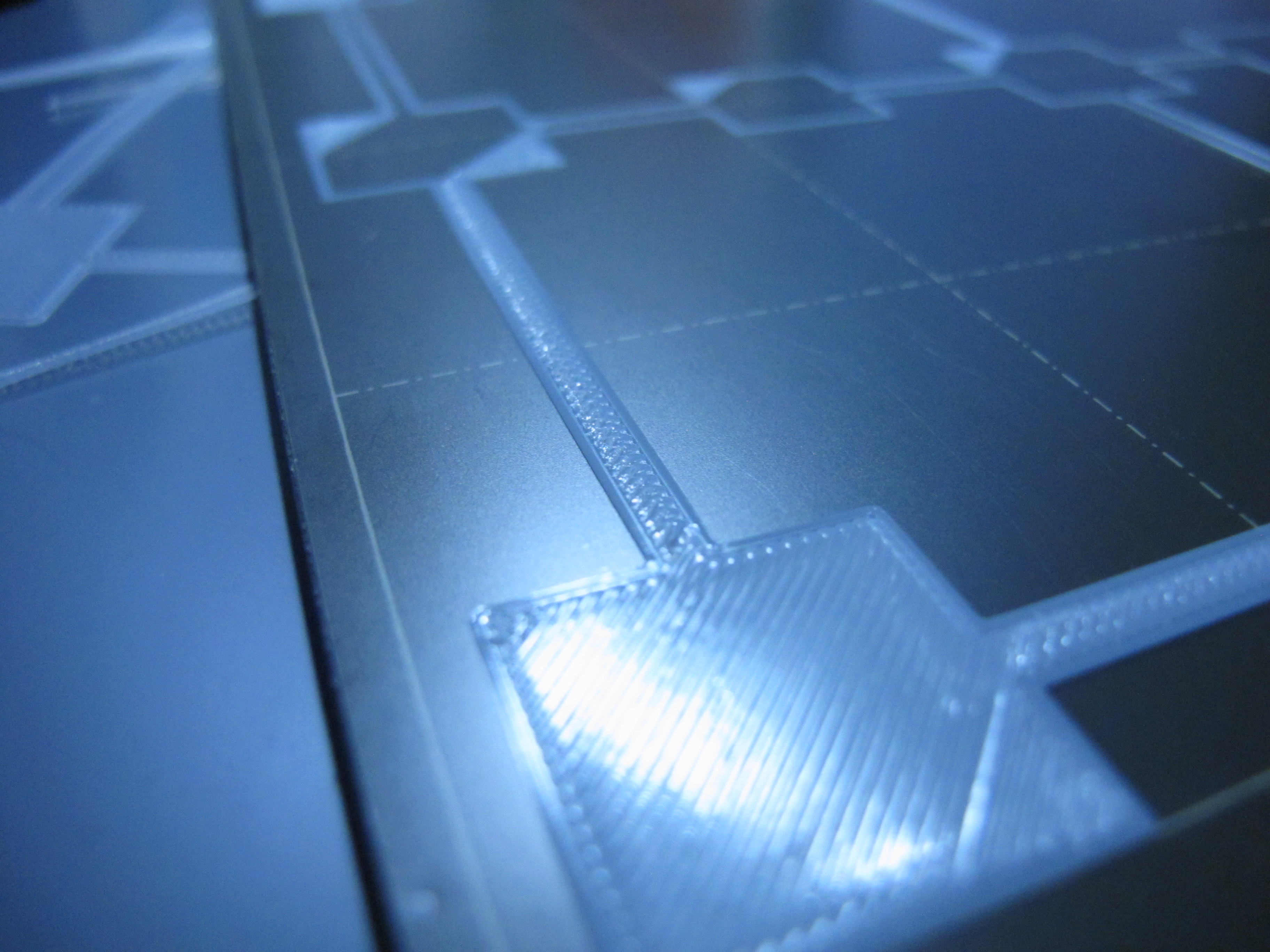
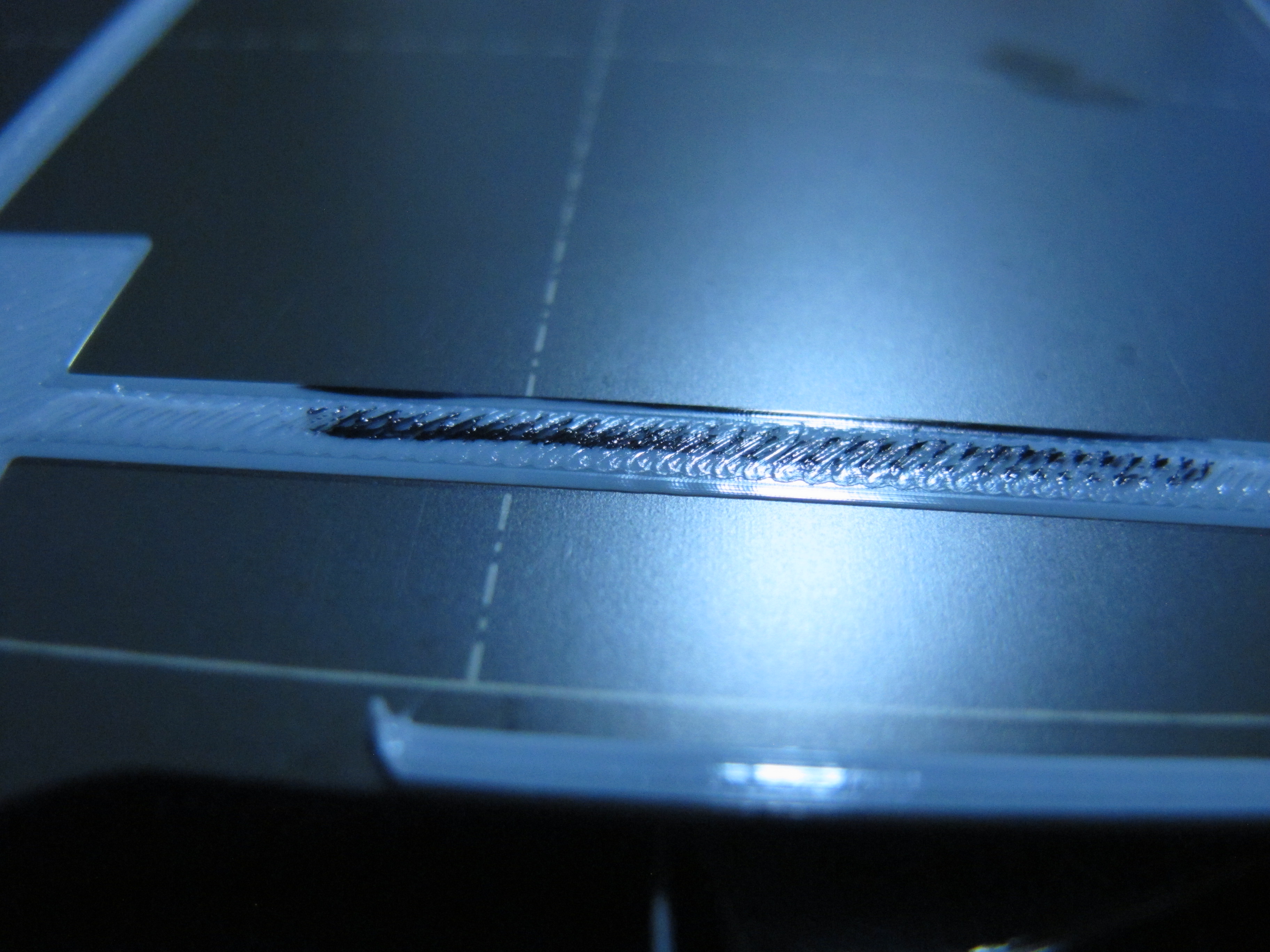
How to reproduce
Please describe steps to reproduce the behavior.
Expected behavior
Layer thickness should be consistent from left to right side of the bed.
G-code
3x3-calibration-prusa-mini_02mm_pla_mini_18m.gcode.tar.gz
Crash dump file
N/A
 vintagepc
All 21 comments
Can confirm the same issue in 4.3.0-RC1 on 2 MINI+ printers. For the record, I have not touched print sheet profiles yet, assuming that matters.
CORRECTION 2020-12-18: After printing the same kind of calibration gcode (though with PETG), layer thickness is consistent, though I'm having some other unrelated issue. I have used the first layer calibration for Rough Sheet 1 and selected it though, if that changes anything.
 murk-sy
on 17 Dec 2020
murk-sy
on 17 Dec 2020
I just want to say I have this issue as well. I have a brand new mini+ with the super pinda. I am by no means an expert on 3D printing, but I'm also not new to it. After attempting to do the calibration print multiple times, I can say without hesitation something is wrong. Mine will drag in certain places on the sheet, in particular the right side. I'm going to try heat soaking the entire thing and running the calibration then and see if I can get consistent results. It is extremely frustrating to either be too high, or dragging the head. Unfortunately, to make the middle of the sheet look good, it requires dragging, if I raise the nozzle on live z adjust so it doesn't drag, the middle of the sheet first layer looks awful.
I thought this issue was supposed to be fixed with the super pinda?
 Gaugeforever
on 1 Jun 2021
Gaugeforever
on 1 Jun 2021
The SuperPINDA just fixes the temperature variability which confounds the problem.
This seems to be a separate issue and from my observation, Z is moving very little as the head moves from left to right side of the bed, as though it's simply just not compensating enough for the measured distance. I have also tried following the guide on https://help.prusa3d.com/en/article/xz-axis-skew-correction-mini_158518/ with no success - but it's worth noting that despite having raised the right end of the arm by more than a mm, there is still a very similar level of "squish" to the parts on the right end of the bed.
If this was just arm sag then in theory that should be compensated for by the PINDA as it should also read "closer" and therefore raise Z as the arm tilts more.
(currently on 4.3.1, so it's still an issue)
vintagepc
on 1 Jun 2021
What's odd to me is that I can do the calibration Z print, get it leveled, then do the same print keeping what I entered last time, and it forces me to raise is by .2mm, if I repeat the same process, I need to raise it .2mm again. It is the strangest thing. Perhaps I should contact support.
Gaugeforever
on 1 Jun 2021
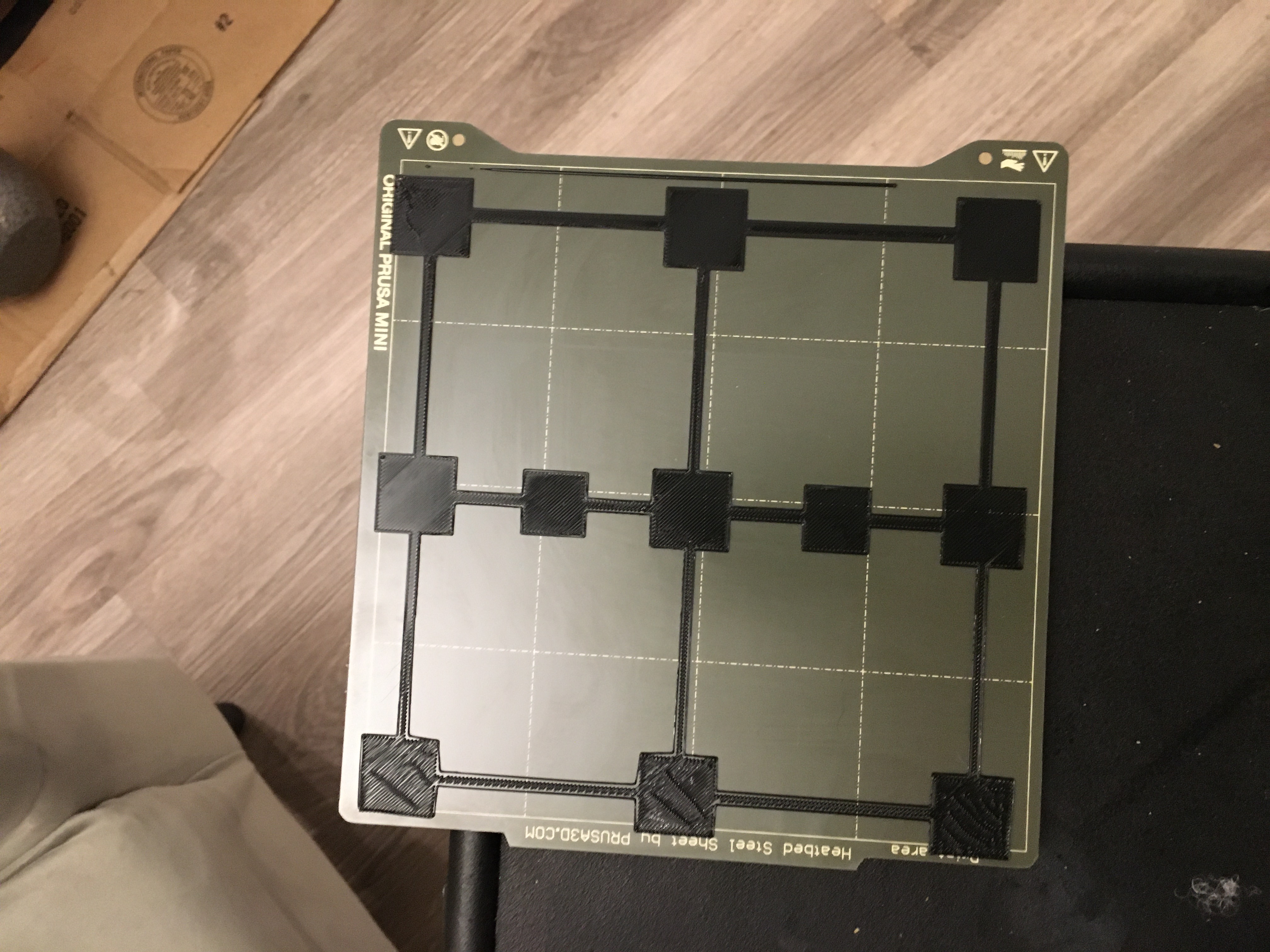
I wanted to add a 9 point leveling print as proof that mine fails consistently front to back. As there is no manual bed leveling option, nor is there an option to fix the broken calibration in the settings like other Prusa printers, I am basically stuck with a broken printer. I will contact support tomorrow and see how refunds work.
Gaugeforever
on 2 Jun 2021
@Gaugeforever please try follow https://help.prusa3d.com/en/article/xz-axis-skew-correction-mini_158518/ like @vintagepc. If this doesn't help you may try loosening the bed screws, heating up and tightening them again.
 JohnnyDeer
on 2 Jun 2021
JohnnyDeer
on 2 Jun 2021
I've actually tried all of that. I thought loosing the back of the bed would raise it. None of it works. Also, while I did do the xz askew test and it came out fine, that makes sense seeing as this is a yz askew problem, not xz. They need to allow us to calibrate the bed leveling like in their other printers. There simply is not a solution for y askew at this point. I'm not sure if the steel sheet is not level, the heating bed is not level, the extrusions, I have no idea. Whatever the case is though, the pinda probe is not compensating for it. I can't go lower because if you look at the front, it's hard to see, the nozzle would drag and not print any lower. I got it as low as possible without dragging in the front in this photo.
I'm a software engineer so I may branch the firmware myself and see if I can adjust the calibration there. For now I'm going to add paper towel strips in the back, between the heating bed and the steel sheet to even see if correction of the bed would solve the issue. If it would then editing the firmware manually (assuming it's open source) will allow me to fix this myself.
Gaugeforever
on 2 Jun 2021
@Gaugeforever We just struggled with the exact same issue for quite a while. In our case the heatbed wires were in reverse polarity. Swapping them around made the printer work correctly.
 widgetlords
on 13 Jul 2021
widgetlords
on 13 Jul 2021
I'll check the polarity of the wires. However, I did manage to get this working correctly anyways with silicone bumpers around the bed screws so I could manually level the bed. It works fine now. I'll need to come up with a more permanent solution though. Something prusa should supply if their manufacturing and return processes are not good enough (which they aren't).
Gaugeforever
on 14 Jul 2021
Pretty sure that's a red herring. Bed polarity shouldn't have any impact on MBL unless you disassembled something to replace the wire and "fixed" it during reassembly
vintagepc
on 14 Jul 2021
@vintagepc I thought the same but I have 3 of these printers, two had wrong polarity and had the exact same issue. I also disassembled and reseated the heat bed many many times with no change. The printer was mechanically perfect (measured with a level at 6 points and with precision calipers at 9 points) but the bed levelling went completely wrong every time. The only reason I figured it out it was by swapping heat beds. The issue followed the heat bed.
widgetlords
on 14 Jul 2021
Interesting - did the bed LED also not work on those beds until you swapped the leads?
vintagepc
on 14 Jul 2021
Yes. I had thought they were damaged and the bed seemed to be heating correctly so I dismissed it out of hand.
widgetlords
on 14 Jul 2021
Definitely not my issue then, LED works as expected :)
vintagepc
on 14 Jul 2021
In that case, try firmware version 4.1.0. I found it fixed most of the issues before I found the bed problem.
widgetlords
on 14 Jul 2021
Well, just think about it like this. Let's assume we are not crazy, and that Prusa is not so perfect that no bed will be more than .3 mm off front to rear. There is no way to fix this without hacking away at your printer like I had to. Even now, with my mesh readout within .1 mm across the entire bed, the mesh level system doesn't do a perfect job. Part of me is convinced it doesn't actually do anything at all except read the thing in the firmware.
They need to A) Allow offsets to be input into the firmware like with the mk3. B) Engineer a bed system creality has long ago solved by allowing the user to manually bed level. C) Have a fucking return process that doesn't require video transfers for proof to support, tons of images of proof of shipping materials, EXACT SHIPPING PROCESSES, and charge the person for the shipping. It was my understanding the last one was one of the reasons we pay Prusa more, when in fact it is worse than other companies. It's not 2016 anymore.
Oh, any my micro usb broke off because of course it did. So I hope my custom bed level holds, if it doesn't I'll have to attempt the world's worst solder or buy a new buddy board. I will say, when it does work, after all this work, it is a fun little printer. Not even close to worth the price, but fun nonetheless.
Gaugeforever
on 14 Jul 2021
Eh, I think I just need to get my rear in gear and implement MBL mesh specification in Mini404. Then I can feed in arbitrary mesh inputs and observe the deviance from "correct" as determined by the printer. Hopefully more effective than futzing around with random stabs in the dark with the variability in real hardware from measurement to measurement
;)
vintagepc
on 14 Jul 2021
I'm curious for the other folks here with this issue - if anyone has a problematic bed and access to some sort of digital measurement probe/micrometer... Would you have time to find a way to mount it next to the PINDA to get "real" bed variance measurements at the 16 probe points? I added a simulated PINDA to the hardware sim and it'd be interesting to see if "real world" data that has issues translates into simulated compensation issues too. It'd be interesting to get a variety of data sets here to confirm or deny whether this is a firmware MBL bug.
Note I'm not sure how valuable the pinda measurements as reported over serial are at this time; I haven't looked whether those are "raw' or modified/filtered in some way - hence the request for independent data from an external device.
vintagepc
on 14 Jul 2021
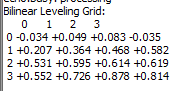
To be clear, my assertion isn't that the new PINDA probe is not accurate. I believe it to be very accurate. My assertion is that the firmware isn't doing anything with that data. Or that if it is, it's not doing anything very useful. I didn't have hyper accurate measurements, but I did use digital calipers with support and the pinda probe readouts seemed to be right on what I was measuring. Having said that, it would be very hard for me to know within .1 mm if the pinda was accurate or not, and that would result in some of the issues I'm seeing if it wasn't. Basically if the inaccuracy was on a very small scale, as opposed to the nearly full millimeter I started at.
I plan on redoing my bed leveling system now that I know it works, so I could do this if you can tell me of a tool that can do this to the degree you desire.
Gaugeforever
on 14 Jul 2021
Sure - I'm not saying it is variability in the measurements either - but I'd just like to eliminate it as a variable in the early stages of investigating - at least, without confirmation they agree like what you've already done. If you've observed the measurements as reported by the mini FW over serial agree with your manual measurements then those values will be just as useful to start.
vintagepc
on 14 Jul 2021
Sure, here you go :)
Gaugeforever
on 14 Jul 2021
Related issues
 fuelflo
·
3Comments
fuelflo
·
3Comments
 OndraCerv
·
5Comments
OndraCerv
·
5Comments
 Chips83
·
3Comments
Chips83
·
3Comments
 kdpainter
·
8Comments
kdpainter
·
8Comments
 kgolger
·
6Comments
kgolger
·
6Comments
Most helpful comment
Can confirm the same issue in 4.3.0-RC1 on 2 MINI+ printers. For the record, I have not touched print sheet profiles yet, assuming that matters.
CORRECTION 2020-12-18: After printing the same kind of calibration gcode (though with PETG), layer thickness is consistent, though I'm having some other unrelated issue. I have used the first layer calibration for Rough Sheet 1 and selected it though, if that changes anything.