Prusa-firmware-buddy: [BUG]continuing issue with Watchdog error on Prusa mini
With the latest firmware (4.2.1.final) I still get intermittent print failures, with no rhyme nor reason.
Prusa help sent me a new hot end thermistor but it hasn't changed anything, I still get the Watchdog errors.
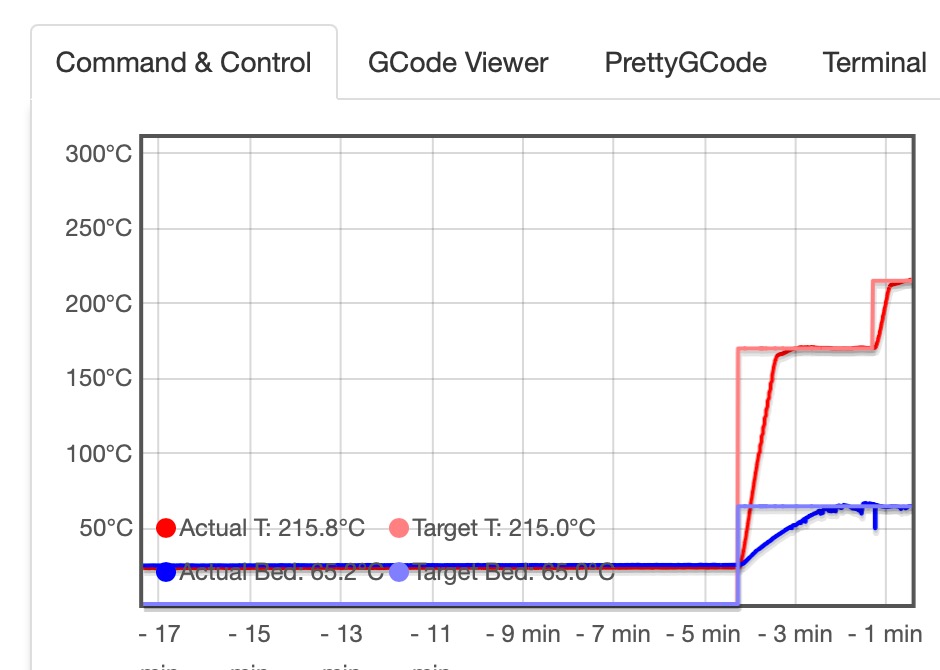
I've attached the temp graph from Octoprint as well as the last part of the most recent log. Sure am getting/staying frustrated.
2020-11-15 14:18:11,748 - octoprint.plugins.announcements - INFO - Loaded channel _octopi from https://octoprint.org/feeds/octopi.xml in 0.57s
2020-11-15 14:18:13,082 - octoprint.plugins.pluginmanager - INFO - Loaded plugin repository data from https://plugins.octoprint.org/plugins.json
2020-11-15 14:18:14,577 - octoprint.plugins.pluginmanager - INFO - Loaded plugin notices data from https://plugins.octoprint.org/notices.json
2020-11-15 14:18:15,044 - octoprint.server.util.sockjs - INFO - User mini logged in on the socket from client ::ffff:192.168.50.222
2020-11-15 14:19:37,327 - octoprint.util.comm - INFO - Changing monitoring state from "Offline" to "Detecting serial connection"
2020-11-15 14:19:37,379 - octoprint.util.comm - INFO - Serial detection: Performing autodetection with 7 port/baudrate candidates: /dev/ttyACM0@115200, /dev/ttyACM0@250000, /dev/ttyACM0@230400, /dev/ttyACM0@57600, /dev/ttyACM0@38400, /dev/ttyACM0@19200, /dev/ttyACM0@9600
2020-11-15 14:19:37,380 - octoprint.util.comm - INFO - Serial detection: Trying port /dev/ttyACM0, baudrate 115200
2020-11-15 14:19:37,382 - octoprint.util.comm - INFO - Connecting to port /dev/ttyACM0, baudrate 115200
2020-11-15 14:19:37,441 - octoprint.util.comm - INFO - Serial detection: Handshake attempt #1 with timeout 2.0s
2020-11-15 14:19:37,444 - octoprint.util.comm - INFO - M110 detected, setting current line number to 0
2020-11-15 14:19:37,469 - octoprint.util.comm - INFO - Changing monitoring state from "Detecting serial connection" to "Operational"
2020-11-15 14:19:37,504 - octoprint.util.comm - INFO - M110 detected, setting current line number to 0
2020-11-15 14:19:37,515 - octoprint.util.comm - INFO - Printer reports firmware name "Prusa-Firmware-Buddy 4.2.1-final+2072 (Github)"
2020-11-15 14:19:37,540 - octoprint.util.comm - INFO - Firmware states that it supports temperature autoreporting
2020-11-15 14:19:38,296 - octoprint.plugins.tracking - INFO - Sent tracking event printer_connected, payload: {u'printer_baudrate': 0, u'printer_port': u'AUTO', 'firmware_name': u'Prusa-Firmware-Buddy 4.2.1-final+2072 (Github)'}
2020-11-15 14:32:16,280 - octoprint.server.util.flask - INFO - Passively logging in user mini from ::ffff:192.168.50.222
2020-11-15 14:32:16,281 - octoprint.access.users - INFO - Logged in user: mini
2020-11-15 14:32:16,377 - octoprint.server.util.sockjs - INFO - Client connection closed: ::ffff:192.168.50.222
2020-11-15 14:32:16,572 - octoprint.server.util.sockjs - INFO - New connection from client: ::ffff:192.168.50.222
2020-11-15 14:32:16,587 - octoprint.server.util.flask - INFO - Passively logging in user mini from ::ffff:192.168.50.222
2020-11-15 14:32:16,588 - octoprint.access.users - INFO - Logged in user: mini
2020-11-15 14:32:17,840 - octoprint.server.util.sockjs - INFO - User mini logged in on the socket from client ::ffff:192.168.50.222
2020-11-15 14:32:28,436 - octoprint.filemanager.analysis - INFO - Starting analysis of local:collector_v6_0.15mm_PLA_MINI_4h8m.gcode
2020-11-15 14:32:28,439 - octoprint.filemanager.analysis - INFO - Invoking analysis command: /home/pi/oprint/bin/python2 -m octoprint analysis gcode --speed-x=6000 --speed-y=6000 --max-t=10 --throttle=0.0 --throttle-lines=100 /home/pi/.octoprint/uploads/collector_v6_0.15mm_PLA_MINI_4h8m.gcode
2020-11-15 14:32:31,231 - octoprint.printer.standard.job - INFO - Print job selected - origin: local, path: collector_v6_0.15mm_PLA_MINI_4h8m.gcode, owner: mini, user: mini
2020-11-15 14:32:36,306 - octoprint.server.heartbeat - INFO - Server heartbeat <3
2020-11-15 14:32:44,249 - octoprint.util.comm - INFO - Changing monitoring state from "Operational" to "Starting"
2020-11-15 14:32:44,255 - octoprint.printer.standard.job - INFO - Print job started - origin: local, path: collector_v6_0.15mm_PLA_MINI_4h8m.gcode, owner: mini, user: mini
2020-11-15 14:32:44,283 - octoprint.util.comm - INFO - M110 detected, setting current line number to 0
2020-11-15 14:32:44,298 - octoprint.util.comm - INFO - Changing monitoring state from "Starting" to "Printing"
2020-11-15 14:32:44,587 - octoprint.plugins.tracking - INFO - Sent tracking event ping, payload: {'octoprint_uptime': 53955}
2020-11-15 14:32:45,176 - octoprint.plugins.tracking - INFO - Sent tracking event print_started, payload: {'origin': u'local', 'file': 'e0f8b45cab1b240f29f5d94d93a9b8d2c382c68e'}
2020-11-15 14:32:46,333 - octoprint.util.comm - INFO - Printer seems to support the busy protocol, will adjust timeouts and set busy interval accordingly
2020-11-15 14:33:48,401 - octoprint.util.comm - INFO - Telling the printer to set the busy interval to our "communicationBusy" timeout - 1s = 2s
2020-11-15 14:36:37,352 - octoprint.util.comm - INFO - Communication timeout while printing, trying to trigger response from printer.
2020-11-15 14:36:40,364 - octoprint.util.comm - INFO - Communication timeout while printing, trying to trigger response from printer.
2020-11-15 14:36:41,308 - octoprint.util.comm - ERROR - Unexpected error while reading from serial port
Traceback (most recent call last):
File "/home/pi/oprint/local/lib/python2.7/site-packages/octoprint/util/comm.py", line 2916, in _readline
ret = self._serial.readline()
File "/home/pi/oprint/local/lib/python2.7/site-packages/octoprint/util/comm.py", line 5069, in readline
c = self.read(1)
File "/home/pi/oprint/local/lib/python2.7/site-packages/serial/serialposix.py", line 501, in read
'device reports readiness to read but returned no data '
SerialException: device reports readiness to read but returned no data (device disconnected or multiple access on port?)
2020-11-15 14:36:41,323 - octoprint.util.comm - ERROR - Please see https://faq.octoprint.org/serialerror for possible reasons of this.
2020-11-15 14:36:41,364 - octoprint.util.comm - INFO - Changing monitoring state from "Printing" to "Offline (Error: SerialException: 'device reports readiness to read but returned no data (device disconnected or multiple access on port?)' @ comm.py:_readline:2916)"
2020-11-15 14:36:41,385 - octoprint.filemanager.analysis - INFO - Starting analysis of local:collector_v6_0.15mm_PLA_MINI_4h8m.gcode
2020-11-15 14:36:41,393 - octoprint.filemanager.analysis - INFO - Invoking analysis command: /home/pi/oprint/bin/python2 -m octoprint analysis gcode --speed-x=6000 --speed-y=6000 --max-t=10 --throttle=0.0 --throttle-lines=100 /home/pi/.octoprint/uploads/collector_v6_0.15mm_PLA_MINI_4h8m.gcode
2020-11-15 14:36:41,421 - octoprint.plugins.action_command_notification - INFO - Notifications cleared
2020-11-15 14:36:42,166 - octoprint.plugins.tracking - INFO - Sent tracking event print_failed, payload: {'origin': u'local', u'reason': u'error', u'commerror_text': u"SerialException: 'device reports readiness to read but returned no data (device disconnected or multiple access on port?)' @ comm.py:_readline:2916", 'file': 'e0f8b45cab1b240f29f5d94d93a9b8d2c382c68e', u'elapsed': 237}
2020-11-15 14:37:08,034 - octoprint.filemanager.analysis - INFO - Analysis of entry local:collector_v6_0.15mm_PLA_MINI_4h8m.gcode finished, needed 26.65s
Thanks in advance for any help ...
 cdsayles
All 10 comments
Hi @cdsayles thank you for reporting. Do you have this issue only via OctoPrint or in all print cases?
 JohnnyDeer
on 18 Nov 2020
JohnnyDeer
on 18 Nov 2020
Do you recognize the watchdog error when printing the same print from USB flashdisk?
Can you please attach the watchdog error screen photo ?
If it is not a secret attached .stl or G-code file whould be great.
The pre 4.2.1 FW worked fine with octoprint?
 zoltan-l
on 18 Nov 2020
zoltan-l
on 18 Nov 2020
Follow UP
When I first had the watchdog error I tried the same print via USB flashdisk but the printer wouldn't recognize the USB. Prusa sent me a new Buddy board and then I was able to retest but the error still occurred both using octoprint and using the flash drive. When the error occurred the temp graph on octoprint showed an anomaly so I replaced both the hotend and the heatbed thermistors and since then ( and hours of successful prints) I have not seen the watchdog error
cdsayles
on 18 Nov 2020
@cdsayles thanks for fast reply. So at this moment after changing Buddy board and both thermistors problem disapired? Did you sended bad Buddy board back to our Support or they did not want it?
JohnnyDeer
on 18 Nov 2020
@cdsayles what is your voltage in the wall socket? Is it European 230V or 110V or 85V?
Looking at the graph again, the drop in temperature on the bed occured at similar time like the hotend started heating at full power.
Was your power supply fully plugged into the Buddy board (it must click)?
 DRracer
on 18 Nov 2020
DRracer
on 18 Nov 2020
No one asked for it, I assumed it was faulty and unusable so I subsequently threw it away.
On Nov 18, 2020, 6:47 AM -0700, JohnnyDeer notifications@github.com, wrote:
@cdsayles thanks for fast reply. So at this moment after changing Buddy board and both thermistors problem disapired? Did you sended bad Buddy board back to our Support or they did not want it?
—
You are receiving this because you were mentioned.
Reply to this email directly, view it on GitHub, or unsubscribe.
cdsayles
on 18 Nov 2020
110V here in Canada, and I believe the plug was fully seated.
On Nov 18, 2020, 6:49 AM -0700, DRracer notifications@github.com, wrote:
@cdsayles what is your voltage in the wall socket? Is it European 230V or 110V or 85V?
Looking at the graph again, the drop in temperature on the bed occured at similar time like the hotend started heating at full power.
Was your power supply fully plugged into the Buddy board (it must click)?
—
You are receiving this because you were mentioned.
Reply to this email directly, view it on GitHub, or unsubscribe.
cdsayles
on 18 Nov 2020
@cdsayles no problem :) , we are just trying to gather more technical information, because your report is quite unusual. We have got other watchdog reports only from a few more people. It could be the HW itself. Thanks
DRracer
on 18 Nov 2020
It’s a great little printer and I’m very happy that it’s working as it should. The watchdog error was frustrating as the printer was essential unusable during the issue. One benefit is that I learned a lot about troubleshooting and repairing (the hardware).
Thanks for the follow up. Stay Safe.
On Nov 18, 2020, 6:59 AM -0700, DRracer notifications@github.com, wrote:
@cdsayles no problem :) , we are just trying to gather more technical information, because your report is quite unusual. We have got other watchdog reports only from a few more people. It could be the HW itself. Thanks
—
You are receiving this because you were mentioned.
Reply to this email directly, view it on GitHub, or unsubscribe.
cdsayles
on 18 Nov 2020
@cdsayles Happy to hear that your MINI is alright now. Hopefully there will be no more issues with it.
Would you mind closing this issue?
DRracer
on 18 Nov 2020
Related issues
 Gromit21
·
6Comments
Gromit21
·
6Comments
 hawwwran
·
4Comments
hawwwran
·
4Comments
 AlexW-578
·
4Comments
AlexW-578
·
4Comments
 Chips83
·
3Comments
Chips83
·
3Comments
 kdpainter
·
8Comments
kdpainter
·
8Comments
Most helpful comment
It’s a great little printer and I’m very happy that it’s working as it should. The watchdog error was frustrating as the printer was essential unusable during the issue. One benefit is that I learned a lot about troubleshooting and repairing (the hardware).
Thanks for the follow up. Stay Safe.
On Nov 18, 2020, 6:59 AM -0700, DRracer notifications@github.com, wrote: