Prusa-firmware-buddy: [FEATURE REQUEST]Hotend fan PWM setpoint modification
I would like to run the hotend fan at higher speed. I installed Bondtech heatbreak and a copper heat block for better high temperature printing performance, now I would like to raise the hotend fan speed.
Building my own firmware would be an option, I'm willing to break the appendix, but where to change the firmware to run the fan at 75% or 100%?
Any hint would be highly appreciated, even if it's like "edit line xxx in file yyy from 128 to 255, then run the fw build."
 PeterDHabermehl
All 16 comments
This is a function of the slicer not just the firmware. In PrusaSlicer, you have to disable auto fan speed and lock it in at 100%. In Simplify3D you can simply adjust your printer profile.
If you like to edit gcode, just find and replace all the M106 commands with M106 S255. I personally wouldn't do this as you would be shortening the lifespan of the stock fan. Granted, that is just splitting hairs but still something to consider.
On that note, I would speculate that the default value for fan speed is actually stored in the EEPROM with the rest of the factory settings and not hard-coded into the image itself.
 mattderen
on 25 Oct 2020
mattderen
on 25 Oct 2020
Thanks for the answer but I'm talking about the hotend fan. NOT the print/part cooling. I'm well aware of M106 and how the part cooling settings work.
The control of the hotend fan is hardcoded in the firmware and actually somewhat different from normal Marlin code.
PeterDHabermehl
on 25 Oct 2020
That should be easy to find, actually. Give me a sec.
mattderen
on 25 Oct 2020
As a second note, the hotend fan is usually wired directly to the 12/24V rail with just a basic relay or other kind of switch to control it, but it wouldn't surprise me if Prusa leverages PWM for it as well. I personally wire my hotend fans directly to the PSU, btw.
mattderen
on 25 Oct 2020
The Mini hotend fan is PWM controlled. And I know that a fw hack is used to enable HW PWM control instead of the usual Marlin sw PWM.
The Delta fan used is a high peformance device and operated at (probably) 50% PWM only for noise reduction. Since I want to upgrade an existing Mini I would like to plug the replacement fan directly into the HE fan connector of the Buddy Board. There's no simple way of connecting directly to the PSU.
PeterDHabermehl
on 25 Oct 2020
Yup on the controlled fan: https://github.com/prusa3d/Buddy-board-MINI-PCB/blob/master/rev.1.0.0/BUDDY_v1.0.0.pdf (page 2)
There is a value here that is of interest. (MARLIN_VAR_FAN1_RPM) *Just fixed that link, btw. Nope. Unrelated.
There are also Min/Max PWM pulse settings that I just found, and lost. Give me another 5.
mattderen
on 25 Oct 2020
@PeterDHabermehl https://github.com/prusa3d/Prusa-Firmware-Buddy/blob/089b442e16389becfe7d3583788e17ae7eb15e6f/src/common/config_a3ides2209_02.h maybe?
Specifically:
//FANCTL1 - heatbreak fan
//static const uint8_t FANCTL1_PWM_MIN = 12;
static const uint8_t FANCTL1_PWM_MIN = 0;
static const uint8_t FANCTL1_PWM_MAX = 50;
static const uint16_t FANCTL1_RPM_MIN = 1000;
static const uint16_t FANCTL1_RPM_MAX = 8000;
static const uint8_t FANCTL1_PWM_THR = 20;
Also, you may need to look into if watchdog has anything regarding hotend temperature timing checks, btw. That is some serious speculation on my end, however. Still, it's just a thought as I have never dabbled with it, personally. Still, anything like that is mitigated with proper PID tuning.
I did see a couple of statements in my searching regarding HOTEND_TOO_COLD, or something like that. It's probably related to a thermistor check, so it would have to be an extreme condition to trigger that.
mattderen
on 25 Oct 2020
Cool. Thanks for taking me down this little path of source code spelunking and hope I was able to help. Cheers!
mattderen
on 25 Oct 2020
Thanks for taking the dive into the source code.I appreciate that!
I'll see what I can figure out.
PeterDHabermehl
on 25 Oct 2020
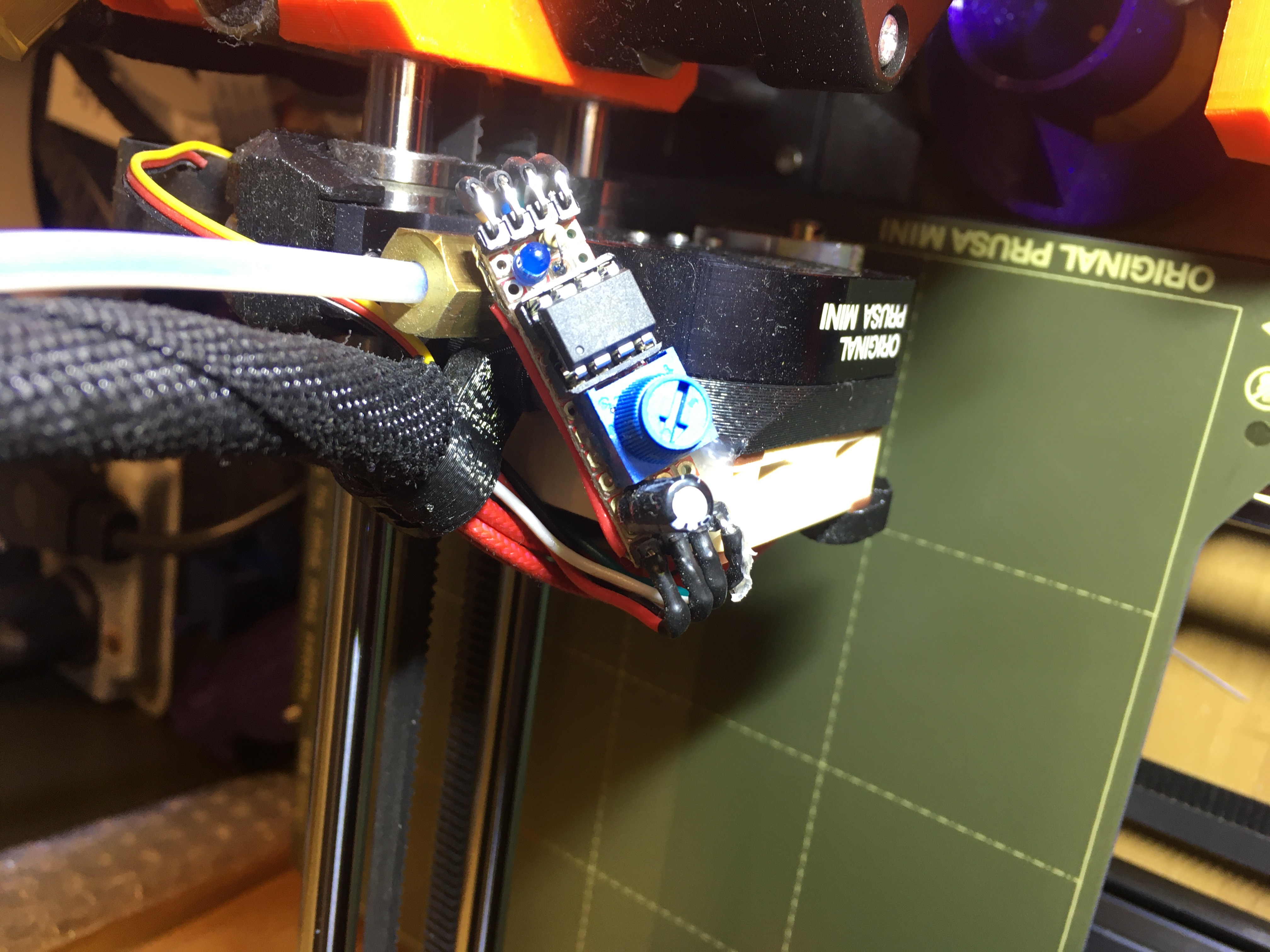
@PeterDHabermehl I ended up building a custom hotend fan controller using an ATTiny microcontroller to control the speed of the Noctua fan I installed. It's a lot quieter than the stock Delta fan and I have a little knob to adjust the speed. The airflow isn't as good as the Delta fan but it sure is a lot quieter and I haven't run into any issues just printing PLA. I might have to turn it up to prevent clogs when printing PETG or PC filaments though.
I don't know why they didn't implement temperature based speed control for the hotend fan, but it would be a nice feature to be able to easily modify. I was too lazy to dig into the source code and compile my own version so I went the hardware way. Good luck with your modification!
 BerenV
on 4 Nov 2020
BerenV
on 4 Nov 2020
@PeterDHabermehl https://github.com/prusa3d/Prusa-Firmware-Buddy/issues/304
 Lino77
on 7 Nov 2020
Lino77
on 7 Nov 2020
I think a lot of people (myself included) would like to change the hotend to a silent noctua with a slower rpm that needs the full 5Vdc. At the very least exposing the PWM constant as an advanced setting would help in those scenarios.
 blerrgh
on 15 Nov 2020
blerrgh
on 15 Nov 2020
@BerenV
Thanks for that one - where did you connect to the +5V to supply your controller?
@JohnnyDeer I would second @blerrgh 's request. But for the moment It would really great to know where to modify the fw to get 5v to the fan.
PeterDHabermehl
on 16 Nov 2020
@PeterDHabermehl actually the fan is supplied with +5v all the time and the fan's ground is PWM'd to get a certain speed (left floating or pulled high when the fan is off at below 50°C). I had to run a real solid ground from the Buddy board to my ATtiny setup to power it. Then the old ground from the Delta fan was used by the microcontroller to determine whether or not to run the fan (using input pull-ups on the ATtiny). Here's a schematic of the way I did it, and if anyone wants the code just let me know (it's pretty simple)
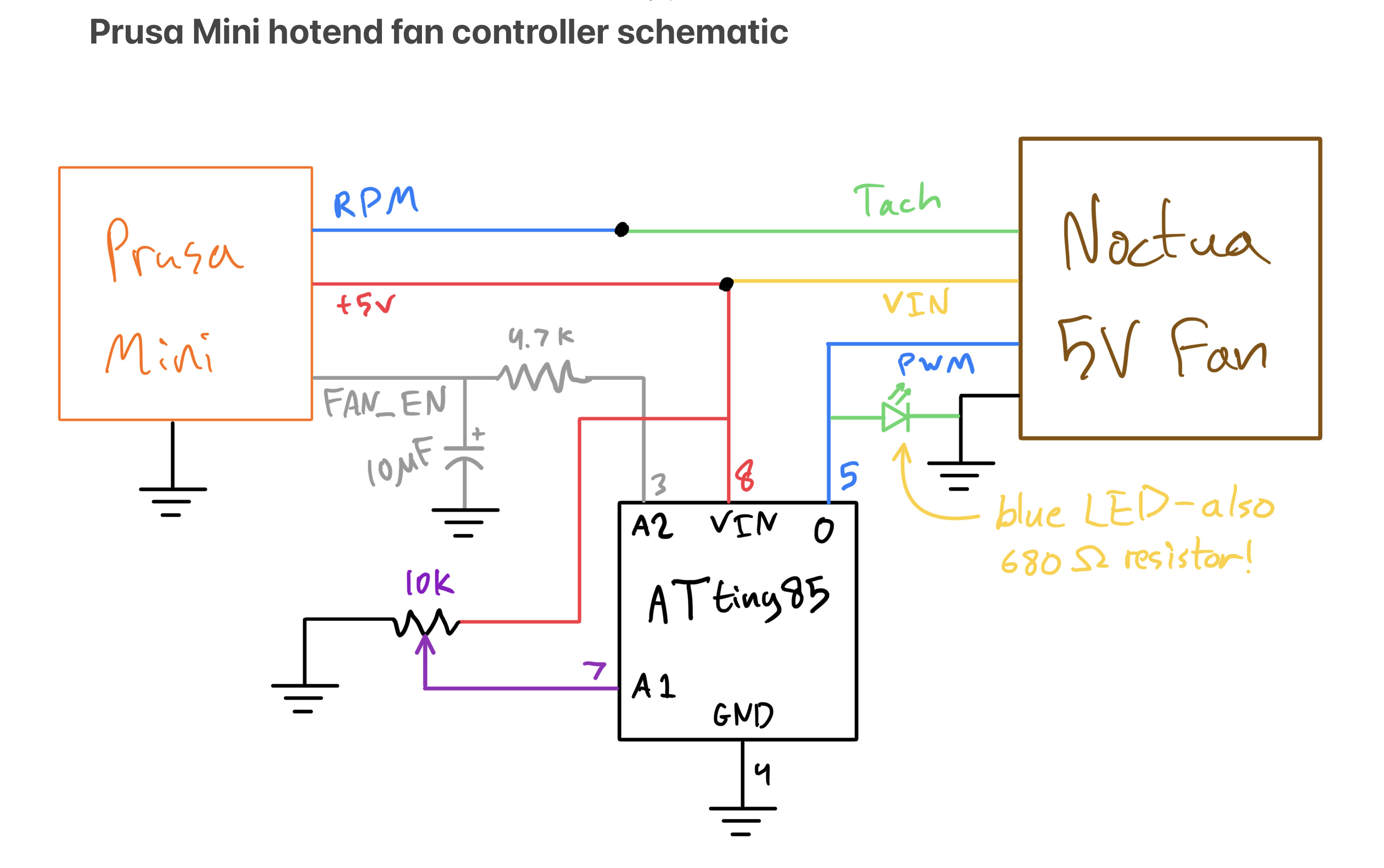
EDIT: here is the Arduino sketch I wrote for the ATtiny. It has a 10 second hysteresis because with the latest firmware, the Buddy board kept turning the FAN_EN off and on to my setup randomly because it didn't like the rpm signal it was getting. I should have implemented some signal finagling with the ATtiny so it gives the printer a doctored rpm signal that looks like the speed it wants, but I just needed to be able to get back to printing and didn't have a lot of time to scope the signals and figure out what the Buddy board expected.
const int fanPin = 0;  // pin 5
const int potPin = A1; // pin 7
const int inPin = A2;  // pin 4

int potVal = 0;
int fanSpeed = 0;
int inThresh = 480; // less than 2.25v = fan on
int count = 0;

void setup() {
  pinMode(fanPin, OUTPUT);
  pinMode(potPin, INPUT);
  pinMode(inPin, INPUT_PULLUP); // Buddy board pulls this low when it wants the fan on
  digitalWrite(fanPin, HIGH);
  while(analogRead(inPin) < inThresh) { // wait for printer to boot
    delay(10);
  }
  digitalWrite(fanPin, LOW);

}

void loop() {
  potVal = analogRead(potPin);
  if (analogRead(inPin) < inThresh) {
    count = 0;
    fanSpeed = map(potVal, 0, 1023, 0, 255); // turn fan on to the speed set by the pot
  }
  else {
    count ++;
    if (count > 255) {count = 201;} // clumsy way to deal with overflow i know
  };

  if (count > 200) { // gives like 10 sec
    fanSpeed = 0; // turn it off after a delay
  }

  analogWrite(fanPin, fanSpeed);
  delay(50);

}
I second what's been said before, I'm also switching to a Noctua fan, and it seems to be a popular upgrade since the original fan is so loud. I'd definitely like to see an option for controling the PWM in software, options, or GCode, there's no reason this feature should be missing.
 A-Bielefeld
on 15 Feb 2021
A-Bielefeld
on 15 Feb 2021
Related issues
 thinkyhead
·
3Comments
thinkyhead
·
3Comments
 Chips83
·
3Comments
Chips83
·
3Comments
 anthr76
·
4Comments
anthr76
·
4Comments
 fuelflo
·
3Comments
fuelflo
·
3Comments
 AlexW-578
·
4Comments
AlexW-578
·
4Comments
Most helpful comment
I second what's been said before, I'm also switching to a Noctua fan, and it seems to be a popular upgrade since the original fan is so loud. I'd definitely like to see an option for controling the PWM in software, options, or GCode, there's no reason this feature should be missing.