Projectreunion: Windows.Storage.ApplicationData is unreliable for packaged Win32 applications
Windows.Storage.ApplicationData is extremely trivial to break.
One can simply open the non-Store version of Inkscape or GIMP and then try to run a packaged app which makes use of Windows.Storage.ApplicationData.Current.RoamingFolder.Path (or one of the other folders). The app will fail to use this API, getting an invalid parameter HRESULT or the appropriate language exception (but what parameter? there's no parameter to give to this API!)
The IRestrictedErrorInfo is not useful either, it just says "Error trying to initialize application data storage folder" and a stack trace pointing to OS internals:

Two current apps on the Store which exhibit this behavior are Spotify (which crashes on startup) and my own TranslucentTB (which provides an error message and then calls RaiseFailFastException on startup)
I've received multiple bug reports both privately and publicly about this, including one issue on GitHub https://github.com/TranslucentTB/TranslucentTB/issues/268. I was never able to root cause the problem for that user (or any other user for that matter), but I've later encountered the same issue by trying to debug my app while I had Inkscape open to design SVG icons for the app.
I filled feedback on the Feedback Hub a while ago: https://aka.ms/AA8av7x
How are developers expected to make use of those APIs in packaged Win32 apps if they are easily broken by another running app on the system?
 sylveon
All 17 comments
for MS people this is this bug: https://microsoft.visualstudio.com/OS/_workitems/edit/26262772
 ChrisGuzak
on 8 Jul 2020
ChrisGuzak
on 8 Jul 2020
Not USB-related, I reproduced the issue with GIMP and Inkscape in a VM where there's obviously no USB drive. USB could have been the original user's problem, but the fact so many external factors influence the reliability of this API is worrying.
sylveon
on 8 Jul 2020
+1
We just accepted Windows.Storage.* as completely unreliable and just catch all the exceptions, then failover to a backup storage mechanism (i.e. registry). We were working offline with WinRT Storage API devs re: high crash rates w/ Windows.Storage.ApplicationData.Current but the thread died in 2017. Happy to forward thread to ftes.
 riverar
on 10 Jul 2020
riverar
on 10 Jul 2020
As @ChrisGuzak points out there is an internal bug for this, created based on the FedbackHub feedback (They really are read, and do get turned into bugs after investigations indicate a problem) This isn't a completely UWP related issue. The problem is that an underlying Win32 API can fail if a folder is opened with restrictions or exclusive access, which is what is happening here. (Basically any app running can open files or folders it is allowed to access in an exclusive mode [e.g. share mode = none ], this is sometimes a requirement for data files, but rarely ever required at the folder level for most apps.)
The engineering team is investigating options for how to avoid the error/continue functioning in this case.
@riverar please do forward me any email thread as my team should have been on such a conversation and I have no recollection of that.
 smaillet-ms
on 13 Jul 2020
smaillet-ms
on 13 Jul 2020
To add onto the pile of reliability issues: currently the #1 most impacting crash for my app on the store happens when I call a Windows.Storage.ApplicationData API.
It's caused by the system modification known as "old new explorer". For some reason it's loaded within my process, and when I call the ApplicationData APIs it manages to trigger an access violation, however COM catches it and handles it by brutally terminating my app with no chance for me to catch the SEH whatsoever.
Since retrieving the path where I store my config files is one of the first things done at startup, it leaves users with the impression that my app is buggy and doesn't even start, despite it being caused by a third party app.

At this point I am really considering just getting the local app data folder using SHGetKnownFolderPath and my package identity using the C API for it. Then concatenating those two into $APPDATA\Packages\$ID. I'm (rightfully) told I shouldn't do that but the alternative is not reliable. At all.
sylveon
on 6 Sep 2020
@riverar were you able to forward the thread(s) that @smaillet-ms was asking for?
 stevewri
on 21 Sep 2020
stevewri
on 21 Sep 2020
Hi @stevewri, I did. No response.
Rough timeline thus far:
- Email originally sent December 8, 2017 8:34:46 AM
- Last email response received December 15, 2017 12:57 AM
- Email forwarded July 13, 2020 10:30 AM
riverar
on 21 Sep 2020
Why has this been closed? The problem is not resolved.
sylveon
on 21 Sep 2020
Thanks @riverar (reactivating). @smaillet-ms, is there anything else you need from @riverar or @sylveon?
stevewri
on 21 Sep 2020
I've found a temporal bypass for this issue by using Environment.SpecialFolder.ApplicationData/LocalApplicationData to access local app data store since _"After conversion, AppData is redirected to the local app data store"_ (as stated here https://docs.microsoft.com/en-us/windows/msix/desktop/desktop-to-uwp-prepare) and by reading/writing using System.IO instead of Windows.Storage.
 WoKavo
on 9 Oct 2020
WoKavo
on 9 Oct 2020
To add onto the pile of reliability issues: currently the #1 most impacting crash for my app on the store happens when I call a Windows.Storage.ApplicationData API.
It's caused by the system modification known as "old new explorer". For some reason it's loaded within my process, and when I call the ApplicationData APIs it manages to trigger an access violation, however COM catches it and handles it by brutally terminating my app with no chance for me to catch the SEH whatsoever.
I'd never heard of that before but after a quick web search: https://www.file.net/process/oldnewexplorer32.dll.html
The process known as OldNewExplorer shell enhancements belongs to software OldNewExplorer or SkinPack Alienred or Windows (version 10 Transformation Pack) or SkinPack macOS Mojave or SkinPack El Capitan or SkinPack Crystal or SkinPack AndroidM or SkinPack macOS Glass by www.startisback.com.
There's more including potential malware. Unclear why it would it would be involved for Windows.Storage.ApplicationData if it's not malware. Have you filed feedback or have links to more data including dumps?
 DrusTheAxe
on 11 Oct 2020
DrusTheAxe
on 11 Oct 2020
I haven't personally managed to reproduce it by getting a legitimate version of the software. I haven't filled feedback (due to not being able to locally reproduce) and while I do have memory dumps from Store telemetry, I've committed in my privacy policy to not share those dumps (since they can contain PII).
I can share stacks however. The main thread is blocked on another thread:
0:000> k
 # ChildEBP RetAddr
00 006fd338 76756d23     ntdll!NtWaitForMultipleObjects+0xc
01 006fd4cc 7587eded     KERNELBASE!WaitForMultipleObjectsEx+0x133
02 006fd57c 7587f975     combase!MTAThreadWaitForCall+0x22d [onecore\com\combase\dcomrem\channelb.cxx @ 7249]
03 006fd604 75883af4     combase!MTAThreadDispatchCrossApartmentCall+0x295 [onecore\com\combase\dcomrem\chancont.cxx @ 232]
04 (Inline) --------     combase!CSyncClientCall::SwitchAptAndDispatchCall+0x1c1 [onecore\com\combase\dcomrem\channelb.cxx @ 5871]
05 006fd910 758b36c5     combase!CSyncClientCall::SendReceive2+0x444 [onecore\com\combase\dcomrem\channelb.cxx @ 5474]
06 (Inline) --------     combase!SyncClientCallRetryContext::SendReceiveWithRetry+0x25 [onecore\com\combase\dcomrem\callctrl.cxx @ 1542]
07 (Inline) --------     combase!CSyncClientCall::SendReceiveInRetryContext+0x25 [onecore\com\combase\dcomrem\callctrl.cxx @ 565]
08 (Inline) --------     combase!DefaultSendReceive+0x67 [onecore\com\combase\dcomrem\callctrl.cxx @ 523]
09 006fda80 75857068     combase!CSyncClientCall::SendReceive+0x5f5 [onecore\com\combase\dcomrem\ctxchnl.cxx @ 778]
0a (Inline) --------     combase!CClientChannel::SendReceive+0x79 [onecore\com\combase\dcomrem\ctxchnl.cxx @ 655]
0b 006fdaa8 7636643f     combase!NdrExtpProxySendReceive+0xc8 [onecore\com\combase\ndr\ndrole\proxy.cxx @ 1998]
0c 006fdf2c 75935dc0     rpcrt4!NdrClientCall2+0xbef
0d 006fdf4c 7592dd5f     combase!ObjectStublessClient+0x70 [onecore\com\combase\ndr\ndrole\i386\stblsclt.cxx @ 227]
0e 006fdf5c 758499e6     combase!ObjectStubless+0xf [onecore\com\combase\ndr\ndrole\i386\stubless.asm @ 171]
0f 006fdf88 758ed602     combase!CProcessActivator::CCICallback+0x86 [onecore\com\combase\objact\actvator.cxx @ 1617]
10 006fdfa8 758ed4bf     combase!CProcessActivator::AttemptActivation+0x32 [onecore\com\combase\objact\actvator.cxx @ 1504]
11 006fdfe8 758ed441     combase!CProcessActivator::ActivateByContext+0x6f [onecore\com\combase\objact\actvator.cxx @ 1351]
12 006fe018 7589f5d8     combase!CProcessActivator::CreateInstance+0x61 [onecore\com\combase\objact\actvator.cxx @ 1248]
13 006fe0ec 758c0d97     combase!ActivationPropertiesIn::DelegateCreateInstance+0xa8 [onecore\com\combase\actprops\actprops.cxx @ 1908]
14 006fea68 758c036b     combase!ICoCreateInstanceEx+0x8c7 [onecore\com\combase\objact\objact.cxx @ 1931]
15 006feb44 758c017e     combase!CComActivator::DoCreateInstance+0x18b [onecore\com\combase\objact\immact.hxx @ 395]
16 (Inline) --------     combase!CoCreateInstanceEx+0xa2 [onecore\com\combase\objact\actapi.cxx @ 320]
17 006feb84 73e36809     combase!CoCreateInstance+0xbe [onecore\com\combase\objact\actapi.cxx @ 264]
18 006ff4a4 741f51ea     windows_storage!_SHCoCreateInstance+0x749
19 006ff4e4 73fcebfc     windows_storage!SHExtCoCreateInstanceString+0x40
1a 006ff570 73e2f44b     windows_storage!CMountPoint::GetDriveJunctionCLSID+0x1a4eaf
1b 006ff5c0 73e2f107     windows_storage!CDrivesFolder::_FillDriveID+0x98
1c 006ff650 73e2d109     windows_storage!CDrivesFolder::ParseDisplayName+0x137
1d 006ff73c 73e2e72c     windows_storage!CRegFolder::ParseDisplayName+0x449
1e 006ff7c0 73e2d0fa     windows_storage!CDesktopFolder::ParseDisplayName+0xdc
1f 006ff8ac 73e2b59d     windows_storage!CRegFolder::ParseDisplayName+0x43a
20 006ff91c 73e05bf4     windows_storage!SHParseDisplayName+0x2ed
21 006ff958 5e840a9b     windows_storage!SHCreateItemFromParsingName+0x84
22 006ff980 5e8554bc     Windows_Storage_ApplicationData!<lambda_c2a2c00a01efbae1d5f481c8d32c6a6a>::operator()+0x14c [onecoreuap\base\appmodel\statemanager\winrt\lib\windows.storage.applicationdata.server.cpp @ 1005]
23 006ff9b0 5e840c2a     Windows_Storage_ApplicationData!Windows::Storage::ApplicationDataServer::InternalGetRootStorageFolderFullTrustCaller+0x49 [onecoreuap\base\appmodel\statemanager\winrt\lib\windows.storage.applicationdata.server.cpp @ 1018]
24 006ff9d0 5e8393f5     Windows_Storage_ApplicationData!<lambda_c7834221ea812d0dac426f2e503fc798>::operator()+0xee [onecoreuap\base\appmodel\statemanager\winrt\lib\windows.storage.applicationdata.server.cpp @ 938]
25 006ff9fc 5e856105     Windows_Storage_ApplicationData!Windows::Storage::ApplicationDataServer::InternalGetRootStorageFolder+0xd5 [onecoreuap\base\appmodel\statemanager\winrt\lib\windows.storage.applicationdata.server.cpp @ 954]
26 006ffa10 0015a9a4     Windows_Storage_ApplicationData!Windows::Storage::ApplicationDataServer::get_RoamingFolder+0x35 [onecoreuap\base\appmodel\statemanager\winrt\lib\windows.storage.applicationdata.server.cpp @ 672]
27 (Inline) --------     TranslucentTB!winrt::impl::consume_Windows_Storage_IApplicationData<winrt::Windows::Storage::IApplicationData>::RoamingFolder+0x1f [C:\Program Files (x86)\Windows Kits\10\Include\10.0.18362.0\cppwinrt\winrt\Windows.Storage.h @ 153]
28 006ffa50 00152719     TranslucentTB!UWP::GetApplicationFolderPath+0x84 [T:\Projects\temp\TranslucentTB\TranslucentTB\uwp.cpp @ 20]
29 006ffaa8 00156679     TranslucentTB!GetPaths+0x49 [T:\Projects\temp\TranslucentTB\TranslucentTB\main.cpp @ 163]
2a 006ffb84 0016072d     TranslucentTB!wWinMain+0x2c9 [T:\Projects\temp\TranslucentTB\TranslucentTB\main.cpp @ 693]
2b (Inline) --------     TranslucentTB!invoke_main+0x1a [d:\agent\_work\3\s\src\vctools\crt\vcstartup\src\startup\exe_common.inl @ 118]
2c 006ffbd0 76086719     TranslucentTB!__scrt_common_main_seh+0xf8 [d:\agent\_work\3\s\src\vctools\crt\vcstartup\src\startup\exe_common.inl @ 288]
2d 006ffbe0 775c8bfd     kernel32!BaseThreadInitThunk+0x19
2e 006ffc38 775c8bcb     ntdll!__RtlUserThreadStart+0x2b
2f 006ffc48 00000000     ntdll!_RtlUserThreadStart+0x1b
That thread somehow ends up calling into OldNewExplorer32.dll, and then crashes in there:
0:007> k
  *** Stack trace for last set context - .thread/.cxr resets it
 # ChildEBP RetAddr
WARNING: Stack unwind information not available. Following frames may be wrong.
00 0309e930 71f42237     OldNewExplorer32+0x11e5
01 0309ea30 75918cce     OldNewExplorer32+0x2237
02 (Inline) --------     combase!DoImmediateCallback+0x27 [onecore\com\combase\inc\ImmediateCallback.hpp @ 55]
03 0309ea70 7591819b     combase!CClassCache::CDllPathEntry::GetClassObject+0x7d [onecore\com\combase\objact\dllcache.cxx @ 2303]
04 0309eb48 75918bc5     combase!CClassCache::CDllPathEntry::DllGetClassObject+0x120 [onecore\com\combase\objact\dllcache.cxx @ 2725]
05 0309eb70 758f9617     combase!CClassCache::CDllClassEntry::GetClassObject+0x35 [onecore\com\combase\objact\dllcache.hxx @ 2124]
06 0309eb84 75918ab0     combase!CClassCache::CDllFnPtrMoniker::BindToObjectNoSwitch+0x17 [onecore\com\combase\objact\dllcache.cxx @ 3099]
07 0309ebc0 75917859     combase!CClassCache::GetClassObject+0x62 [onecore\com\combase\objact\dllcache.cxx @ 4324]
08 0309ebe8 75854682     combase!CCGetClassObject+0x34 [onecore\com\combase\objact\dllcache.cxx @ 7138]
09 0309ecf0 7589f610     combase!CServerContextActivator::CreateInstance+0x182 [onecore\com\combase\objact\actvator.cxx @ 848]
0a 0309ed34 7584a2d0     combase!ActivationPropertiesIn::DelegateCreateInstance+0xe0 [onecore\com\combase\actprops\actprops.cxx @ 1908]
0b 0309ed90 7639fe24     combase!CApartmentActivator::CreateInstance+0x1c0 [onecore\com\combase\objact\actvator.cxx @ 2157]
0c 0309edb4 76364d3b     rpcrt4!Invoke+0x34
0d 0309f1f4 758583b2     rpcrt4!NdrStubCall2+0x38b
0e 0309f23c 7585818a     combase!CStdStubBuffer_Invoke+0x92 [onecore\com\combase\ndr\ndrole\stub.cxx @ 1531]
0f (Inline) --------     combase!InvokeStubWithExceptionPolicyAndTracing::__l6::<lambda_ee1df801181086a03fa4f8f75bd5617f>::operator()+0x4a [onecore\com\combase\dcomrem\channelb.cxx @ 1279]
10 0309f290 75857c36     combase!ObjectMethodExceptionHandlingAction<<lambda_ee1df801181086a03fa4f8f75bd5617f> >+0x6f [onecore\com\combase\dcomrem\excepn.hxx @ 94]
11 (Inline) --------     combase!InvokeStubWithExceptionPolicyAndTracing+0x13b [onecore\com\combase\dcomrem\channelb.cxx @ 1277]
12 0309f374 7588c5e2     combase!DefaultStubInvoke+0x2b6 [onecore\com\combase\dcomrem\channelb.cxx @ 1346]
13 (Inline) --------     combase!SyncStubCall::Invoke+0xa [onecore\com\combase\dcomrem\channelb.cxx @ 1403]
14 (Inline) --------     combase!SyncServerCall::StubInvoke+0xa [onecore\com\combase\dcomrem\ServerCall.hpp @ 780]
15 (Inline) --------     combase!StubInvoke+0x47a [onecore\com\combase\dcomrem\channelb.cxx @ 1628]
16 0309f560 7587e3fa     combase!ServerCall::ContextInvoke+0x662 [onecore\com\combase\dcomrem\ctxchnl.cxx @ 1423]
17 (Inline) --------     combase!CServerChannel::ContextInvoke+0x126 [onecore\com\combase\dcomrem\ctxchnl.cxx @ 1332]
18 (Inline) --------     combase!DefaultInvokeInApartment+0x126 [onecore\com\combase\dcomrem\callctrl.cxx @ 3297]
19 0309f59c 758868c8     combase!ReentrantSTAInvokeInApartment+0x16a [onecore\com\combase\dcomrem\reentrantsta.cpp @ 113]
1a (Inline) --------     combase!AppInvoke+0x28c [onecore\com\combase\dcomrem\channelb.cxx @ 1122]
1b 0309f8bc 758b27fa     combase!ComInvokeWithLockAndIPID+0x1458 [onecore\com\combase\dcomrem\channelb.cxx @ 2225]
1c (Inline) --------     combase!ComInvoke+0x35d [onecore\com\combase\dcomrem\channelb.cxx @ 1697]
1d (Inline) --------     combase!ThreadDispatch+0x42e [onecore\com\combase\dcomrem\chancont.cxx @ 417]
1e 0309f958 75617da3     combase!ThreadWndProc+0x76a [onecore\com\combase\dcomrem\chancont.cxx @ 743]
1f 0309f984 755f84ba     user32!_InternalCallWinProc+0x2b
20 0309fa74 755f6fc5     user32!UserCallWinProcCheckWow+0x4aa
21 0309faf0 755f6af0     user32!DispatchMessageWorker+0x4c5
22 0309fafc 75866a8c     user32!DispatchMessageW+0x10
23 0309fb38 758669bd     combase!CDllHost::STAWorkerLoop+0x86 [onecore\com\combase\objact\dllhost.cxx @ 1273]
24 0309fb58 758668fe     combase!CDllHost::WorkerThread+0xb4 [onecore\com\combase\objact\dllhost.cxx @ 1179]
25 0309fb64 7587c828     combase!DLLHostThreadEntry+0xe [onecore\com\combase\objact\dllhost.cxx @ 1081]
26 0309fb90 758fa55f     combase!CRpcThread::WorkerLoop+0x198 [onecore\com\combase\dcomrem\threads.cxx @ 279]
27 0309fba0 76086719     combase!CRpcThreadCache::RpcWorkerThreadEntry+0x1f [onecore\com\combase\dcomrem\threads.cxx @ 77]
28 0309fbb0 775c8bfd     kernel32!BaseThreadInitThunk+0x19
29 0309fc08 775c8bcb     ntdll!__RtlUserThreadStart+0x2b
2a 0309fc18 00000000     ntdll!_RtlUserThreadStart+0x1b
Some of those crashes happen in the same thread instead of a different thread, but the story is the same. I call ApplicationData.Current.RoamingFolder, and after some class cache stuff it crashes in OldNewExplorer.
The generated exception is
EXCEPTION_RECORD:  (.exr -1)
ExceptionAddress: 71f411e5 (OldNewExplorer32+0x000011e5)
   ExceptionCode: c0000005 (Access violation)
  ExceptionFlags: 00000000
NumberParameters: 2
   Parameter[0]: 00000001
   Parameter[1]: 76ecb8c0
Attempt to write to address 76ecb8c0
The specific dump I am sharing traces from was from a user on Insider build 20190 with OldNewExplorer version 1.1.8.2, but telemetry reports and inspecting other dumps tells me this happens on stable Windows releases with the latest version of OldNewExplorer as well.
Since getting the folder path happens at startup, my app silently crashes, leading to extremely poor UX (not to mention I'm getting blamed for that crash).
sylveon
on 11 Oct 2020
Can you repro without the buggy shell extension?
riverar
on 11 Oct 2020
Nope
sylveon
on 11 Oct 2020
For MS people see http://task.ms/29914496
ChrisGuzak
on 21 Oct 2020
I've worked around the initial issue with Windows.Storage.ApplicationData returning invalid parameter when GIMP is opened by:
- Getting the path of LocalAppData with
SHGetKnownFolderPath(FOLDERID_LocalAppData, KF_FLAG_NO_PACKAGE_REDIRECTION, ...) - Getting the app package family name with
GetCurrentPackageFamilyName - Assembling them in the following fashion:
<local app data>\Packages\<family name>\<desired storage folder>
But now it only gets weirder:
Using ShellExecuteEx on one of those paths gives the following dialog
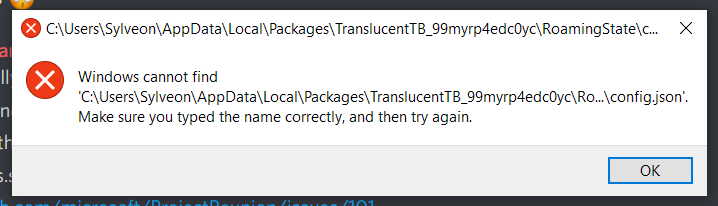
But only while GIMP is running. The file does exist and calling ShellExecuteEx once GIMP is closed will open it successfully.
If I put the following code (which is directly extracted from my program, minus error handling) in a new console project in VS, running unpackaged
#include <filesystem>
#include <Windows.h>

void EditFile(const std::filesystem::path& file)
{
    SHELLEXECUTEINFO info = {
        .cbSize = sizeof(info),
        .fMask = SEE_MASK_CLASSNAME,
        .lpVerb = L"open",
        .lpFile = file.c_str(),
        .nShow = SW_SHOW,
        .lpClass = L".txt"
    };

    ShellExecuteEx(&info);
}


int main()
{
    EditFile(LR"(C:\Users\Sylveon\AppData\Local\Packages\TranslucentTB_99myrp4edc0yc\RoamingState\config.json)");
}
It works even while GIMP is running. So there is something else in GIMP also preventing ShellExecuteEx from working in packaged scenarios...
sylveon
on 6 Jan 2021
Looks like both the first bug and the second bug were fixed in the Windows source code on October 2020 and January 2021 respectively! I would anticipate these fixes to be available in the next release of Windows.
Since these bugs and this thread are specific to the Windows platform itself (and not Project Reunion), I will be closing this thread to keep Project Reunion's issues focused on Project Reunion topics.
 andrewleader
on 3 Feb 2021
andrewleader
on 3 Feb 2021
Related issues
 jonwis
·
4Comments
jonwis
·
4Comments
 pjmlp
·
5Comments
jonwis
·
5Comments
pjmlp
·
5Comments
jonwis
·
5Comments
 Jaiganeshkumaran
·
4Comments
Jaiganeshkumaran
·
4Comments
 mevey
·
4Comments
mevey
·
4Comments
Most helpful comment
As @ChrisGuzak points out there is an internal bug for this, created based on the FedbackHub feedback (They really are read, and do get turned into bugs after investigations indicate a problem) This isn't a completely UWP related issue. The problem is that an underlying Win32 API can fail if a folder is opened with restrictions or exclusive access, which is what is happening here. (Basically any app running can open files or folders it is allowed to access in an exclusive mode [e.g. share mode = none ], this is sometimes a requirement for data files, but rarely ever required at the folder level for most apps.)
The engineering team is investigating options for how to avoid the error/continue functioning in this case.
@riverar please do forward me any email thread as my team should have been on such a conversation and I have no recollection of that.