Project-system: Redundant builds in Visual studio 2019 16.6.0 Preview 5.0
_This issue has a corresponding ticket on Developer Community. Please vote and comment there to make sure your voice is heard._
[regression] [worked-in:16.5.4]
Issue: when using the 16.6.0 Preview 5.0 version of Visual studio Professional, we are facing an issue that Visual studio builds projects that have not changed. This leads to very long builds on bigger solutions.
Note: the same solution builds ok using the 16.5.4 version of Visual studio.
The behavior can be reproduced using the following steps:
- run Visual studio 16.6.0 Preview 5.0
- create a new project – Class library (c#, .NET Core)
- build the project (in Solution explorer, right click the project node, select “Build”)
- in the Output window, observe that the project has been built:
========== Build: 1 succeeded, 0 failed, 0 up-to-date, 0 skipped ========== - build the project again, now the Output correctly indicates that the project was up-to-date and no build was needed:
========== Build: 0 succeeded, 0 failed, 1 up-to-date, 0 skipped ==========
So far – all good.
Now:
- Close the Visual studio now <-- this is an important step to observe the problem
- Open Visual studio again, load the project
- Build the project for the first time, check the Output (_ok so far_):
========== Build: 1 succeeded, 0 failed, 0 up-to-date, 0 skipped ========== - Build the project for the second time, check the Output – it indicates that a build was needed (_this is wrong_):
========== Build: 1 succeeded, 0 failed, 0 up-to-date, 0 skipped ========== - Build the project for the third time, check the Output – it indicates that a build was needed (_this is wrong_):
========== Build: 1 succeeded, 0 failed, 0 up-to-date, 0 skipped ==========
This wrong behavior will magically disappear if you modify the .csproj file (eg. add a space, delete a space). After a first build, the subsequent builds again correctly indicate that the project is up-to-date.
(while this can be a workaround on small projects, on bigger solutions, it is impractical to modify all the .csproj files to avoid the issue)
Additional info: running on Windows 10 (1909). No 3rd party anti-virus. Tried both with Windows Defender real time protection turned off an on – no difference.
Original Comments
Visual Studio Feedback System on 5/7/2020, 11:46 PM:
We have directed your feedback to the appropriate engineering team for further evaluation. The team will review the feedback and notify you about the next steps.
Visual Studio Feedback System on 5/10/2020, 10:58 PM:
Thank you for sharing your feedback! Our teams prioritize action on product issues with broad customer impact. See details at: https://docs.microsoft.com/en-us/visualstudio/ide/report-a-problem?view=vs-2019#faq. In case you need answers to common questions or need assisted support, be sure to use https://visualstudio.microsoft.com/vs/support/. We’ll keep you posted on any updates to this feedback.
Original Solutions
(no solutions)
 vsfeedback
All 13 comments
1>FastUpToDate: Adding UpToDateCheckBuilt outputs: (ConsoleApp7)
1>FastUpToDate: 'C:\Users\oscalles\source\repos\ConsoleApp7\ConsoleApp7\bin\Debug\net5.0\ConsoleApp7.dll' (ConsoleApp7)
1>FastUpToDate: 'C:\Users\oscalles\source\repos\ConsoleApp7\ConsoleApp7\obj\Debug\net5.0\ConsoleApp7.pdb' (ConsoleApp7)
1>FastUpToDate: 'C:\Users\oscalles\source\repos\ConsoleApp7\ConsoleApp7\obj\Debug\net5.0\ConsoleApp7.dll' (ConsoleApp7)
1>FastUpToDate: 'C:\Users\oscalles\source\repos\ConsoleApp7\ConsoleApp7\bin\Debug\net5.0\ConsoleApp7.pdb' (ConsoleApp7)
1>FastUpToDate: The set of AdditionalDependentFileTimes was changed more recently (5/14/2020 1:55:17 PM) than the earliest output 'C:\Users\oscalles\source\repos\ConsoleApp7\ConsoleApp7\bin\Debug\net5.0\ConsoleApp7.dll' (5/14/2020 1:51:55 PM), not up to date. (ConsoleApp7)
 ocallesp
on 14 May 2020
ocallesp
on 14 May 2020
Can we change the log say which files within AdditionalDependentFilesTimes changed?
 davkean
on 15 May 2020
davkean
on 15 May 2020
Is there any workaround for VS 16.6 before 16.7 release?
 ipanin
on 23 May 2020
ipanin
on 23 May 2020
@ipanin not a great one. If you rebuild, the up-to-date check will get back into a good state.
 drewnoakes
on 24 May 2020
drewnoakes
on 24 May 2020
A workaround that works for my solution with 85 projects:
- close Visual Studio
- delete .vs folder
- delete all bin folders
- delete all obj folders
- open and build the solution
- build again - if there are any projects that always build, delete their bin & obj folders - you may have to do this a few times
- MOST IMPORTANT: never close Visual Studio, or the problem will reappear
 Jinjinov
on 9 Jun 2020
Jinjinov
on 9 Jun 2020
Thank you @Jinjinov your steps worked for me. 👍
 Mike-E-angelo
on 13 Jun 2020
Mike-E-angelo
on 13 Jun 2020
- MOST IMPORTANT: never close Visual Studio, or the problem will reappear
So FWIW I did indeed run into this problem again after closing the solution. But was then able to work around this by:
- Closing solution.
- Re-opening solution.
- Cleaning solution
- Rebuilding it.
Not sure if I was lucky, but I will monitor in case I close it again. For instance, I am not sure (re-)closing the solution (step 1) is necessary.
In my case, I closed it forgetting of this issue/condition and tried the above. This is going to take an adjustment. :P
Mike-E-angelo
on 14 Jun 2020
Rebuild will get things back into a good state (see https://github.com/dotnet/project-system/issues/6181#issuecomment-633201307).
drewnoakes
on 16 Jun 2020
Yeah I did try that the first time I encountered this issue @drewnoakes but it didn't work for whatever reason. Now it seems to be working well. Or at least, for a workaround. :)
Mike-E-angelo
on 16 Jun 2020
OK, I see the source of my confusion now. Rebuild does get everything back into a good state, but there is a subsequent build required to do so. In my case, at least. So:
- Rebuild.
- Build again (will rebuild everything again, no cache, even though Rebuild should have cached everything).
- Build _again_ (will build from cache).
When I previously attempted to use Rebuild, I tried building again (step 2) and it didn't seem to be working, so gave up. The trick was to build it a 2nd time (step 3) to get everything working as expected.
Mike-E-angelo
on 18 Jun 2020
Woohoo... I can confirm this is fixed in 16.7.0. 🎉 Thank you for all your diligent work over there, team! Visual Studio is starting to feel really solid these days.
Also a shout of appreciation for dealing with those of us who are continuously learning patience and get a little grumpy when things don't fall according to perfect expectations. 😊😇
Mike-E-angelo
on 8 Aug 2020
Nothing has been fixed in 16.7.0 and 16.7.1. So random rebuilds continue with each click on the "build".
========= Build: 1 succeeded, 0 failed, 71 up-to-date, 2 skipped ==========
========== Build: 21 succeeded, 0 failed, 51 up-to-date, 2 skipped ==========
========== Build: 1 succeeded, 0 failed, 71 up-to-date, 2 skipped ==========
========== Build: 7 succeeded, 0 failed, 65 up-to-date, 2 skipped ==========
 NektoDron
on 12 Aug 2020
NektoDron
on 12 Aug 2020
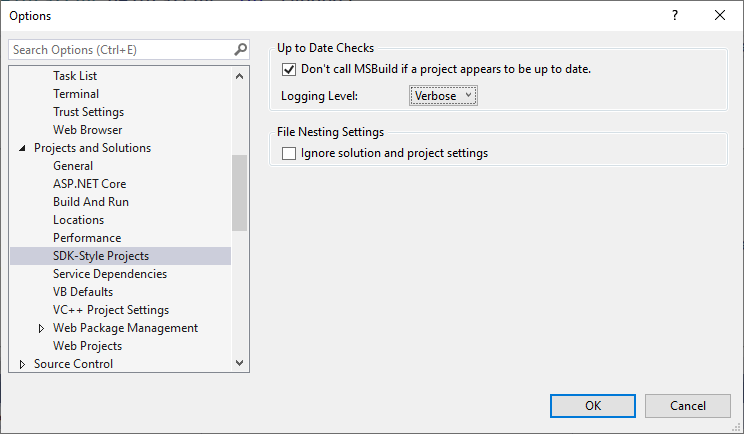
@NektoDron Please turn on verbose logs via the following and file a new bug:
davkean
on 12 Aug 2020
Related issues
 evgeny-burmakov
·
68Comments
davkean
·
41Comments
davkean
·
50Comments
davkean
·
39Comments
evgeny-burmakov
·
68Comments
davkean
·
41Comments
davkean
·
50Comments
davkean
·
39Comments
 natidea
·
35Comments
natidea
·
35Comments