Project-system: Retargeting Winforms project from 'net5.0' to 'net3.1' cause build failure
Visual Studio Version
D16.8 preview 3
Summary:
There are other repercussion but following is the mainline scenario.
By default, we target to 'net5.0' and project file has SDK as "Microsoft.NET.Sdk" in it.

However, when we target to 'net3.1', project file supposed to have SDK as "Microsoft.NET.Sdk.WindowsDesktop". This is not the case when create app targeting to 'Net5.0' and later change the target framework to 'net3.1'. This causing the design time build to fail and users would see compile errors. Users would need to be educated on what need to be changed to get this working.
Expected:
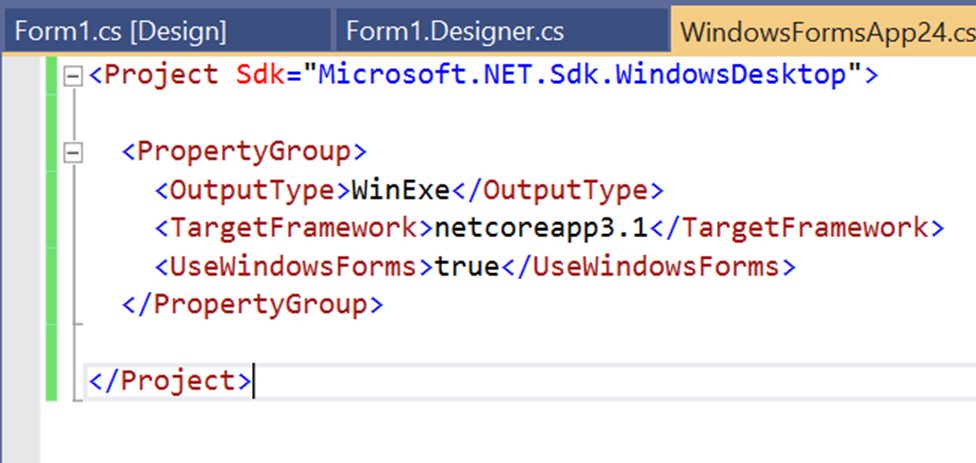
Steps to Reproduce:
Create a new .Net core winforms application from 2019 16.8 preview 3 build
Retarget framework to 'net3.1/net3.0'
Design time build fails. Compile errors shown.
User Impact:
This experience is different from desktop framework applications. Their project won't compile and users need to have knowledge on what is right SDK version and manually update in the project file.
 dreddy-work
All 4 comments
Notes:
- We also need to consider similar issues that WPF projects may face.
- In figuring out if/how to change the
Sdkattribute we need to consider theUseWindowsFormsandUseWPFproperties but we shouldn't add, remove, or change the value of the properties. - We are already intercepting the target framework change when it is made through the UI, so doing something smarter with the SDK at the same time shouldn't be too hard. However, I don't think we can (or even should) do anything when the project file is edited directly. We should assume at that point that the user knows what they are doing.
 tmeschter
on 8 Sep 2020
tmeschter
on 8 Sep 2020
For WPF apps it's the same problem, and manually updating the SDK attribute to Microsoft.NET.Sdk.WindowsDesktop kicks off a design-time build that does the right thing.
On (3) it would be nice if the error list didn't explode, but that's really just a nice to have. If someone is manually editing project files to go back from .NET 5 to .NET Core 3.1, they can probably figure this out on their own. I guess we could make sure there's documentation in place, or that this issue in particular can be found by people.
 cartermp
on 9 Sep 2020
cartermp
on 9 Sep 2020
- TargetFrameworkMonikerValueProvider can handle the UI set
- We could do something if users manually changed the TFM, but agreed probably shouldn't.
- Error List exploding is difficult; Roslyn wants types to resolve, and if we can't find them == error.
- I think we should at least be better at ranking the root cause of the error, maybe we should promote NuGet/MSBuild above Roslyn errors/compiles from the same project, see: https://github.com/dotnet/project-system/issues/3778.
 davkean
on 10 Sep 2020
davkean
on 10 Sep 2020
This is addressed by #6601
 jjmew
on 25 Sep 2020
jjmew
on 25 Sep 2020
Related issues
 gulbanana
·
4Comments
gulbanana
·
4Comments
 MBulli
·
3Comments
MBulli
·
3Comments
 nguerrera
·
5Comments
nguerrera
·
5Comments
 DavidArno
·
3Comments
DavidArno
·
3Comments
 wjk
·
4Comments
wjk
·
4Comments
Most helpful comment
This is addressed by #6601