Project-system: Convert to Collection Association on a Class Diagram shows an error
Hi,
I have an error using "Show as Collection Association" in Class Diagram.
Sorry for the italian version of screens.
Visual Studio Version:
Microsoft Visual Studio Enterprise 2019
Versione 16.4.6
.Net Core 3.1 Console App project.
Summary:
The command "Show as Collection Association" generate an error.
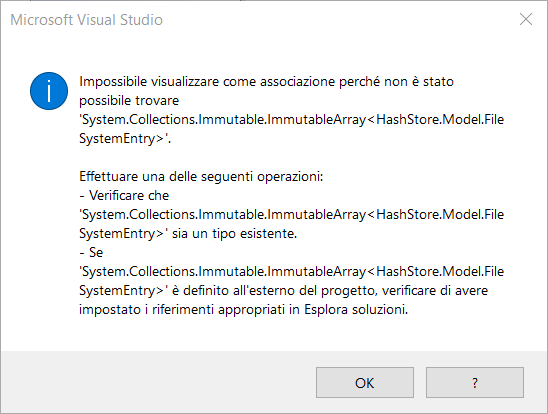
The wizard is unable to recognize System.Collections.Immutable.ImmutableArray
HashStore.Model.FileSystemEntry is defined into the project.
System.Collections.Immutable.ImmutableArray is included in the .Net Core 3.1 framework.
Steps to Reproduce:
Command:
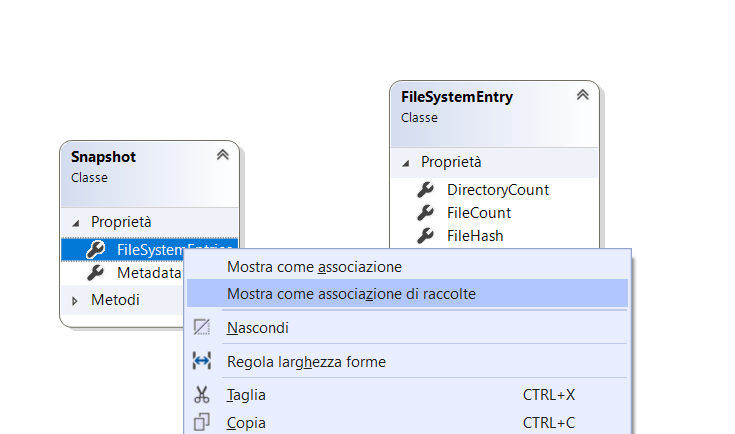
Error:
User Impact:
Unable to create a correct diagram with relationships between classes.
 filippobottega
All 11 comments
@filippobottega The Class Diagram feature is unrelated to this repo. Could you report a feedback item through Visual Studio?
 tmeschter
on 17 Mar 2020
tmeschter
on 17 Mar 2020
@tmeschter This is very likely caused by iteraction with the new project-system.
 davkean
on 17 Mar 2020
davkean
on 17 Mar 2020
Sending back to triage.
@davkean I thought class diagram hadn't been implemented, hence #5349. Can you give me a little more background on how this might be caused by the new project-system?
 dmonroym
on 2 Apr 2020
dmonroym
on 2 Apr 2020
@dmonroym Class Diagram support was added back in 15.x.
Lots of these commands call through the project system APIs, I don't know in this particular what would be blocking this but start with the command and debug from there.
davkean
on 3 Apr 2020
@dmonroym You need manually enable it. You have to install the component called Class Diagram and then create a new class diagram.
 jjmew
on 7 Apr 2020
jjmew
on 7 Apr 2020
Component is called Class Designer in the VS installer (not sure if name was changed). I've attempted to repo on latest main (16.9.0 Preview 3.0 [30814.93.main]) and was not able to reproduce the issue. GIF here:
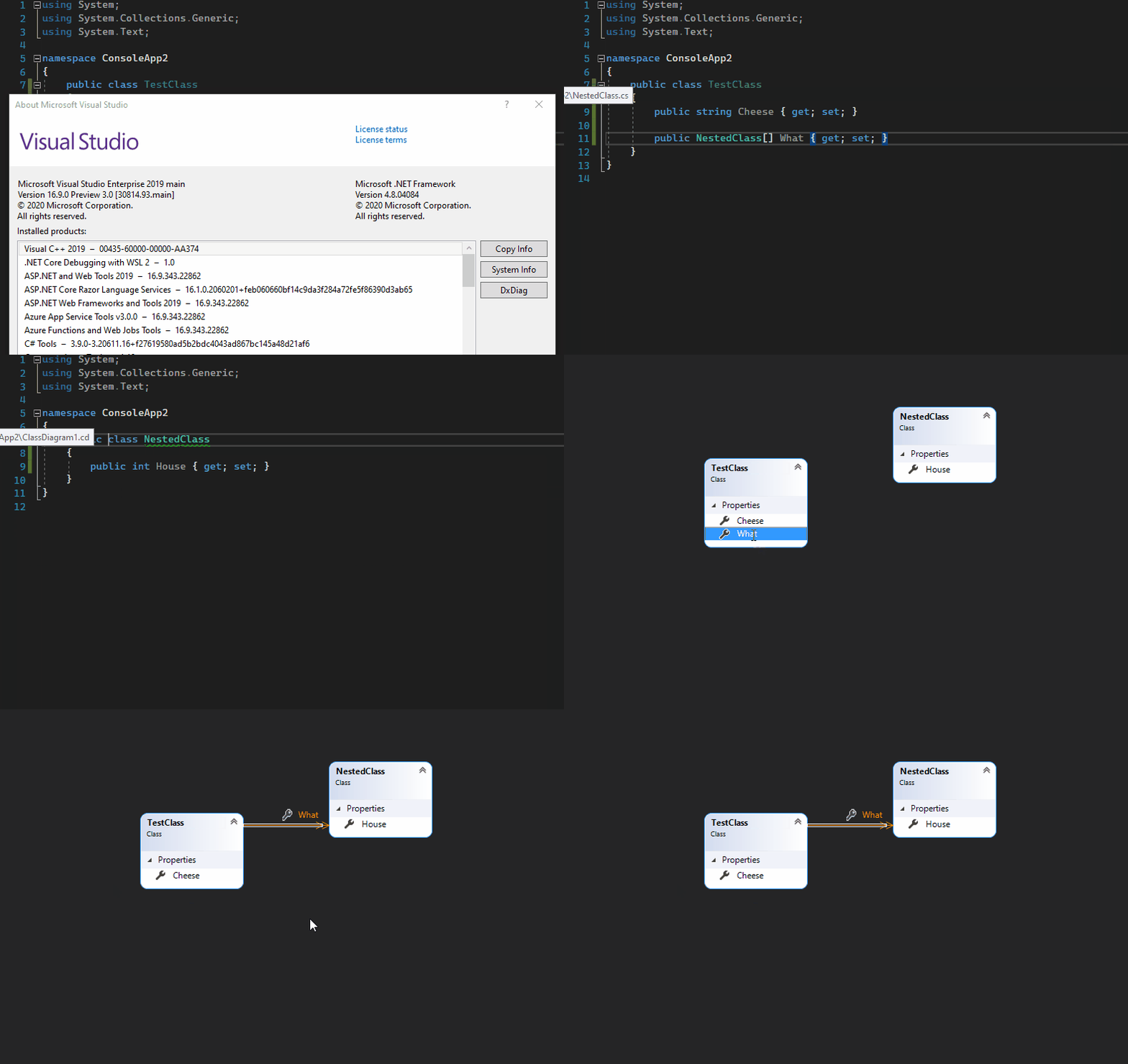
@dmonroym Let me know if you can repro. If not, we should close.
 MiYanni
on 15 Dec 2020
MiYanni
on 15 Dec 2020
@MiYanni was your project targetting netcoreapp3.1?
 drewnoakes
on 15 Dec 2020
drewnoakes
on 15 Dec 2020
@MiYanni please try using a console application targeting netcoreapp3.1 or .NET 5.0. I have the issue in Visual Studio 2019 Version 16.8.3 and also in Visual Studio 2019 Preview Version 16.9.0.

filippobottega
on 15 Dec 2020
@drewnoakes @filippobottega My project was targeting netcoreapp3.1.
MiYanni
on 15 Dec 2020
@MiYanni, please try using the attached solution.
ClassDiagramSample.zip
filippobottega
on 15 Dec 2020
@filippobottega thanks, your solution reproduces the issue:
Cannot show as association because 'System.Collections.Immutable.ImmutableArray
' cannot be found. Try one of the following:
Ensure that 'System.Collections.Immutable.ImmutableArray
' is an existing type. If 'System.Collections.Immutable.ImmutableArray
' is defined outside your project, ensure you have placed the correct references in Solution Explorer.
Version 16.9.0 Preview 3.0 [30814.102.main]
drewnoakes
on 15 Dec 2020
Related issues
 sanderobdeijn
·
4Comments
sanderobdeijn
·
4Comments
 terrajobst
·
5Comments
terrajobst
·
5Comments
 bricelam
·
3Comments
bricelam
·
3Comments
 dreddy-work
·
4Comments
dreddy-work
·
4Comments
 davidmatson
·
4Comments
davidmatson
·
4Comments