Profanity: Issues with selection of messages
I'm using profanity 0.6.0-1 from Debian Buster repos.
When I want to select a message to use it for a quote I have the following issues:
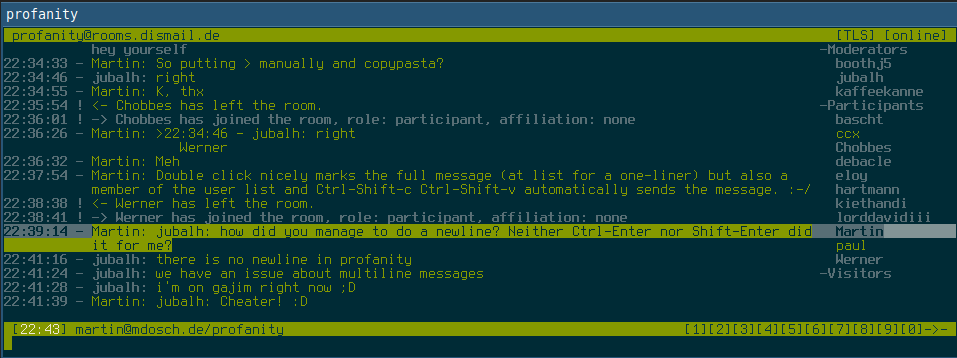
- Single line: A double click selects the whole message including timestamp and nick (I like that behaviour) but also a nick from the participants list (which you usually don't want to quote)
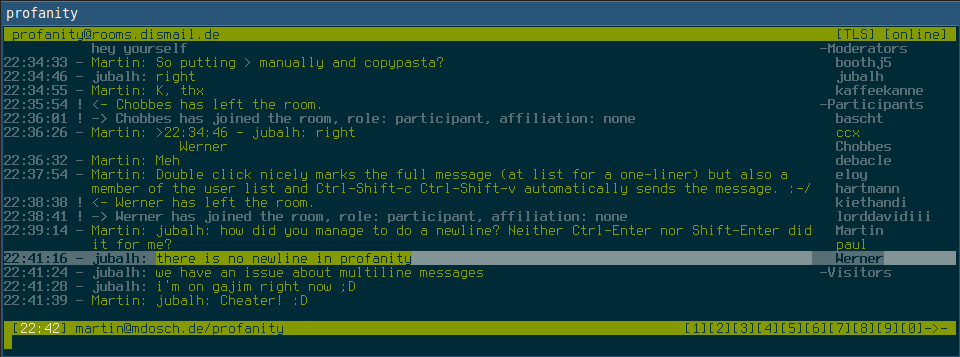
- Multi line: Manually selecting a multi line message also selects one nick from the participants list per complete line.
What I would expect: Selecting messages should not select participant list items although I don't know if this is easily to achieve for a TUI client. Please find screenshots showing the behavior attached.
 mdosch
All 9 comments
My guess is that this depends on your terminal emulator. I would suggest using tmux for copy pasting.
 jubalh
on 14 Apr 2019
jubalh
on 14 Apr 2019
Just opened profanity in termux. Didn't change the behavior for me.
mdosch
on 14 Apr 2019
The bevhaviour doesnt change by using tmux.
My suggestion was to use tmux instead of what you are doing. For this you need to set some keybindings to copy and paste and use them.
Google tmux copy paste and you will find something like this: http://www.rushiagr.com/blog/2016/06/16/everything-you-need-to-know-about-tmux-copy-pasting/
jubalh
on 14 Apr 2019
Someone told me in the profanity muc that weechat has a copy&paste friendly raw mode which might also be an option for profanity.
Also I'd like a quote feature /quote <nick> [n] which fills your input area with the users n-th last message (n being optional and defaulting to the last message) prefixed with a >.
mdosch
on 14 Apr 2019
Disabling the /occupants gets you pretty close to that behaviour. Escape sequences for colors are probably handled by the terminal emulator upon copy. Either they are copied or not.
 kaffeekanne
on 14 Apr 2019
kaffeekanne
on 14 Apr 2019
Thx, that's a great workaround indeed. :)
mdosch
on 14 Apr 2019
I'll close this as there is a workaround that works well (except for long URLs) but maybe you can keep my suggestions in mind for later.
mdosch
on 15 Apr 2019
Depending on the Terminal, long URLs can be copied starting with http://... and be put even with two or more lines into clip board. When pasting in a recent browser linebreaks are recognized and should not affect loading of the copied page. I have not encountered a browser in recent years, that was not capable of this. Clearly just a workaround, but i think we have more important things to resolve.
But thanks for testing and reporting!
PS: The whitespace of copied multiline URLs (below the timestamp) is interpreted correcty and cut away by Firefox, Chrome seems to have Problems with it, inserting %20.
kaffeekanne
on 15 Apr 2019
Maybe we could implement https://weechat.org/blog/post/2014/02/16/Bare-display later
jubalh
on 17 Jun 2019
Related issues
 boothj5
·
8Comments
boothj5
·
8Comments
 PMaynard
·
3Comments
PMaynard
·
3Comments
 SteveGZr
·
9Comments
SteveGZr
·
9Comments
 marsch-
·
4Comments
jubalh
·
8Comments
marsch-
·
4Comments
jubalh
·
8Comments
Most helpful comment
Disabling the
/occupantsgets you pretty close to that behaviour. Escape sequences for colors are probably handled by the terminal emulator upon copy. Either they are copied or not.