Privatebin: shorturl return the wrong value
1.When I click the shorturl button, it will open a new page and display:
{"status":"fail","code":"error:url","url":{"keyword":"#####","url":"https://###.###.###/?ee1ad642cfc011b7#2bFCBym3BjjSobVrcT2v4NDWMcnEvdz4PvCWmS6XZt2n","title":"PrivateBin","date":"2019-12-03 11:11:50","ip":"###.###.###.###","clicks":"0"},"message":"https://###.###.###/?ee1ad642cfc011b7#2bFCBym3BjjSobV[...] u5df2u7ecfu5b58u5728","title":"PrivateBin","shorturl":"https://###.###.###/#####","statusCode":200}
2.urlshortener = "https://###.###.###/yourls-api.php?signature=##########&action=shorturl&format=json&url="
3.I used the self built yourls
PrivateBin version:1.3.1
time:2019-12-3 19:20:59
I'm using # instead of the privacy content
 decentone
All 17 comments
The URL looks correct, as far as I can tell. Looking at issues with that error in the Yourls project, like https://github.com/YOURLS/YOURLS/issues/1845, there should be something in the "message" section in the JSON that explains what the issue is. Is it maybe in the part that you shortened ([...]) in the provided example?
 elrido
on 3 Dec 2019
elrido
on 3 Dec 2019
The URL looks correct, as far as I can tell. Looking at issues with that error in the Yourls project, like YOURLS/YOURLS#1845, there should be something in the "message" section in the JSON that explains what the issue is. Is it maybe in the part that you shortened ([...]) in the provided example?
I watched YOURLS/YOURLS#1845,and change
YOURLS_UNIQUE_URLS,Cannot solve the problem[...] is the initial data
This is an example
https://###.###.###/yourls-api.php?signature=#########&action=shorturl&format=json&url=https%3A%2F%2Fcv.###.###%2F%3Ffc99b81f40b1e510%23BbYxVMNfFiYwuLrshsGLCcASU5zwoYZS76jRadzJZdvY
decentone
on 3 Dec 2019
I want to know the correct response after clicking the ’URL shortener‘ button
decentone
on 4 Dec 2019
It should redirect you to the URL shortener service which then presents you the shortened URL in whatever UI it has. For Yourls that is a raw JSON or XML message, so that is clunky, but working as expected.
The error message in that JSON is in chinese (I am guessing): 已经存在 - Google translate claims that this means "already exists". So you seem to have already added that URL? I don't think this is an error in PrivateBin, maybe a setting in Yourls that makes it ignore the path of the URL so that it thinks the new paste is the same as a priviously stored one? I suggest to check with that project as I don't know enough about that software to help you debug it.
elrido
on 4 Dec 2019
so the correct response after clicking the ’URL shortener‘ button is Open a new web page?
Because there is no description of the short address response result in the development document,I mistakenly thought it would show me in an elegant way,Such as extracting short addresses from JSON
decentone
on 4 Dec 2019
That is correct. The implementation of that response page is in the responsibility of the URL shortener. Other products may have a more elegant UI.
Since there is no "standard" for URL shortener APIs, we just forward to the shortener service and let it handle the UI any way they like.
elrido
on 4 Dec 2019
thank u
decentone
on 4 Dec 2019
@decentone @elrido For YourLS to work correctly with PrivateBin, you have to enable Cross Origin Resource Sharing.
Taking Nginx as an example, this can be done by setting the following header on your YourLS site:
add_header Access-Control-Allow-Origin "https://privatebin.example.org" always;
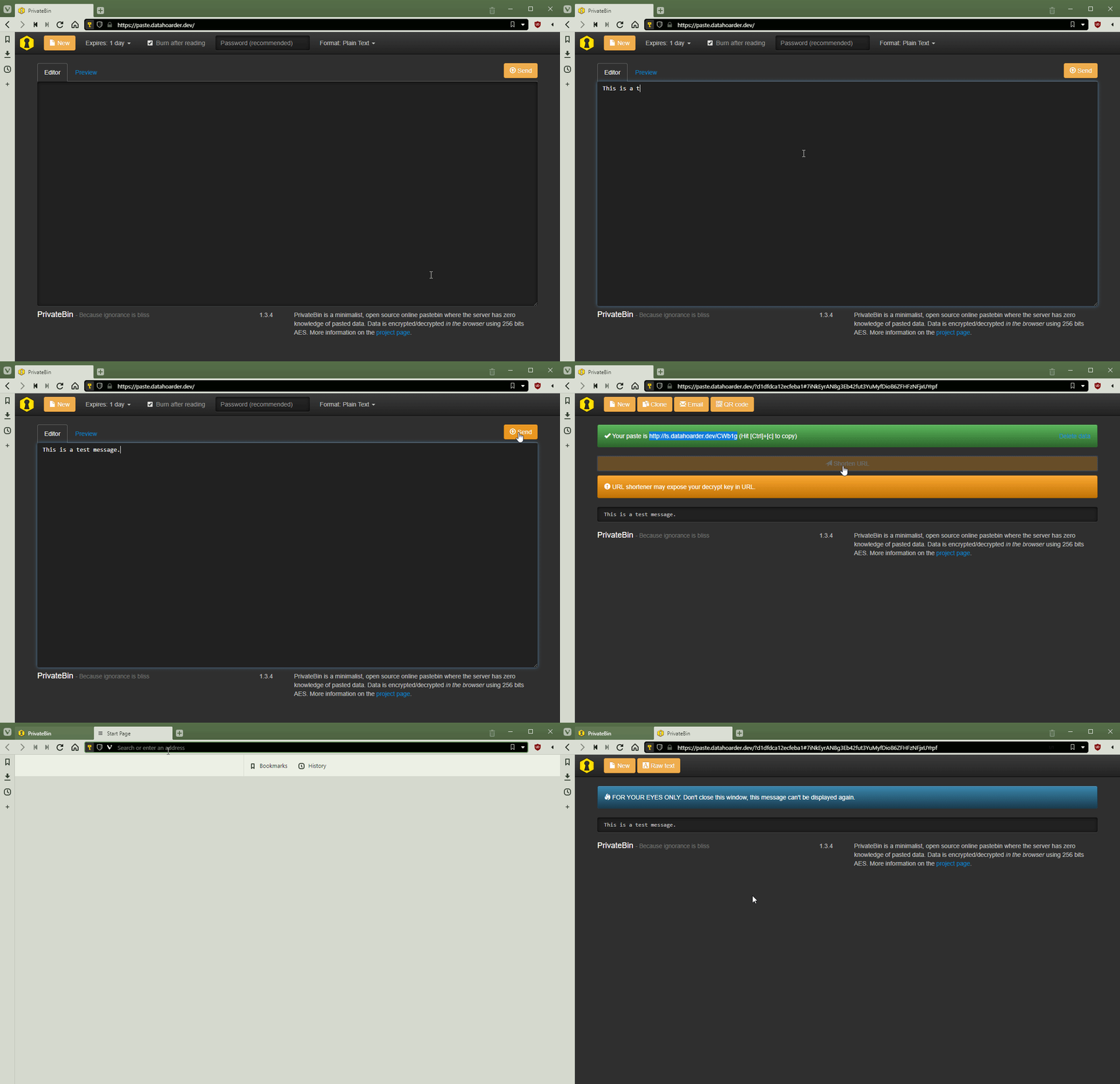
This is what the link shortening process looks like with CORS enabled:
 whalehub
on 7 Jun 2020
whalehub
on 7 Jun 2020
@whalehu If this is always the case, could you maybe consider adding/describing that in our FAQ or possibly here in the wiki?
Your GIF is nice, so feel free to include it here. (or just link to this issue)
 rugk
on 8 Jun 2020
rugk
on 8 Jun 2020
@rugk It looks like the second link already has that info.
whalehub
on 8 Jun 2020
@whalehub the the configured value of urlshortener is https://yourls.org/yourls-api.php?signature=1002a612b4&action=shorturl&format=json&url= ?
This is how I set the format, but I can't automatically replace the URL with a short address.
This signature(1002a612b4) is not mine, it's just an example.
When I click the URL shorter button, a page of my yourls will pop up.

The mosaic part is my yourls URLs
decentone
on 8 Jun 2020
@decentone Correct. In your screenshot, it says format=simple, but it needs to be format=json.
whalehub
on 8 Jun 2020
@whalehub if i change the format=json,When I click the URL shorter button, a page of my yourls will also pop up.like the screenshot.I know this is the format of 'json'.it seems that PrivateBin can't extract URL shorter from json format.just like u gif.

i whant to my PrivateBin can be as elegant as gif,Replace long address with short address directly.
decentone
on 8 Jun 2020
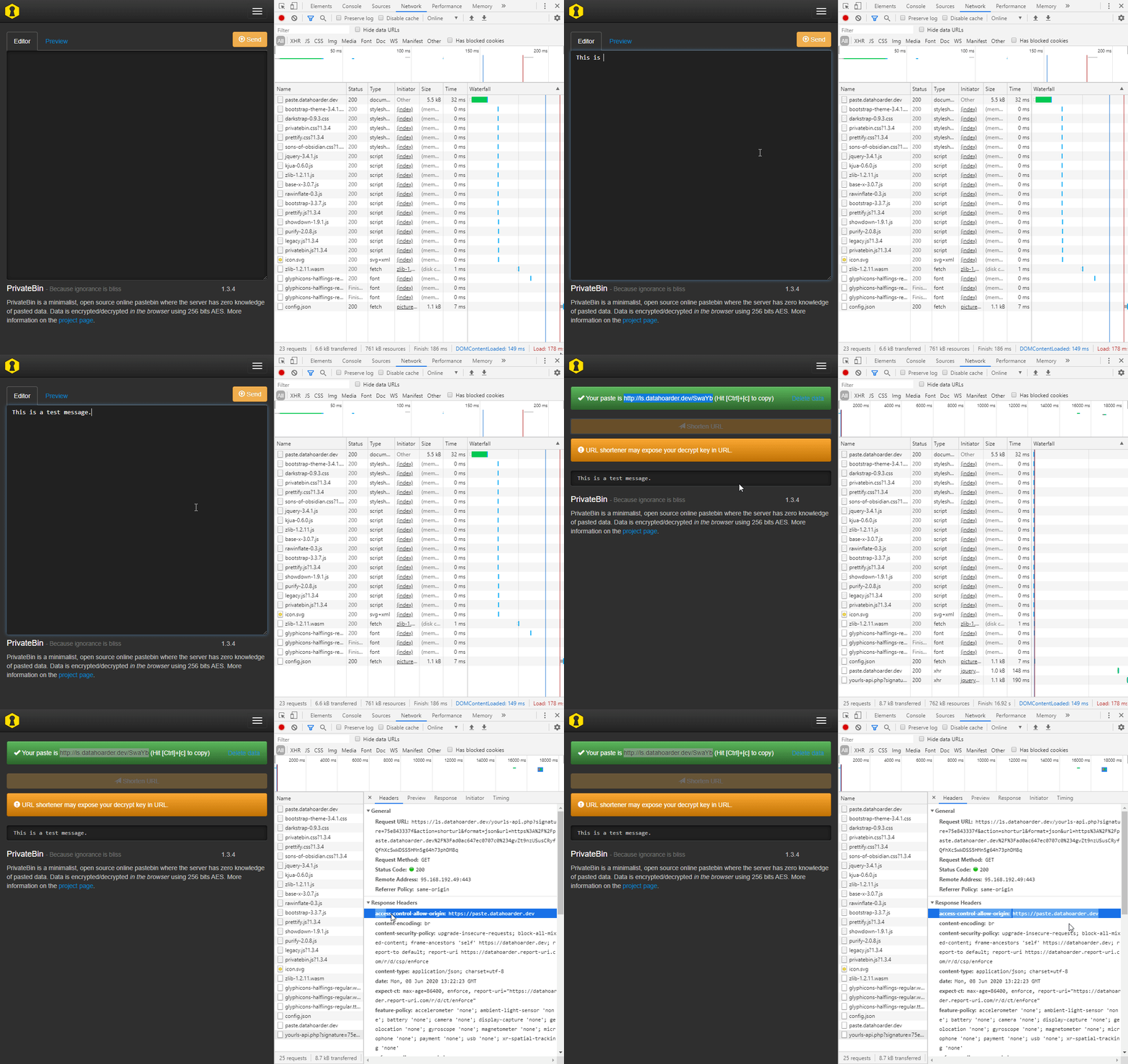
@decentone Did you set up Cross Origin Resource Sharing in your web server/reverse proxy? You should see something similar to this in the "Network" tab in Chrome DevTools (CTRL+SHIFT+I) if it is set up correctly.
whalehub
on 8 Jun 2020
@whalehub
OK,thanks,.
After I set CORS, everything is OK. It's my previous nginx setting error.
It's important to add CORS and format=json.
The problem is finally solved.
decentone
on 8 Jun 2020
@decentone You're welcome. Glad you got it working. 👍
whalehub
on 8 Jun 2020
Uh yes, so if the wiki doc can be improved here, please feel free to adjust that.
rugk
on 8 Jun 2020
Related issues
 LuckySandwich
·
4Comments
LuckySandwich
·
4Comments
 Haocen
·
5Comments
Haocen
·
5Comments
 chatq
·
7Comments
chatq
·
7Comments
 pstray
·
7Comments
elrido
·
3Comments
pstray
·
7Comments
elrido
·
3Comments
Most helpful comment
@decentone @elrido For YourLS to work correctly with PrivateBin, you have to enable Cross Origin Resource Sharing.
Taking Nginx as an example, this can be done by setting the following header on your YourLS site:
This is what the link shortening process looks like with CORS enabled: