Prisma: Issue with not closing DB connections
Bug description
I have a heroku free tier DB and it looks like Prisma is not ending connections after making calls to the hosted DB on heroku.
I am only using my app in basic development, and have never experienced any problems with too many connections, however, now I experience this error every few errors, and it persists even after killing all connections manually.
"[GraphQL] Invalid invocation: Error querying the database: db error: FATAL: too many connections for role
How to reproduce
Steps to reproduce the behavior:
- Create Heroku free tier postgresql DB
- Make some queries involving joins across a few tables
- See error of max connections being reached
Expected behavior
DB connections should be killed after requests are complete
Prisma information
Environment & setup
- OS: MacOs
- Database: PostgreSQL
- Node.js version: v12.10.0
- Prisma versions:
@prisma/cli : 2.11.0
@prisma/client : 2.11.0
 15chrjef
All 24 comments
I am having this same issue running localhost and querying a Postgres database hosted on DigitalOcean. The error that I receive is:
Invalid prisma.user.findMany() invocation:

Error querying the database: db error: FATAL: remaining connection slots are reserved for non-replication superuser connections
Not sure if this issue will persist into production - it could be related to how localhost and Prisma interact.
Environment/Setup
- OS: Windows 10
- Database: PostgreSQL
- Node.js version: 12.19.0
- Prisma version: 2.12.0 (@15chrjef mentions being on version 6.x.x - not sure if that's referencing a different library or what)
 dayvista
on 28 Nov 2020
dayvista
on 28 Nov 2020
Thanks for adding to this @dayvista! Updated my Prisma versions for clarity.
15chrjef
on 29 Nov 2020
No problem @15chrjef, glad to see I'm not alone with this issue. I'm also getting a message in the console akin to "Warning: 10 Prisma Clients are already running" after using the dev server for a while. (don't remember the message exactly - I'm away from my computer at the moment).
dayvista
on 29 Nov 2020
Likewise @dayvista! I have spoken to another dev who also is experiencing this issue on Prisma2. FWIW After updating my Prisma version to 2.12.1, I can also confirm that this issue persists onto Prisma version 2.12.1.
15chrjef
on 30 Nov 2020
I'm having this error against a hosted postgres instance on Render, as well. It's consumed all 100 connection slots and prevents new connections from being created.
The error has happened with prisma 2.11.X and 2.12.1 on various different postgres instances, in development and production.
 kunalgorithm
on 30 Nov 2020
kunalgorithm
on 30 Nov 2020
Are you sure you don't create a client per request by any mean?
Never seen this issue before unless the dev was recreating the client over and over.
 Sytten
on 30 Nov 2020
Sytten
on 30 Nov 2020
@Sytten I am rather sure that I am not creating multiple clients, but please tell me if I'm wrong.
My Prisma setup has not changed recently, I only started seeing this issue 3 days ago in a repository I have been using for around a month.
The two files related to creating a prisma client are attached below. I don't see how multiple clients could be getting created.
context.ts
import { PrismaClient } from '@prisma/client';

const prisma = new PrismaClient();

export interface Context {
  prisma: PrismaClient;
}

export function createContext(): Context {
  return { prisma };
}
graphql.ts
import { ApolloServer } from 'apollo-server-micro';

// we'll create these in a second!
import { schema } from '../../graphql/schema/schema';
import { createContext } from './../../graphql/context';

const apolloServer = new ApolloServer({
  context: createContext,
  schema,
  tracing: process.env.NEXT_PUBLIC_NODE_ENV !== 'production'
});

export const config = {
  api: {
    bodyParser: false
  }
};

export default apolloServer.createHandler({
  path: '/api/graphql'
});
@Sytten I am actually creating multiple clients in my app, although only 2 or 3 in the whole codebase.
Does the use of multiple clients somehow create a loop that creates more clients or fails to destroy used ones? Is there a function/hook I should be running to kill unused clients?
Forgive any ignorance on my part, I'm fairly new to Prisma.
dayvista
on 1 Dec 2020
Hey all 👋 ,
thanks for reaching out to us! With free/cheap tiers on any provider you probably need to set the connection_limit parameter in your connection string correctly. Have you read and applied this article from our docs?
 mavilein
on 1 Dec 2020
mavilein
on 1 Dec 2020
Hi @mavilein!
Thank you for responding here!
I am using a free DB with shared resources at the moment on Heroku with a connection limit of 20.
However, even after taking your advice and updating the DB URL that Prisma uses with a postfix of ?connection_limit=2, I am still getting this error of too many connections.
I also know @kunalgorithm has a DB instance with a connection limit of 100 but also has a similar issue.
Is there a certain amount of DB connections that you think is required to avoid this problem?
15chrjef
on 1 Dec 2020
I would say 20 is enough, but you do need to make sure they are closed if you do an auto-restart on your dev machine unless you have many cores (connections = num_physical_cpus * 2 + 1).
Creating a few clients might also be problematic depending on the formula above.
But if this is a new issue, it should be investigated. I upgraded one of my client's installation the other day and didn't notice anything special, @pantharshit00 care to try to reproduce?
Sytten
on 1 Dec 2020
Thank you ,@Sytten.
I manually kill all of my connections every half an hour or so as that is how often I get a 'too many connections error'.
15chrjef
on 1 Dec 2020
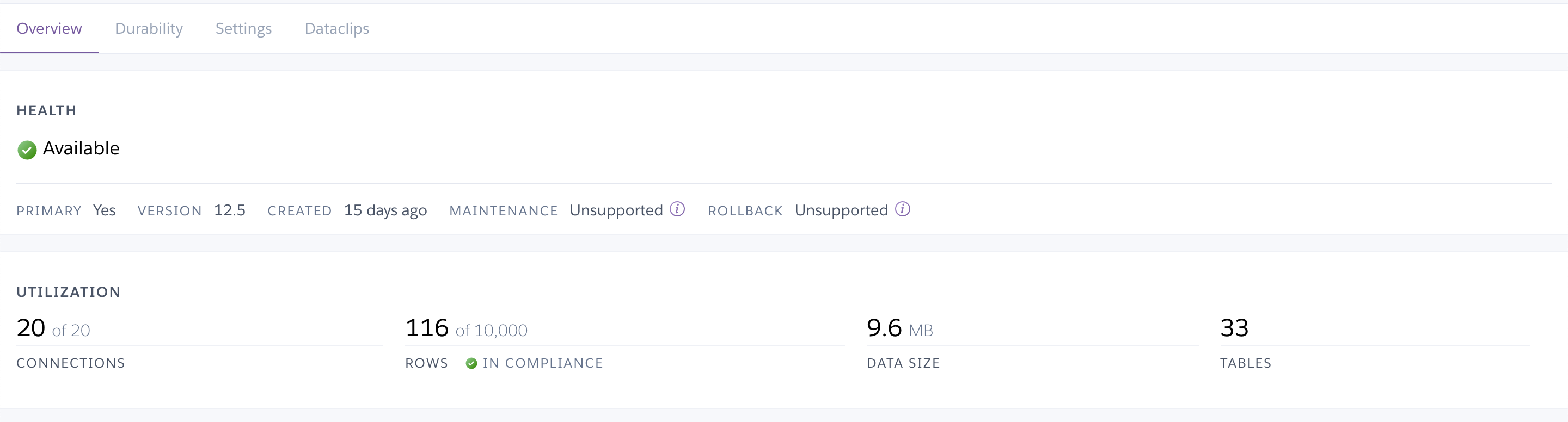
I was unable to reproduce this. Can you please check from the heroku UI on how many connections are getting used? You can see that under the utilization section of your heroku database dashboard
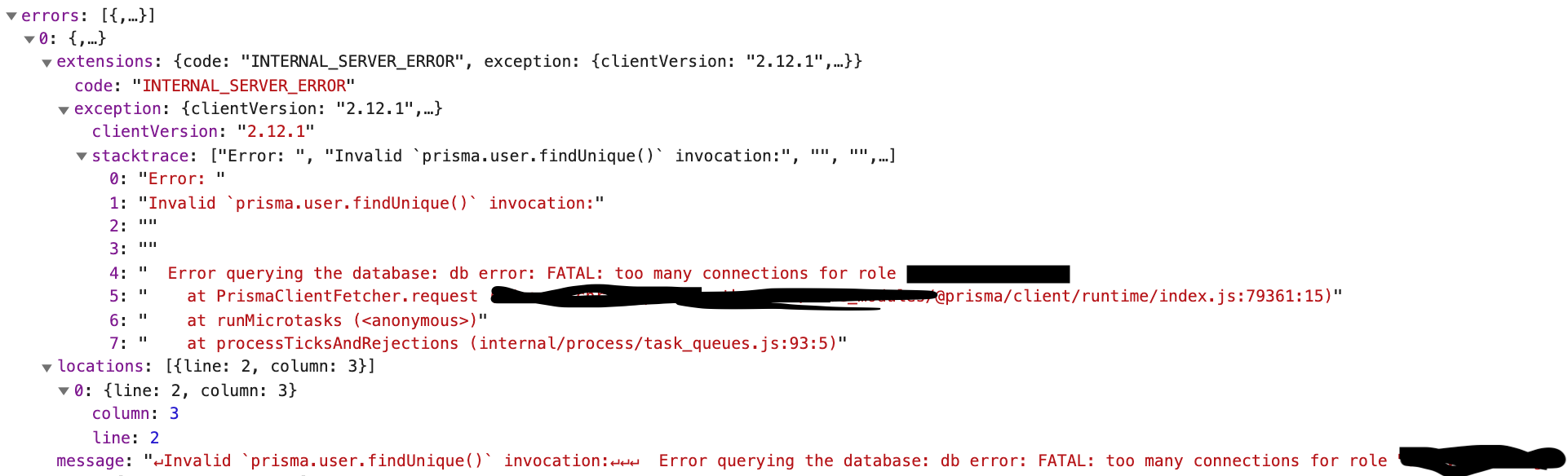
Also, if you share the actual client call which is causing this, that might also help here.
 pantharshit00
on 1 Dec 2020
pantharshit00
on 1 Dec 2020
Hi @pantharshit00, here is the Heroku UI for my instance.
Here is the network Call
15chrjef
on 1 Dec 2020
After adding ?connection_limit=1 to the end of my database string, I am also still getting this error. Here's a screenshot of my database at the moment I received the error:
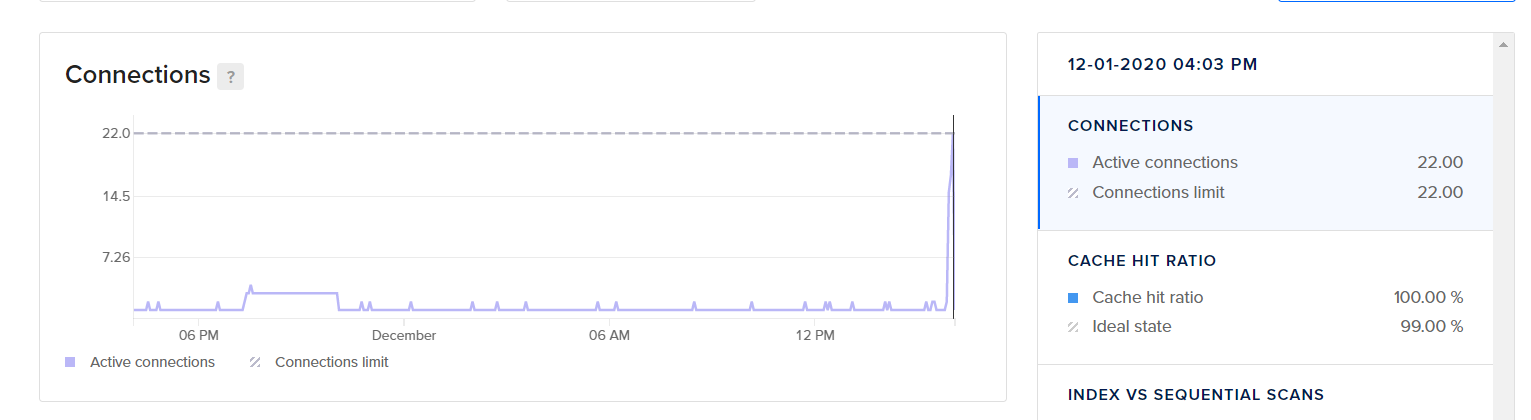
Could this be occurring because I'm instantiating 3 Prisma clients in total? That doesn't seem to be the case after implementing the 'connection limit' and seeing @15chrjef and @kunalgorithm experience the same issue under different circumstances. Also, 3 < 22 😅
dayvista
on 2 Dec 2020
Also of note is the fact that the DB logs showed around 20 queries being made at the same moment right before the error hit. I was only intentionally running 2 queries max at that moment. (unfortunately didn't get a screenshot at the time)
dayvista
on 2 Dec 2020
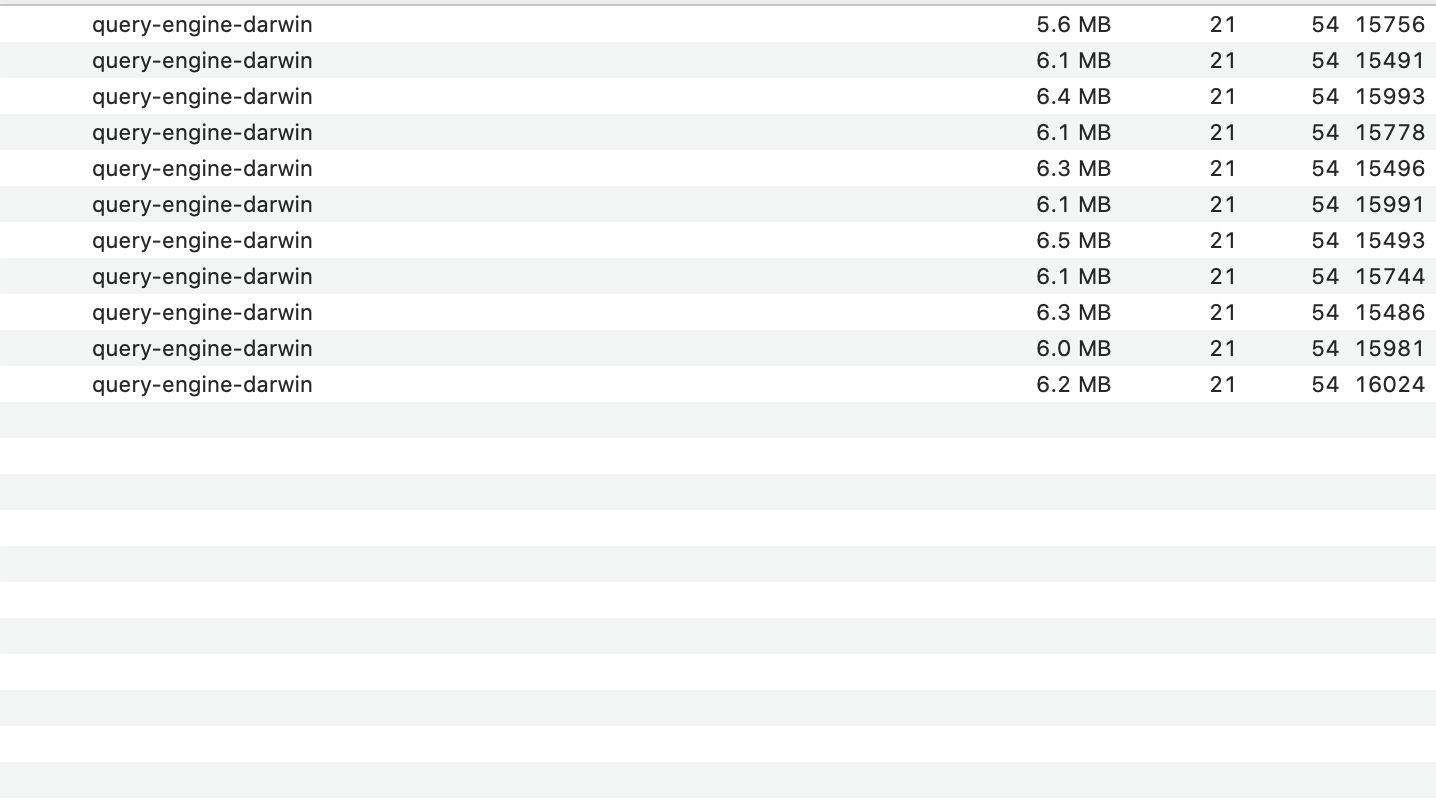
We have to identify if it's a rust issue or a TS issue, can you check if new processes are created? It should have the name query-engine-
Sytten
on 2 Dec 2020
@Sytten I have 11 instances running on my local machine, and a max_connections limit of 2 on the DB URL, and my Heroku instance only allows for 20 connections. Not sure if that is the information you were looking for.
15chrjef
on 2 Dec 2020
Yes this indicates that the TS code spawns a lot of instances causing the max connection. I would consider moving the code that creates the prisma client to a separate file and export only one instance that is always used. If this fixes the issue that means your implementation was leaking PrismaClient for some reason.
Sytten
on 2 Dec 2020
@Sytten. I was under the impression that my implementation was already following the guidance you outlined of moving the Prisma client to a separate file and exporting only the instance that is used. Do you disagree?
context.ts
import { PrismaClient } from '@prisma/client';

const prisma = new PrismaClient();

export interface Context {
  prisma: PrismaClient;
}

export function createContext(): Context {
  return { prisma };
}
graphql.ts
import { ApolloServer } from 'apollo-server-micro';

// we'll create these in a second!
import { schema } from '../../graphql/schema/schema';
import { createContext } from './../../graphql/context';

const apolloServer = new ApolloServer({
  context: createContext,
  schema,
  tracing: process.env.NEXT_PUBLIC_NODE_ENV !== 'production'
});

export const config = {
  api: {
    bodyParser: false
  }
};

export default apolloServer.createHandler({
  path: '/api/graphql'
});
Not really, but you do seem to have an issue that has been historically linked to having multiple clients created. So I thought it would be worth a shot. Do the engine processes die when you stop your server? What are you using to hot reload the server?
Sytten
on 2 Dec 2020
@Sytten The processes do die when I stop the server. I use next for development.
15chrjef
on 2 Dec 2020
Check the issue I linked I think this relevant for use case with next
Sytten
on 2 Dec 2020
Looks like it, thanks!
15chrjef
on 2 Dec 2020
Related issues
 ranjan-purbey
·
25Comments
ranjan-purbey
·
25Comments
 kartikthapar
·
25Comments
kartikthapar
·
25Comments
 malekjaroslav
·
53Comments
malekjaroslav
·
53Comments
 nikolasburk
·
57Comments
pantharshit00
·
28Comments
nikolasburk
·
57Comments
pantharshit00
·
28Comments
Most helpful comment
Check the issue I linked I think this relevant for use case with next