Prestashop: Comment module 4.21 issue: when click on "read user reviews" button, no review appears
Describe the bug
After validation of a review from the back office, the product page is updated with stars, the quantity of reviews, and a button written "read user reviews".
But after clicking that button, o review appears, it goes to the bottom of the page, with stars on the right, a comment icon and the nomber of comments on the left, a "write your review" in the middle, but no comments. Only symbols like this " "> " under comments.
Expected behavior
Comments may appear
Steps to Reproduce
Create a comment on the front office, and validate.
Validate it on the back office
Go to the product page on the front office, and try to see your comment.
You'll see the issue
Screenshots
If applicable, add screenshots or screen recordings to help explain your problem.

Additional information
- PrestaShop version: 1.7.6.1
- PHP version: 7.2.34
Thanks!
 gringo1er
All 9 comments
Hello @gringo1er
I didn't manage to reproduce your issue with PS1.7.7.0 and ProductComment v4.2.1, see the attached screen record:
https://drive.google.com/file/d/12K1zxOOWHaKqQ2_JJnFDR5kfnoK5d7-S/view?usp=sharing
Please check and feedback.
Thanks!
 hibatallahAouadni
on 14 Dec 2020
hibatallahAouadni
on 14 Dec 2020
Thank you for your feedback
The module is also compliant with previous PS versions. Our e-shop is based on PS 1.7.6.1
Could it be a compatibility issue with the template?
gringo1er
on 14 Dec 2020
Hello @gringo1er
Just to make you sure, here's a screen record with PS1.7.6.1 and ProductComment 4.2.1:
https://drive.google.com/file/d/1PjLqQh3UnqMwS-A3keDZeQQ6pcEqbmNb/view
Thanks!
hibatallahAouadni
on 15 Dec 2020
There are some breaking changes in latest version of the module, I suggest to check themes/your_theme/modules/productcomments if you have any overrides, if so, it might be a reason of why you're not able to use module in your store
 kpodemski
on 15 Dec 2020
kpodemski
on 15 Dec 2020
Hi,
For your very last video (I really enjoy them!!) I have proceed exactly like you, except that comments don't appear, replaced by "> (stars appear).
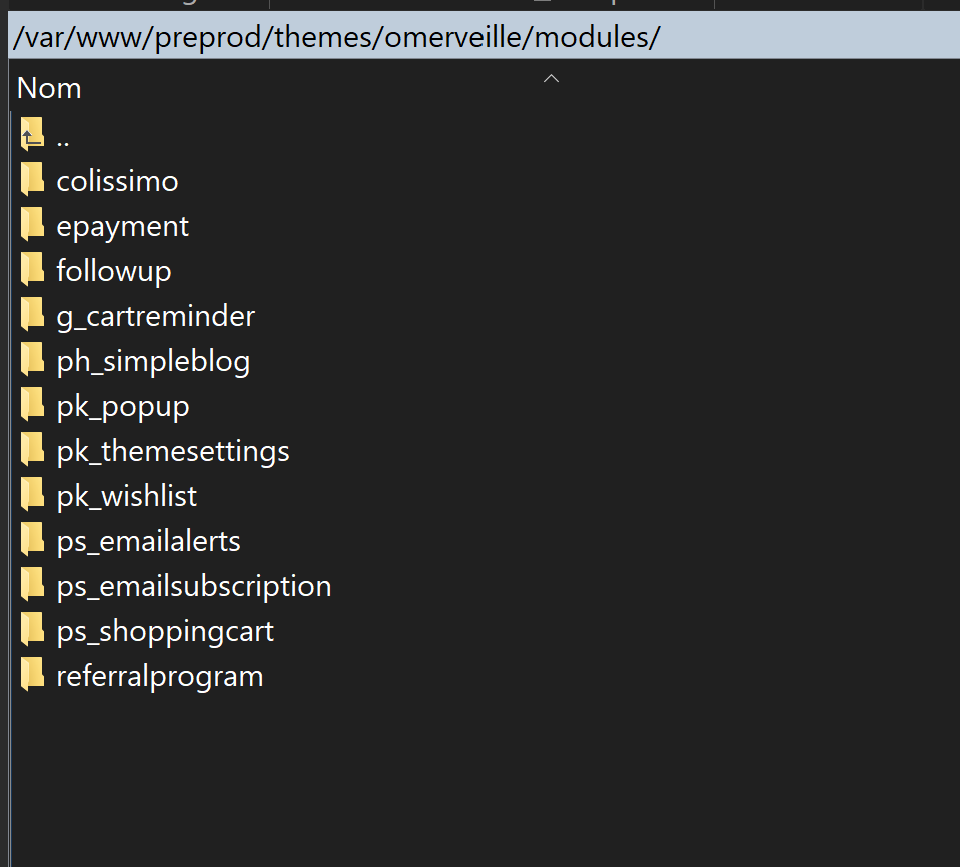
When I check the modules folder inside the theme folder, the module doesn't appear. Could it be the source of my trouble?
gringo1er
on 15 Dec 2020
On my preprod platform (clone of our eshop) I have chosen the default prestasho theme, reinitialized the comments module, and now it works fine. It is really a theme issue, and as you can see in my previous snapshot, the module doesn't appear in its module folder. Do I have only to copy / paste the comments folder from root/modules to the theme modules folder?
gringo1er
on 15 Dec 2020
Hello @gringo1er
Glad to hear that the problem is theme issue. So, I close the issue, but we can still answer your question here :wink:
@kpodemski thanks for your help!
Do I have only to copy / paste the comments folder from root/modules to the theme modules folder?
@kpodemski do you think is it possible?
Thanks!
hibatallahAouadni
on 15 Dec 2020
Do I have only to copy / paste the comments folder from root/modules to the theme modules folder?
It's not a good idea, you should override module only if you want to change its default behavior, not to force default behavior :)
probably there are some other issues, I suggest to contact with theme developer
kpodemski
on 15 Dec 2020
Ok thank you for your time.
I think I will change the template. This one was too complex to use...
Or maybe no theme, only personalization of the native one...
Best regards!
gringo1er
on 15 Dec 2020
Related issues
 zuk3975
·
3Comments
zuk3975
·
3Comments
 khouloudbelguith
·
3Comments
khouloudbelguith
·
3Comments
 nrcjea001
·
3Comments
nrcjea001
·
3Comments
 Van-peterson
·
3Comments
Van-peterson
·
3Comments
 hiousi
·
3Comments
hiousi
·
3Comments