Prestashop: Child theme doesn't load parent modules and load from other child theme
Describe the bug
Child them loads module template from an other child theme in case If a module folder exists or not in a child theme
Expected behavior
A child them must load module template from the parent them "classic" or from the current child them if the module template exists
Steps to Reproduce
Multistore enabled with 2 stores
DEV mode enabled
Store 1 has child them "dark" with theme.yml parameters :
parent: classic
name: dark
display_name: Dark
Store 2 has child them "light" with theme.yml parameters :
parent: classic
name: light
display_name: Light
In the store 1, with "browser dev tools", the module ps_featuredproducts folder exists in the them "dark", it must load the module template from it, but instead it loads the module template from the light them.
In the case where the module folder does not exist, it must load the module template from the parent them "classic", but instead it loads the module template from the "light" them too.
<!-- begin module:ps_featuredproducts/views/templates/hook/ps_featuredproducts.tpl -->
<!-- begin C:\wamp64\www\presta/themes/light/modules/ps_featuredproducts/views/templates/hook/ps_featuredproducts.tpl -->
<section>...</section>
<!-- end C:\wamp64\www\presta/themes/light/modules/ps_featuredproducts/views/templates/hook/ps_featuredproducts.tpl -->
<!-- end module:ps_featuredproducts/views/templates/hook/ps_featuredproducts.tpl -->
And sometimes in the store 2 its the inverse, it loads module from the "dark" them
Reproduced on 3 different installations
Additional information
- PrestaShop version: 1.7.6.7 & 1.7.6.8
- PHP version: 7.2
 catlynx
All 12 comments
Hello @catlynx ,
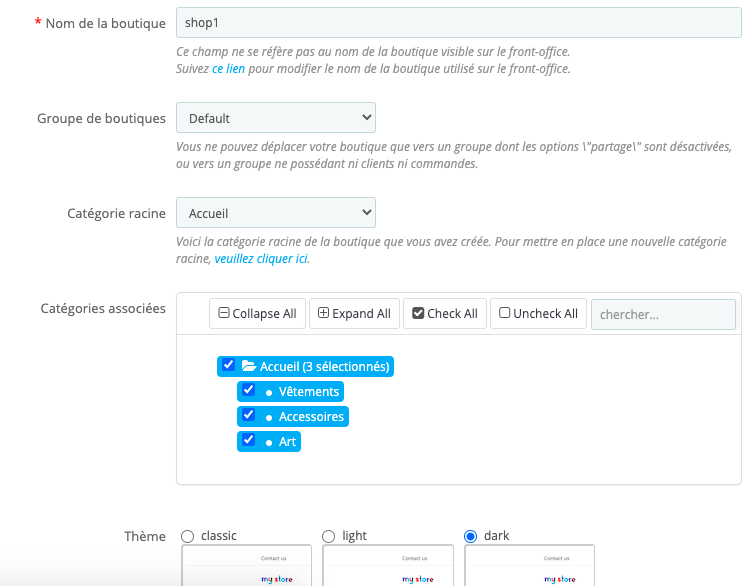
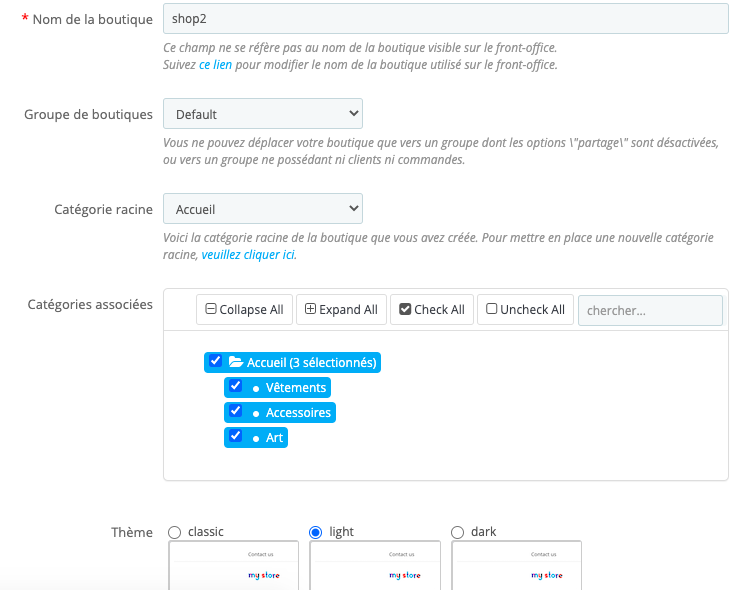
After doing all your steps, when opening the console, I only see the module being related to classic theme :

Shop 1 -> Dark
Shop 2 -> Light
Dev mode activated :

 florine2623
on 13 Nov 2020
florine2623
on 13 Nov 2020
Hi @florine2623,
Have you checked both shop and empty the cache?
Case 1 : both shop have ps_featuredproducts module folder
Shop 1 "dark theme" : loads wrong modules folder

Shop 2 "light theme" : modules folder are correct

Case 2 : I delete the ps_featuredproducts module only on the Shop 1 and clear the cache
Shop 1 "dark theme" : the ps_featuredproducts module is loaded from classic theme and the rest of modules are loaded from the correct "dark" theme

Shop 2 "light theme" : the ps_featuredproducts module exists in this theme but it is loaded from the classic theme and the rest of the modules are loaded from the wrong "dark" theme

Prestashop loads the theme which was compiled at first :
Deleting the cache folder
Refreshing the first store "dark theme" and after the second store "light theme"
The result is both store use the same theme "dark theme"
Deleting the cache folder
Refreshing the second store "light theme" and after the first store "dark theme"
The result is both store use the same theme "light theme"
catlynx
on 13 Nov 2020
Hello @catlynx
Case 1 : both shop have ps_featuredproducts module folder
I didn't manage to reproduce your issue with PS1.7.6.8 as you can see in the attached screen record below:
https://drive.google.com/file/d/13NTEwci2nf-zA38y4H4xYb1x-vIaELb5/view
Case 2 : I delete the ps_featuredproducts module only on the Shop 1 and clear the cache
If you uninstall a module, it will be uninstalled from all shops.
Please check and feedback.
Thanks!
 hibatallahAouadni
on 17 Nov 2020
hibatallahAouadni
on 17 Nov 2020
Hello @hibatallahAouadni
The bug happens even if there is not a parent theme.
Both theme have all modules override in "themes/theme_name/modules/".
Each theme must load modules from it.
The order of opening the shop 2 at first for compiling affects the shop 1, more details in this video :
https://drive.google.com/file/d/1Vx4jpV-Mmf9jl3rqK0ZO0O_5iSAY1G4_/view?usp=sharing
Case 2 : I delete the ps_featuredproducts module only on the Shop 1 and clear the cache
I don't uninstall the module but I delete the folder in "themes/dark/modules/" to check if it's loaded from the parent theme "when enabled".
Many thanks!
catlynx
on 18 Nov 2020
Hello @catlynx
I did the override of ps_featuredproducts module like you mentioned above and follow the order that you sugguest, yet I didn't manage to reproduce your issue, see the attached scren record below:
https://drive.google.com/file/d/1x8jKAXZCDG7rySbGCw7QTxC44Af0VRCg/view
As you see in the record, I tried with both order and there's no problem.
Please check and feedback.
Thanks!
hibatallahAouadni
on 18 Nov 2020
Hello @hibatallahAouadni
Thanks for the screen video,
The bug persists, I checked my web server parameters and I did an update. I tried several installations, but no way.
I will do other test and I will be back if something new comes up.
catlynx
on 21 Nov 2020
Hi @catlynx @hibatallahAouadni ,
I'm having similar a issue, where one of the themes is a child theme and one isn't.
Shop 1: child of classic theme
Shop 2: "Full" theme
As @catlynx already mentioned, the order of opening the shops is important. If you first open Shop 2 and then Shop 1, Shop 1 loads templates of Shop 2.
 arisschl
on 1 Dec 2020
arisschl
on 1 Dec 2020
Hello @arisschl
As I mentionned above I didn't manage to reproduce the issue even with the order that @catlynx sugguested it, could you please watch and check the attached screen record above.
If you notice something is missed or you have other information that will help me to reproduce the issue, please let me know.
Thanks!
hibatallahAouadni
on 1 Dec 2020
Hi @arisschl @hibatallahAouadni
Fortunately, This bug disappeared in version 1.7.7.0 of Prestashop.
Happy coding !
catlynx
on 3 Dec 2020
@catlynx Glad to hear 🎉
hibatallahAouadni
on 3 Dec 2020
@catlynx @hibatallahAouadni that's great news!
However, we have a PrestaShop environment that we don't simply upgrade to 1.7.7.0. Is there anything known about the fix that is applied to solve this issue?
arisschl
on 7 Dec 2020
Issue is solved by #13804
arisschl
on 11 Dec 2020
Related issues
 Fabuloops
·
3Comments
Fabuloops
·
3Comments
 Van-peterson
·
3Comments
Van-peterson
·
3Comments
 centoasa
·
3Comments
centoasa
·
3Comments
 prestonBot
·
3Comments
prestonBot
·
3Comments
 khouloudbelguith
·
3Comments
khouloudbelguith
·
3Comments