Prestashop: Be able to move in bulk clients from one group client to another
I have a few hundreds clients in one groupe.
I would like to move all them in bulk in an other group
 julienbuh
All 9 comments
Thanks for opening this issue! We will help you to keep its state consistent
![prestashop-issue-bot[bot] picture](https://avatars3.githubusercontent.com/in/60395?v=4&s=40) prestashop-issue-bot[bot]
on 29 Oct 2020
prestashop-issue-bot[bot]
on 29 Oct 2020
Hi @julienbuh ,
Thanks for the suggestion, the Product Team will take a look.
Please stay tuned !
 florine2623
on 30 Oct 2020
florine2623
on 30 Oct 2020
Ping @PrestaShop/product-team ,
@julienbuh has a great improvement to share, what do you think !
Thanks !
florine2623
on 30 Oct 2020
Hi @florine2623 and @julienbuh! It could be nice to improve the list of customers by allowing bulk actions via checkboxes. I've just added this idea as an improvement to the migration issues so that it can be studied and specified when working on those pages.
 LouiseBonnard
on 2 Nov 2020
LouiseBonnard
on 2 Nov 2020
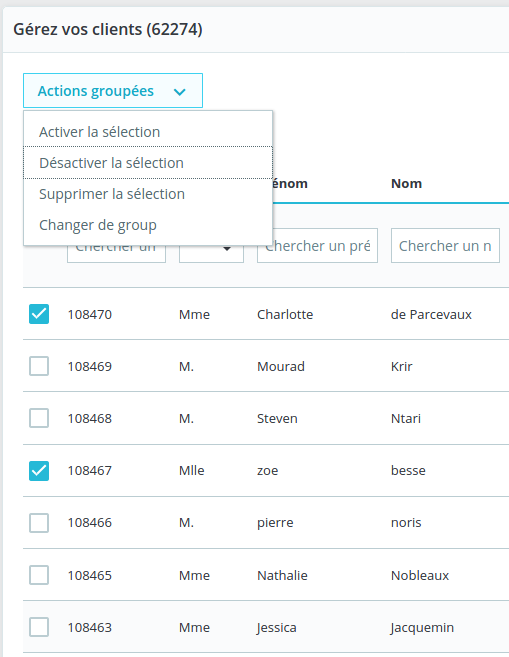
IMO it must be in BO > Clients > Clients.
 PululuK
on 2 Nov 2020
PululuK
on 2 Nov 2020
Hello @PululuK! It is not very common to have a management setting at this place but it sure will be quicker to add this possibility here. @PrestaShop/ux-team, what do you think: from a UI point of view, is it okay to have this kind of parameter in a bulk action here?
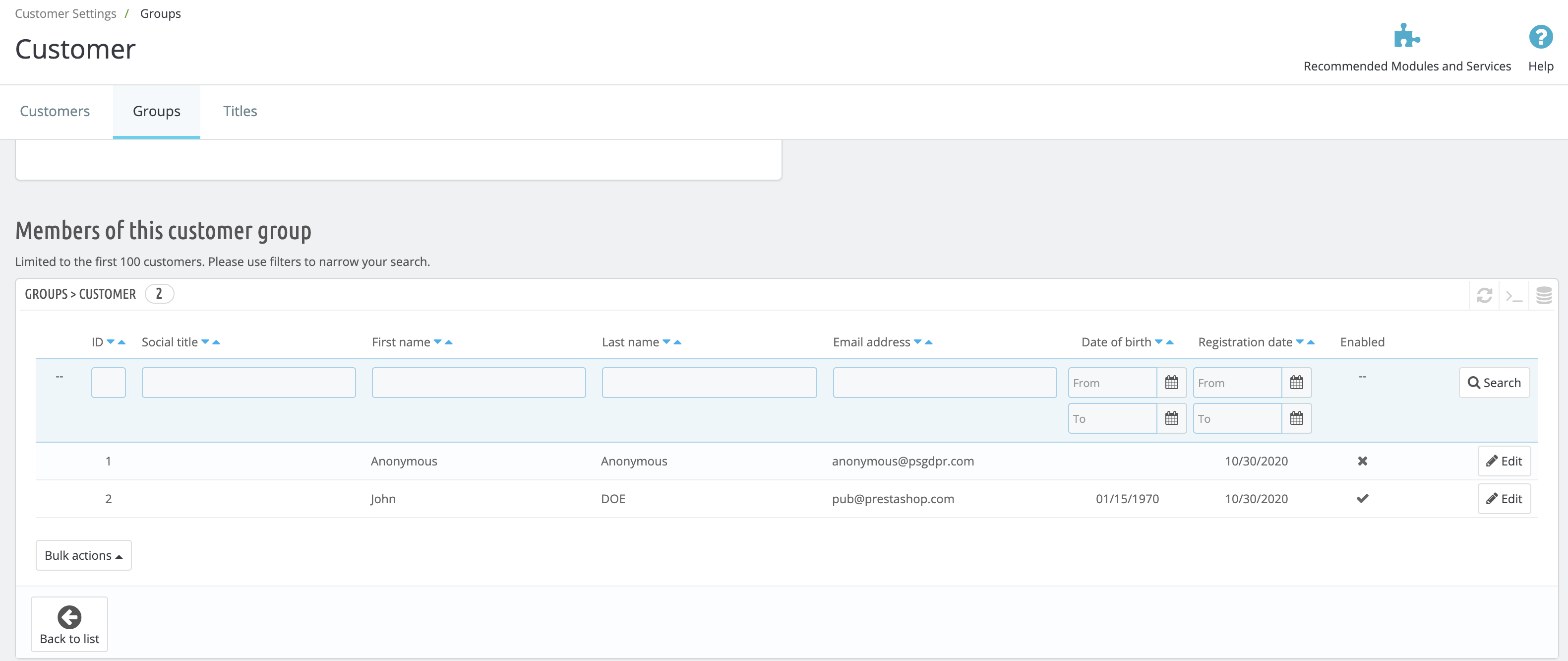
In my opinion, whatever we decide for the Customers > Customers bulk action, we should have this bulk action possible in the Shop Parameters > Customer Settings > Groups pages. Regarding the user journey, it makes sense to first enable merchants to change customers groups in this section of the back office.
LouiseBonnard
on 2 Nov 2020
Yes I understand your point of view @LouiseBonnard
In my suggestion, users will have the possibility to filter too, imagine the following cases :
- I want to update the groups of all users created today
- I want to change the group of all male clients
- etc etc
For me this feature should allow two things:
- Move customers from one group to another
- Add customers to a group
PululuK
on 2 Nov 2020
Absolutely, I like the filter idea and I admit that the _Shop Parameters > Customer Settings > Groups (edit)_ table must be reworked to fit the _Customers > Customers_ table. It will enrich the filter possibilities for users and make the back office more consistent.
@PululuK, we think the same regarding the features, but not the same place to handle them! 😄
LouiseBonnard
on 2 Nov 2020
Hello everyone!
Thanks @julienbuh for your report. :)
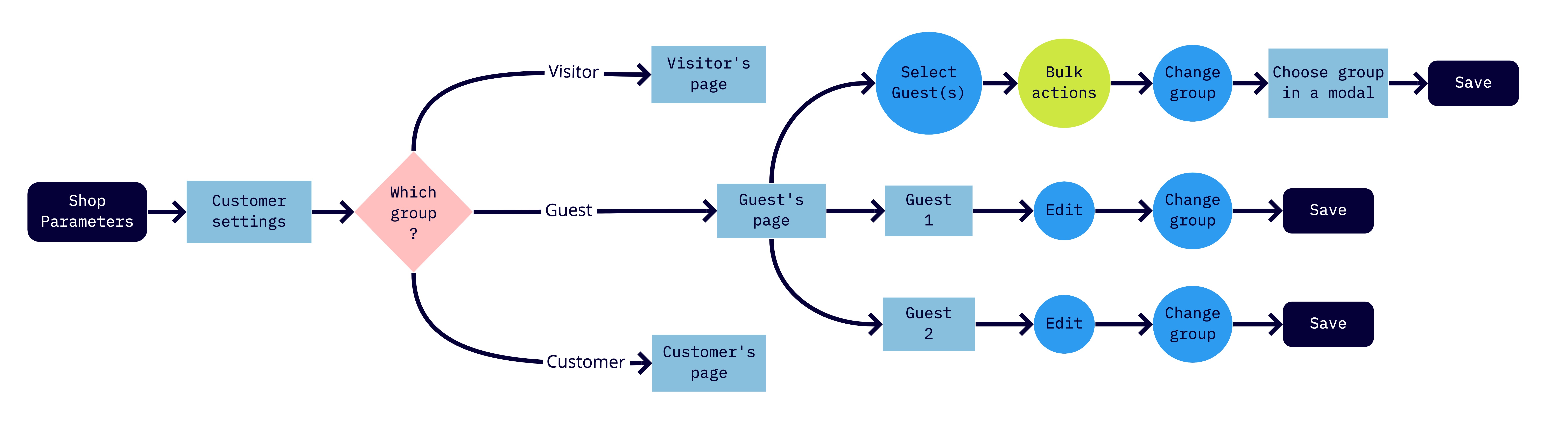
I studied both possibilities and here is the user flow of moving customers to another group from the Shop Parameters > Customer settings' page:
Good points:
- It makes sense to manage groups there because it is where users find and create new groups. So this is where moving groups should be handle.
Negative points:
- Users can't move more than 1 group to another one at a time because they have to choose only 1 group they want to manage.
- Users will need to switch group back and forth and this process can take time... Plus, this increases mistakes and oversights.
- As you can see in this user flow, bulk actions button doesn't take into account all of the existing groups but only a specific one.
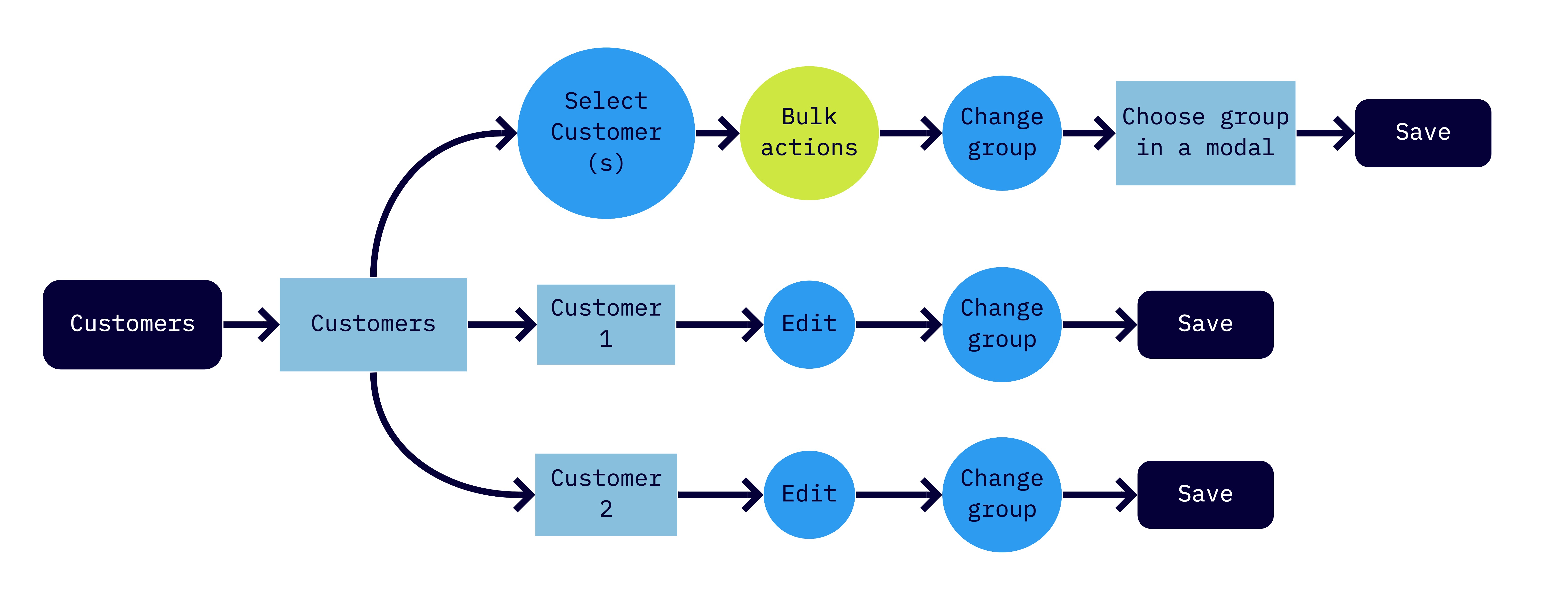
Then, here is the user flow of moving customers to another group from the Customers > Customers' page:
Good points:
- Bulk actions can be applied to all customers with any kind of groups.
- Users are able to move more than 1 group to another one at a time.
- Everything can be manage on the Customer's page, so users don't have to quit it. It means less oversights.
Negative points:
- It makes sense to manage groups here if Customer settings page doesn't exist.
In fact, the feature of filtering groups is really interesting.
Let me know wdyt?
 prestascott
on 12 Nov 2020
prestascott
on 12 Nov 2020
Related issues
 rGaillard
·
3Comments
rGaillard
·
3Comments
 itisco
·
3Comments
itisco
·
3Comments
 hiousi
·
3Comments
hiousi
·
3Comments
 nrcjea001
·
3Comments
nrcjea001
·
3Comments
 matks
·
3Comments
matks
·
3Comments
Most helpful comment
Hello everyone!
Thanks @julienbuh for your report. :)
I studied both possibilities and here is the user flow of moving customers to another group from the Shop Parameters > Customer settings' page:

Good points:
Negative points:
Then, here is the user flow of moving customers to another group from the Customers > Customers' page:

Good points:
Negative points:
In fact, the feature of filtering groups is really interesting.
Let me know wdyt?