Prestashop: BO - Order page - Recalculate shipping costs option enabled - the Shipping price not instantly updated
Describe the bug
When setting the "Recalculate shipping costs after editing the order" option to Yes, the shipping cost are recalculated when editing the order in BO when the price of the order exceeds the carrier's "limit" but not instantly, we need to refresh the page

When we refresh the page

Steps to Reproduce
Steps to reproduce the behavior:
- Have a carrier set up with a fee below a certain amount, free above it (For example "My Cheap carrier")

- Go to BO > Shop Parameters > Order Settings
- Set "Recalculate shipping costs after editing the order" to Yes
- On FO, make an order with this carrier, under the limit amount
- On BO, edit the order to make it exceed the limit
Additional information
- PrestaShop version: 1770rc1
- PHP version: 7.1
 khouloudbelguith
All 7 comments
Thanks for opening this issue! We will help you to keep its state consistent
![prestashop-issue-bot[bot] picture](https://avatars3.githubusercontent.com/in/60395?v=4&s=40) prestashop-issue-bot[bot]
on 2 Oct 2020
prestashop-issue-bot[bot]
on 2 Oct 2020
Related to: https://github.com/PrestaShop/PrestaShop/pull/20798
Related to: https://github.com/PrestaShop/PrestaShop/issues/21099
khouloudbelguith
on 2 Oct 2020
Ping @jolelievre could be fixed with this PR: https://github.com/PrestaShop/PrestaShop/pull/20903?
Thanks!
khouloudbelguith
on 2 Oct 2020
Hi @khouloudbelguith
it is not directly related, I think what is missing here is just an ajax update of this carrier tab.
But yes, I think it's pertinent to add this small fix to the already existing PR indeed, I have to finish fixing another tricky bug but I'll add this to the PR right after.
Thank you
 jolelievre
on 2 Oct 2020
jolelievre
on 2 Oct 2020
Hi @khouloudbelguith,
I looked into the carrier update to see if I could integrate it easily in my PR, but no ajax update
of this part of the page exists currently. So it requires a bit of additional javascript and probably
a new Controller to fetch the appropriate formatted data.
So I think it's safer to handle this bug in a dedicated PR. Although it should probably be done
after the #20903 is merged.
jolelievre
on 2 Oct 2020
For a patch version instead of 1.7.7.
 LouiseBonnard
on 7 Oct 2020
LouiseBonnard
on 7 Oct 2020
Hi!
Other steps to reproduce the issue:
- Create order from the FO with only one product
- In the Shipping steps " choose a carrier with fees (not free)"
- Delete the product
- Click on the Carriers Tab
- See error
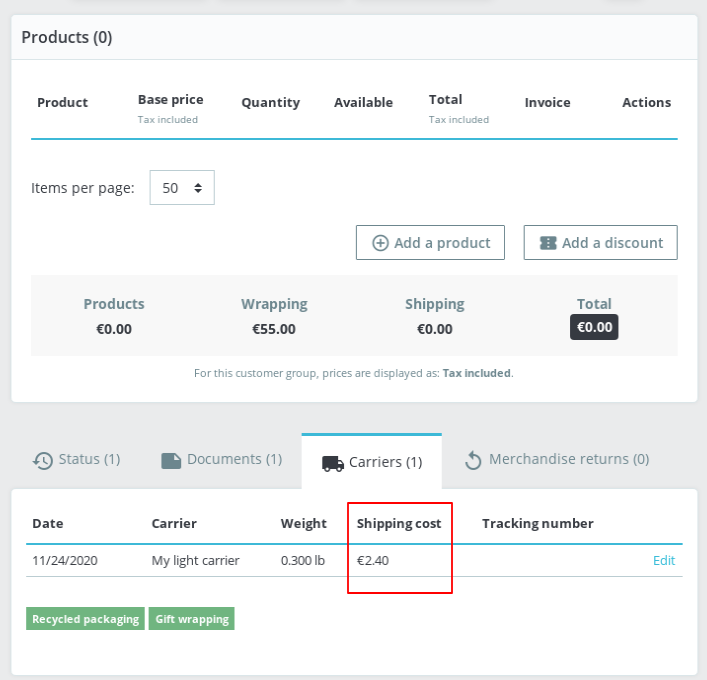
Thanks!
khouloudbelguith
on 24 Nov 2020
Related issues
 Prestaworks
·
3Comments
Prestaworks
·
3Comments
 zuk3975
·
3Comments
zuk3975
·
3Comments
 Fabuloops
·
3Comments
Fabuloops
·
3Comments
 wikao2
·
3Comments
wikao2
·
3Comments
 vincent-dp
·
3Comments
vincent-dp
·
3Comments