Prestashop: By default, turn off the 'Erase previous images' button when regenerating thumbnails
Is your feature request related to a problem
Accidentaly deleted all the images trying to regenerate for the new products.
Describe the solution you'd like - Edited by Louise B. on September 28th following https://github.com/PrestaShop/PrestaShop/issues/20962#issuecomment-692632521:
I would like to propose, the default state of "delete all images" to be off. Accidents can happen when regenerating for new products.
- [x] 1. Emphasize the irreversibility of this action by turning the blue information notification into a yellow warning one, stating: / Fixed by #21215
_Be careful! Depending on the options selected, former manually uploaded thumbnails might be erased and replaced by automatically generated thumbnails. / Also, regenerating thumbnails for all existing images can take several minutes, please be patient._ in _Admin.Design.Notification_.
[x] 2. In order to avoid previous work to be deleted by mistake, set the 'Erase previous images' switch button to 'No' by default. / Fixed by #21166
[ ] 3. Update the modal window that pops up when the user clicks on 'Regenerate thumbnails' to display a more explicit message:
title = _Regenerate thumbnails_ in _Admin.Actions_
confirm_message = _Are you sure you want to regenerate thumbnails for the selected images? With the erase option enabled, the previous thumbnails of your selection will be deleted._ in _Admin.Design.Notification_
confirm_button_label = _Regenerate_ in _Admin.Actions_
close_button_label = _Cancel_ in _Admin.Actions_
 salbatyku
All 17 comments
Thanks for opening this issue! We will help you to keep its state consistent
![prestashop-issue-bot[bot] picture](https://avatars3.githubusercontent.com/in/60395?v=4&s=40) prestashop-issue-bot[bot]
on 12 Sep 2020
prestashop-issue-bot[bot]
on 12 Sep 2020
Hi @salbatyku,
Thanks for your report.
Ping @PrestaShop/product-team what do you think?
Thanks!
 khouloudbelguith
on 14 Sep 2020
khouloudbelguith
on 14 Sep 2020
Hi @khouloudbelguith
No problem, i just figured out this is a huge problem. I almost deleted photos of 50K products.
salbatyku
on 14 Sep 2020
Hey, or do not allow to erase previous images by default?
 LouiseBonnard
on 14 Sep 2020
LouiseBonnard
on 14 Sep 2020
Hi @LouiseBonnard,
By default, "Erase previous image" is enabled
https://drive.google.com/file/d/14V-thjUtXJU859H-3921bAiOuMRQZ8um/view?usp=sharing
Thanks!
khouloudbelguith
on 14 Sep 2020
Exactly @khouloudbelguith, that's the point, perhaps it should be disabled by default to avoid deleting previous work?
LouiseBonnard
on 14 Sep 2020
@LouiseBonnard it should be allowed to erase previous images. If you're changing sizes of images you have to be able to delete the old ones. But yeah, disabled by default should be better.
salbatyku
on 14 Sep 2020
As discussed with @TristanLDD and @prestascott, here is our suggestion:
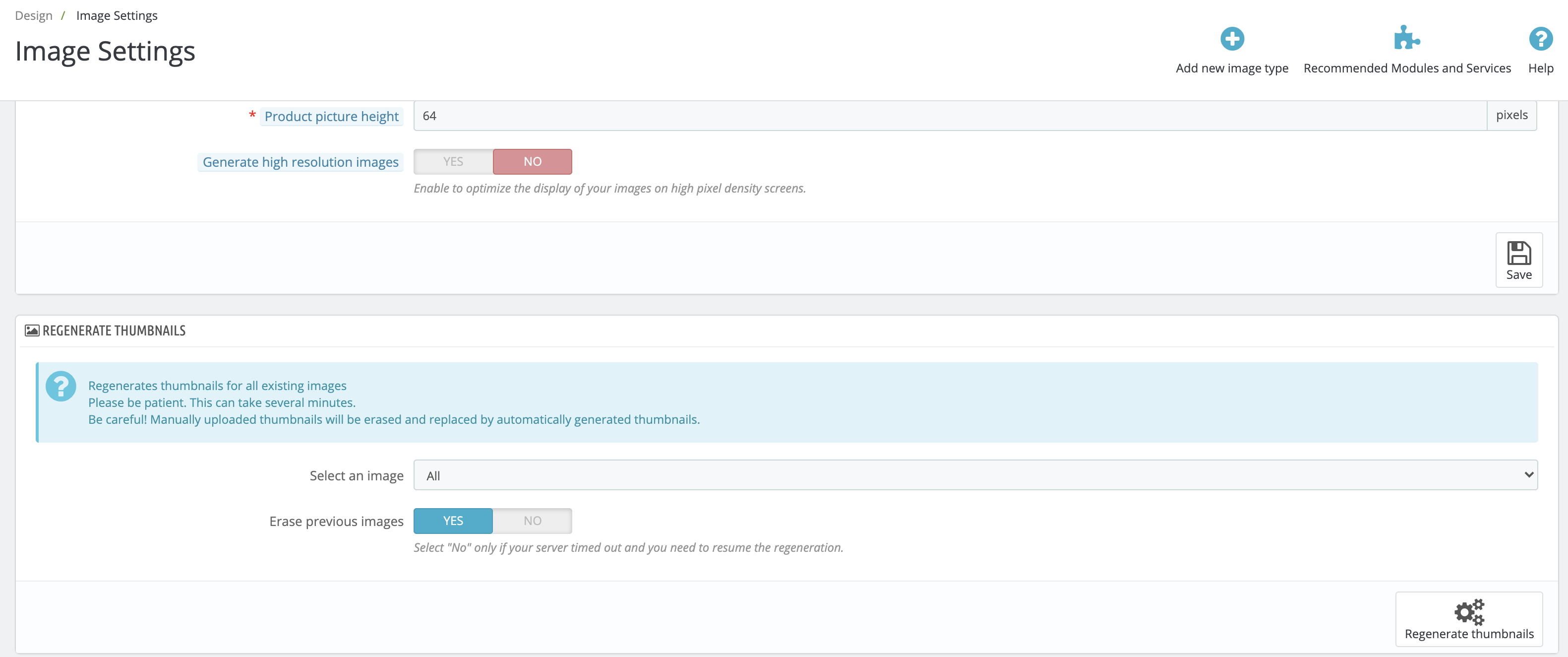
- Emphasize the irreversibility of this action by turning the blue information notification into a yellow warning one, stating:
_Be careful! Depending on the options selected, former manually uploaded thumbnails might be erased and replaced by automatically generated thumbnails. / Also, regenerating thumbnails for all existing images can take several minutes, please be patient._ in _Admin.Design.Notification_.
In order to avoid previous work to be deleted by mistake, set the 'Erase previous images' switch button to 'No' by default.
Update the modal window that pops up when the user clicks on 'Regenerate thumbnails' to display a more explicit message:
title = _Regenerate thumbnails_ in _Admin.Actions_
confirm_message = _Are you sure you want to regenerate thumbnails for the selected images? With the erase option enabled, the previous thumbnails of your selection will be deleted._ in _Admin.Design.Notification_
confirm_button_label = _Regenerate_ in _Admin.Actions_
close_button_label = _Cancel_ in _Admin.Actions_
@Julievrz, feel free to challenge this wording. ;-)
LouiseBonnard
on 15 Sep 2020
Thank you Louise for this wording, I like it. 👍
Just one question about this sentence : "Are you sure you want to regenerate thumbnails for the selected images? Combined with the second option, it will delete your previous thumbnails images."
By "combined with the second option", do you mean "by choosing "Yes" on the second switch button?

If yes, I would suggest something like: "Are you sure you want to regenerate thumbnails for the selected images? Combined with the switch button set to "Yes", it will delete your previous thumbnails images."
or "Combined with an affirmative answer to the second option, it will delete your previous thumbnails."
What do you think @LouiseBonnard ?
 Julievrz
on 23 Sep 2020
Julievrz
on 23 Sep 2020
You're right, it is not clear enough, thanks! What about _Are you sure you want to regenerate thumbnails for the selected images? With the option to erase them enabled, it will delete all your previous thumbnails images._ to call a spade a spade?
LouiseBonnard
on 23 Sep 2020
I tried to modify a little bit your sentence to clarify whether "selected images" or "all previous images" will be deleted.
(Example, see screenshot) Let's say a merchant wants to regenerate thumbnails only for "Categeories" images, if he/she enables the erase option, it will only delete the previous thumbnails of selected images (Categories), right?

If yes, I suggest the following sentence:
"Are you sure you want to regenerate thumbnails for the selected images? With the erase option enabled,the previous thumbnails of your selection will be deleted."
What do you think @LouiseBonnard ?
Julievrz
on 23 Sep 2020
Perfectly clear, thanks a lot @Julievrz! I modify the wording in my comment. ;-)
LouiseBonnard
on 23 Sep 2020
@LouiseBonnard The 2nd point is done by #21166 (Thanks @aleksiuno)
 Progi1984
on 28 Sep 2020
Progi1984
on 28 Sep 2020
The first point would be to to change informational message to "Are you sure you want to regenerate thumbnails for the selected images? With the erase option enabled,the previous thumbnails of your selection will be deleted." right?
 aleksiuno
on 28 Sep 2020
aleksiuno
on 28 Sep 2020
@aleksiuno, hi, and congratulations on your first pull request here! You are mentioning the third point, see the description for a better overview: https://github.com/PrestaShop/PrestaShop/issues/20962#issue-699896621. First point is to emphasize the irreversibility of this action by turning the blue information notification into a yellow warning one, stating:
Be careful! Depending on the options selected, former manually uploaded thumbnails might be erased and replaced by automatically generated thumbnails. / Also, regenerating thumbnails for all existing images can take several minutes, please be patient. to be localized in Admin.Design.Notification
LouiseBonnard
on 28 Sep 2020
The first part of this task is clear, if nobody will, I will create PR this evening. The second part is more complicated though.
Currently, when the user clicks on 'Regenerate thumbnails' there is no "Modal pop-up" there is just a basic JavaScript confirmation dialog message for which you can update only the message content (you can't update the title or the button names).
So should only the confirmation dialog content be updated
OR should custom modal pop up be created, if so, is currently Prestashop using somewhere such custom confirmation dialog, if no then usually for such features libraries are used (what are the standards for choosing librarie?). Or is totally custom confirmation modal is needed?
aleksiuno
on 29 Sep 2020
It would be amazing, thank you very much!
🙌
Absolutely, the idea is to turn this JS confirmation dialog message into a modal window. We did the same for the table items, cf. https://github.com/PrestaShop/PrestaShop/issues/17847. Maybe @sowbiba could help you with this?
LouiseBonnard
on 29 Sep 2020
Related issues
 wikao2
·
3Comments
wikao2
·
3Comments
 Prestaworks
·
3Comments
Prestaworks
·
3Comments
 PrestaShark
·
3Comments
PrestaShark
·
3Comments
 nrcjea001
·
3Comments
nrcjea001
·
3Comments
 marionf
·
3Comments
marionf
·
3Comments