Prestashop: Login to BO in 1.7.6.7 does not work
Describe the bug
As per title, when I try to login into my BO this not work. If I put a wrong password prestashop correctly tells me I'm wrong but if I use the correct data nothing happens.
Expected behavior
Redirect to back office
Steps to Reproduce
Steps to reproduce the behavior:
- Go to https://yourshop/folder/index.php
- Insert username and password
- Click ENTRA (I'm from Italy, I think the EN version says LOGIN)
- Here is nothing
Additional information
- PrestaShop version: 1.7.6.7
- PHP version: 7.2.30
- Apache version (hosting): 2.4.43
- No extra Apache/PHP modules installed
- No extra customization about session and No memcached
Very plain installation
Edit
I found out that even the customer access to the My Account area in the front end are compromised. They are redirected to a blank page and they can't do anything.
 kasugaicrow
All 42 comments
Thanks for opening this issue! We will help you to keep its state consistent
![prestashop-issue-bot[bot] picture](https://avatars3.githubusercontent.com/in/60395?v=4&s=40) prestashop-issue-bot[bot]
on 7 Jul 2020
prestashop-issue-bot[bot]
on 7 Jul 2020
Same here after upgrading from 1.7.6.5 with 1click module.
In the console we can see :
Request URL: http://xxxx.com/admin/index.php?controller=AdminDashboard&token=4182a4a5b07c186d47a13f66a0d9ac61
Request Method: GET
Status Code: 302 Found
 EukaPS
on 7 Jul 2020
EukaPS
on 7 Jul 2020
I have same problem... after upgrading from 1.7.6.5 with 1click module.
 wlakin
on 7 Jul 2020
wlakin
on 7 Jul 2020
Hello all,
this is concerning. Could you please give us:
- your original PrestaShop version
- your PHP version
- if you have any module related to BO access (a security module, perhaps ?)
Did you get any error during the upgrade ?
Thanks in advance.
 SimonGrn
on 8 Jul 2020
SimonGrn
on 8 Jul 2020
Same problem. Using PHP 7.1, using memcache, using 1.7.6.7, no additional (backoffice) security modules present.
Error log:
[Wed Jul 08 08:28:54.649345 2020] [lsapi:notice] [pid 362529:tid 140505193105152] [client X.X.X.X:26289] [host www.XXXXX.be] Backend log: PHP Notice: Undefined index: class_name in /home/u40880p36579/domains/XXXXX.be/public_html/ecommerce/classes/controller/AdminController.php on line 596\n, referer: https://www.XXXXX.be/ecommerce/adminXXXXXXXX/index.php?controller=AdminLogin&token=XXX
 deebug
on 8 Jul 2020
deebug
on 8 Jul 2020
@SimonGrn you can find Prestashop and PHP version under Additional information in the main thread. Also I haven't any module related to BO access.
kasugaicrow
on 8 Jul 2020
@kasugaicrow This bug appear only in the login page of the back office ? Can you login as customer in your front office, with old id ?
 sarahdib
on 8 Jul 2020
sarahdib
on 8 Jul 2020
I found out that even the customer access to the My Account area in the front end are compromised. They are redirected to a blank page and they can't do anything.
Added to the main thread.
Right now I can't give you further information because I did a rollback to a previous version.
kasugaicrow
on 8 Jul 2020
@SimonGrn you can find Prestashop and PHP version under Additional information in the main thread. Also I haven't any module related to BO access.
Thank you, but I was asking for the old PS version you upgraded from.
This was also directed to @EukaPS, @wlakin and @deebug since they posted in the thread and we need to find some sort of common denominator: we're not able to reproduce with only the information provided in this thread.
SimonGrn
on 8 Jul 2020
@EukaPS, @wlakin and @deebug could you try to log in after wiping your cache and cookies, please ?
SimonGrn
on 8 Jul 2020
@SimonGrn my bad. The version I upgraded from was a 1.7.6.5 whereas the PHP version was the same, so 7.2.30. I haven't encountered any error during the upgrade.
For what concerns your question, yesterday I tried to wipe the cache and cookies but the result was the same
kasugaicrow
on 8 Jul 2020
Could you also give us information on how hosted is your shop?
Nginx, apache, which versions?
Are there some apache modules / PHP modules?
Do you customize something in your BO about sessions / memcached management?
 PierreRambaud
on 8 Jul 2020
PierreRambaud
on 8 Jul 2020
@PierreRambaud added to the main thread.
kasugaicrow
on 8 Jul 2020
@kasugaicrow If you have some time for discussing with our core team, please connect on the Open Source Slack : https://join.slack.com/t/prestashop/shared_invite/zt-dkmbz5qf-I~FlEWwmRUOXunc5ui0Ucg
 Progi1984
on 8 Jul 2020
Progi1984
on 8 Jul 2020
@kasugaicrow @EukaPS @wlakin @deebug We are investigating the shop of someone who seems to observe the same issue.
The root cause of him unable to log-in is because SQL tables ps_customer_session and ps_employee_session are missing in his database. These SQL tables are new since 1.7.6.6 and needed for security purposes. They should have been added to your database when upgrading to PS 1.7.6.6.
Could you tell us whether you see these SQL tables in your database ?
 matks
on 8 Jul 2020
matks
on 8 Jul 2020
@matks I see these tables in my database but both are empty in my case
kasugaicrow
on 8 Jul 2020
@matks I see these tables in my database but both are empty in my case
Would it be possible to discuss further together on Slack ?
https://join.slack.com/t/prestashop/shared_invite/zt-dkmbz5qf-I~FlEWwmRUOXunc5ui0Ucg
matks
on 8 Jul 2020
The tables ps_customer_session and ps_employee_session were not in my database, I've created them using the SQL create table statements.
SET SESSION sql_mode='';
SET NAMES 'utf8';

CREATE TABLE `PREFIX_employee_session` (
  `id_employee_session` int(11) unsigned NOT NULL auto_increment,
  `id_employee` int(10) unsigned DEFAULT NULL,
  `token` varchar(40) DEFAULT NULL,
  PRIMARY KEY `id_employee_session` (`id_employee_session`)
) ENGINE=ENGINE_TYPE DEFAULT CHARSET=utf8;

CREATE TABLE `PREFIX_customer_session` (
  `id_customer_session` int(11) unsigned NOT NULL auto_increment,
  `id_customer` int(10) unsigned DEFAULT NULL,
  `token` varchar(40) DEFAULT NULL,
  PRIMARY KEY `id_customer_session` (`id_customer_session`)
) ENGINE=ENGINE_TYPE DEFAULT CHARSET=utf8;`
In my case PREFIX was default "pr" and using a default MySQL database, ENGINE_TYPE was InnoDB.
A very big thanks for the whole Prestashop community for figuring this one out.
deebug
on 8 Jul 2020
I've upgraded from 1.7.6.5 version.
PHP version: 7.2.29
Apache 2.4.43
No extra Apache/PHP modules installed
No extra customization about session and No memcached
I cannot login in BO also as customer to FO.
No ps_customer_session and ps_employee_session tables
Thanks @deebug :) After yours solution it work's :)
wlakin
on 8 Jul 2020
Works too on my side after @deebug analyze ; Nginx/PHP7.2-fpm ; PS 1.7.6.5 to 1.7.6.7 ; Thanks for helping
EukaPS
on 9 Jul 2020
Hi all,
After a bit more investigation, I would say that the root cause is either the extraction of the 1.7.6.7 archive that doesn't complete for some reason or, once extracted, the copy of those extracted files to the actual shop that doesn't complete.
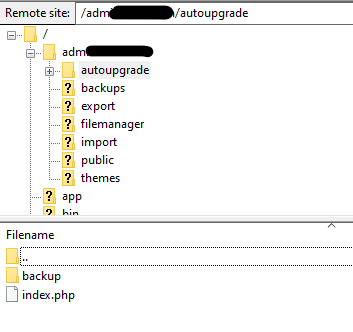
In both case, a complete log of the 1-click upgrade module would be appreciated to be able to see where exactly something went wrong. The content of the extracted 1.7.6.7 archive could be useful too. You can find them both in your-prestashop-directory/adminXXXX/autoupgrade/tmp/log.txt & your-prestashop-directory/adminXXXX/autoupgrade/lastest/
 atomiix
on 9 Jul 2020
atomiix
on 9 Jul 2020
@atomiix the odd thing is, I cannot find those files. The only files present are index.php, a directory backup also containing only index.php
deebug
on 9 Jul 2020
@deebug did you rollback? It could be the reason why.
atomiix
on 9 Jul 2020
@deebug did you rollback? It could be the reason why.
I did not rollback, all I had to do is to create the two missing tables. My installation broke after using the auto update, using the "App Installer", it's an external application located in my hosting administration panel. It's never a good idea to auto update in a live environment. Fortunately in this case it wasn't live yet.
deebug
on 10 Jul 2020
Hi, just to provide some informations here about what PrestaShop team has been doing on this topic:
Thanks to @deebug and @kasugaicrow we could investigate the state of 2 shops an issue after upgrades. We could see what was wrong but could not find informations about how it _went_ wrong.
We have tried multiple setups, configurations and scenarii (including with or without multishop, with or without superadmin, with or without cookies ...) on our side to attempt to reproduce the faulty behavior of the upgrade from 1.7.6.5 to 1.7.6.7 but we could never "see the upgrade fail". So we have nothing tangible on it, which makes it hard to fix "it", whatever "it" is.
Investigation continues. If you find yourself in the situation described on this issue, try deebug solution as it seems that many people have the same issues as him.
matks
on 12 Jul 2020
For people who want to try deebug's solution, you should probably try to install the 1-Click Upgrade module too, just to check that your core files of PrestaShop are up-to-date with 1.7.6.7 as it seems that in some cases, all files are not copied during the upgrade process.
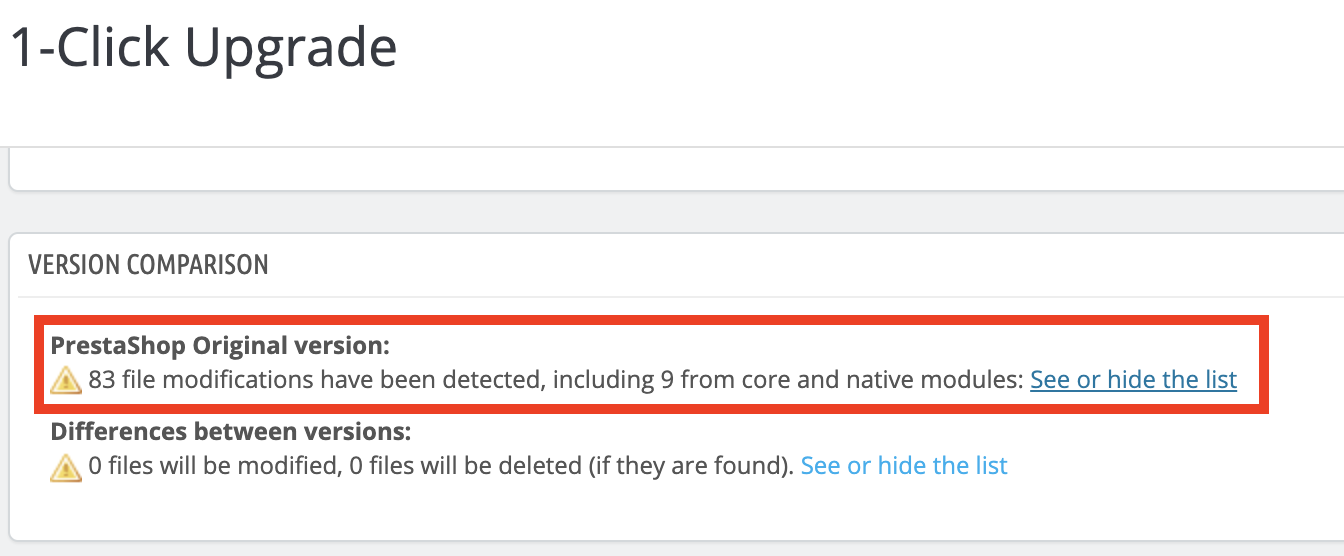
Also, it seems that this issue happens only with a third-party updater (probably softaculous). Please let us know if I'm wrong and you had this issue with our 1-Click Upgrade module.
atomiix
on 13 Jul 2020
For people who want to try deebug's solution, you should probably try to install the 1-Click Upgrade module too, just to check that your core files of PrestaShop are up-to-date with 1.7.6.7 as it seems that in some cases, all files are not copied during the upgrade process.
Also, it seems that this issue happens only with a third-party updater (probably softaculous). Please let us know if I'm wrong and you had this issue with our 1-Click Upgrade module.
I can confirm using softaculous auto update, this is now disabled. Will use 1-Click upgrade and perform backups prior to upgrade.
 didaktafrederik
on 15 Jul 2020
didaktafrederik
on 15 Jul 2020
Thanks to @sarahdib I managed to resolve my login issue, the problem was that some files for some reason were missing. Sarah provided me a clean prestashop folder and I replaced all except for the folder upload, themes, override, modules, mails, img, docs, download, config, app and the admin folder.
After deleting the install folder I was able to login properly in my backoffice.
Thank you all for the responses and for your help
kasugaicrow
on 16 Jul 2020
Hi @kasugaicrow,
So, can we close this issue?
Thanks!
 khouloudbelguith
on 27 Jul 2020
khouloudbelguith
on 27 Jul 2020
@khouloudbelguith yes, you can close it. Again thank you all for support
kasugaicrow
on 27 Jul 2020
@kasugaicrow, thanks!
Feel free to open a new one when needed.
khouloudbelguith
on 28 Jul 2020
Dear guys,
I'm updated to 1767 and I cannot login to BO. In the database there is the 2 above mentioned table.
Anyone has idea what should be wrong?
 normannasty
on 30 Jul 2020
normannasty
on 30 Jul 2020
Dear guys,
I'm updated to 1767 and I cannot login to BO. In the database there is the 2 above mentioned table.
Anyone has idea what should be wrong?
- did you use auto-upgrade module or something else ?
- do you have any error in PHP logs that might indicate the issue ?
- did you try with another browser / in incognito mode ?
matks
on 30 Jul 2020
Dear guys,
I'm updated to 1767 and I cannot login to BO. In the database there is the 2 above mentioned table.
Anyone has idea what should be wrong?
- did you use auto-upgrade module or something else ?
- do you have any error in PHP logs that might indicate the issue ?
- did you try with another browser / in incognito mode ?
I used 1 click upgrade and everything was green.
There was no error everything was green.
Yes I tried safari and chrome all of thenm in incognito also.
normannasty
on 30 Jul 2020
Dear guys,
I'm updated to 1767 and I cannot login to BO. In the database there is the 2 above mentioned table.
Anyone has idea what should be wrong?
- did you use auto-upgrade module or something else ?
- do you have any error in PHP logs that might indicate the issue ?
- did you try with another browser / in incognito mode ?
I used 1 click upgrade and everything was green.
There was no error everything was green.
Yes I tried safari and chrome all of thenm in incognito also.
I mean your PHP logs now 😄 when you try to log-in we can suppose there is something that fails and it will appear inside your logs
We need more details to understand how we can reproduce your issue:
- host
- server setup and configuration
- PrestaShop version (source)
- debug mode report
- PHP error logs
- apache error log
- javascript console log
- screenshots
Don't you know how to get this information? Please read the following article:
http://build.prestashop.com/howtos/misc/how-to-create-bug-report/
matks
on 30 Jul 2020
Its a hungarian host I think you not know them. prestashop version was 1.7.5.2.
Right now I can to anything with the site because its in maintenance mode. I cant login to admin. I enable the debug via ftp makes nothing no message.
Please tell me what exactly need and I can make it to you.
BRN
normannasty
on 30 Jul 2020
Hi to everyone.
I have the same problem!
I updated from 1.7.6.4 to 1.7.6.7
PHP 7.3.2 ( I tryed different, but nothing change)
my SQL ps_customer_session and ps_employee_session tables exist.
I didn't get any error from 1-click upgrade after installation.
I removed manually al caches many times.
no problem with FO.
I don't know what is missed, but I cant login in to BO.
some one found a solution?
 compagniadelmontale
on 3 Aug 2020
compagniadelmontale
on 3 Aug 2020
Dear guys,
I'm updated to 1767 and I cannot login to BO. In the database there is the 2 above mentioned table.
Anyone has idea what should be wrong?
- did you use auto-upgrade module or something else ?
- do you have any error in PHP logs that might indicate the issue ?
- did you try with another browser / in incognito mode ?
I used 1 click upgrade and everything was green.
There was no error everything was green.
Yes I tried safari and chrome all of thenm in incognito also.I mean your PHP logs now 😄 when you try to log-in we can suppose there is something that fails and it will appear inside your logs
We need more details to understand how we can reproduce your issue:
- host
- server setup and configuration
- PrestaShop version (source)
- debug mode report
- PHP error logs
- apache error log
- javascript console log
- screenshots
Don't you know how to get this information? Please read the following article:
http://build.prestashop.com/howtos/misc/how-to-create-bug-report/
PHP logs should indicate an issue I think
matks
on 4 Aug 2020
mod_fcgid: stderr: PHP Warning: "continue" targeting switch is equivalent to "break". Did you mean to use "continue 2"? in /var/www/vhosts/mysite.com/modules/veplatform/vendor/guzzlehttp/ringphp/src/Client/CurlFactory.php on line 382
this is the log
compagniadelmontale
on 4 Aug 2020
if use debug mode I get no error!!
compagniadelmontale
on 4 Aug 2020
mod_fcgid: stderr: PHP Warning: "continue" targeting switch is equivalent to "break". Did you mean to use "continue 2"? in /var/www/vhosts/mysite.com/modules/veplatform/vendor/guzzlehttp/ringphp/src/Client/CurlFactory.php on line 382
this is the log
This is because you use PHP7.3 and not PHP7.2
matks
on 4 Aug 2020
I turned on PHP 7.2 but nothing change a part the log.
it is very frustrating, because everything works but not BO.
compagniadelmontale
on 4 Aug 2020
Related issues
 rGaillard
·
3Comments
rGaillard
·
3Comments
 wikao2
·
3Comments
wikao2
·
3Comments
 hiousi
·
3Comments
hiousi
·
3Comments
 Fabuloops
·
3Comments
Fabuloops
·
3Comments
 nrcjea001
·
3Comments
nrcjea001
·
3Comments
Most helpful comment
The tables
ps_customer_sessionandps_employee_sessionwere not in my database, I've created them using the SQL create table statements.In my case PREFIX was default "pr" and using a default MySQL database, ENGINE_TYPE was InnoDB.
A very big thanks for the whole Prestashop community for figuring this one out.