Prestashop: CSS cache is not flushed automatically
When you had CSS compress and combine enabled in Prestashop 1.6, it used to flush the cache automatically when some of the source CSS were changed.
This no longer happens, is it done on purpose?
I think the behavior should be the same as in TPL files, which listen for changes, if it's set so.
Additional information
- PrestaShop version: 1.7.6.2
- PHP version: 7.2
 Hlavtox
All 4 comments
Hi @Hlavtox ,
The cache is cleared whenever a file is modified if the configuration is the following :
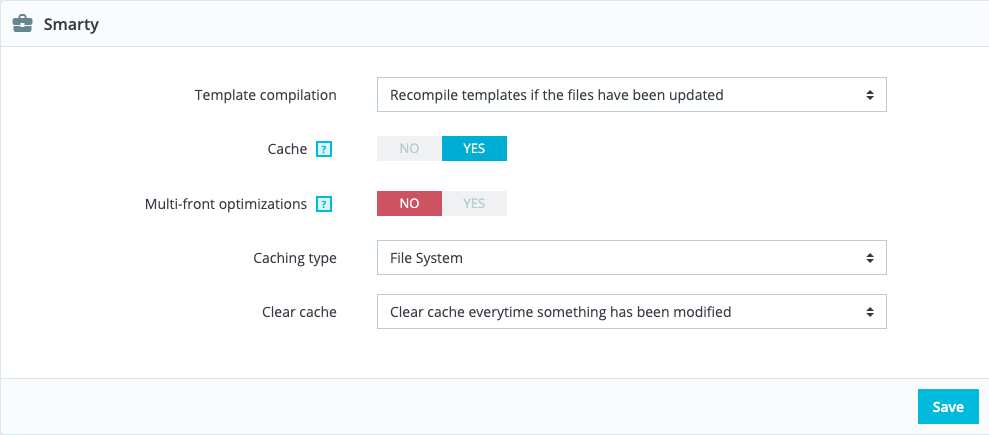
I've tried changing the theme.css file of the classic template. After refreshing my page, I saw the updates. It works in both 1.7.6.4 and 1.7.5.2.
 florine2623
on 16 Apr 2020
florine2623
on 16 Apr 2020
@florine2623 I am 99% sure that the settings in the screenshot are only related to TPL file changes.
Set your CCC setting like this:
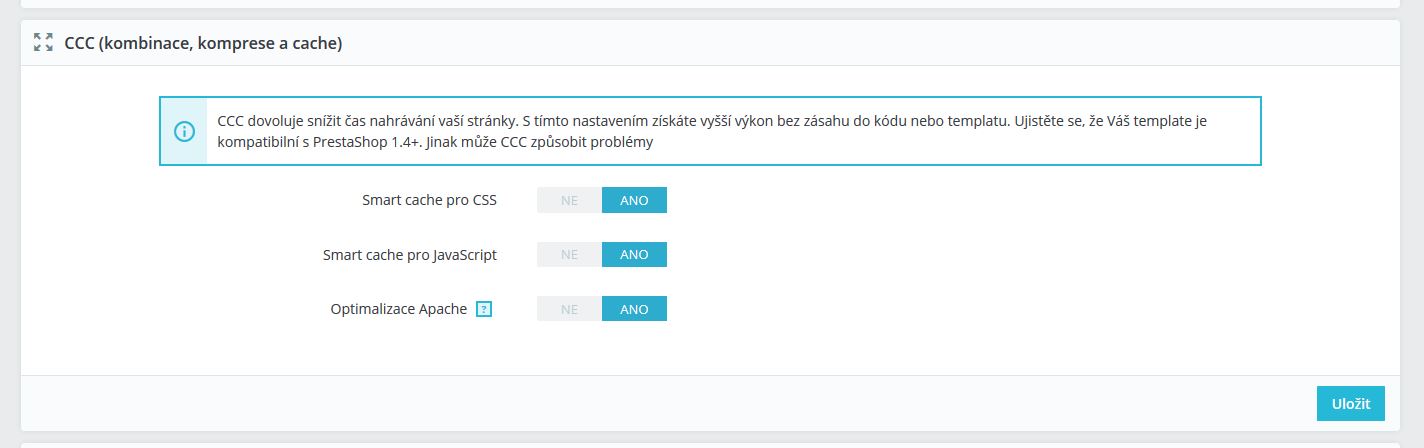
Open some page in FO to cache the CSS.
Go to themes/themename/assets/css and change something in custom.css
You can addbody{background-color: red !important;}for example.
4. Go to FO, the changes are not visible.
- Clear cache manually or delete files in themes/themename/assets/cache and you will see the change.
Hlavtox
on 16 Apr 2020
Thanks for the details @Hlavtox.
I managed to reproduce the issue with PrestaShop version 1.7.6.4 and 1.7.5.2.
Indeed, when those 3 options are set in CCC, you need to clear cache manually to see css changes.
I’ll add this to the debug roadmap so that it’s fixed. If you have already fixed it on your end or if you think you can do it, please do send us a pull request!
Thanks!
florine2623
on 16 Apr 2020
hola @PrestaShop/prestashop-product-team,
The behavior here needs to be investigated, does someone know what was the reason for the change between 1.6 and 1.7?
 sam-pires
on 10 Jun 2020
sam-pires
on 10 Jun 2020
Related issues
 vincent-dp
·
3Comments
vincent-dp
·
3Comments
 PrestaShark
·
3Comments
PrestaShark
·
3Comments
 Fabuloops
·
3Comments
Fabuloops
·
3Comments
 wikao2
·
3Comments
wikao2
·
3Comments
 nrcjea001
·
3Comments
nrcjea001
·
3Comments