Prestashop: Prestashop 1.7.6.2 Blank Page on edit Product Back Office
Describe the bug
Hi Everyone,
I have a serious problem, whenever i want to create / edit product, i got a blank page on PROD (no errors in prestashop logs, php logs and apache logs) , if i switch to debug mode, the product page shows without no errors.
I've already :
- Clear cache (/var/cache/dev & /var/cache/prod)
- Rebuild .htaccess
It happen somewhere around the formAction in ProductController.php (i can do a die('ok') within this method and have my 'ok' displayed before the return (method formAction))
Thanks for your help.
Expected behavior
Showing my edit product in PROD mode (let it in debug mode is not a solution)
Steps to Reproduce
Steps to reproduce the behavior:
- Go to 'Products'
- Click on a product or add a product
Screenshots
Additional information
- PrestaShop version: 1.7.6.2
- PHP version: 7.2.8
 kevinflou
All 26 comments
Hi @kevinflou,
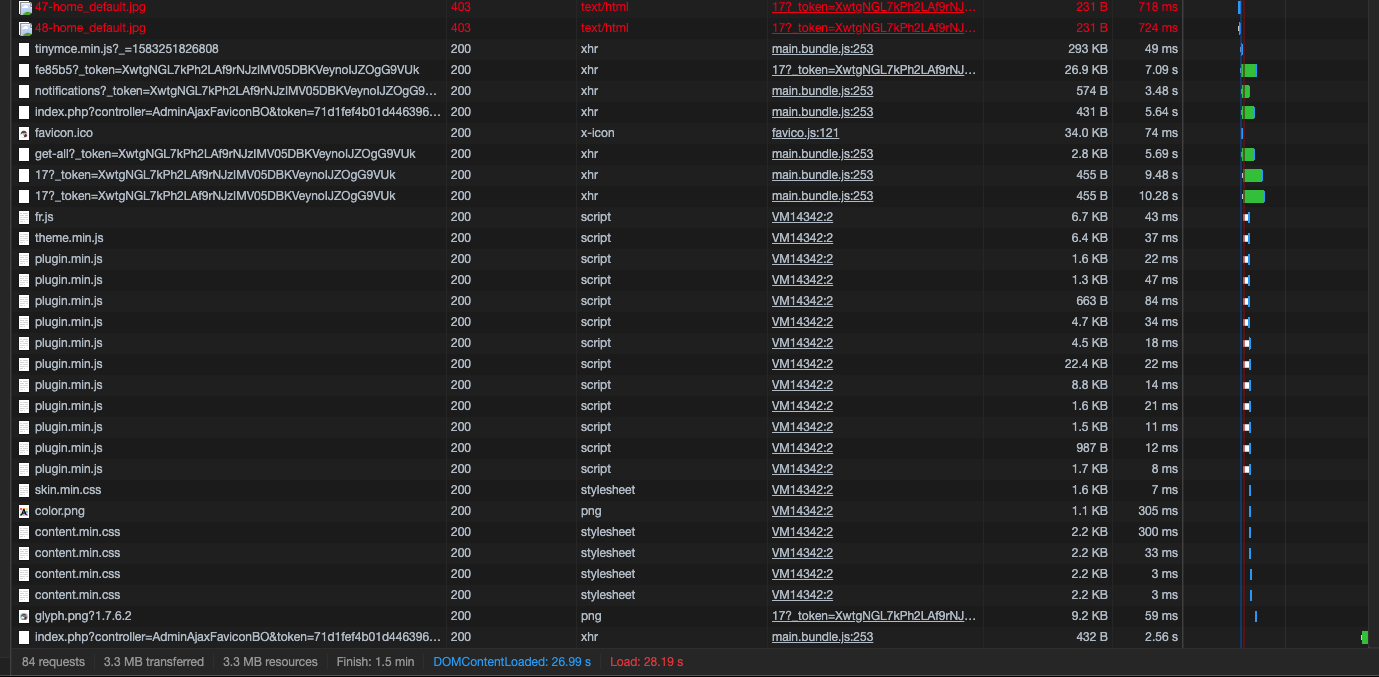
You need to enable debug mode in your store and debug request which is sent for product edition in your browser, using DevTools, so:
- enable debug mode
- go to the product page
- open up developer tools
- go to Network tab
- edit the product
- wait for an error, you should see red request information in Network tab
- click on it, you should see the error message in "Response" or "Preview" tab
Thanks!
 khouloudbelguith
on 3 Mar 2020
khouloudbelguith
on 3 Mar 2020
Nothing relevant unfortunately

kevinflou
on 3 Mar 2020
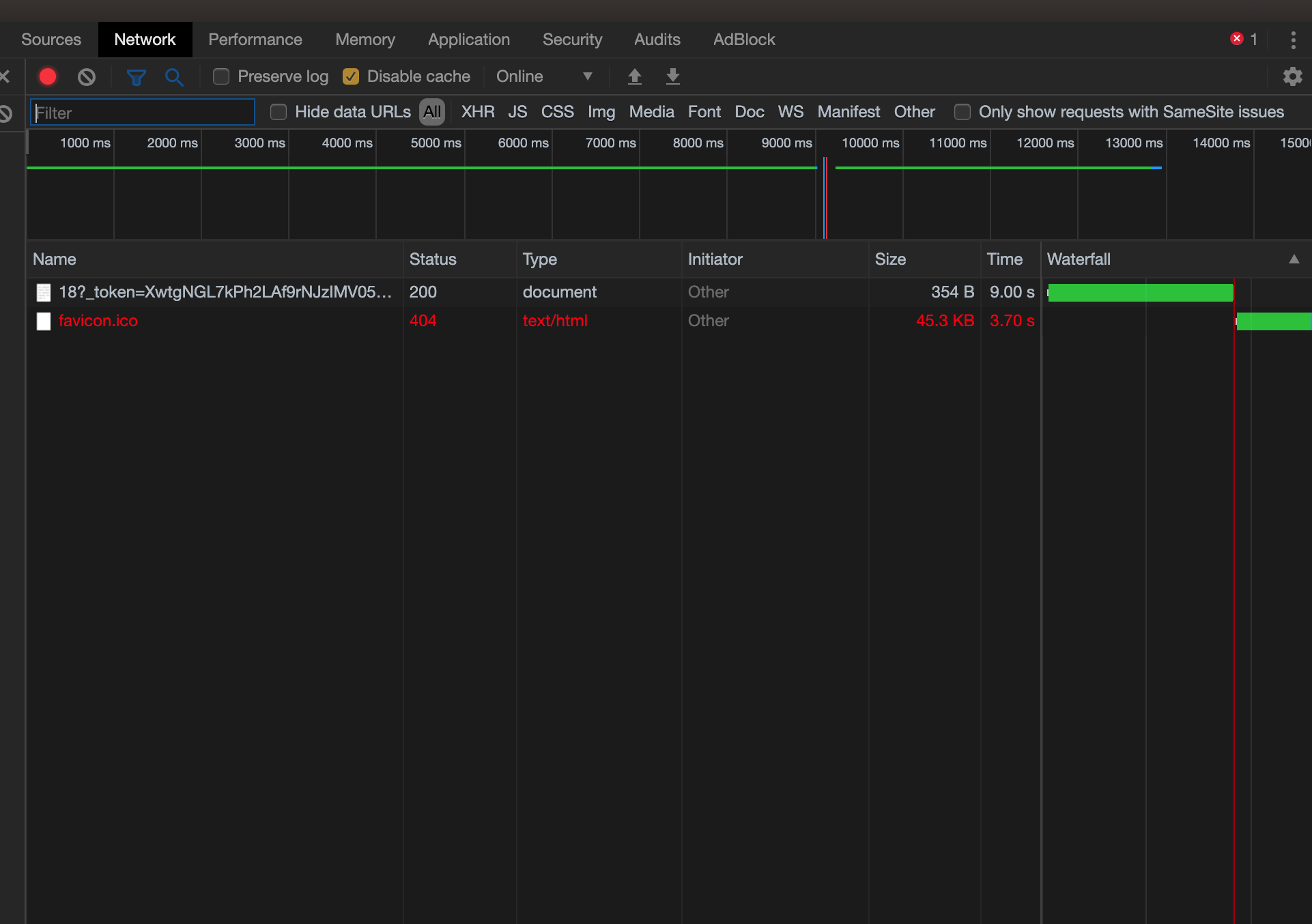
And with Debug Mode Off send this in HTML :
<html><head></head><body></body></html>
And Network (Debug mode off) :
kevinflou
on 3 Mar 2020
@kevinflou, it could be a permission issue on your server.
Thanks to check with your host and feedback.
khouloudbelguith
on 4 Mar 2020
Put a chmod on my local server , nothing else happened (chmod -R 777 ./*)
kevinflou
on 4 Mar 2020
@kevinflou, have you a large number of combinations, or features or categories?
Is it similar to this issue: https://github.com/PrestaShop/PrestaShop/issues/13698 or https://github.com/PrestaShop/PrestaShop/issues/9809?
Thanks!
khouloudbelguith
on 4 Mar 2020
22 features, 17 categories, I don't think it is similar to these issues :/
kevinflou
on 4 Mar 2020
@kevinflou,
We need to retrieve the PHP error log and the debug mode report in order to find out what's wrong.
Don't you know how to get this information? Please read the following article:
http://build.prestashop.com/howtos/misc/how-to-create-bug-report/
Thanks!
khouloudbelguith
on 4 Mar 2020
Here they are :
Php error log is empty
kevinflou
on 4 Mar 2020
@kevinflou, I found this error
php.CRITICAL: Fatal Error: Maximum execution time of 30 seconds exceeded
It is a size problem.
Thanks to check your configuration in the php.ini file & try to increase them
upload_max_filesize

post_max_size

max_file_uploads

memory_limit

max_input_vars

max_input_time

max_execution_time

set_time_limit
Thanks!
khouloudbelguith
on 4 Mar 2020
upload_max_filesize = 128M
post_max_size = 128M
max_file_uploads ??
max_execution_time = 90 ; Maximum execution time of each script, in seconds
max_input_time = 90 ; Maximum amount of time each script may spend parsing request data
memory_limit = 256M ; Maximum amount of memory a script may consume (8MB)
max_input_vars = 5000
set_time_limit ??
Still blank
kevinflou
on 4 Mar 2020
@kevinflou,
Use the following settings to optimize the performances:
; Increase this value if you are able to do it
memory_limit = 512M
max_execution_time = 300
max_input_time = 300
upload_max_filesize = 20M
post_max_size = 22M
; Increase this value if you work with products with a lot of combinations
max_input_vars = 20000
allow_url_fopen = on
For more details you can follow those links:
https://devdocs.prestashop.com/1.7/scale/optimizations/#1-php
https://devdocs.prestashop.com/1.7/basics/installation/system-requirements/#how-to-verify-your-server-meets-prestashop-s-requirements
Thanks!
khouloudbelguith
on 4 Mar 2020
No luck, still a blank page
kevinflou
on 4 Mar 2020
@kevinflou, Could you please try to run those command lines to remove the cache:
rm -fR /Projet_PrestaShop/var/cache/*
php -d memory_limit=-1 ./bin/console cache:clear
php -d memory_limit=-1 ./bin/console cache:clear --env=prod
Thanks!
khouloudbelguith
on 4 Mar 2020
php -d memory_limit=-1 ./bin/console cache:clear
php -d memory_limit=-1 ./bin/console cache:clear --env=prod
// Clearing the cache for the dev environment with debug
// true
[OK] Cache for the "dev" environment (debug=true) was successfully cleared.
// Clearing the cache for the prod environment with debug
// false
[OK] Cache for the "prod" environment (debug=false) was successfully cleared.
No luck, still happens :(
kevinflou
on 4 Mar 2020
@kevinflou, could you please follow this link: https://github.com/PrestaShop/php-ps-info
phppsinfo file provides an equivalent to the phpinfo() function that reports PrestaShop Requirements information about the PHP/MySQL/Apache environment and offers suggestions for improvement.
Or simply download this file
phppsinfo.php.zip
- Upload the file to the server. You should upload your file to the exact directory you want to test. Typically, this will be your httpdocs (/var/www/vhosts/example.com/httpdocs/) directory, although you can upload it to any subdirectory on your server as well. Use FTP to upload the file.
- Visit the page in your browser. If you uploaded it to your html directory, you should now visit http://www.example.com/phppsinfo.php, replacing example.com with your own domain name.
- Now you can view all of the information about PHP for your server for that particular directory.

Thanks to check and feedback.
khouloudbelguith
on 4 Mar 2020
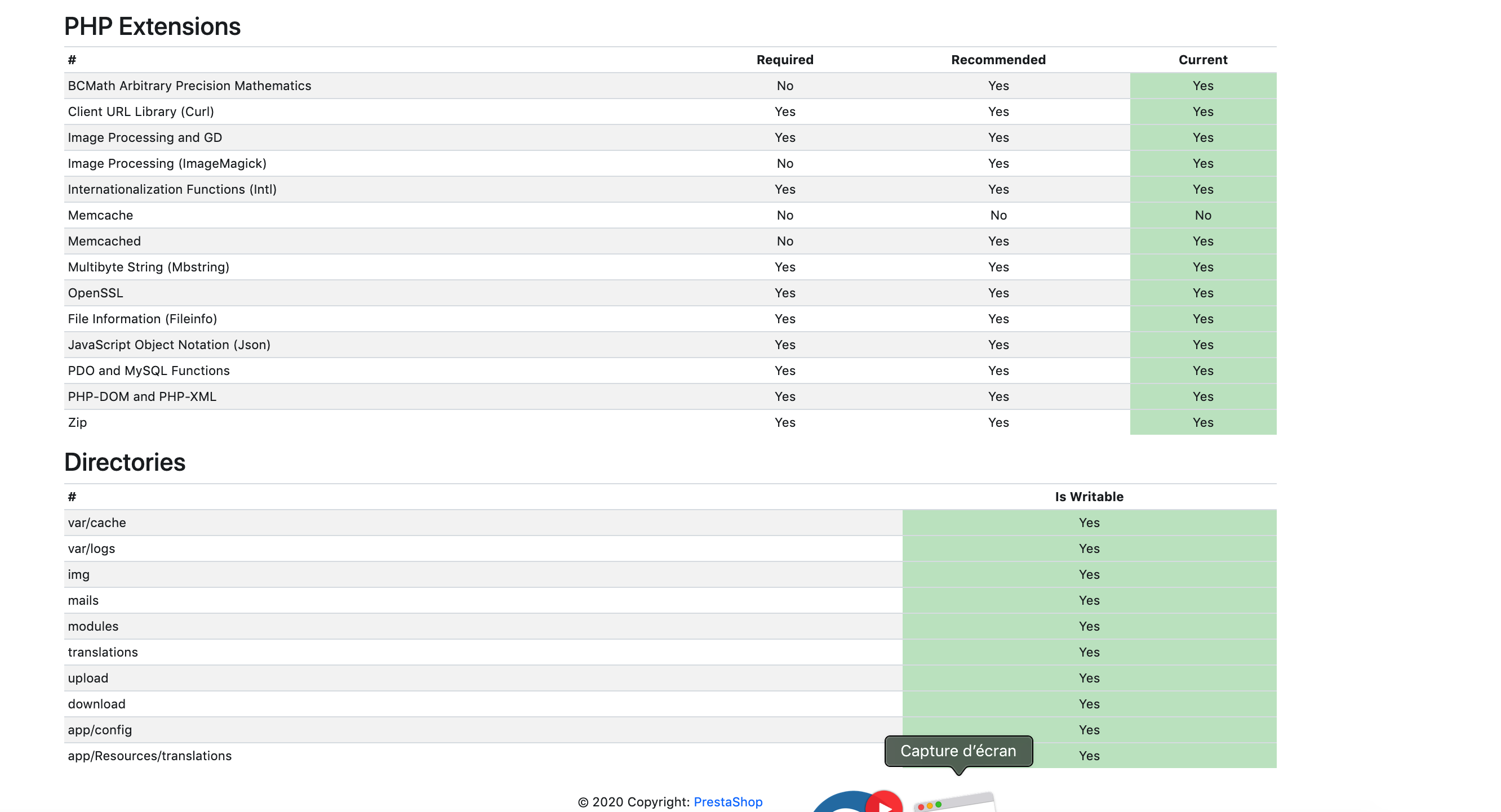

kevinflou
on 4 Mar 2020
@kevinflou, thanks to increase those options
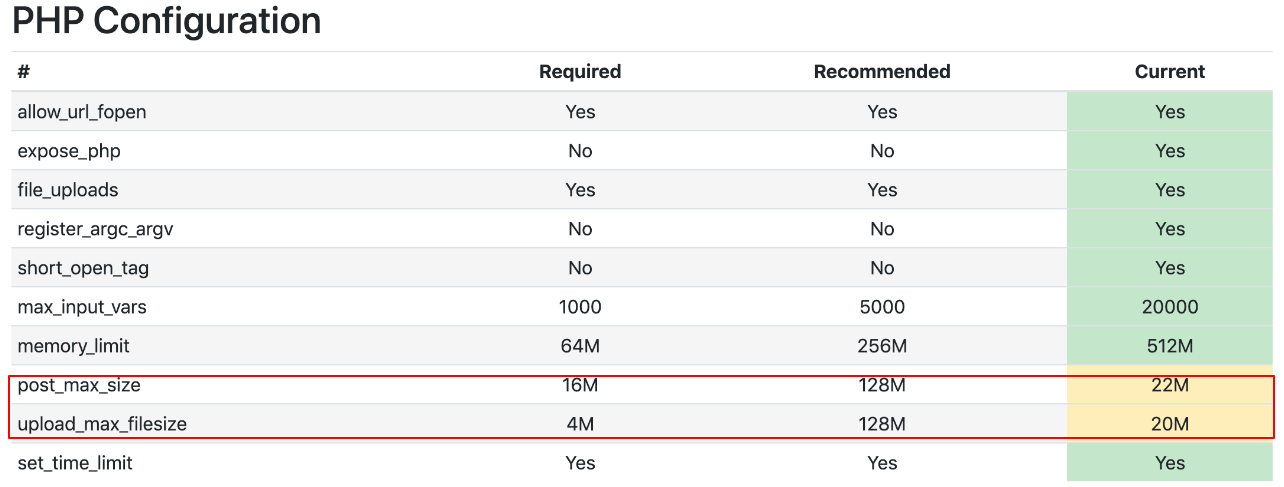
Thanks!
khouloudbelguith
on 4 Mar 2020
You asked me to change them, no luck, doesn't work either
kevinflou
on 4 Mar 2020
@kevinflou, when debug mode is enabled, the issue doesn't occur.
So, the issue is probably related to the cache.
PrestaShop features a Dev Mode, which allows you to configure your use of PHP to display error messages.
Thanks!
khouloudbelguith
on 4 Mar 2020
Solved , it was about the 'displayAdminProductsExtra' that was used in database and not in positions tab, don't know what it was doing there but it was making my page crash, removing it from database solved my issue 👍
kevinflou
on 4 Mar 2020
@kevinflou, Great!
Since it is fixed, I will close the issue, feel free to open a new one when needed.
Thanks!
khouloudbelguith
on 4 Mar 2020
Salut @kevinflou, j'ai le même problème que toi mais je n'ai pas bien compris comment tu as corrigé ton problème
 alex4102
on 12 Mar 2020
alex4102
on 12 Mar 2020
Hello,
I have the same problem as you.
No error log, the page is available in debug mode, and blank page otherwise.
I tried to desactivate everything (overrides, modules, features and combinations...).
How did you resolved this issue?
 QuentinMaypic
on 24 Mar 2020
QuentinMaypic
on 24 Mar 2020
@QuentinMaypic
I fix my problem by removing vendors, composer.json and composer.lock.
Download the 2 composer files from the release of your prestashop version : https://github.com/PrestaShop/PrestaShop/tree/1.7.6.4 for the 1.7.6.4 version
And execute composer install to get the right vendors
alex4102
on 24 Mar 2020
@alex4102
Thanks for your help.
So I upgraded my prestashop version from 1.7.6.0 to 1.7.6.4. It worked well, but I am still having this problem...
The only logs I have in debug mode are Warnings about "Translation not found" and one warning about classes/Media.php "Warning: filemtime(): stat failed" but I add a temporary correction to this file and It doesn't change anything...
I also have a deprecated : User Deprecated: AdminMarketing is a deprecated tab since version...
QuentinMaypic
on 25 Mar 2020
Related issues
 itisco
·
3Comments
itisco
·
3Comments
 matks
·
3Comments
matks
·
3Comments
 vincent-dp
·
3Comments
vincent-dp
·
3Comments
 nrcjea001
·
3Comments
nrcjea001
·
3Comments
 wikao2
·
3Comments
wikao2
·
3Comments
Most helpful comment
Solved , it was about the 'displayAdminProductsExtra' that was used in database and not in positions tab, don't know what it was doing there but it was making my page crash, removing it from database solved my issue 👍