Prestashop: Exception - Transplant the contactform module to the displayAdminEndContent hook
Edit by Khouloud
Steps to reproduce the issue
- Go to the BO => Design => Positions page
- Click on the button "Transplant a module" => redirection to "TRANSPLANT A MODULE" page
- Select the
contactformmodule - Select a "Transplant to" =>
displayAdminEndContenthook - Save
- See error
Describe the bug
Suddenly the frontend and the backend became full WHITE & EMPTY screen. After several hours trying to know what's happening the only error i found is this:
PrestaShopPrestaShopCoreDataLayerDataLayerException: Unable to persist data in cache data layer in /home/prestan/sinsanoroeste.com/src/Core/Localization/CLDR/DataLayer/LocaleCache.php:124
Curiously, when i hack the method saveReadPropagationResult($id, $data) to don't throw errors but only return; after error, the frontend "runs normally". But admin panel don't !? Without the "hack", both fails on the same point. I suppose that the admin accumulate another kind of error, but i'm not able to fix the first (this current issue).
To Reproduce
The most curious is that just after the first EMPTY SCREEN i was normally working. I did the installation of Prestashop 1.7.6.3 almost 2 weeks ago. It's true that i've not working very much on it. But, well, it worked fine until today.
Apparently, no change on server settings. Even i moved the shop to a new VPS (instead of shared hosting) to have more control over the environment (the MYSQL is anycase on another VPS, so it's not a variable on the problem).
After several hours searching on internet, reading and debugging and testing i finally decided to write here. I even have read other similar issues. But usually they are "closed without being solved". I'm available to be here giving all the info you ask me. So please, help.
Steps to reproduce the behavior:
- I couldn't say it: as i said above it happened when i was "normally working". Now i even cannot access to the login page. It seems some kind of problem with cache !?
- The last thing i was doing before the crash was trying to create a "hook" from admin panel. After click on "add hook" from the "hook form" it crashed, and after that it never run well again.
Additional information
PrestaShop version: 1.7.6.3
PHP version: 7.2
OPcache: Zend OPcache enabled
memcached: 3.0.3 enabled
* The whole error message with Trace rows *
PrestaShop\PrestaShop\Core\Data\Layer\DataLayerException: Unable to persist data in cache data layer in /home/prestan/sinsanoroeste.com/src/Core/Localization/CLDR/DataLayer/LocaleCache.php:124
Stack trace:
#0 /home/prestan/sinsanoroeste.com/src/Core/Data/Layer/AbstractDataLayer.php(197): PrestaShop\PrestaShop\Core\Localization\CLDR\DataLayer\LocaleCache->doWrite('es-MX', Object(PrestaShop\PrestaShop\Core\Localization\CLDR\LocaleData))
#1 /home/prestan/sinsanoroeste.com/src/Core/Data/Layer/AbstractDataLayer.php(102): PrestaShop\PrestaShop\Core\Data\Layer\AbstractDataLayer->saveReadPropagationResult('es-MX', Object(PrestaShop\PrestaShop\Core\Localization\CLDR\LocaleData))
#2 /home/prestan/sinsanoroeste.com/src/Core/Localization/CLDR/LocaleDataSource.php(62): PrestaShop\PrestaShop\Core\Data\Layer\AbstractDataLayer->read('es-MX')
#3 /home/prestan/sinsanoroeste.com/src/Core/Localization/CLDR/LocaleRepository.php(60): PrestaShop\PrestaShop\Core\Localization\CLDR\LocaleDataSource->getLocaleData('es-MX')
#4 /home/prestan/sinsanoroeste.com/src/Core/Localization/Locale/Repository.php(173): PrestaShop\PrestaShop\Core\Localization\CLDR\LocaleRepository->getLocale('es-MX')
#5 /home/prestan/sinsanoroeste.com/src/Core/Localization/Locale/Repository.php(149): PrestaShop\PrestaShop\Core\Localization\Locale\Repository->getNumberSpecification('es-MX')
#6 /home/prestan/sinsanoroeste.com/classes/controller/Controller.php(189): PrestaShop\PrestaShop\Core\Localization\Locale\Repository->getLocale('es-MX')
#7 /home/prestan/sinsanoroeste.com/classes/controller/AdminController.php(2785): ControllerCore->init()
#8 /home/prestan/sinsanoroeste.com/classes/controller/Controller.php(273): AdminControllerCore->init()
#9 /home/prestan/sinsanoroeste.com/classes/Dispatcher.php(515): ControllerCore->run()
#10 /home/prestan/sinsanoroeste.com/admin750shjdcg/index.php(102): DispatcherCore->dispatch()
#11 {main}
 caos30
All 16 comments
I get that errors Trace modifying the file:
/home/prestan/sinsanoroeste.com/src/Core/Data/Layer/AbstractDataLayer.php
Adding those 2 lines after "catch (Exception $e) {" in:
    protected function saveReadPropagationResult($id, $data)
    {
        if ($this->isWritable()) {
            //echo "<h1>id= $id</h1>"."<hr />$data<hr />";
            try {
                $this->doWrite($id, $data);
            } catch (Exception $e) {
        if (!preg_match('/adminXXXXXX/',$_SERVER['REQUEST_URI'])) return;
        echo "error: $id<hr />".str_replace("\n","<br />",$e);die();
                throw new DataLayerException(
                    'Unable to write into "' . $id . '"" (data layer : "' . __CLASS__ . '")',
                    0,
                    $e
                );
            }
        }
    }
If instead those 2 files i put only a return; then i obtain this error on admin panel:
Oops! An Error Occurred
The server returned a "500 Internal Server Error".
Something is broken. Please let us know what you were doing when this error occurred. We will fix it as soon as possible. Sorry for any inconvenience caused.
meanwhile then the frontend seems to work "fine".
caos30
on 18 Feb 2020
I've now setted to true this DEV option on /config/defines.insc.php
if (!defined('_PS_MODE_DEV_')) {
define('_PS_MODE_DEV_', true);
}
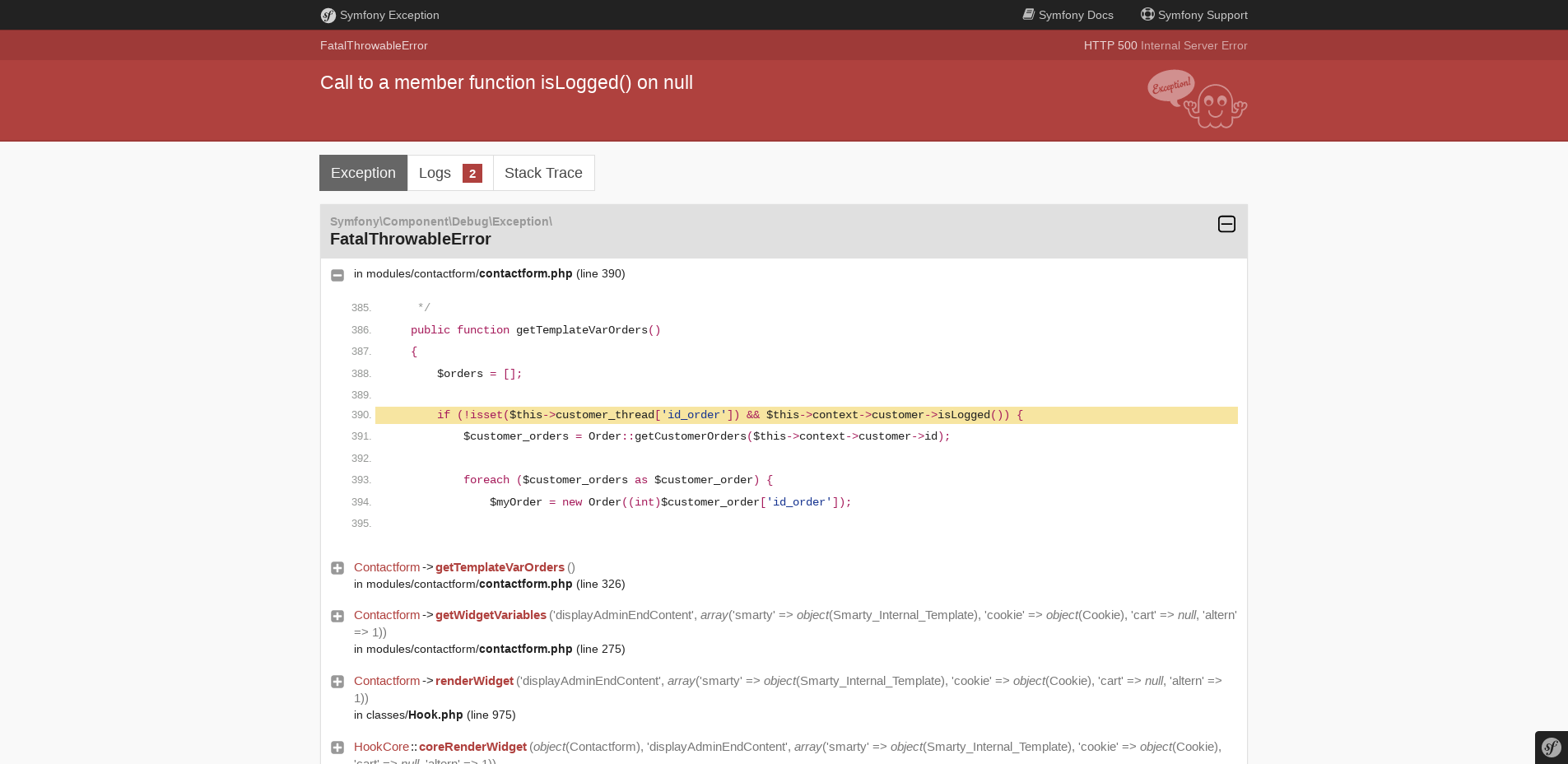
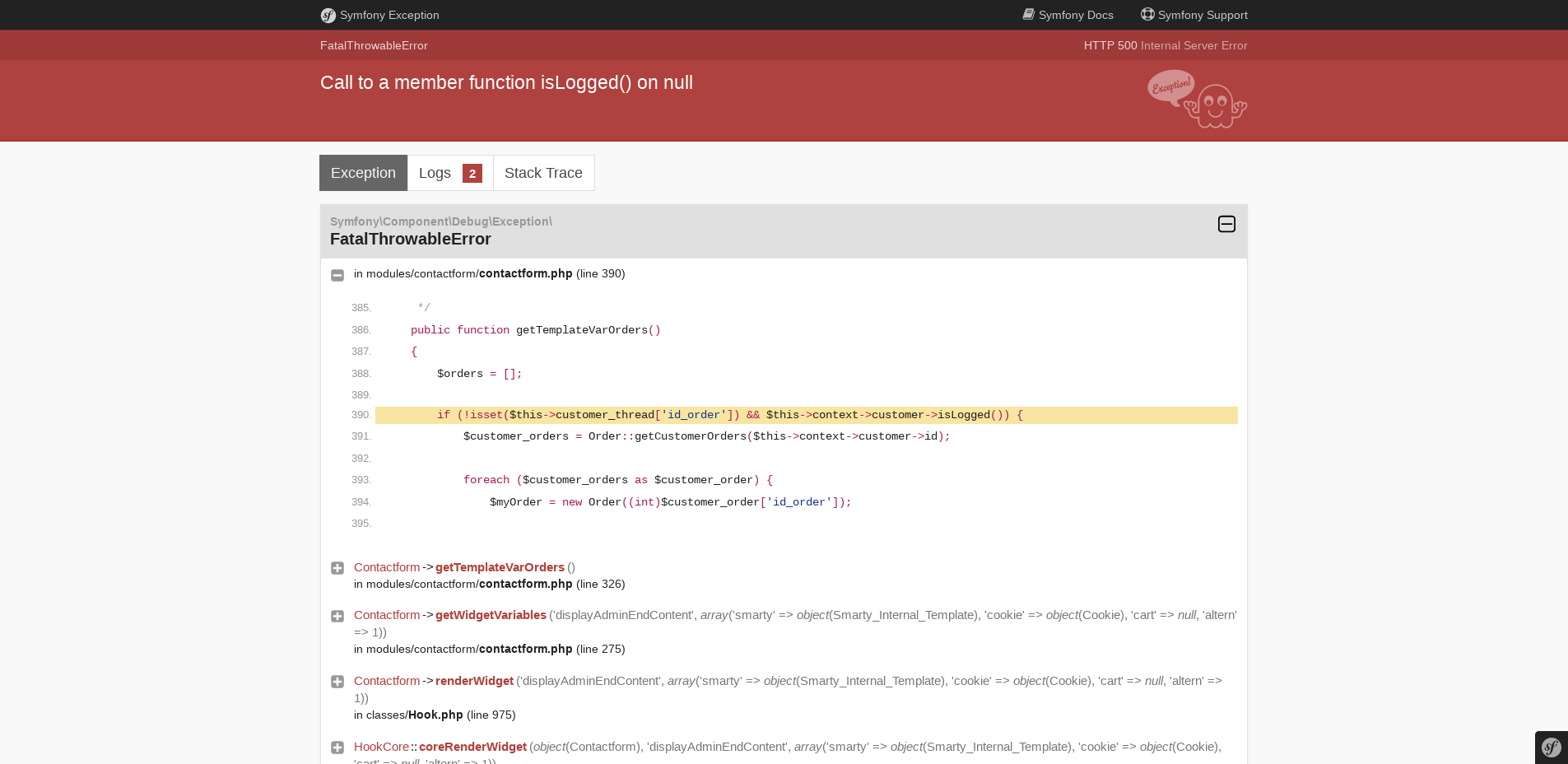
and on admin panel it shows the 500 error but with more information:
FatalThrowableError
HTTP 500 Internal Server Error
Call to a member function isLogged() on null
...
Symfony\Component\Debug\Exception\ FatalThrowableError
in modules/contactform/contactform.php (line 390)
I think that maybe is not casual that the first EMPTY SCREEN appeared when i tried to add a hook affecting the contactform module !!
The strange thing is that the error arise on the login page ¿?¿?
Anyway, i paste below the complete chain of errors showed in this page, because it's really mixing cache and hook and contactform... so i think that an EXPERT EYE can undederstand what's happening on my Prestashop:
 Contactform->getTemplateVarOrders() in modules/contactform/contactform.php (line 326)
Contactform->getWidgetVariables('displayAdminEndContent', array('smarty' => object(Smarty_Internal_Template), 'cookie' => object(Cookie), 'cart' => null, 'altern' => 1)) in modules/contactform/contactform.php (line 275)
Contactform->renderWidget('displayAdminEndContent', array('smarty' => object(Smarty_Internal_Template), 'cookie' => object(Cookie), 'cart' => null, 'altern' => 1)) in classes/Hook.php (line 975)
HookCore::coreRenderWidget(object(Contactform), 'displayAdminEndContent', array('smarty' => object(Smarty_Internal_Template), 'cookie' => object(Cookie), 'cart' => null, 'altern' => 1)) in classes/Hook.php (line 927)
HookCore::exec('displayAdminEndContent', array('smarty' => object(Smarty_Internal_Template), 'cookie' => object(Cookie), 'cart' => null, 'altern' => 1), null) in config/smarty.config.inc.php (line 167)
smartyHook(array('h' => 'displayAdminEndContent'), object(Smarty_Internal_Template)) in classes/Smarty/SmartyLazyRegister.php (line 83)
SmartyLazyRegister->__call('smartyHook', array(array('h' => 'displayAdminEndContent'), object(Smarty_Internal_Template))) in var/cache/dev/smarty/compile/8f/bd/59/8fbd59d4d89a352e6c9584668f888f355d2edf93_0.file.footer.tpl.php (line 25)
content_5e4b50bf725da5_24098497(object(Smarty_Internal_Template)) in vendor/smarty/smarty/libs/sysplugins/smarty_template_resource_base.php (line 123)
Smarty_Template_Resource_Base->getRenderedTemplateCode(object(Smarty_Internal_Template)) in vendor/smarty/smarty/libs/sysplugins/smarty_template_compiled.php (line 114)
Smarty_Template_Compiled->render(object(Smarty_Internal_Template)) in vendor/smarty/smarty/libs/sysplugins/smarty_internal_template.php (line 216)
Smarty_Internal_Template->render(false, 0) in vendor/smarty/smarty/libs/sysplugins/smarty_internal_templatebase.php (line 232)
Smarty_Internal_TemplateBase->_execute(object(Smarty_Internal_Template), null, null, null, 0) in vendor/smarty/smarty/libs/sysplugins/smarty_internal_templatebase.php (line 116)
Smarty_Internal_TemplateBase->fetch('footer.tpl') in classes/controller/AdminController.php (line 1877)
AdminControllerCore->display() in classes/controller/Controller.php (line 312)
ControllerCore->run() in classes/Dispatcher.php (line 515)
DispatcherCore->dispatch() in admin750shjdcg/index.php (line 102)
"SOLVED" ("avoided" would be more exactly).
I have deleted at database, table "ps_hook_module" the record:
id_module   id_shop     id_hook     position
 1       1       67     2
I suppose this record was the effect of my last activity on the admin panel before the crash: i created a "hook" trying to show the "contact form" on frontend in the main content zone just above the footer. But obviously i was wrong... because this have not had the desired effect.
I must say that i tried to use "hooks" without know what they are. But, men, the last thing that i would expect is that all the site could crash (frontend & backend!!).
In the meanwhile... someone can tell me what was wrong with this hook? And please, can i show on frontend a simple contact form. I know that there is the module "contactform"... but i don't know how to embed the form on a page :-|
caos30
on 18 Feb 2020
...And please, can i show on frontend a simple contact form. I know that there is the module "contactform"... but i don't know how to embed the form on a page :-|
contactform is widget-compliant module, so you just need to add {widget module='contactform'} in the place you want to render your form in your theme.
 arouiadib
on 18 Feb 2020
arouiadib
on 18 Feb 2020
Thannks @arouiadib , just an hour ago read in a publication that i can insert this code {widget module='contactform'} to render the contact form. But i understood that it only works if you insert it on a .tpl file, is it true?
I 've pasted this code in a "simple page" WYSIWIG editor, with something like this:
<div>{widget module='contactform'}</div>
But it doesn't work. So, must i access by FTP to insert a contact form in a webpage?
Thanks again!
caos30
on 18 Feb 2020
Hi @caos30,
The last thing i was doing before the crash was trying to create a "hook" from admin panel. After click on "add hook" from the "hook form" it crashed, and after that it never run well again.
Can you confirm these steps?
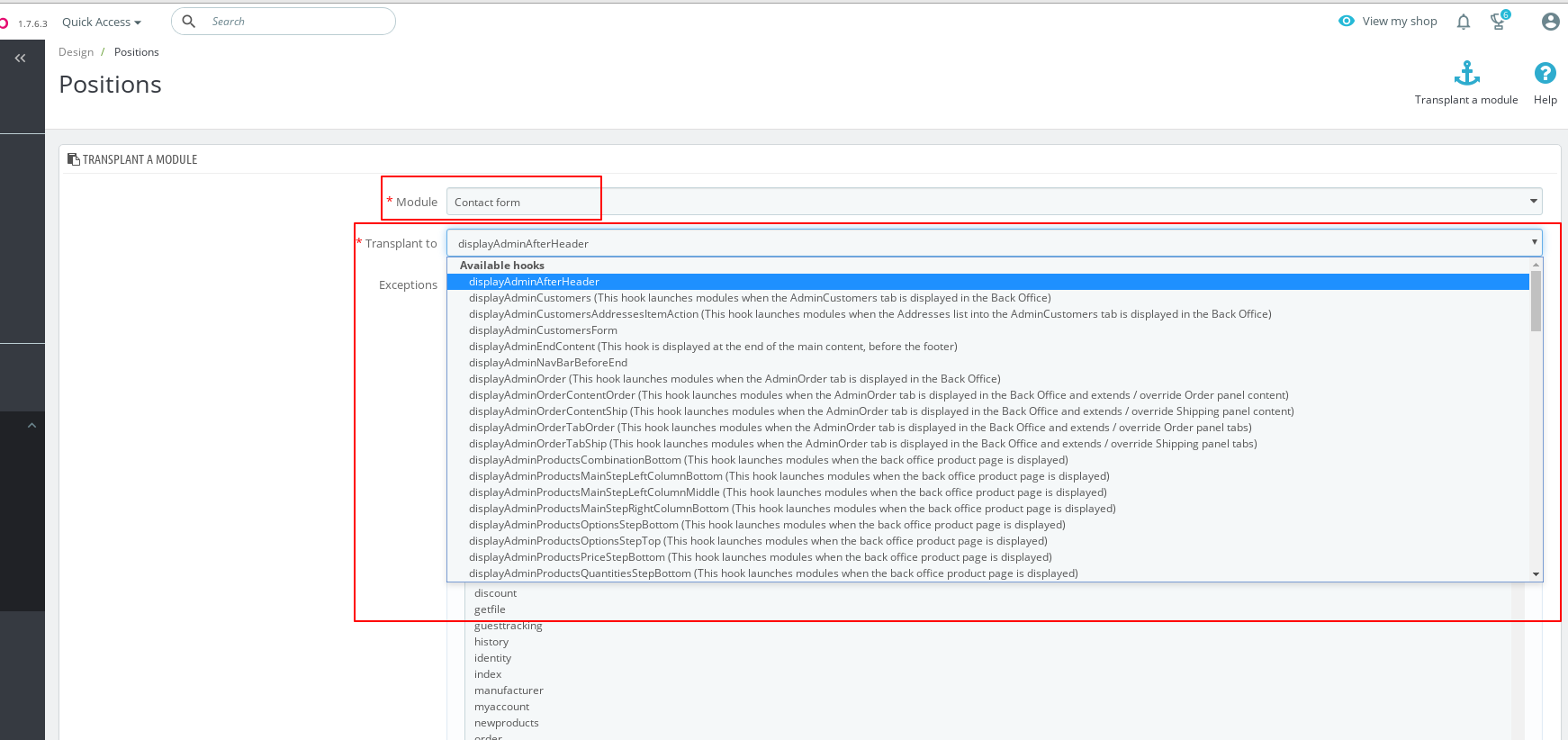
- Go to the BO => Design => Positions page
- Click on the button "Transplant a module" => redirection to "TRANSPLANT A MODULE" page
- Select the
contactformmodule - Select a "Transplant to" => which hook selected in this case?
About the widget, you can follow our documentation: https://devdocs.prestashop.com/1.7/modules/concepts/widgets/
Thanks to check & feedback.
 khouloudbelguith
on 18 Feb 2020
khouloudbelguith
on 18 Feb 2020
Thanks to you @khouloudbelguith !
You're right: just these are the steps i followed.
I choosed as transplant to the option: displayAdminEndContent (This hook is displayed at the end of the main content, before the footer)
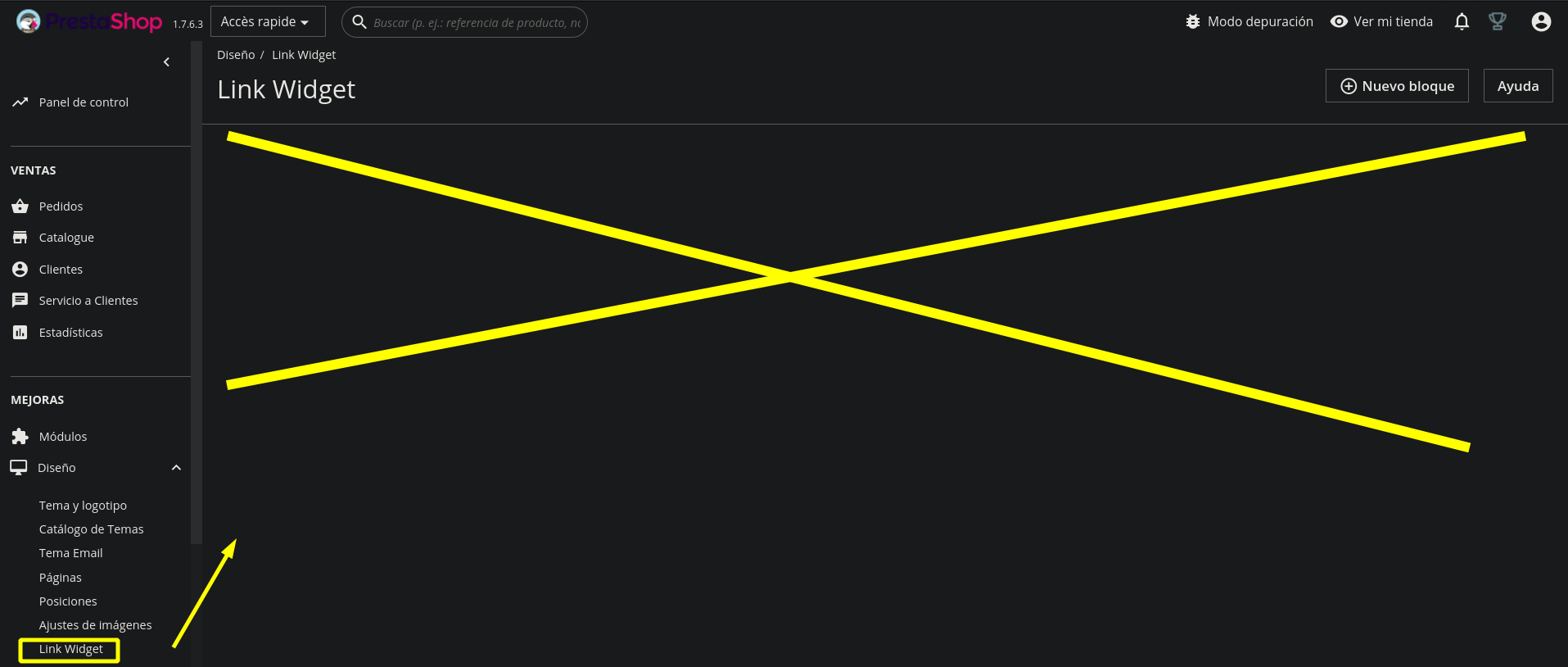
Indeed, do you know if it's NORMAL that the section Design > Link Widget is appearing COMPLETELY IN BLANK. I attached an screenshot. Certainly, i'm new to Prestashop, so i must to read the link you give me, but i think that it's strange that this section appear "almost" empty (it appears the button to "add a block". But i would expect to appear a table with no rows, but with column titles, or a message like "There is no link widgets yet.". Thanks in advance for your help. I need do discard that there is not a bug here too.
caos30
on 18 Feb 2020
@caos30, you are right, widgets work form template files, and not from back office inputs. Additionally, it is {widget name='<module_name>'} and not {widget module='<module_name>'} (as indicated by docs), sorry for this mistake. :).
arouiadib
on 18 Feb 2020
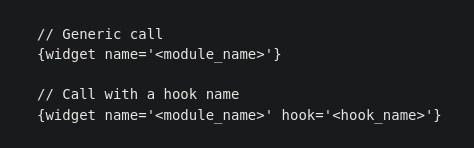
Hello @arouiadib , the docs are right... at least the link passed by @khouloudbelguith above:
https://devdocs.prestashop.com/1.7/modules/concepts/widgets/
It appears with "name=" as you say:
caos30
on 18 Feb 2020
@caos30,
Thanks for your feedback.
I manage to reproduce the issue with PS1.7.6.3 & PS1.7.5.2 and the contact form module v4.1.1.
I’ll add this to the debug roadmap so that it’s fixed. If you have already fixed it on your end or if you think you can do it, please do send us a pull request!
PS: to fix this issue instantly, you need just to rename the contactform folder to contactform_old in your Project_Folder/modules/ path.
About the link widget issue, this issue is different, can you open a new one with more information about your configuration.
Thanks!
khouloudbelguith
on 19 Feb 2020
Thank you @khouloudbelguith for reproducing the issue. You are right, there is small issue in contactform.
However I want to note that the problem never happens when you try to transplant the contactform module to a frontoffice hook. This is the normal behaviour because contactform is a frontoffice module and there is no reason of transplanting it in backoffice.
And because contactform has been written with "frontoffice" in mind, I suggest this fix to avoid the blank page in the case merchant transplant the wrong hook.
@caos30, the hooks for backoffice start with displayAdmin. Please try to transplant contactfrom to a front office hook (before the issue fixed by Prestashop) and feedback.
arouiadib
on 19 Feb 2020
Hello @arouiadib I realised that hook positions beginning with "displayAdmin" are for show the content on the admin panel. I did not know this fact when i reported the bug in this issue. But i have understood this now. Thanks anyway for your explanation, confirming this.
Said this, i followed your instructions and successfully created a hook for the "Contact form" at the position "displayFooterBefore", and effectively the contact form was showed immediately in all the pages just above the footer. Even i could remove also successfully the hook and the contact form immediately disappeared from above footer (on frontend).
So, it seems that work as expected.
So, finally, i understand that some modules are not "ready" to be inserted in "any" position (specially frontend/backend). My error was made so by ignorance. Anyway, i'm happy to know that this cannot happen again to nobody, not even by ignorance :-)
And guys... you were so so fast managing my issue! I'm very impressed. Excellent team work!
Cheers!
caos30
on 20 Feb 2020
@caos30 Happy you managed to use the contact form module :), you are welcome
arouiadib
on 20 Feb 2020
Indeed, i've got again the same cache error reported at the start of this issue, but making other changes on settings related with cache and debug mode. I opened another issue.
caos30
on 20 Feb 2020
@caos30, there is no PR to fix this issue yet.
I will re-open.
Thanks!
khouloudbelguith
on 2 Mar 2020
Fixed by PrestaShop/contactform#33
 Progi1984
on 8 Apr 2020
Progi1984
on 8 Apr 2020
Related issues
 Fabuloops
·
3Comments
Fabuloops
·
3Comments
 esistgut
·
3Comments
esistgut
·
3Comments
 PrestaShark
·
3Comments
PrestaShark
·
3Comments
 Van-peterson
·
3Comments
Van-peterson
·
3Comments
 zuk3975
·
3Comments
zuk3975
·
3Comments