Prestashop: Remove search fields when listing are empty
Describe the bug
Remove search fields, search button, labels and bulk checkbox when listing are empty
Already migrated pages:
- [x] Catalog > categories
- [x] Catalog > monitoring
- [x] Catalog > brands
- [x] Catalog > suppliers
- [x] Catalog > files
- [x] Customers > customers
- [x] Customers > addresses
- [x] Customer service > order messages
- [x] Design > pages (categories & pages)
- [x] International > localization > Languages
- [x] International > localization > Currencies
- [x] International > taxes > taxes
- [x] Shop parameters > order settings > statuses
- [x] Shop parameters > customer settings > groups
- [x] Shop parameters > contact > contacts
- [x] Shop parameters > traffic & SEO > SEO & URLs
- [x] Advanced parameters > E-mail
- [x] Advanced parameters > Team > Employees
- [x] Advanced parameters > Team > Profiles
- [x] Advanced parameters > Database > SQL manager
- [x] Advanced parameters > Database > DB backup
- [x] Advanced parameters > Logs
- [x] Advanced parameters > Webservice
Not yet migrated pages:
- [ ] Catalog > products
- [ ] Catalog > attributes
- [ ] Catalog > features
- [ ] Catalog > cart rules
- [ ] Catalog > catalog price rules
- [ ] Customer service > customer service
- [ ] Customer service > merchandise returns
- [ ] Design > image settings
- [ ] Shipping > carriers
- [ ] International > locations > Zones
- [ ] International > locations > Countries
- [ ] International > locations > States
- [ ] International > taxes > taxes rules
- [ ] Shop parameters > customer settings > titles
- [ ] Shop parameters > contact > stores
- [ ] Shop parameters > traffic & SEO > Search engines
- [ ] Shop parameters > traffic & SEO > Referrers
- [ ] Shop parameters > Search > Search
- [ ] Shop parameters > Search > Tags
- [ ] Advanced parameters > Multistore > Admin shop group
- [ ] Advanced parameters > Multistore > Admin shop
- [ ] Advanced parameters > Multistore > Admin shop url
Screenshots
Pages without empty state

Pages with empty state
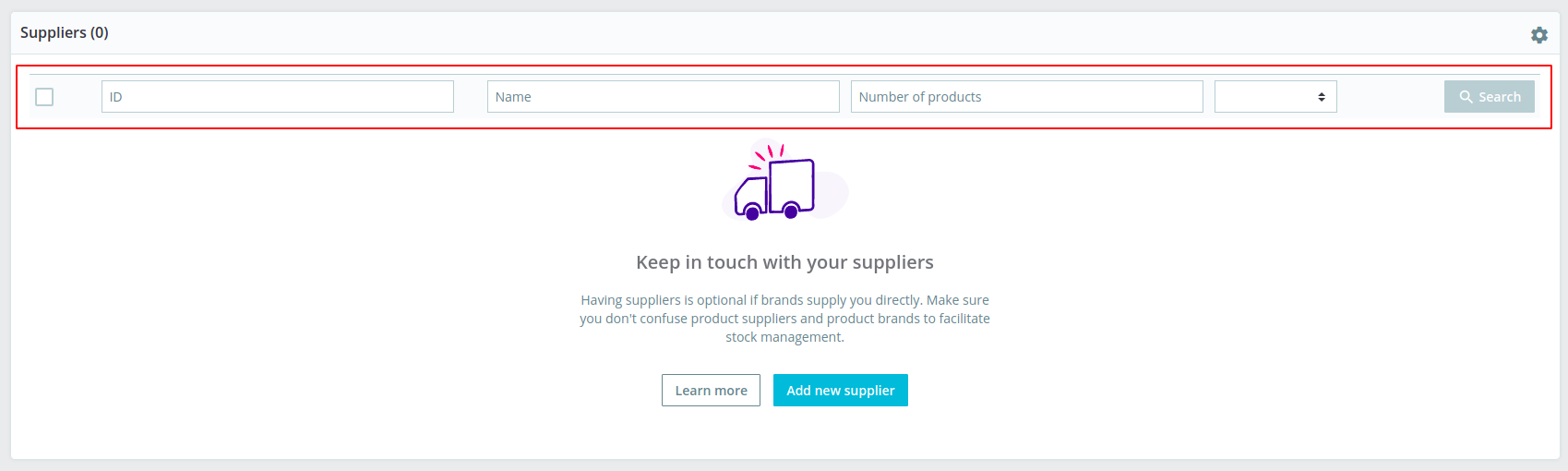
 marionf
All 3 comments
@matks can we do it at once or does it require going through all the pages ?
marionf
on 11 Feb 2020
@marionf It can be done in a single step when modifying the global system.
By the way, there was an attempt to do this task in https://github.com/PrestaShop/PrestaShop/pull/17456 however I had to revert it in https://github.com/PrestaShop/PrestaShop/pull/17547 because it broke e2e tests 😄 .
The issue was that there are 2 ways to have an empty listing:
- no data in this page (ex: credit slips page, when you have never created one)
- you used the filters to look for something that does not exist so, you performed a search and were given no results
In the 1st usecase, removing the "search" fields makes sense. In the 2nd if you do that, you cannot correct your bad search 😅
 matks
on 11 Feb 2020
matks
on 11 Feb 2020
In the 2nd if you do that, you cannot correct your bad search sweat_smile
Ah yes, nice catch !
Good news if it can be done in a signle step, I add it for the 1.7.8
marionf
on 11 Feb 2020
Related issues
 zuk3975
·
3Comments
marionf
·
3Comments
zuk3975
·
3Comments
matks
·
3Comments
zuk3975
·
3Comments
marionf
·
3Comments
zuk3975
·
3Comments
matks
·
3Comments
 rGaillard
·
3Comments
rGaillard
·
3Comments
Most helpful comment
@marionf It can be done in a single step when modifying the global system.
By the way, there was an attempt to do this task in https://github.com/PrestaShop/PrestaShop/pull/17456 however I had to revert it in https://github.com/PrestaShop/PrestaShop/pull/17547 because it broke e2e tests 😄 .
The issue was that there are 2 ways to have an empty listing:
In the 1st usecase, removing the "search" fields makes sense. In the 2nd if you do that, you cannot correct your bad search 😅