Prestashop: Unable to remove customized product from cart - minimum quantity error
Describe the bug
During testing, I got the store to a situation, where I couldn't delete product from cart. It happened only on my phone and I can't (for now) reproduce it on desktop.
- When I attempted to delete product from cart or reduce amount to 0, it threw 'You must add %quantity% minimum quantity'.
- Adding and reducing count above 1 worked OK.
- Behavior was the same if it was only this product in cart, or I added some another.
Steps to reproduce the issue:
- Customize a product with a file.
- Add it to cart.
- Refresh the page, customize the product again, do not add it to cart.
- Go to cart, try to remove product. Will not work.
- After my fix, will work as it should and the logic will count only customized products that ARE in cart.
Possible fix
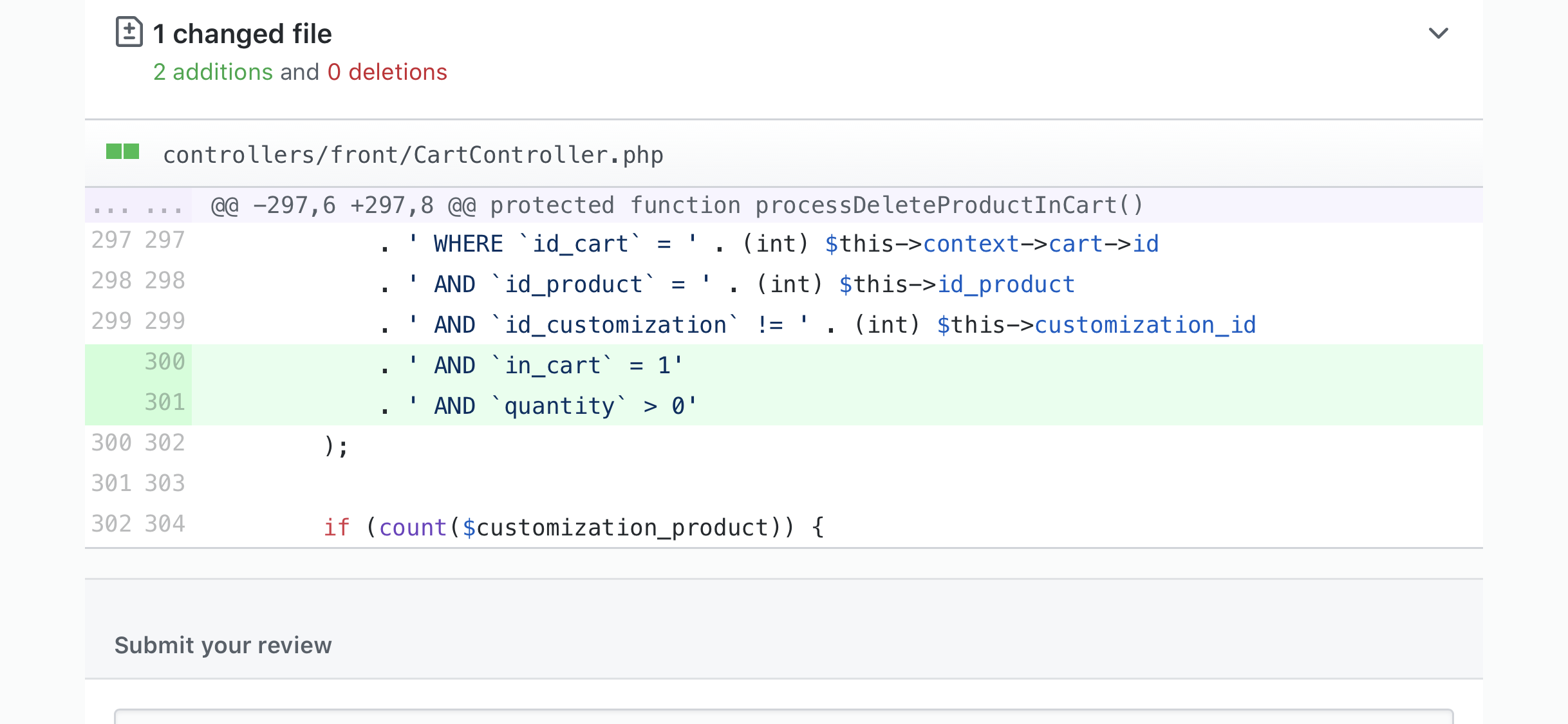
If we added two more conditions to the query, it should fix it.
in_cart = 1 AND quantity > 0
Another question is, why and how are these entries which are not in_cart and have zero quantity even created?
How it looked (ignore the variables I output to the error)

The code causing the error

Database status for given id_cart and id_product

Database status for given query

Additional information
PrestaShop version: 1.7.6.0
PHP version: 7.2
 Hlavtox
All 15 comments
Hi @Hlavtox,
Thanks for your report.
We have recently fixed two issues in PS1.7.7.0 similar to this problem.
- Customized product can't be deleted from the cart reported in this ticket: https://github.com/PrestaShop/PrestaShop/issues/15986 & fixed by this PR: https://github.com/PrestaShop/PrestaShop/pull/15987
- Removal of customization makes impossible to remove a product from the cart reported in this ticket: https://github.com/PrestaShop/PrestaShop/issues/15624 fixed by this PR: https://github.com/PrestaShop/PrestaShop/pull/15625
Thanks to check & feedback.
 khouloudbelguith
on 6 Nov 2019
khouloudbelguith
on 6 Nov 2019
@khouloudbelguith
Hi, none of these PRs seem to be related.
I don't know how the 'corrupted' entries happen, but adding these two restrictions to the query in controllers/front/CartController.php fix the issue. Have a look on it.
CHANGE FROM:
``
 /**
     * This process delete a product from the cart.
     */
    protected function processDeleteProductInCart()
    {
        $customization_product = Db::getInstance()->executeS(
            'SELECT * FROM
' . _DB_PREFIX_ . 'customization'
. ' WHEREid_cart= ' . (int) $this->context->cart->id
. ' ANDid_product= ' . (int) $this->id_product
. ' ANDid_customization` != ' . (int) $this->customization_id
);
CHANGE TO:


   ```
 /**
     * This process delete a product from the cart.
     */
    protected function processDeleteProductInCart()
    {
        $customization_product = Db::getInstance()->executeS(
            'SELECT * FROM `' . _DB_PREFIX_ . 'customization`'
            . ' WHERE `id_cart` = ' . (int) $this->context->cart->id
            . ' AND `id_product` = ' . (int) $this->id_product
            . ' AND `id_customization` != ' . (int) $this->customization_id
            . ' AND `in_cart` = 1'
            . ' AND `quantity` > 0'
        );
@Hlavtox,
Would you be willing to make a pull request on GitHub with your code suggestion?
https://github.com/PrestaShop/PrestaShop/tree/develop
In the meantime, I will try to reproduce the issue:
- What is the exact type of customization? Text or file?
- Is it required? yes or no?
- what is the exact version of the ps_shoppingcart module v2.0.2? or 2.0.3?
- Have only one customization or more
- The Minimum quantity for this product?
Thank you!
khouloudbelguith
on 21 Nov 2019
Hi @khouloudbelguith
Customization:
- File type
- Optional
- ps_shopping cart version 2.0.3
- Only one customization
- Minimum quantity for all products is 1 (default).
Hlavtox
on 27 Nov 2019
@khouloudbelguith PR with a fix #16574
Hlavtox
on 27 Nov 2019
@Hlavtox, I did not manage to reproduce the issue with PS1.7.6.1 & PS1.7.6.2build1 & ps_shoppingcart v2.0.3
https://drive.google.com/file/d/1CXBDQC057LEs9F7G_Ki--Zg-5vZCID-R/view
Ping @sarahdib, could you please try to reproduce the issue.
Thanks!
khouloudbelguith
on 28 Nov 2019
@khouloudbelguith @sarahdib
Ladies, try it with a product that has combination, maybe it has something to do with it.
I just played with around with adding and removing customization, removing product from cart, changing quantity and I got it to this situation, where the entries existed (refer to the screenshots of my database.
Hlavtox
on 28 Nov 2019
@Hlavtox, it is OK
https://drive.google.com/file/d/1KwdvClsDnXe2GSYMTng9vRSsvOTIRmDl/view
Thanks!
khouloudbelguith
on 28 Nov 2019
@khouloudbelguith Managed to reproduce the issue. See the video:
https://drive.google.com/file/d/19SuT5YMueCVa-mG3AI2Bj1_kjB1qyZt8/view?usp=sharing
- Customize a product with a file.
- Add it to cart.
- Refresh the page, customize the product again, do not add it to cart.
- Go to cart, try to remove product. Will not work.
- After my fix, will work as it should and the logic will count only customized products that ARE in cart.
Hlavtox
on 28 Nov 2019
Hello @Hlavtox @khouloudbelguith
@Hlavtox Thank you for this precious information.
@khouloudbelguith I manage to reproduce the issue in 1.7.5.2, 1.7.6.2 and develop.
 sarahdib
on 29 Nov 2019
sarahdib
on 29 Nov 2019
Hi @sarahdib, thank you!
@Hlavtox, thanks for these clarifications.
I’ll add this to the debug roadmap.
Thanks!
khouloudbelguith
on 29 Nov 2019
@khouloudbelguith @sarahdib You are welcome.
I made a PR ladies, link above. Check it out, get it accepted and we have this solved. Have a nice day! :)
Hlavtox
on 29 Nov 2019
Fixed in #16574
 Progi1984
on 10 Jan 2020
Progi1984
on 10 Jan 2020
I am running into this problem with a recent site and see that there is a fix with version 1.7.7. Is this version of Presta available?
 birdiesroom
on 5 Jun 2020
birdiesroom
on 5 Jun 2020
@birdiesroom You can apply the fix to your current Prestashop, just add these two lines and fixed! :)
Hlavtox
on 5 Jun 2020
Related issues
 marionf
·
3Comments
marionf
·
3Comments
 wikao2
·
3Comments
wikao2
·
3Comments
 Fabuloops
·
3Comments
Fabuloops
·
3Comments
 centoasa
·
3Comments
centoasa
·
3Comments
 zuk3975
·
3Comments
zuk3975
·
3Comments