Prestashop: Improve pop up information on Category deletion
The information displayed in the pop-up when removing a category is not clear, we should improve the content to make it more understandable.
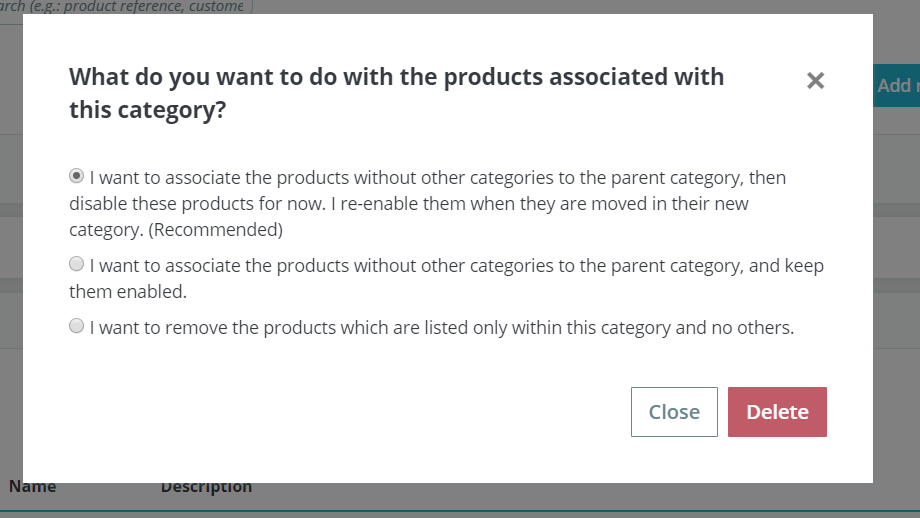
For instance, there is no information about what is happening for products which belong to 2 different categories when one of them is deleted.
 colinegin
All 2 comments
Hello @colinegin, here is a new suggestion of wording (to keep localized in Admin.Catalog.Notification), feel free to challenge it! I tend to synthesize it in order to get things clearer.
What do you want to do with the products associated with this category?
If they have no other category, I want to associate them with the parent category.
If they have no other category, I want to associate them with the parent category and turn them offline. (recommended)
If they have no other category, I want to delete them as well.
Note that if they have another category, your products will logically remain associated with it.
 LouiseBonnard
on 26 Sep 2019
LouiseBonnard
on 26 Sep 2019
Great thanks ! Maybe we should just leave the "Recommended" option, so that merchants easily know what they should do. What do you think ?
colinegin
on 26 Sep 2019
Related issues
 Fabuloops
·
3Comments
Fabuloops
·
3Comments
 hiousi
·
3Comments
hiousi
·
3Comments
 Prestaworks
·
3Comments
Prestaworks
·
3Comments
 sandra2n
·
3Comments
sandra2n
·
3Comments
 centoasa
·
3Comments
centoasa
·
3Comments
Most helpful comment
Hello @colinegin, here is a new suggestion of wording (to keep localized in Admin.Catalog.Notification), feel free to challenge it! I tend to synthesize it in order to get things clearer.
What do you want to do with the products associated with this category?
If they have no other category, I want to associate them with the parent category.
If they have no other category, I want to associate them with the parent category and turn them offline. (recommended)
If they have no other category, I want to delete them as well.
Note that if they have another category, your products will logically remain associated with it.