Prestashop: [RESOLVED] Display promotions, best-sellers ... on homepage PS 1751
Hello
Since i have update from 173 to 1751 my shop i have no possibility to "hook" the promotions, new products, prices-drops, best sellers ...) on the homepage.
I can't too put the left column with CMS pages in "content" folder.
I don't know what to do?
My ovveride folder is empty and i doesn't understand the double addons in "module" and in the "modules of the theme".
Can someone help to resolve it?
Best regards
kolorslab
Describe the bug
A clear and concise description of what the bug is.
To Reproduce
Steps to reproduce the behavior:
- Go to '...'
- Click on '....'
- Scroll down to '....'
- See error
Screenshots
If applicable, add screenshots or screenrecords to help explain your problem.
Additionnal information
PrestaShop version: N/A
PHP version: N/A
 kolorslab
All 18 comments
I use a child theme
kolorslab
on 25 Jun 2019
Hi @kolorslab,
I did not manage to reproduce the issue with PS1.7.5.1 after upgrade from 1.7.5.0 upgraded previously from PS1.7.4.4 with the 1-click upgrade v4.8.0.
The first issue, I think it is related to this issue: "Hook reset during theme upgrade": #https://github.com/PrestaShop/PrestaShop/issues/11873, but it is fixed in the module 1-click upgrade v4.7.0.
I attached a screen record
https://drive.google.com/file/d/1zugauasUZiieF8b018QsVqFn2aoDcmSg/view
Have you tried to use the theme classic? have you the same issue when using the default theme?
Thanks!
 khouloudbelguith
on 26 Jun 2019
khouloudbelguith
on 26 Jun 2019
Hi,
Thanks i will try
yes i do on localhost:8888 with Classsic but same problem
Best regards
Hugo
Hugo Costard
Designer UI-UX & Intégrateur Freelance
[email protected] (mailto:[email protected])
(+33) 06 522 19 473 (tel:(+33)%2006%20522%2019%20473)
Nantes {L.A.} (https://maps.google.com/?q=Nantes%20%7BL.A.%7D)
https://www.kolorslab.com
On juin 26 2019, at 11:32 am, khouloudbelguith notifications@github.com wrote:
Hi @kolorslab (https://github.com/kolorslab),
I did not manage to reproduce the issue with PS1.7.5.1 after upgrade from 1.7.5.0 upgraded previously from PS1.7.4.4 with the 1-click upgrade v4.8.0.
The first issue, I think it is related to this issue: "Hook reset during theme upgrade": ##11873 (https://github.com/PrestaShop/PrestaShop/issues/11873), but it is fixed in the module 1-click upgrade v4.7.0.
I attached a screen record
https://drive.google.com/file/d/1zugauasUZiieF8b018QsVqFn2aoDcmSg/view
Have you tried to use the theme classic? have you the same issue when using the default theme?Thanks!
—
You are receiving this because you were mentioned.
Reply to this email directly, view it on GitHub (https://github.com/PrestaShop/PrestaShop/issues/14369?email_source=notifications&email_token=AAK4D5DOJYWHG2WDAEWDLHTP4MZUHA5CNFSM4H3L3NM2YY3PNVWWK3TUL52HS4DFVREXG43VMVBW63LNMVXHJKTDN5WW2ZLOORPWSZGODYS56ZQ#issuecomment-505798502), or mute the thread (https://github.com/notifications/unsubscribe-auth/AAK4D5AMTFLSW365J6GRWKLP4MZUHANCNFSM4H3L3NMQ).
kolorslab
on 26 Jun 2019
@kolorslab, what is the exact version of the 1-click upgrade did you use?
Thanks!
khouloudbelguith
on 26 Jun 2019
I have upgrade since PS1.6 with "MigrationPro" addon because the 1 Click upgrade didn't works on the website.
I have chosse the left column for cms but it doesn't appear.
I made a new version and update from 1.7.3 to 1.7.5.1 and i have these problems since this migration.
You can see in the actual production website i have with classic and the child theme the same problem :
HOME
https://www.tekplongee.fr/shop/
CMS
https://www.tekplongee.fr/shop/content/2-mentions-legales
For my form like it is not in the "content" folder like CMS pages i can hook the left column.
The 2nd problem since i migrate datas from a new install website always in PS1751 from a clean install i don't see in Module Manager the "sales, best-sellers, prices-drops" blocks in the Back-Office so i don't understand.
I see them in the production site but not in the new one ; i have parameter all the website to transfert it but i can't cause of this i will look at the modules.
Question: in Cild theme i put the modules "specials, sales...." in the theme or do i have to use the parent modules?
i can't put off the production website and i have a copy to test.
Look at this picture on the actual website same version, same child theme.
Best regards
kolorslab
on 26 Jun 2019
@kolorslab,
Could you please provide us with more info? We need more details to understand how we can reproduce your issue:
- server setup and configuration
- debug mode report
- PHP error logs
- Apache error log
- javascript console log
Don't you know how to get this information? Please read the following article:
http://build.prestashop.com/howtos/misc/how-to-create-bug-report/
Thanks!
khouloudbelguith
on 26 Jun 2019
Thanks,
i do it in 1h
i will send you the information but i can't do it with the new website for security. But the problems are the same.
Best
Hugo Costard
Designer UI-UX & Intégrateur Freelance
[email protected] (mailto:[email protected])
(+33) 06 522 19 473 (tel:(+33)%2006%20522%2019%20473)
Nantes {L.A.} (https://maps.google.com/?q=Nantes%20%7BL.A.%7D)
https://www.kolorslab.com
On juin 26 2019, at 1:14 pm, khouloudbelguith notifications@github.com wrote:
@kolorslab (https://github.com/kolorslab),
Could you please provide us with more info? We need more details to understand how we can reproduce your issue:
server setup and configuration
debug mode reportPHP error logs
Apache error log
javascript console log
Don't you know how to get this information? Please read the following article:
http://build.prestashop.com/howtos/misc/how-to-create-bug-report/Thanks!
—
You are receiving this because you were mentioned.
Reply to this email directly, view it on GitHub (https://github.com/PrestaShop/PrestaShop/issues/14369?email_source=notifications&email_token=AAK4D5H5VQHLN6AMTJRCPS3P4NFPTA5CNFSM4H3L3NM2YY3PNVWWK3TUL52HS4DFVREXG43VMVBW63LNMVXHJKTDN5WW2ZLOORPWSZGODYTF4JI#issuecomment-505830949), or mute the thread (https://github.com/notifications/unsubscribe-auth/AAK4D5H4HMHBYM4H7HHGHT3P4NFPTANCNFSM4H3L3NMQ).
kolorslab
on 26 Jun 2019
@kolorslab, that's OK.
Waiting for your feedback.
Thanks!
khouloudbelguith
on 26 Jun 2019
Hi
I got 3 type of errors
1 - from MySQL private server cause of RAM (not enough) (upgrade ram i think)
2 - errors of this type but mod_security is well activate in ovhconfig for Firewall (maybe get a private server)
I can see the 1rst domain name we have used but it ws many years ago
ModSecurity: Access denied with code 403 (phase 2). Operator EQ matched 0 at REQUEST_HEADERS. [file "/usr/local/apache2/conf/modsecurity/base_rules/modsecurity_crs_21_protocol_anomalies.conf"] [line "65"] [id "960009"] [rev "2.1.1"] [msg "Request Missing a User Agent Header"] [severity "NOTICE"] [tag "PROTOCOL_VIOLATION/MISSING_HEADER_UA"] [tag "WASCTC/WASC-21"] [tag "OWASP_TOP_10/A7"] [tag "PCI/6.5.10"] [hostname "OLDOMAINE.biz"]
The actual domain is in .fr
3 - I don't understand why i don't see (capture) these "blocks" since i update PS173 to PS1751 so i can't hook them i have try - before to answer - with the Classic theme but it was the same result and on CMS page i can't have a left column too :(
on many forums i have see these same problems with hooks and left column. In the documentation in Position PS said we can disable on mobile AND on tablettes but i don't have the checkbox !
Do you think i have after migration folders in shop/modules and shop/themes/modules ?
Ex : i had google analytics before to change the them to Classic at 14h00 but know even if the folder is in shop/modules i don't see it in Module Manager ???
Thanks for your help, as you can see i have not finished yet :(
best!
Hugo Costard
Designer UI-UX & Intégrateur Freelance
[email protected] (mailto:[email protected])
(+33) 06 522 19 473 (tel:(+33)%2006%20522%2019%20473)
Nantes {L.A.} (https://maps.google.com/?q=Nantes%20%7BL.A.%7D)
https://www.kolorslab.com
On juin 26 2019, at 1:31 pm, khouloudbelguith notifications@github.com wrote:
@kolorslab (https://github.com/kolorslab), that's OK.
Waiting for your feedback.
Thanks!—
You are receiving this because you were mentioned.
Reply to this email directly, view it on GitHub (https://github.com/PrestaShop/PrestaShop/issues/14369?email_source=notifications&email_token=AAK4D5A6P3FKM6BHILAVTADP4NHQZA5CNFSM4H3L3NM2YY3PNVWWK3TUL52HS4DFVREXG43VMVBW63LNMVXHJKTDN5WW2ZLOORPWSZGODYTHCPI#issuecomment-505835837), or mute the thread (https://github.com/notifications/unsubscribe-auth/AAK4D5AQ7BXEOQ4ZXQZVR2TP4NHQZANCNFSM4H3L3NMQ).
kolorslab
on 26 Jun 2019
@kolorslab, thanks for your feedback.
The first & the second issue are not related to the Prestashop.
About the third issue, could you please try to navigate to your BO => Design => Positions => search for the hook displayHome & check if those modules are hooked to it,
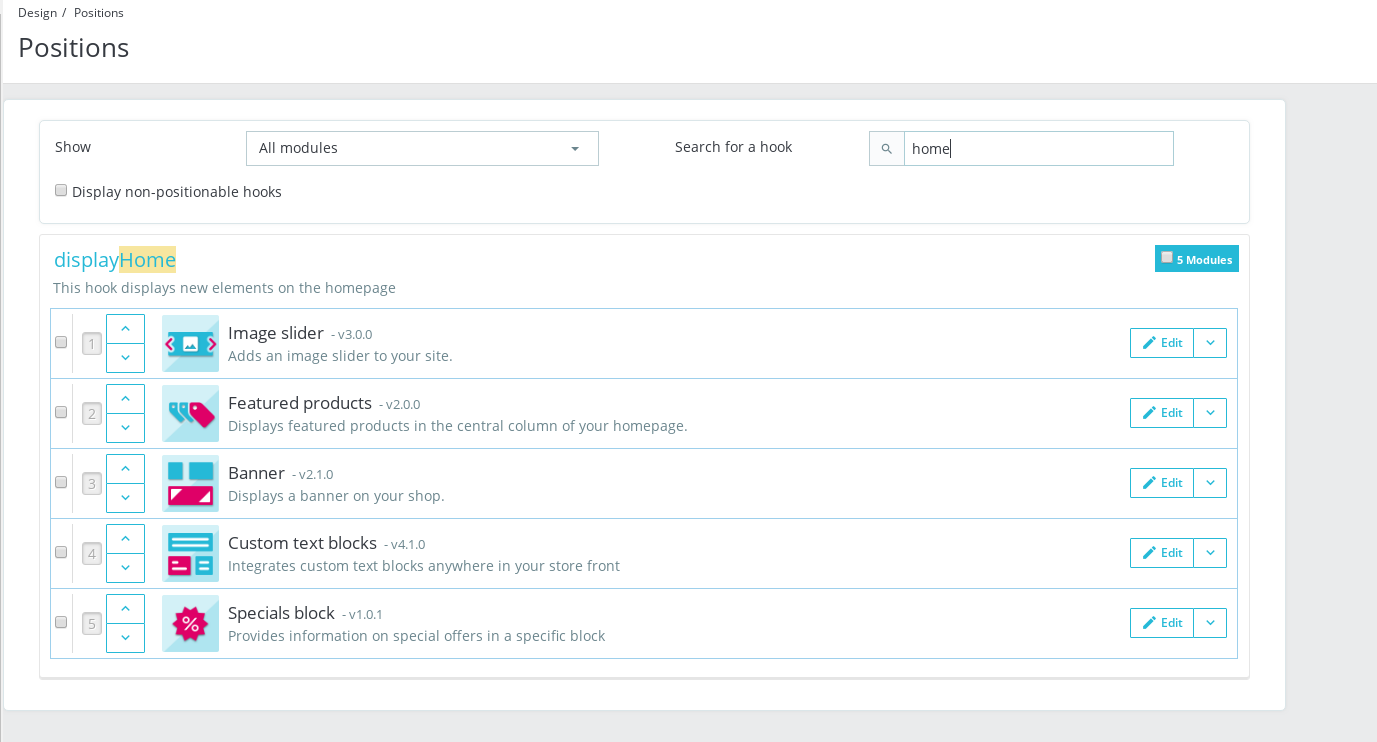
If no, try to hook them when debug mode is enabled & using DevTools:
- open up developer tools
- go to Network tab
- hook a module
- wait for an error, you should see red request information in Network tab
- click on it, you should see the error message in "Response" or "Preview" tab
About the google analytics module, did you installed from the BO => Module Catalog page?
Thanks to check & feedback
khouloudbelguith
on 26 Jun 2019
Thanks i kew for the 2 problems (server) and i will follow your instructions really happy for your feedback
Hugo
Hugo Costard
Designer UI-UX & Intégrateur Freelance
[email protected] (mailto:[email protected])
(+33) 06 522 19 473 (tel:(+33)%2006%20522%2019%20473)
Nantes {L.A.} (https://maps.google.com/?q=Nantes%20%7BL.A.%7D)
https://www.kolorslab.com
On juin 26 2019, at 5:44 pm, khouloudbelguith notifications@github.com wrote:
@kolorslab (https://github.com/kolorslab), thanks for your feedback.
The first & the second issue are not related to the Prestashop.
About the third issue, could you please try to navigate to your BO => Design => Positions => search for the hook displayHome & check if those modules are hooked to it,If no, try to hook them when debug mode is enabled & using DevTools:
open up developer tools
go to Network tabhook a module
wait for an error, you should see red request information in Network tab
click on it, you should see the error message in "Response" or "Preview" tab
About the google analytics module, did you installed from the BO => Module Catalog page?
Thanks to check & feedback—
You are receiving this because you were mentioned.
Reply to this email directly, view it on GitHub (https://github.com/PrestaShop/PrestaShop/issues/14369?email_source=notifications&email_token=AAK4D5BO54ACZMK6VWUCNGDP4OFEFA5CNFSM4H3L3NM2YY3PNVWWK3TUL52HS4DFVREXG43VMVBW63LNMVXHJKTDN5WW2ZLOORPWSZGODYT6SFQ#issuecomment-505932054), or mute the thread (https://github.com/notifications/unsubscribe-auth/AAK4D5GXFHXID3S577OKX2LP4OFEFANCNFSM4H3L3NMQ).
kolorslab
on 26 Jun 2019
@kolorslab, thanks!
Waiting for your feedback.
khouloudbelguith
on 26 Jun 2019
yes i do in BO / Module Manager and after to try Classic i saw there was not in Modules and Positions but only in the "root" modules.
When you change yoyr theme to Classic all positions are like after install so i had to re-organize all.
I will put the code in the footer it will be more easy and delete tables on MySQL
Best
Hugo Costard
Designer UI-UX & Intégrateur Freelance
[email protected] (mailto:[email protected])
(+33) 06 522 19 473 (tel:(+33)%2006%20522%2019%20473)
Nantes {L.A.} (https://maps.google.com/?q=Nantes%20%7BL.A.%7D)
https://www.kolorslab.com
On juin 26 2019, at 5:46 pm, Hugo COSTARD hugo@kolorslab.com wrote:
Thanks i kew for the 2 problems (server) and i will follow your instructions really happy for your feedback
Hugo
Hugo Costard
Designer UI-UX & Intégrateur Freelance
[email protected] (mailto:[email protected])
(+33) 06 522 19 473 (tel:(+33)%2006%20522%2019%20473)
Nantes {L.A.} (https://maps.google.com/?q=Nantes%20%7BL.A.%7D)
https://www.kolorslab.comOn juin 26 2019, at 5:44 pm, khouloudbelguith notifications@github.com wrote:
@kolorslab (https://github.com/kolorslab), thanks for your feedback.
The first & the second issue are not related to the Prestashop.
About the third issue, could you please try to navigate to your BO => Design => Positions => search for the hook displayHome & check if those modules are hooked to it,If no, try to hook them when debug mode is enabled & using DevTools:
open up developer tools
go to Network tabhook a module
wait for an error, you should see red request information in Network tab
click on it, you should see the error message in "Response" or "Preview" tab
About the google analytics module, did you installed from the BO => Module Catalog page?
Thanks to check & feedback—
You are receiving this because you were mentioned.
Reply to this email directly, view it on GitHub (https://github.com/PrestaShop/PrestaShop/issues/14369?email_source=notifications&email_token=AAK4D5BO54ACZMK6VWUCNGDP4OFEFA5CNFSM4H3L3NM2YY3PNVWWK3TUL52HS4DFVREXG43VMVBW63LNMVXHJKTDN5WW2ZLOORPWSZGODYT6SFQ#issuecomment-505932054), or mute the thread (https://github.com/notifications/unsubscribe-auth/AAK4D5GXFHXID3S577OKX2LP4OFEFANCNFSM4H3L3NMQ).
kolorslab
on 26 Jun 2019
@kolorslab, so, those modules are not installed?
Thanks!
khouloudbelguith
on 26 Jun 2019
They are cause i can access to sales pages, nex products ... but i don't see the block in "positions" to hook them so i don't understand .. ?
Hugo Costard
Designer UI-UX & Intégrateur Freelance
[email protected] (mailto:[email protected])
(+33) 06 522 19 473 (tel:(+33)%2006%20522%2019%20473)
Nantes {L.A.} (https://maps.google.com/?q=Nantes%20%7BL.A.%7D)
https://www.kolorslab.com
On juin 26 2019, at 5:52 pm, khouloudbelguith notifications@github.com wrote:
@kolorslab (https://github.com/kolorslab), so, those modules are not installed?
Thanks!
—
You are receiving this because you were mentioned.
Reply to this email directly, view it on GitHub (https://github.com/PrestaShop/PrestaShop/issues/14369?email_source=notifications&email_token=AAK4D5G6X2KMELPHXXFJLSTP4OGFDA5CNFSM4H3L3NM2YY3PNVWWK3TUL52HS4DFVREXG43VMVBW63LNMVXHJKTDN5WW2ZLOORPWSZGODYT7N6I#issuecomment-505935609), or mute the thread (https://github.com/notifications/unsubscribe-auth/AAK4D5BTREDXRLIAB3B25GLP4OGFDANCNFSM4H3L3NMQ).
kolorslab
on 26 Jun 2019
Hi,
in debug mode i always don't see new products, best sales ... Blocks in the module Manager and i can't hook them but thy are in modules folder.
however i can hook some other modules to my homepage but the blocks of products ; i can go to the sales page, best-sellers ... but not see them and hook them too.
No error when i hook a module i just don't see them ...
i don't know what to do the website must be online friday ... :(
best
Hugo Costard
Designer UI-UX & Intégrateur Freelance
[email protected] (mailto:[email protected])
(+33) 06 522 19 473 (tel:(+33)%2006%20522%2019%20473)
Nantes {L.A.} (https://maps.google.com/?q=Nantes%20%7BL.A.%7D)
https://www.kolorslab.com
On juin 26 2019, at 5:44 pm, khouloudbelguith notifications@github.com wrote:
@kolorslab (https://github.com/kolorslab), thanks for your feedback.
The first & the second issue are not related to the Prestashop.
About the third issue, could you please try to navigate to your BO => Design => Positions => search for the hook displayHome & check if those modules are hooked to it,If no, try to hook them when debug mode is enabled & using DevTools:
open up developer tools
go to Network tabhook a module
wait for an error, you should see red request information in Network tab
click on it, you should see the error message in "Response" or "Preview" tab
About the google analytics module, did you installed from the BO => Module Catalog page?
Thanks to check & feedback—
You are receiving this because you were mentioned.
Reply to this email directly, view it on GitHub (https://github.com/PrestaShop/PrestaShop/issues/14369?email_source=notifications&email_token=AAK4D5BO54ACZMK6VWUCNGDP4OFEFA5CNFSM4H3L3NM2YY3PNVWWK3TUL52HS4DFVREXG43VMVBW63LNMVXHJKTDN5WW2ZLOORPWSZGODYT6SFQ#issuecomment-505932054), or mute the thread (https://github.com/notifications/unsubscribe-auth/AAK4D5GXFHXID3S577OKX2LP4OFEFANCNFSM4H3L3NMQ).
kolorslab
on 26 Jun 2019
Hi Huys
TKANS SO MUCH FOR YOUR HELP
Everything is OK with "devug mode"
Thanks a LOT!
Hugo
Hugo Costard
Designer UI-UX & Intégrateur Freelance
[email protected] (mailto:[email protected])
(+33) 06 522 19 473 (tel:(+33)%2006%20522%2019%20473)
Nantes {L.A.} (https://maps.google.com/?q=Nantes%20%7BL.A.%7D)
https://www.kolorslab.com
On juin 26 2019, at 6:48 pm, Hugo COSTARD hugo@kolorslab.com wrote:
Hi,
in debug mode i always don't see new products, best sales ... Blocks in the module Manager and i can't hook them but thy are in modules folder.
however i can hook some other modules to my homepage but the blocks of products ; i can go to the sales page, best-sellers ... but not see them and hook them too.
No error when i hook a module i just don't see them ...
i don't know what to do the website must be online friday ... :(
best
Hugo Costard
Designer UI-UX & Intégrateur Freelance
[email protected] (mailto:[email protected])
(+33) 06 522 19 473 (tel:(+33)%2006%20522%2019%20473)
Nantes {L.A.} (https://maps.google.com/?q=Nantes%20%7BL.A.%7D)
https://www.kolorslab.comOn juin 26 2019, at 5:44 pm, khouloudbelguith notifications@github.com wrote:
@kolorslab (https://github.com/kolorslab), thanks for your feedback.
The first & the second issue are not related to the Prestashop.
About the third issue, could you please try to navigate to your BO => Design => Positions => search for the hook displayHome & check if those modules are hooked to it,If no, try to hook them when debug mode is enabled & using DevTools:
open up developer tools
go to Network tabhook a module
wait for an error, you should see red request information in Network tab
click on it, you should see the error message in "Response" or "Preview" tab
About the google analytics module, did you installed from the BO => Module Catalog page?
Thanks to check & feedback—
You are receiving this because you were mentioned.
Reply to this email directly, view it on GitHub (https://github.com/PrestaShop/PrestaShop/issues/14369?email_source=notifications&email_token=AAK4D5BO54ACZMK6VWUCNGDP4OFEFA5CNFSM4H3L3NM2YY3PNVWWK3TUL52HS4DFVREXG43VMVBW63LNMVXHJKTDN5WW2ZLOORPWSZGODYT6SFQ#issuecomment-505932054), or mute the thread (https://github.com/notifications/unsubscribe-auth/AAK4D5GXFHXID3S577OKX2LP4OFEFANCNFSM4H3L3NMQ).
kolorslab
on 26 Jun 2019
@kolorslab, thanks for your feedback.
I close the issue, feel free to open a new one when needed.
Thanks!
khouloudbelguith
on 27 Jun 2019
Related issues
 centoasa
·
3Comments
centoasa
·
3Comments
 zuk3975
·
3Comments
zuk3975
·
3Comments
 Van-peterson
·
3Comments
Van-peterson
·
3Comments
 prestonBot
·
3Comments
prestonBot
·
3Comments
 esistgut
·
3Comments
esistgut
·
3Comments