Prestashop: Inline flag in theme.yml doesn't work
Describe the bug
Original forge ticket: http://forge.prestashop.com/browse/BOOM-5606
When declaring a custom asset such as a .css or .js file we have the option of using the inline: true flag. In theory this should inject the contents of the file into a style or script tag accordingly.
While a style and script tag is created successfully, the contents of the file is missing:
<style>
  /* ---- styles @ /mystore/themes/sometheme/assets/css/styles.css ---- */
</style>
When enabling the debug mode you get the following error:
Warning: file_get_contents(/mystore/themes/sometheme/assets/css/styles.css): failed to open stream: No such file or directory
The file exists. The file is not empty. The file is formatted correctly.
If it was working correctly this would be an incredible option/feature to have at our disposal.
To Reproduce
See ticket link above.
Screenshots
See ticket link above.
Additional information
PrestaShop version: 1.7.3.2 -> 1.7.6.0 beta (at least)
 dennispw
All 7 comments
Hi @dennispw,
Thanks for your report.
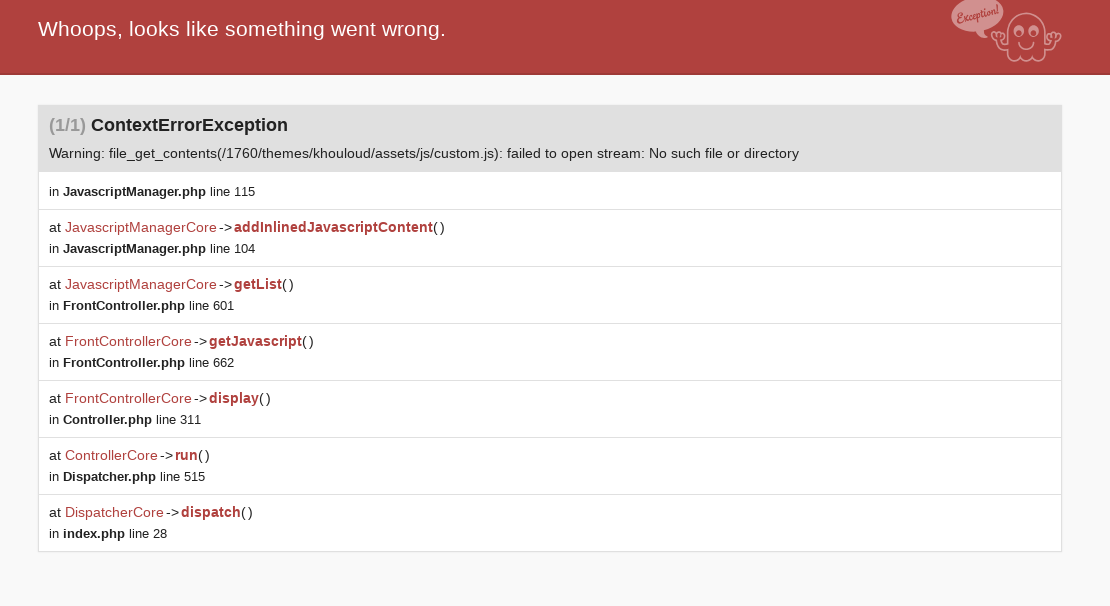
I manage to reproduce the issue with PS1.7.6.0beta1 & PS1.7.5.2 (debug mode enabled)
I used this theme
khouloud.zip
In the FO => Product page => I have this error
If I replace this
  js:
      product:
        - id: cat-extra-lib
          path: assets/js/custom.js
          inline: true
By this
  js:
      product:
        - id: cat-extra-lib
          path: assets/js/custom.js
          inline: false
The exception doesn't exist anymore
I’ll add this to the debug roadmap so that it’s fixed. If you have already fixed it on your end or if you think you can do it, please do send us a pull request!
Thanks!
 khouloudbelguith
on 20 May 2019
khouloudbelguith
on 20 May 2019
Just for clarity, it's not just a fix for the exception that is needed. The actual content's of the file(s) are missing.
dennispw
on 21 May 2019
In order to keep up with the times I would greatly appreciate if this could be considered more than "minor". After all, with all the different requirements when it comes to speed tests, rendering times and more, being able to choose what should be inline and where is a huge advantage.
dennispw
on 27 May 2019
Got the same problem. Inlined custom CSS and instead of its content, I see this:
__
Prestashop version: 1.7.6.0 beta
 nexispl
on 2 Jun 2019
nexispl
on 2 Jun 2019
Hi @nexispl,
This issue is added to our bug roadmap, it is not fixed yet.
Thanks!
khouloudbelguith
on 3 Jun 2019
Got the same problem.
use : https://devdocs.prestashop.com/1.7/themes/getting-started/asset-management/#without-a-front-controller-module
Prestashop version: 1.7.6.1
 valentin-anamorphik
on 11 May 2020
valentin-anamorphik
on 11 May 2020
The bug has been around longer: (https://www.prestashop.com/forums/topic/622965-register-javascript-17-inline/)
I think it is caused by an incorrect line in the StylesheetManager and JavascriptManager Class (Both are malfunctioning).
In the addInlinedStyleContent and addInlinedJavascriptContent method file_get_contents($item['path'])
correctly: file_get_contents($item['uri'])
 Akron99
on 16 May 2020
Akron99
on 16 May 2020
Related issues
 zuk3975
·
3Comments
zuk3975
·
3Comments
 rGaillard
·
3Comments
rGaillard
·
3Comments
 Prestaworks
·
3Comments
Prestaworks
·
3Comments
 prestonBot
·
3Comments
prestonBot
·
3Comments
 itisco
·
3Comments
itisco
·
3Comments