Prestashop: Hardcoded image URLs should be using `Link::getImageLink`
Describe the bug
On the product page of PrestaShop admin, images are displayed via hardcoded image URLs, instead of the correct method of Link::getImageLink. This is inconsistent because throughout all other PrestaShop admin and live web pages, product images are embedded with the special Link::getImageLink method.
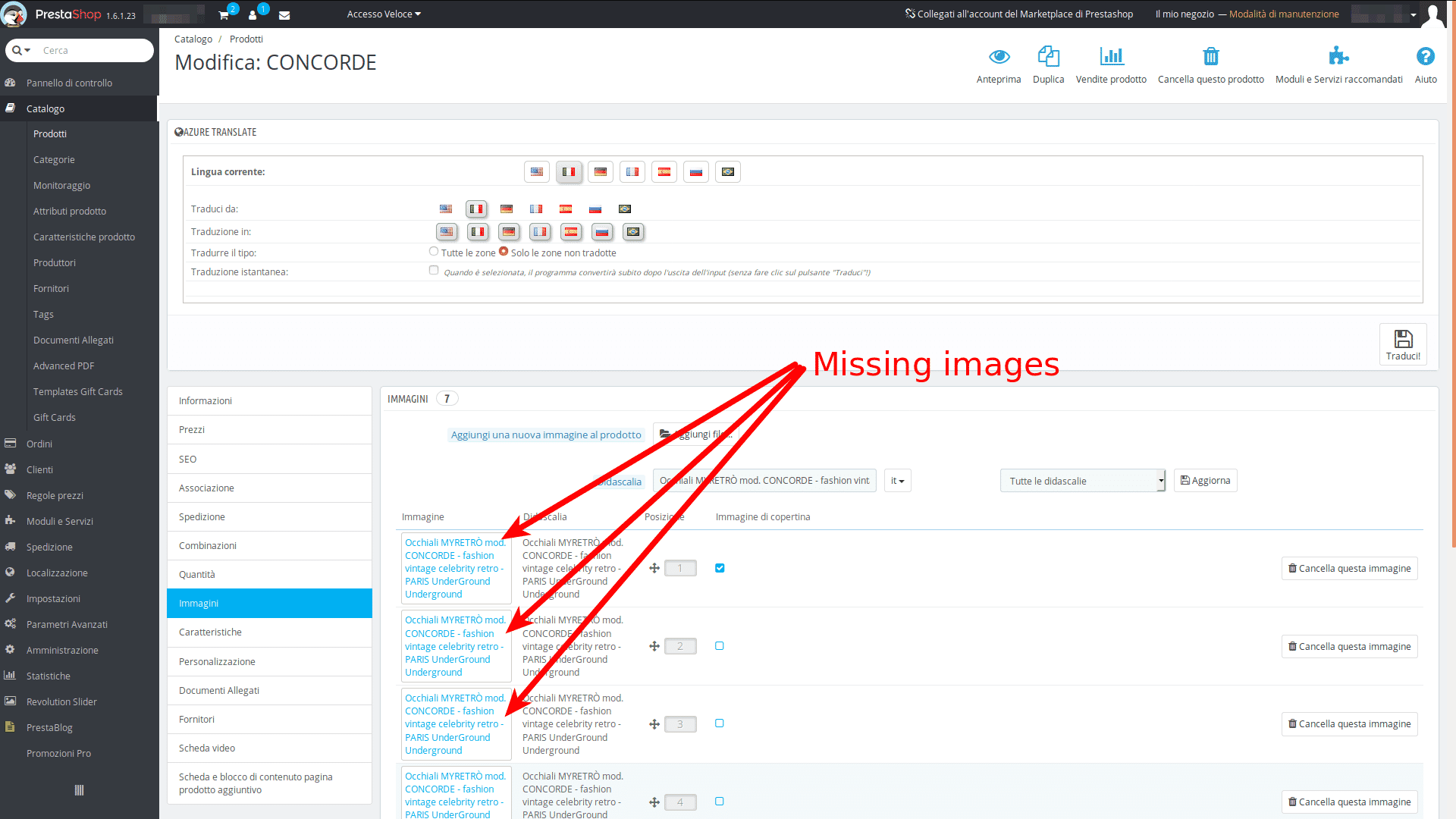
This causes missing images if the product thumbnails are deleted, in preference to the Sirv image optimisation/CDN addon or another such addon. Deleting product thumbnails is desirable because they can use up a lot of disk space on stores with many products.
The solution is simply to replace the hardcoded image URLs with Link::getImageLink.
To Reproduce
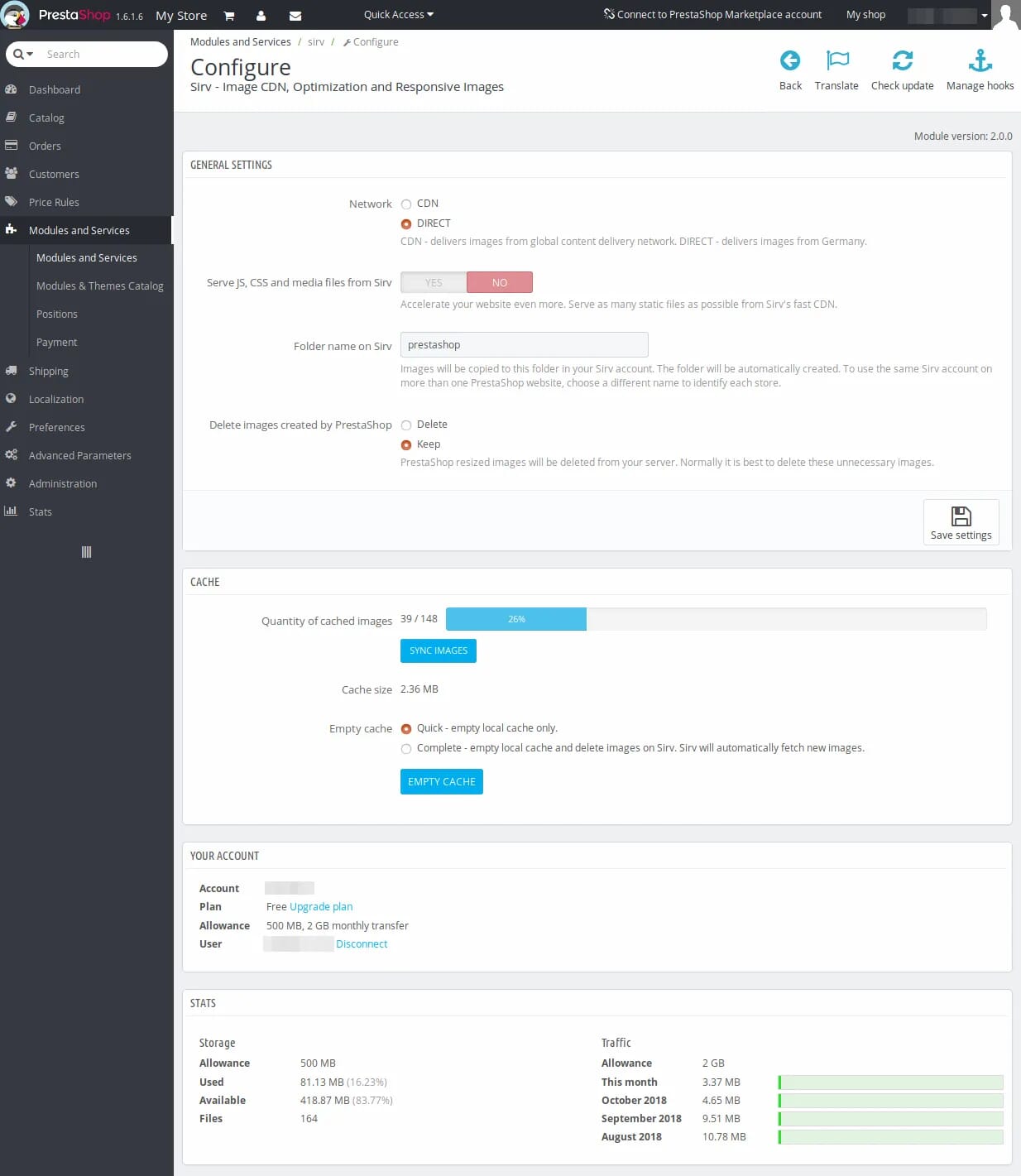
- Install the Sirv addon and set 'Delete images created by PrestaShop' to 'Delete'.
- Click the blue button 'Sync Images'.
- Go to any product in 'Catalogue > Products > Images' to see the missing images.
Screenshots
Additional information
Also reported here: https://www.prestashop.com/forums/topic/957014-image-urls-hardcoded-in-admin/
 jacket
All 14 comments
Hi @jacket,
As it's not a module provided by Prestashop, we can't do anything with this.
You should contact the module author via your addons.prestashop.com account, they are the only ones to help you with it.
Thanks!
 khouloudbelguith
on 1 Mar 2019
khouloudbelguith
on 1 Mar 2019
I think you misunderstood. The problem is not with the addon. The problem is with core PrestaShop code. PrestaShop is not referencing images in the standard way. They're hard coded. Hopefully it's just an oversight, which can be resolved by referencing images like PrestaShop normally does in its code.
I work for the company that provides the Sirv addon.
jacket
on 1 Mar 2019
@jacket, thanks for these clarifications.
This issue is reproduced with PS1.7?
If yes, could you please provide me the module to test it.
This is a public space.
You can provide me the module by email.
My address mail: khouloud.[email protected]
Let's be safe!
khouloudbelguith
on 1 Mar 2019
Hi @jacket,
I just received the email.
I will check & feedback.
Thanks!
khouloudbelguith
on 1 Mar 2019
@jacket, this module is only compatible with PS1.6.
Is not compatible with PS1.7?
Thanks!
khouloudbelguith
on 1 Mar 2019
It is compatible with PS1.7 (v1.5.0.0 - v1.7.5.1).
jacket
on 1 Mar 2019
@jacket, thanks, it is installed in PS1.7.5.1.
I will check & feedback.
khouloudbelguith
on 1 Mar 2019
@jacket, I tried with PS1.7.5.1, but it takes a lot of time.
In the meantime, I tried with PS1.6.1.23, but it is OK
I attached a video record
https://drive.google.com/file/d/1vr4M5jWbJznvkn9qVW3kvCHtTO_nI-3j/view
Thanks to check & feedback.
khouloudbelguith
on 1 Mar 2019
Thanks for testing. Please enable the Sirv addon with the option attached,
then click Save settings.
On Fri, 1 Mar 2019 at 15:49, khouloudbelguith notifications@github.com
wrote:
@jacket https://github.com/jacket, I tried with PS1.7.5.1, but it takes
a lot of time.
In the meantime, I tried with PS1.6.1.23, but it is OK
I attached a video record
https://drive.google.com/file/d/1vr4M5jWbJznvkn9qVW3kvCHtTO_nI-3j/view
Thanks to check & feedback.—
You are receiving this because you were mentioned.
Reply to this email directly, view it on GitHub
https://github.com/PrestaShop/PrestaShop/issues/12763#issuecomment-468710340,
or mute the thread
https://github.com/notifications/unsubscribe-auth/AADVh_49wnbrcKfsu7Pdqo_Vjjby_Ao1ks5vSUwigaJpZM4bY2pw
.
jacket
on 1 Mar 2019
@jacket, I enabled the "Active" option => but it is OK.
I attached a video record.
https://drive.google.com/file/d/1ePEKSlq5bx-omazLGgf_YaKAkJG9X8Wv/view
Thanks to check & feedback
khouloudbelguith
on 1 Mar 2019
@jacket, I tested the module with PS1.7.5.1, the synchronise does not complete.

That's why I couldn't complete the test of your module with PS1.7.5.1.
Thanks
khouloudbelguith
on 1 Mar 2019
Thanks for sharing your investigation @khouloudbelguith.
We found that the issue affects PS1.6.x only. The code in PS 1.7 has been rewritten to image URLs are retrieved using one of the methods of the Image core class.
Do you think a fix might be released for PS1.6? If not, we'll try and can create a workaround to override the Image class method.
jacket
on 12 Mar 2019
@jacket, sorry.
As you may already know, normal maintenance support for PrestaShop 1.6 ended in October 2018, which is now in extended maintenance mode until June 30, 2019.
During this period, and in order to ensure the stability of current 1.6 shops, only critical bugs and security fixes will be accepted in the 1.6.1.x branch.
I close the issue, feel free to open a new one when needed.
Thanks!
khouloudbelguith
on 12 Mar 2019
OK, thanks for your help @khouloudbelguith!
jacket
on 12 Mar 2019
Related issues
 wikao2
·
3Comments
wikao2
·
3Comments
 PrestaShark
·
3Comments
PrestaShark
·
3Comments
 rGaillard
·
3Comments
rGaillard
·
3Comments
 marionf
·
3Comments
marionf
·
3Comments
 vincent-dp
·
3Comments
vincent-dp
·
3Comments