Prestashop: Unable to save this image code 66
Hi
Im trying to save a image using prestashop api, but i always get the 66 error code. The images are in my local machine into img directory, the only thing that i need is pass the url image and that the prestashop process associate it with product.
thanks
 lewis2413
All 18 comments
Hi @lewis2413,
I tried with this script:
<html><head><title>pUT DATA</title></head><body>
<?php

// Here we define constants /!\ You need to replace this parameters
define('DEBUG', true);
ini_set('display_errors','on');
define('PS_SHOP_PATH', 'http://shop');
define('PS_WS_AUTH_KEY', 'KEY');
require_once('PSWebServiceLibrary.php');
?>
<form enctype="multipart/form-data" method="POST" action="http://shop/api/images/products/14">
    <fieldset>
        <legend>Add image for products No 1</legend>
        <input type="file" name="image">
        <input type="submit" value="Execute">
    </fieldset>
</form>
<?php
$webService = new PrestaShopWebservice(PS_SHOP_PATH, PS_WS_AUTH_KEY, DEBUG);
$xml = new SimpleXMLElement($psXML);
$opt = array( 'resource' => 'images' );
$opt['postXml'] = $xml->asXML();
$xml = $webService->add( $opt );
?>
But I did not manage to reproduce your issue with PS1.7.5.0, thanks to check & feedback.
 khouloudbelguith
on 11 Feb 2019
khouloudbelguith
on 11 Feb 2019
Hi
Thanks for your response, but i'm trying to create a new image using the
prestashop api non interface user....
Saludos Cordiales
Ing. Jose Luis Idrogo
Movil: +34 678 878385
Email: joseluis.[email protected]
Web Site: http://www.edisa.com/
- http://www.edisa.com/*
MADRID - BARCELONA - VIGO - OVIEDO - OURENSE - LAS PALMAS - MEXICO -
COLOMBIA - ECUADOR - REP. DOMINICANA - PANAMÁ
------------------------------CONFIDENCIALIDAD: Este mensaje se dirige
exclusivamente a su destinatario y puede contener información privilegiada
o confidencial. Si no es vd. el destinatario indicado, queda notificado de
que la utilización, divulgación y/o copia sin autorización está prohibida
en virtud de la legislación vigente. Si ha recibido este mensaje por error,
le rogamos que nos lo comunique inmediatamente por esta misma vía y proceda
a su destrucción.
Antes de imprimir este mensaje, asegúrate de que es necesario. Proteger el
medio ambiente está también en tu mano.
El lun., 11 feb. 2019 a las 11:32, khouloudbelguith (<
[email protected]>) escribió:
Hi @lewis2413 https://github.com/lewis2413,
I tried with this script:
pUT DATA
// Here we define constants /!\ You need to replace this parameters
define('DEBUG', true);
ini_set('display_errors','on');
define('PS_SHOP_PATH', 'http://shop');
define('PS_WS_AUTH_KEY', 'KEY');
require_once('PSWebServiceLibrary.php');
?>$webService = new PrestaShopWebservice(PS_SHOP_PATH, PS_WS_AUTH_KEY, DEBUG);
$xml = new SimpleXMLElement($psXML);
$opt = array( 'resource' => 'images' );
$opt['postXml'] = $xml->asXML();
$xml = $webService->add( $opt );
?>But I did not manage to reproduce your issue with PS1.7.5.0, thanks to
check & feedback.—
You are receiving this because you were mentioned.
Reply to this email directly, view it on GitHub
https://github.com/PrestaShop/PrestaShop/issues/12519#issuecomment-462280756,
or mute the thread
https://github.com/notifications/unsubscribe-auth/AtMyeO81PdDAMpBqf1N5UCjQLMZK5Uv1ks5vMUaygaJpZM4axrEe
.
lewis2413
on 11 Feb 2019
@lewis2413, yes, I'm adding an image using PrestaShop web service, I tried with a script & I used Postman also & it is OK.
https://drive.google.com/file/d/1LKUbQ89OF-1LlU6Y6TD3Uo8tgzoZzyft/view
You can follow this documentation:
http://doc.prestashop.com/display/PS16/Chapter+9+-+Image+management
Thanks to check & feedback.
khouloudbelguith
on 11 Feb 2019
Hi
Can you send me the xml structure that you use?
Thanks
El lun., 11 feb. 2019 15:04, khouloudbelguith notifications@github.com
escribió:
@lewis2413 https://github.com/lewis2413, yes, I'm adding an image using
PrestaShop web service, I tried with a script & I used Postman also & it is
OK.
https://drive.google.com/file/d/1LKUbQ89OF-1LlU6Y6TD3Uo8tgzoZzyft/view
You can follow this documentation:
http://doc.prestashop.com/display/PS16/Chapter+9+-+Image+management
Thanks to check & feedback.—
You are receiving this because you were mentioned.
Reply to this email directly, view it on GitHub
https://github.com/PrestaShop/PrestaShop/issues/12519#issuecomment-462338346,
or mute the thread
https://github.com/notifications/unsubscribe-auth/AtMyeBZecciES9JcoiMOgY-deAwhaRgxks5vMXhhgaJpZM4axrEe
.
lewis2413
on 11 Feb 2019
@lewis2413, as said before, I used this script
<html><head><title>pUT DATA</title></head><body>
<?php

// Here we define constants /!\ You need to replace this parameters
define('DEBUG', true);
ini_set('display_errors','on');
define('PS_SHOP_PATH', 'http://shop');
define('PS_WS_AUTH_KEY', 'KEY');
require_once('PSWebServiceLibrary.php');
?>
<form enctype="multipart/form-data" method="POST" action="http://shop/api/images/products/14">
    <fieldset>
        <legend>Add image for products No 1</legend>
        <input type="file" name="image">
        <input type="submit" value="Execute">
    </fieldset>
</form>
<?php
$webService = new PrestaShopWebservice(PS_SHOP_PATH, PS_WS_AUTH_KEY, DEBUG);
$xml = new SimpleXMLElement($psXML);
$opt = array( 'resource' => 'images' );
$opt['postXml'] = $xml->asXML();
$xml = $webService->add( $opt );
?>
When I used postman, in the Body, I selected form-data,
POST action: http://shop/api/images/products/id
For the second key, it is with type file.
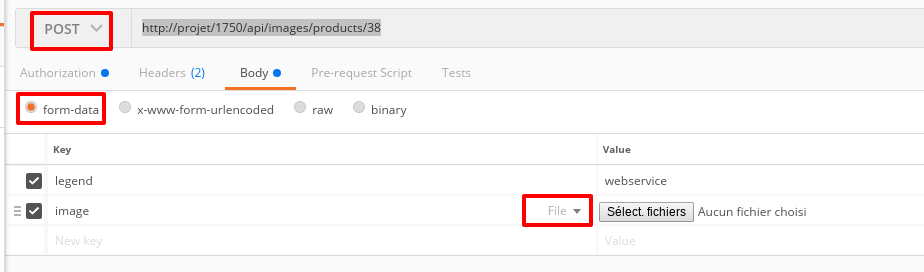
Thanks!
khouloudbelguith
on 11 Feb 2019
Ok perfect, let me check and i will come back to you
El lun., 11 feb. 2019 16:21, khouloudbelguith notifications@github.com
escribió:
@lewis2413 https://github.com/lewis2413, as said before, I used this
scriptpUT DATA
// Here we define constants /!\ You need to replace this parameters
define('DEBUG', true);
ini_set('display_errors','on');
define('PS_SHOP_PATH', 'http://shop');
define('PS_WS_AUTH_KEY', 'KEY');
require_once('PSWebServiceLibrary.php');
?>$webService = new PrestaShopWebservice(PS_SHOP_PATH, PS_WS_AUTH_KEY, DEBUG);
$xml = new SimpleXMLElement($psXML);
$opt = array( 'resource' => 'images' );
$opt['postXml'] = $xml->asXML();
$xml = $webService->add( $opt );
?>When I used postman, in the Body, I selected form-data,
POST action: http://shop/api/images/products/id
For the second key, it is with type file.
[image: image]
https://user-images.githubusercontent.com/16067358/52572819-fd94f000-2e18-11e9-8d2f-f6c87dd027fb.pngThanks!
—
You are receiving this because you were mentioned.
Reply to this email directly, view it on GitHub
https://github.com/PrestaShop/PrestaShop/issues/12519#issuecomment-462366320,
or mute the thread
https://github.com/notifications/unsubscribe-auth/AtMyeKGH6kDh8CCv4j8KRd7s4DRtriB9ks5vMYpngaJpZM4axrEe
.
lewis2413
on 11 Feb 2019
@lewis2413, thanks!
Waiting for your feedback.
khouloudbelguith
on 11 Feb 2019
hi @khouloudbelguith
i was checking your tips using the postman tool and i already send the image using the prestashop api, but when i send the request firstime, the image is inserted very good but i try change it again and the cover value is null....
thanks
lewis2413
on 11 Feb 2019
Hi @lewis2413,
Thanks for your feedback.
I did not manage to reproduce your issue, I added more than one image via API & the cover image is well setted.
I attached a video record.
https://drive.google.com/file/d/1cPNBF7vZgpT2m82c0zzK5F4naNwN0dOJ/view
Thanks to check & feedback.
khouloudbelguith
on 12 Feb 2019
Hi @khouloudbelguith
When I send an image using the prestashop api, the image is associated correctly but when i try to change the image from the same product the image is not change.
lewis2413
on 12 Feb 2019
@lewis2413, so you need to update an image.
To update an existing image, you can use this script
<html><head><title>pUT DATA</title></head><body>
<?php

// Here we define constants /!\ You need to replace this parameters
define('DEBUG', true);
ini_set('display_errors','on');
define('PS_SHOP_PATH', 'http://shop');
define('PS_WS_AUTH_KEY', 'KEY');
require_once('PSWebServiceLibrary.php');
?>

<form action="http://projet/1750/api/images/products/id_product/id_image" method="POST" enctype="multipart/form-data">
<fieldset>
    <legend>Update product image 1/2</legend>
    <input name="ps_method" value="PUT" type="hidden">
    <input name="image" type="file">
    <input value="Execute" type="submit">
</fieldset>
</form>
<?php
$webService = new PrestaShopWebservice(PS_SHOP_PATH, PS_WS_AUTH_KEY, DEBUG);
$xml = new SimpleXMLElement($psXML);
$opt = array( 'resource' => 'images' );
$opt['postXml'] = $xml->asXML();
$xml = $webService->add( $opt );
?>
as described in the documentation
<form action="http://[email protected]/api/images/products/1/2" method="POST" enctype="multipart/form-data">
<fieldset>
    <legend>Update product image 1/2</legend>
    <input name="ps_method" value="PUT" type="hidden">
    <input name="image" type="file">
    <input value="Execute" type="submit">
</fieldset>
</form>
With Postman,
in the Body, I selected form-data,
POST action: http://shop/api/images/products/id_product/id_image
For the first key, it is with type file.

https://drive.google.com/file/d/1fyJNEICwUMTHrIRD78ajTCxixrU0ytsy/view
Thanks!
khouloudbelguith
on 12 Feb 2019
hi @khouloudbelguith
Ok i understand, i have 2 questions.
- Can I add the image path when I upload a product?
- The script that you´ve commented above, where do i must put it?
Thanks....
lewis2413
on 12 Feb 2019
@lewis2413, I think no, it is not possible to add the image path when creating a product.
About the script, it is located in my project folder, you can follow this documentation, to get more information about webservice
http://doc.prestashop.com/display/PS16/Using+the+PrestaShop+Web+Service
All the example files can be found on our code repository: https://github.com/PrestaShop/PrestaShop-webservice-lib/tree/master/examples
Thanks!
khouloudbelguith
on 12 Feb 2019
Hi @khouloudbelguith
Ok, i will checking with my developers partners and back to you as soon as posible, by the last, we have a processs developed on PL/SQL, with this we connect to prestashop webservices using the api that you provide us.
lewis2413
on 13 Feb 2019
@lewis2413,
Thanks!
Waiting for your feedback.
khouloudbelguith
on 13 Feb 2019
Hi @lewis2413,
Since we had no news from you for more than 30 days, I'll close this ticket. Feel free to open another one if you can give specific details.
Thanks!
khouloudbelguith
on 16 Jul 2019
Hi @khouloudbelguith , i have a problem putting the legend/caption of an image and, as i'm seeing here, you add on postman a "legend" parameter but when i do it like you, it don't works and the legend of the image added in prestashop is not setted.
So do you know how to set a legend to the image that i'm posting?
Thanks in advance!
 FrancescCommerce21
on 10 May 2020
FrancescCommerce21
on 10 May 2020
solved here: https://www.prestashop.com/forums/topic/320713-update-image-legend-and-position-with-web-service/
FrancescCommerce21
on 14 May 2020
Related issues
 matks
·
3Comments
matks
·
3Comments
 PrestaShark
·
3Comments
PrestaShark
·
3Comments
 itisco
·
3Comments
itisco
·
3Comments
 Fabuloops
·
3Comments
Fabuloops
·
3Comments
 zuk3975
·
3Comments
zuk3975
·
3Comments