Prestashop: importing combinations with the same reference does not work
Describe the bug
Import combinations (attributes) does not work.
To Reproduce
Steps to reproduce the behavior:
- Go to 'controller=AdminImport'
- Upload attrachted csv file and click import.
- No errors, everything went fine.
- Now check product. Expected 40 combinations, find only 1. There should be 20 colors and a select box with 2 options.
Screenshots
If applicable, add screenshots or screenrecords to help explain your problem.
Additionnal information
PrestaShop version: 7.1
PHP version: 1.7.5.0
 MathiasReker
All 20 comments
Hi @MathiasReker,
I did not manage to reproduce the issue with PS1.7.5.0.
I imported this file
combinations_import.csv.tar.gz
In the product page, I have this

I also tried with your import file & it is OK
https://drive.google.com/file/d/1Z6QQRNStbrWSvdCyJvkgLiYBn093xDK1/view
Thanks to check & feedback.
 khouloudbelguith
on 28 Jan 2019
khouloudbelguith
on 28 Jan 2019
Thats weird. I have a fresh install and the product import works.
MathiasReker
on 28 Jan 2019
@MathiasReker, if you enable the debug mode, is there any exception displayed?
Are there errors in your PHP log file?
Thanks!
khouloudbelguith
on 28 Jan 2019
No errors in debug or in php error log
MathiasReker
on 28 Jan 2019
@MathiasReker, I tried with a new installation 1.7.5.0 & it is OK.
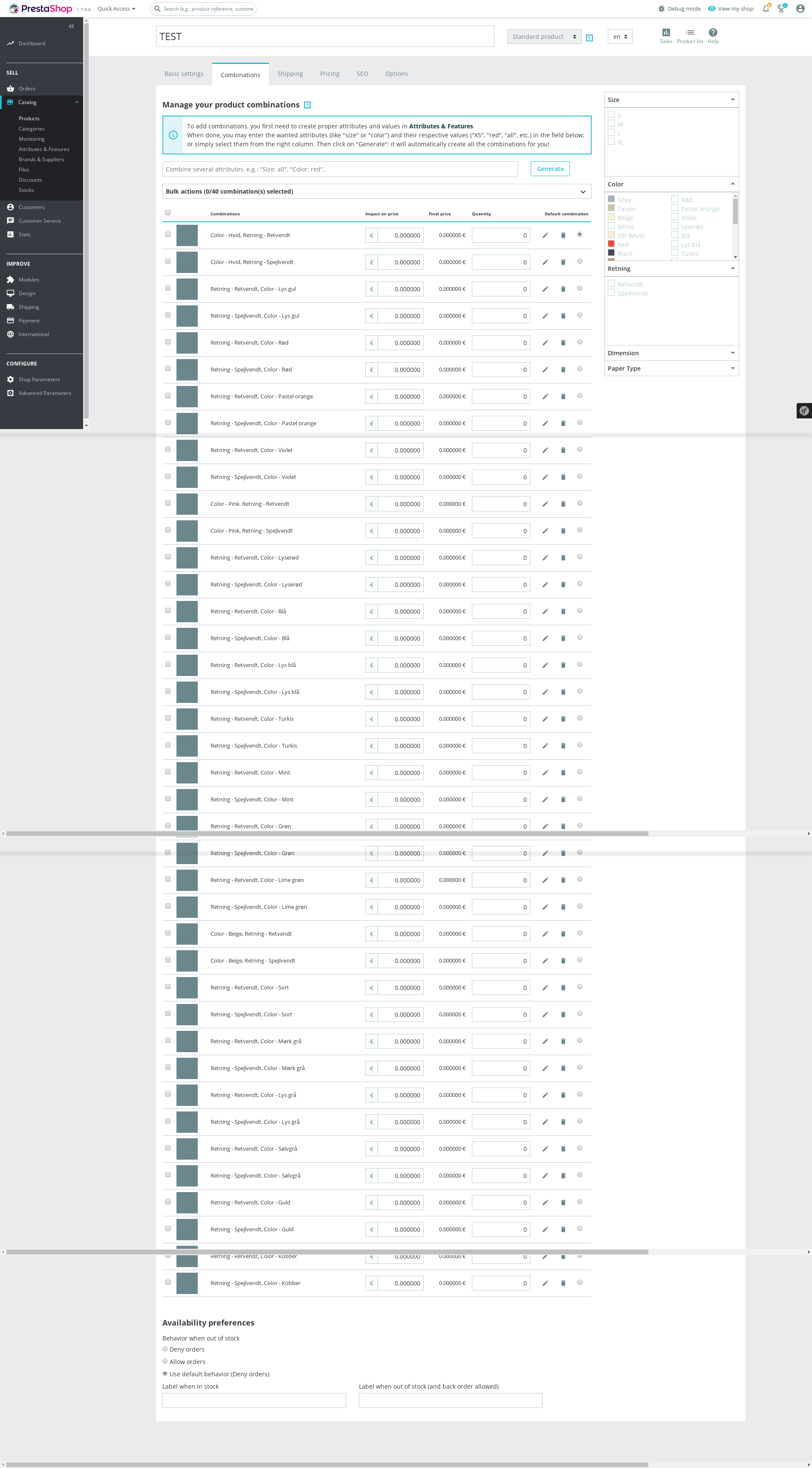
Despite our several trials, we could not reproduce your issue with the provided information.
It seems that your issue is not a PrestaShop's core bug but most likely a server configuration or customization problem.
Thanks!
khouloudbelguith
on 28 Jan 2019
Thanks, I will look further into this.
MathiasReker
on 28 Jan 2019
@khouloudbelguith I found the bug, but I did not solve it. I have included CSV file and screenshot with settings, please check.
Set the combinations with SAME reference:
When import with CSV it only takes the last combination
When doing manual from BO it works.
MathiasReker
on 29 Jan 2019
The reference MUST be unic otherwise the import does not work. This is a bug.
MathiasReker
on 30 Jan 2019
Hi @MathiasReker,
Thanks for your feedback.
Yes, now I manage to reproduce the issue with PS1.7.5.0& PS1.7.4.4.
If I import combinations with the same reference, it only takes the last combination
I’ll add this to the debug roadmap so that it’s fixed. If you have already fixed it on your end or if you think you can do it, please do send us a pull request!
Thanks!
khouloudbelguith
on 30 Jan 2019
I tried to fix it, but I did not manage to do it.
Can you add it for 1.7.5.1? This minor issue blocks an easy migration to 1.7.
MathiasReker
on 30 Jan 2019
@MathiasReker, why it blocks the migration for PS1.7.?
Thanks!
khouloudbelguith
on 30 Jan 2019
I export all combinations on my PS 1.6 store. Then I import the combinations on a new 1.7 store.
With this bug, I can't have the same Reference.
MathiasReker
on 30 Jan 2019
ping @eternoendless @colinegin what do you think, can we fix this issue in the PS1.7.5.1?
Thanks!
khouloudbelguith
on 30 Jan 2019
Any news ? :)
MathiasReker
on 4 Feb 2019
@SharakPL, this is a different issue, can you open a new one with more information about your configuration.
Thanks!
khouloudbelguith
on 4 Feb 2019
@khouloudbelguith @eternoendless @colinegin another thing about reference during import. It cuts off leading 0s. References like 0123456 are imported as 123456. It should import whole string exactly as it is.
+1
MathiasReker
on 4 Feb 2019
@khouloudbelguith @eternoendless @colinegin @MathiasReker nevermind reference. Made some testing and all imports with leading 0 are OK. Turned out leading 0s were removed by my spreadsheet editor that even when I explicitly set field types as plain text and save my .csv, reopening it loads all fields with digits only as numbers without leading 0. I just need to find something _useful_ to edit my data... or simply avoid csv format as xls xlsx and ods work better.
Sorry for the confusion.
 SharakPL
on 5 Feb 2019
SharakPL
on 5 Feb 2019
Hello @MathiasReker ,
Thanks for your feedback, unfortunately this is not a regression from 1.7.5.0, so we won't be able to fix it for 1.7.5.1.
We will review this issue when working on the import system, probably for 1.7.7.
If possible, do not hesitate to make a pull request to fix the bug.
Thank you for your understanding
 colinegin
on 5 Feb 2019
colinegin
on 5 Feb 2019
@colinegin I understand that this is not a regression from 1.7.4, but this is a major part to migrate manuelly from 1.6 to 1.7. Therefore I hope you can take a look at it for next patch release. I am stock on 1.6 until this issue is fixed. I was not able to fix it, but I think it will be quick for one of your developers :)
MathiasReker
on 5 Feb 2019
Hello @MathiasReker,
I really understand your situation, and I'm sorry this is a blocking issue for you.
Unfortunately, we won't be able to fix it during a patch, as it requires indepth study and probably not just a small development.
We will work on the import system as soon as possible.
We will keep you updated !
Have a nice day,
Coline
colinegin
on 8 Feb 2019
Related issues
 vincent-dp
·
3Comments
vincent-dp
·
3Comments
 esistgut
·
3Comments
esistgut
·
3Comments
 matks
·
3Comments
matks
·
3Comments
 PrestaShark
·
3Comments
khouloudbelguith
·
3Comments
PrestaShark
·
3Comments
khouloudbelguith
·
3Comments
Most helpful comment
@khouloudbelguith @eternoendless @colinegin @MathiasReker nevermind reference. Made some testing and all imports with leading 0 are OK. Turned out leading 0s were removed by my spreadsheet editor that even when I explicitly set field types as plain text and save my .csv, reopening it loads all fields with digits only as numbers without leading 0. I just need to find something _useful_ to edit my data... or simply avoid csv format as xls xlsx and ods work better.
Sorry for the confusion.