Prestashop: Maintenance triggered during upgrade 1.7.4.4 -> 1.7.5.0
I'm getting below error during upgrade version 1.7.4.4 to 1.7.5 stable - (1.7.5.0) with 1-Click Upgrade.
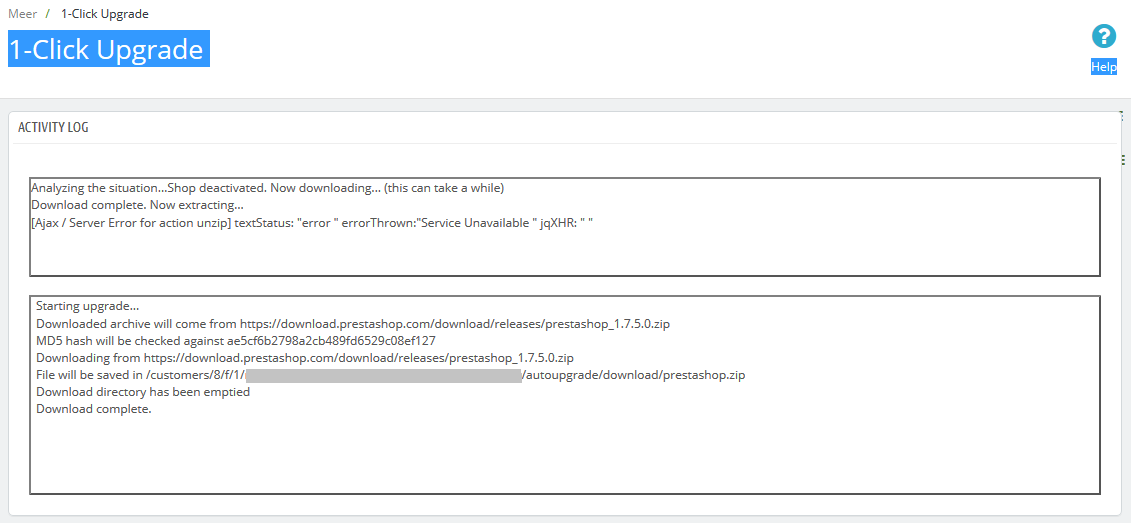
 Akashvastarpara
All 26 comments
Hi @Akashvastarpara,
What is the exact version of the 1-click upgrade module did you use?
Thanks!
 khouloudbelguith
on 8 Jan 2019
khouloudbelguith
on 8 Jan 2019
I have downloaded latest version 4.5.1
Akashvastarpara
on 8 Jan 2019
@Akashvastarpara, Can you please provide us the log of your upgrade? It can be found in the log.txt file, available in /autoupgrade/tmp/log.txt
Thanks!
khouloudbelguith
on 8 Jan 2019
Okay. I will share with you soon.
Akashvastarpara
on 8 Jan 2019
there is no folder with /autoupgrade/tmp inside autoupgrade.
Akashvastarpara
on 8 Jan 2019
@Akashvastarpara, We need to retrieve the PHP error log and the debug mode report in order to find out what's wrong.
Don't you know how to get this information? Please read the following article:
http://build.prestashop.com/howtos/misc/how-to-create-bug-report/
Thanks!
khouloudbelguith
on 8 Jan 2019
I have shared log file via mail. Can you please check for the same?
Akashvastarpara
on 8 Jan 2019
@Akashvastarpara; thanks!
I just received the email.
I will check & feedback.
khouloudbelguith
on 8 Jan 2019
Thanks in advance. @khouloudbelguith
Akashvastarpara
on 8 Jan 2019
@khouloudbelguith I have found log.txt inside admin folder and shared via mail. I hope it will be helpful.
Akashvastarpara
on 8 Jan 2019
@Akashvastarpara, could you please try to increase the max_execution_time in your server.
Also, you have issues with the wirecardceecheckoutseamless module => it is not compatible & you have a critical error with the seowizardmodule, you need to remove those modules before the upgrade.
Thanks!
khouloudbelguith
on 8 Jan 2019
I wonder if you have an issue on the client side (with javascript). Could you please open the browser console, and check the errors which could appear during the upgrade process? Thanks.
 Quetzacoalt91
on 8 Jan 2019
Quetzacoalt91
on 8 Jan 2019
@khouloudbelguith I will remove this modules and How much execution time need to set?
@Quetzacoalt91 Will check console log during upgrade and update you for the same.
Thank you both.
Akashvastarpara
on 8 Jan 2019
@Quetzacoalt91
Akashvastarpara
on 8 Jan 2019
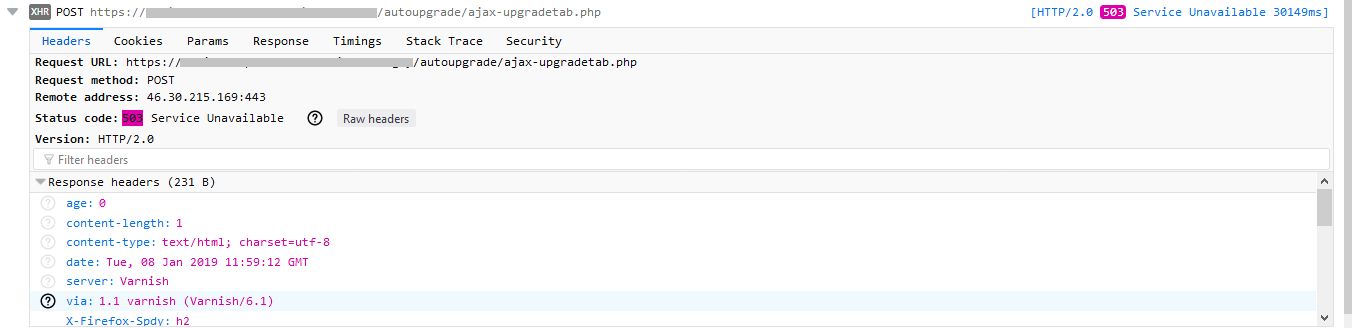
That's an interesting case! The error 503 is quite uncommon, and does not come from PHP itself in that case.
I see that you're running Varnish on your website, and this could be the cause. Each step of the upgrade process is made by calling the same script over & over. The purpose of Varnish is to cache the result of a script and return it quickly if PHP cannot answer in a short amount of time.
In this case, the error 503 could be related to PHP taking a long time to download the new release.
As the module cannot ask for Varnish to not cache the result, would you mind disabling it temporarily while you proceed with the upgrade?
Quetzacoalt91
on 8 Jan 2019
Thanks for reply.
How can I disable it?
Akashvastarpara
on 8 Jan 2019
That's a question I cannot answer unfortunately, as it depends on your environment and how it was installed. Sometimes this can be managed directly from the command line, sometimes with the administration panel of your hosting service...
Quetzacoalt91
on 8 Jan 2019
May the hosting person can help me to disable it?
Akashvastarpara
on 8 Jan 2019
Indeed, if you did not configure your environment, somebody did it for you and will be the most suitable contact for this task.
Quetzacoalt91
on 8 Jan 2019
Thank you so much for your help and valuable time.
Akashvastarpara
on 8 Jan 2019
Hi @Akashvastarpara,
So, can I close the issue?
Thanks!
khouloudbelguith
on 8 Jan 2019
I will update once repeat the upgradation after disabling Varnish as suggested by @Quetzacoalt91
Akashvastarpara
on 8 Jan 2019
@Quetzacoalt91 I have disabled the Varnish cache as my hosting provider suggested by adding a .htaccess file with the code Header add "Cache-Control" "no-cache" I'm getting same error and not able to upgrade also I have disabled module as @khouloudbelguith suggested.
Akashvastarpara
on 11 Jan 2019
First of all, nothing has been modified on your shop, there is no risk to see anything broken following this upgrade.
I received another report about this HTTP code and the maintenance mode being triggered. That's not supposed to happen as we do not reach any FrontController, but it seems to happen in some rare cases.
On my side I cannot reproduce it unfortunately, so I can't do much. Perhaps providing details on your server configuration would help (Web server name, PHP version and so on).
Quetzacoalt91
on 15 Jan 2019
I have moved my hosting from one.com to a2hosting and now it has been upgraded so I think there was issue with hosting provide but I'm not sure what was. Thank you so much for your time and kind help. @Quetzacoalt91 @khouloudbelguith
Akashvastarpara
on 17 Jan 2019
I'm glad to see it worked by switching on another hosting provider.
On your side, it seems we still have a potential issue to fix or at least to detect. I'm closing it as "Cannot reproduce", but anyone having the same symptoms should let us know by providing as many details as possible.
Thanks for your time.
Quetzacoalt91
on 17 Jan 2019
Related issues
 vincent-dp
·
3Comments
vincent-dp
·
3Comments
 nrcjea001
·
3Comments
nrcjea001
·
3Comments
 esistgut
·
3Comments
esistgut
·
3Comments
 sandra2n
·
3Comments
khouloudbelguith
·
3Comments
sandra2n
·
3Comments
khouloudbelguith
·
3Comments