Prestashop: Update order with Webservice adds new order's status line
Describe the bug
When I update an order throw webservice, in order to add a shipping tracking number, a new order history line is created.
This line shouldn't be added.
To Reproduce
Steps to reproduce the behavior:
Try this php script, with the PrestaShopWebservice class:
`
$ws = new PrestaShopWebservice(
'http://10.0.0.36',
'5MGDNCPDSMZ3WKU1QGJQCLZD3DQMG2ZQ',
false);
$oid = 1;
$tracking_number = 'TEST';
$xml = $ws->get(array('resource' => 'orders', 'id' => (int)$oid));
$resources = $xml->children()->children();
$resources->shipping_number = $tracking_number;
$opt['putXml'] = $xml->asXML();
$opt['id'] = (int)$oid;
$opt['resource'] = 'orders';
$xml = $ws->edit($opt);
`
Additionnal information
PrestaShop version: 1.6.* AND 1.7.4.3
PHP version: N/A
 Max84
Max84
All 7 comments
Hi @Max84,
Thanks for your report.
I manage to reproduce the issue.
If I change the tracking number from the Order_backoffice => there's no line added to the order_history table.
If I change the tracking number throw webservice, a line is added to the order_history table.
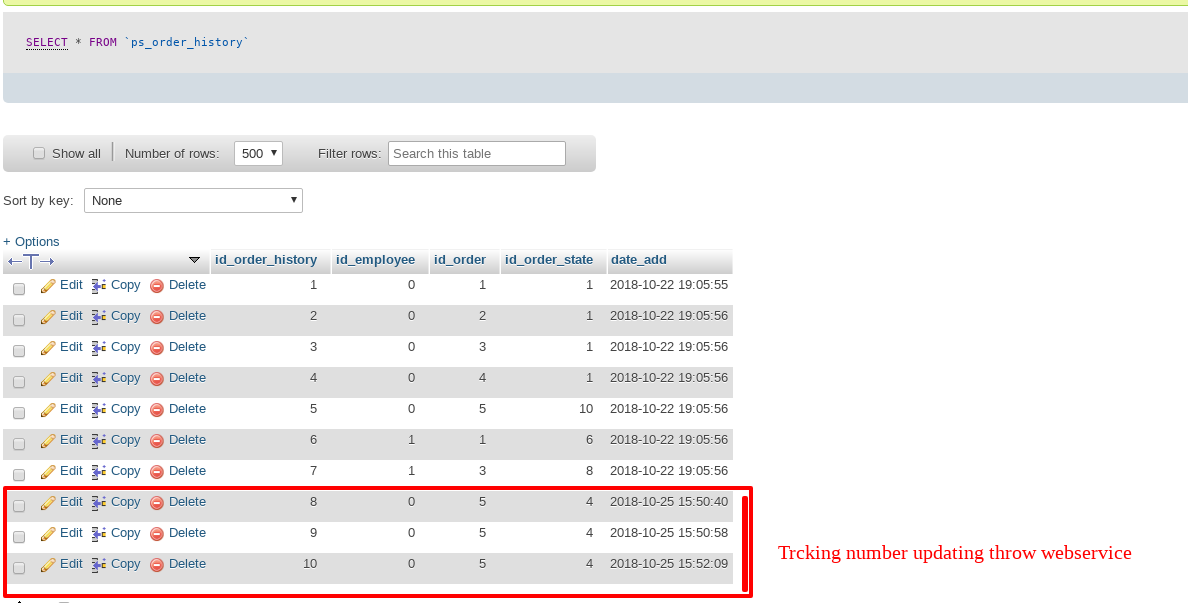
Thanks!
 khouloudbelguith
on 25 Oct 2018
khouloudbelguith
on 25 Oct 2018
To update the _order tracking number_, you have to pass through "order_carriers" object and not "orders" object.
The _shipping number_ property in "orders" object is deprecated !
So for those who might occur the same prob as described above, here is a code to set the tracking number in the correct way :
/**
 * update the given order tracking number
 * @param string $order_ref order reference
 * @param integer $tracking_number the tracking number to set
 */
function sync_orders_tracking_number($order_ref = '', $tracking_number) {

    echo '<p>************* <b>ORDER TRACKING NUMBER PROCESS START</b> *************</p>';

    //do nothing if there is no given order reference or the length of the tracking number is <= 0
    if( empty($order_ref) || strlen($tracking_number) <= 0 ) return;

    $logger = new FileLogger(0); //0 == debug level, logDebug() won’t work without this.
    $logger->setFilename(_PS_ROOT_DIR_.'/app/logs/order-tracking-debug.log');

    try {
        // creating instance of the webservice object
        $webService = new PrestaShopWebservice(SHOP_URL, WS_AUTH_KEY, WS_DEBUG);

        // getting the product by its reference
        $opt_ord = [
            'resource'   => 'orders',
            'display' => '[id]',
            'filter[reference]' =>"[$order_ref]"
        ];
        $xml_1 = $webService->get( $opt_ord );
        $resources = $xml_1->children()->children();

        //if there is a result, then proceed
        if( !empty($resources) ) {

            $id_order = 0;
            foreach ($resources as $key => $order) {
                $id_order = (int)$order->id;
                break;
            }

            if( $id_order <= 0 ) return;


            // getting the product by its reference
            $opt_ord_carr = [
                'resource'   => 'order_carriers',
                'display' => '[id,id_order,id_carrier]',
                'filter[id_order]' =>"[$id_order]"
            ];
            $xml_ord_carr = $webService->get( $opt_ord_carr );
            $resource_carrier = $xml_ord_carr->children()->children();

            if( !empty($resource_carrier) ) {

                $resource_id = (int)$resource_carrier->order_carrier->id;

                // here we get the orders blank representation
                // so we can add the new tracking number to history of the order
                // And then send back to the webservice
                $xml_2 = $webService->get([
                    'url' => SHOP_URL . "/api/order_carriers/$resource_id"
                ]);
                $order_carriers = $xml_2->children()->children();
                $order_carriers->tracking_number = (string)$tracking_number;

                //prepare the new xml data, to send to the webservice
                $opt = [
                    'resource' => 'order_carriers',
                    'putXml' => $xml_2->asXML(),
                    'id' => (int)$resource_id
                ];
                $res = $webService->edit($opt);

                echo "Order [$order_ref] tracking number succesfully updated.<br>";

                $logger->logDebug("Order [$order_ref] tracking number succesfully updated.");
                $logger->logDebug('------');
            } else {
                echo "Order [$order_ref] tracking number was not updated.<br>";

                $logger->logDebug("Order [$order_ref] tracking number was not updated.");
                $logger->logDebug('------');
            }

        }else {
            echo "No order found for the given reference : $order_ref <br>";

            $logger->logDebug('No order found for the given reference : '.$order_ref);
            $logger->logDebug('------');
        }
    } catch (Exception $e) {
        echo "Error : {$e->getMessage()}";

        $logger->logDebug("Error : {$e->getMessage()}");
        $logger->logDebug('------');
    }

    echo '<p>************* <b>ORDER TRACKING NUMBER PROCESS FINISH</b> *************</p><br>';
}
Hope this will help!
 rachidbigm
on 26 Apr 2019
rachidbigm
on 26 Apr 2019
H!
Same issue with PS1.7.6.1.
After updating the tracking number throw webservice, a line is added to the order_history table.

Thanks!
khouloudbelguith
on 12 Sep 2019
Similar to this #15513
Could be fixed by PR: #15514
khouloudbelguith
on 12 Sep 2019
The PR #15514 has been merged in develop. Could you check if your problem is always present ?
 Progi1984
on 8 Oct 2019
Progi1984
on 8 Oct 2019
Hi @Progi1984,
In my case, I did not manage to reproduce the issue with the develop branch.
I tried with this script
<html><head><title>pUT DATA</title></head><body>
<?php
define('DEBUG', true);
ini_set('display_errors','on');
define('PS_SHOP_PATH', 'shop');
define('PS_WS_AUTH_KEY', 'Key');
require_once('PSWebServiceLibrary.php');
$ws = new PrestaShopWebservice(
    'Shop',
    'Key',
    false);


$id = 6; //ID order Here

$xml = $ws->get(array('resource' => 'orders', 'id' => $id));

echo "BEFORE\n";
echo $xml->asXML();

unset($xml->order->current_state);
$xml->order->shipping_number = 5;
$opt['putXml'] = $xml->asXML();
$opt['id'] = $id;
$opt['resource'] = 'orders';
$xml = $ws->edit($opt);
$xml = $ws->get(array('resource' => 'orders', 'id' => $id));
echo "AFTER\n";
echo $xml->asXML();
https://drive.google.com/file/d/15J4V2AfW9F_LEHLSviUdIPEh2i1ddcVN/view
Since it is fixed, I close the issue.
Thanks!
khouloudbelguith
on 9 Oct 2019
Thanks @khouloudbelguith
Progi1984
on 9 Oct 2019
Related issues
 zuk3975
·
3Comments
zuk3975
·
3Comments
 rGaillard
·
3Comments
rGaillard
·
3Comments
 marionf
·
3Comments
marionf
·
3Comments
 Van-peterson
·
3Comments
Van-peterson
·
3Comments
 matks
·
3Comments
matks
·
3Comments
Most helpful comment
To update the _order tracking number_, you have to pass through "order_carriers" object and not "orders" object.
The _shipping number_ property in "orders" object is
deprecated !So for those who might occur the same prob as described above, here is a code to set the tracking number in the correct way :
Hope this will help!