Prestashop: Error 500 while clearing the cache
Describe the bug
In the Advanced Parameters / Performance, if we click twice on the Clear cache button => Error 500
To Reproduce
Steps to reproduce the behavior:
- Go to BO => Advanced Parameters / Performance
- Click on "Clear Cache" button 2 times
- See error : Actual: Error 500
Screenshots
https://drive.google.com/file/d/1cJrW2c5kEbaDvKEbuZA7m74egEzV5UET/view

Additionnal information
PrestaShop version: 1.7.4.3
PHP version: 7.1
Update 2020-08-04 This is clearly a race condition when two processes are cleaning/rebuilding the cache at the same time.
 khouloudbelguith
All 35 comments
also for me this issue, on 1.7.4.4, debian with php 7.2.11
error after clear cache is:
Fatal error: require_once(): Failed opening required '/var/www/vhosts/100asa.it/httpdocs/var/cache/dev/appParameters.php' (include_path='/var/www/vhosts/100asa.it/httpdocs/vendor/pear/pear_exception:/var/www/vhosts/100asa.it/httpdocs/vendor/pear/console_getopt:/var/www/vhosts/100asa.it/httpdocs/vendor/pear/pear-core-minimal/src:/var/www/vhosts/100asa.it/httpdocs/vendor/pear/archive_tar:.:/opt/plesk/php/7.2/share/pear') in /var/www/vhosts/100asa.it/httpdocs/config/bootstrap.php on line 86
After some seconds, backoffice become working well!
 centoasa
on 18 Nov 2018
centoasa
on 18 Nov 2018
Describe the bug
In the Advanced Parameters / Performance, if we click twice on the Clear cache button => Error 500
To Reproduce
Steps to reproduce the behavior:
Go to BO => Advanced Parameters / Performance
Click on "Clear Cache" button 2 times
See error : Actual: Error 500
This error is also present on Prestashop 1.7.5!!
 Spegio
on 28 Jan 2019
Spegio
on 28 Jan 2019
For me too: prestashop 1.7.5, php 7.2.13
If everything goes wrong I give 500 error, otherwise it goes into timeout
centoasa
on 29 Jan 2019
Hi,
I manage to reproduce the issue with PS1.7.5.0 also.
It is not fixed yet.
It is added to our bug roadmap.
Thanks for your understanding!
khouloudbelguith
on 29 Jan 2019
On the Performance page, there is another problem, there are no translations for other languages. The section of the performance page is not present in the translations!
Not all entries, only some items are not present... You cannot change the translation or add it because it is not present for all entries.
Spegio
on 29 Jan 2019
Hi @Spegio,
Your issue is different from this ticket, can you open a new one with more information about your configuration.
Thanks!
khouloudbelguith
on 30 Jan 2019
Fatal error: require_once(): Failed opening required '/var/cache/dev/appParameters.php' (include_path='/vendor/pear/pear_exception:/vendor/pear/console_getopt:/vendor/pear/pear-core-minimal/src:/vendor/pear/archive_tar:.:/:/usr/local/php72/lib/pear') in /config/bootstrap.php on line 86
When save translations on non default theme. To resolve it manual flush of cache folder is needed.
 PrestaShark
on 13 Feb 2019
PrestaShark
on 13 Feb 2019
We have the same problem on several 1.7 versions.
We don't have this problem if we empty cache folders in command line but we can't use it if we use CCC for CSS et JS because JS and CSS are not re-compiled.
 bm-services
on 22 Mar 2019
bm-services
on 22 Mar 2019
just found this row just after clear cache:
[Thu Apr 11 10:12:53.772891 2019] [proxy_fcgi:error] [pid 44501:tid 139946274846464] [client 79.7.101.116:51866] AH01071: Got error 'PHP message: PHP Fatal error: Uncaught Error: Class 'Tools' not found in /var/www/vhosts/100asa.it/httpdocs/classes/db/Db.php:794\nStack trace:\n#0 /var/www/vhosts/100asa.it/httpdocs/config/alias.php(48): DbCore->escape('configuration', false)\n#1 /var/www/vhosts/100asa.it/httpdocs/config/alias.php(53): pSQL('configuration')\n#2 /var/www/vhosts/100asa.it/httpdocs/classes/Configuration.php(155): bqSQL('configuration')\n#3 /var/www/vhosts/100asa.it/httpdocs/classes/Configuration.php(209): ConfigurationCore::loadConfiguration()\n#4 /var/www/vhosts/100asa.it/httpdocs/classes/PrestaShopAutoload.php(171): ConfigurationCore::get('PS_DISABLE_OVER...')\n#5 /var/www/vhosts/100asa.it/httpdocs/classes/PrestaShopAutoload.php(130): PrestaShopAutoload->generateIndex()\n#6 [internal function]: PrestaShopAutoload->load('Tools')\n#7 /var/www/vhosts/100asa.it/httpdocs/config/config.inc.php(85): spl_autoload_call('Tools')\n#8 /var/www/vhosts/100asa.it/httpdocs/Back100asa/index.php(42): require('/var/www/vhosts...')\n#9 {main}\n thrown...\n', referer: https://www.100asa.it/Back100asa/index.php/configure/advanced/performance/?_token=_whh7W5Wf95L5exppUMYheoO6dbnY0cSHfBQsnF7btk
centoasa
on 11 Apr 2019
Same error only on local machine (macOS) when debug is enabled.
[Tue Apr 16 16:52:49.070106 2019] [proxy_fcgi:error] [pid 5517:tid 123145576771584] [client 127.0.0.1:59670] AH01071: Got error 'PHP message: PHP Warning: Uncaught Symfony\\Component\\Debug\\Exception\\ContextErrorException: Warning: require(/Users/matthieu/Code/Sites/site.com/var/cache/dev/ContainerDyst13w/getRouting_LoaderService.php): failed to open stream: No such file or directory in /Users/matthieu/Code/Sites/site.com/var/cache/dev/ContainerDyst13w/appDevDebugProjectContainer.php:1226\nStack trace:\n#0 /Users/matthieu/Code/Sites/site.com/var/cache/dev/ContainerDyst13w/appDevDebugProjectContainer.php(1226): require()\n#1 /Users/matthieu/Code/Sites/site.com/vendor/symfony/symfony/src/Symfony/Component/DependencyInjection/Container.php(304): ContainerDyst13w\\appDevDebugProjectContainer->load('getRouting_Load...')\n#2 /Users/matthieu/Code/Sites/site.com/vendor/symfony/symfony/src/Symfony/Bundle/FrameworkBundle/Routing/Router.php(56): Symfony\\Component\\DependencyInjection\\Container->get('routing.loader')\n#3 /Users/matthieu/Code/Sites/site.com/vendor...\nPHP message: PHP Fatal error: ContainerDyst13w\\appDevDebugProjectContainer::load(): Failed opening required '/Users/matthieu/Code/Sites/site.com/var/cache/dev/ContainerDyst13w/getRouting_LoaderService.php' (include_path='/Users/matthieu/Code/Sites/site.com/vendor/pear/pear_exception:/Users/matthieu/Code/Sites/site.com/vendor/pear/console_getopt:/Users/matthieu/Code/Sites/site.com/vendor/pear/pear-core-minimal/src:/Users/matthieu/Code/Sites/site.com/vendor/pear/archive_tar:.:/usr/local/Cellar/[email protected]/7.2.17/share/[email protected]/pear') in /Users/matthieu/Code/Sites/site.com/var/cache/dev/ContainerDyst13w/appDevDebugProjectContainer.php on line 1226\nPHP message: PHP Fatal error: require(): Failed opening required '/Users/matthieu/Code/Sites/site.com/var/cache/dev/ContainerDyst13w/getDebug_FileLinkFormatter_UrlFormatService.php' (include_path='/Users/matthieu/Code/Sites/site.com/vendor/pear/pear_exception:/Users/matthieu/Code/Sites/site.com/vendor/pear/console_getopt:/Users/matthieu/Code/Sites/site.com/vendor/pear/pear-core-minimal/src:/Users/matthieu/Code/Sites/site.com/vendor/pear/archive_tar:.:/usr/local/Cellar/[email protected]/7.2.17/share/[email protected]/pear') in /Users/matthieu/Code/Sites/site.com/var/cache/dev/ContainerDyst13w/appDevDebugProjectContainer.php on line 1226\n', referer: https://site.com.bx/admin382i2zmtd/index.php/configure/advanced/performance/?_token=qNOLuPDrEqLza1YKt67neeWdA17N4t5F_7h0OkgmChE
Site is on staging server (Ubuntu 18.04) with an iso configuration but no worries when clear cache on same context with debug.
If I refresh page, it works. I've a doubt on PHP FPM config (timeout) because when I dump a string before RedirectResponse on PerformanceController, there is a timeout in JS before redirect and it works.
 matthieumota
on 16 Apr 2019
matthieumota
on 16 Apr 2019
Hi fellas, i have exactly the same problem with PS version 1.7.4.4, i had upgraded it to 1.7.5.1 and it was fixed but there were many modified files with my theme and i broke my orders page. i will rollback to 1.7.4.4 and search for other resolution without to upgrade PS version. Could someone to help what exactly cause this issue and how to resolve it please? Thanks in advance to everyone whoever is trying to involve to solve this.
 cometemarketing
on 29 Apr 2019
cometemarketing
on 29 Apr 2019
Hi @cometemarketing,
No, the issue is not fixed yet.
I manage to reproduce the issue with PS1.7.5.1.
Thanks!
khouloudbelguith
on 30 Apr 2019
Hi, I see.. maybe my case is different than yours, i successfully broke the performance page :), now when i press the clear cache button it broke my PS admin panel, i found an old backup and restored the website for luck but can't clear cache anymore because of this. Anyone who knows how to clear it manually without to use clear cache button on advanced parameters->performance page, i will be very thankful about this because i am searching for temporary fix for now. when there will be a permanent fix it will be a great pleasure to use it.
cometemarketing
on 30 Apr 2019
@cometemarketing, you can clear cache manually by deleting all the folder into var/cache (prod & dev).
Thanks!
khouloudbelguith
on 30 Apr 2019
If this can help core developers: (I'm on prestashop 1.7.5.2 php 7.2.18 apache)
just after clear smarty cache (compilation=no clear cache=never) I've this apache error:
500 | GET /admin/index.php/configure/advanced/performance/?_token=hide-token HTTP/1.0
500 | POST /admin/index.php?controller=AdminAjaxFaviconBO&token=hide-tokenHTTP/1.0
Warning: AH01071: Got error 'PHP message: PHP Warning: require(/var/www/vhosts/100asa.it/httpdocs/var/cache/prod/ContainerEqsstza/getPrestashop_RouterService.php): failed to open stream: No such file or directory in /var/www/vhosts/100asa.it/httpdocs/var/cache/prod/ContainerEqsstza/appProdProjectContainer.php on line 1151\nPHP message: PHP Warning: require(/var/www/vhosts/100asa.it/httpdocs/var/cache/prod/ContainerEqsstza/getPrestashop_RouterService.php): failed to open stream: No such file or directory in /var/www/vhosts/100asa.it/httpdocs/var/cache/prod/ContainerEqsstza/appProdProjectContainer.php on line 1151\nPHP message: PHP Fatal error: require(): Failed opening required '/var/www/vhosts/100asa.it/httpdocs/var/cache/prod/ContainerEqsstza/getPrestashop_RouterService.php' (include_path='/var/www/vhosts/100asa.it/httpdocs/vendor/pear/pear_exception:/var/www/vhosts/100asa.it/httpdocs/vendor/pear/console_getopt:/var/www/vhosts/100asa.it/httpdocs/vendor/pear/pear-core-minimal/src:/var/www/vhosts/100asa.it/httpdocs/vendor/pear/archive_tar:.:/opt/plesk/php/7.2/share/pear') in /var/www/vhosts/100asa.it/httpdocs/var/cache/prod/ContainerEqsstza/appProdProjectContainer.php on line 1151\n', referer: https://www.100asa.it/admin/index.php/configure/advanced/performance/?_token=hide-token
Warning: AH01071: Got error 'PHP message: PHP Warning: require(/var/www/vhosts/100asa.it/httpdocs/var/cache/prod/ContainerEqsstza/getPrestashop_Core_Admin_PagePreferenceInterfaceService.php): failed to open stream: No such file or directory in /var/www/vhosts/100asa.it/httpdocs/var/cache/prod/ContainerEqsstza/appProdProjectContainer.php on line 1151\nPHP message: PHP Warning: require(/var/www/vhosts/100asa.it/httpdocs/var/cache/prod/ContainerEqsstza/getPrestashop_Core_Admin_PagePreferenceInterfaceService.php): failed to open stream: No such file or directory in /var/www/vhosts/100asa.it/httpdocs/var/cache/prod/ContainerEqsstza/appProdProjectContainer.php on line 1151\nPHP message: PHP Fatal error: require(): Failed opening required '/var/www/vhosts/100asa.it/httpdocs/var/cache/prod/ContainerEqsstza/getPrestashop_Core_Admin_PagePreferenceInterfaceService.php' (include_path='/var/www/vhosts/100asa.it/httpdocs/vendor/pear/pear_exception:/var/www/vhosts/100asa.it/httpdocs/vendor/pear/console_getopt:/var/www/vhosts/100asa.it/httpdocs/vendor/pear/pear-core-minimal/src:/var/www/vhosts/100asa.it/httpdocs/vendor/pear/archive_tar:.:/opt/plesk/php/7.2/share/pear') in /var/www/vhosts/100asa.it/httpdocs/var/cache/prod/ContainerEqsstza/appProdProjectContainer.php on line 1151\nPHP message: PHP Warning: require(/var/www/vhosts/100asa.it/httpdocs/var/cache/prod/ContainerEqsstza/getPrestashop_AccessDenied_ListenerService.php): failed to open stream: No such file or directory in /var/www/vhosts/100asa.it/httpdocs/var/cache/prod/ContainerEqsstza/appProdProjectContainer.php on line 1151\nPHP message: PHP Warning: require(/var/www/vhosts/100asa.it/httpdocs/var/cache/prod/ContainerEqsstza/getPrestashop_AccessDenied_ListenerService.php): failed to open stream: No such file or directory in /var/www/vhosts/100asa.it/httpdocs/var/cache/prod/ContainerEqsstza/appProdProjectContainer.php on line 1151\nPHP message: PHP Fatal error: require(): Failed opening required '/var/www/vhosts/100asa.it/httpdocs/var/cache/prod/ContainerEqsstza/getPrestashop_AccessDenied_ListenerService.php' (include_path='/var/www/vhosts/100asa.it/httpdocs/vendor/pear/pear_exception:/var/www/vhosts/100asa.it/httpdocs/vendor/pear/console_getopt:/var/www/vhosts/100asa.it/httpdocs/vendor/pear/pear-core-minimal/src:/var/www/vhosts/100asa.it/httpdocs/vendor/pear/archive_tar:.:/opt/plesk/php/7.2/share/pear') in /var/www/vhosts/100asa.it/httpdocs/var/cache/prod/ContainerEqsstza/appProdProjectContainer.php on line 1151\n', referer: https://www.100asa.it/admin/index.php/configure/advanced/performance/?_token=hide-token
same happens when I try to make db backup:
error 500 POST /admin/index.php/configure/advanced/backups/new?_token=hide-token HTTP/1.0
AH01071: Got error 'PHP message: PHP Fatal error: Allowed memory size of 536870912 bytes exhausted (tried to allocate 4096 bytes) in /var/www/vhosts/100asa.it/httpdocs/classes/db/DbPDO.php on line 156\nPHP message: PHP Fatal error: Allowed memory size of 536870912 bytes exhausted (tried to allocate 147456 bytes) in /var/www/vhosts/100asa.it/httpdocs/vendor/composer/ClassLoader.php on line 444\nPHP message: PHP Fatal error: Allowed memory size of 536870912 bytes exhausted (tried to allocate 221184 bytes) in Unknown on line 0\n', referer: https://www.100asa.it/admin/index.php/configure/advanced/backups/?_token=hide-token
I hope this help to solve this issue
centoasa
on 25 May 2019
Now with 1.7.6.1 and php 7.2.21 this issue doesn't happens anymore! (for me)
centoasa
on 29 Aug 2019
@centoasa, great to hear that your issue is solved but when we click on the "Clear Cache" button 2 times => error 500 still appear with PS1.7.6.1.
Thanks!
khouloudbelguith
on 29 Aug 2019
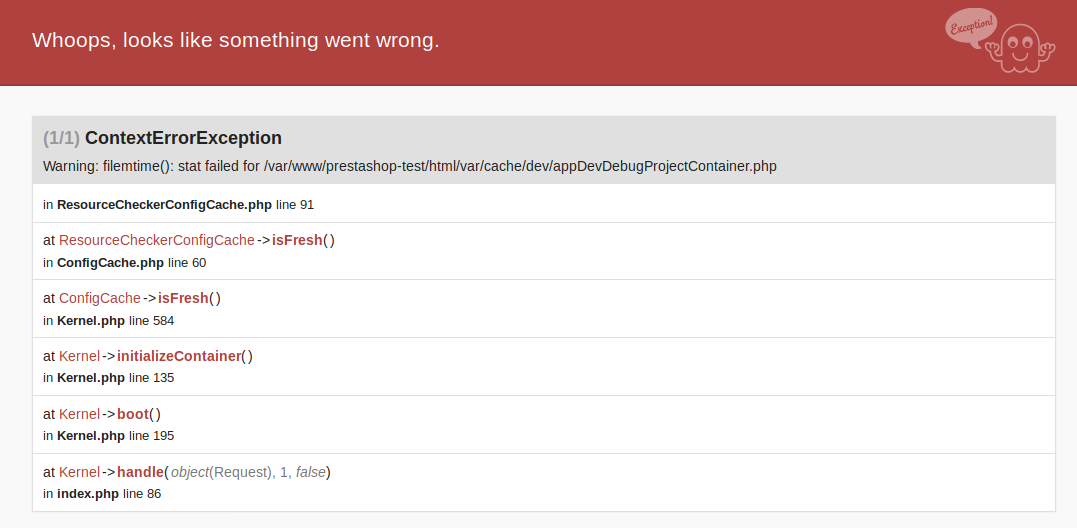
Right, I have this error with PS 1.7.6.1 + PHP 7.2 + nginx + DEV mode ON when doucle-click on "Clear cache" button:
 Klemart3D
on 10 Oct 2019
Klemart3D
on 10 Oct 2019
It's the same for me without double-click on "clear cache" button: it seems the problem occures when someone navigate on front office and I click at the same time on "'clear cache".
bm-services
on 11 Oct 2019
Still not fixed on 1.7.6.1 https://drive.google.com/file/d/1hDoTiBSzKMLK1FzAU0nWVQ-1cuQLOaDG/view?usp=sharing
 Hlavtox
on 29 Nov 2019
Hlavtox
on 29 Nov 2019
Still not fixed on 1.7.6.2
 rss9090
on 2 Dec 2019
rss9090
on 2 Dec 2019
Any help is welcomed, if you have an idea feel free to submit a PR :)
 marionf
on 2 Dec 2019
marionf
on 2 Dec 2019
@marionf
The only thing that I could tell about the issue that I'm often going to WSOD even from the one click on "Clear cache" button if Apache 2.4 is configured as mpm_event + mod_proxy_fcgi. But if I change config to mpm_prefork + mod_php72 there are no WSODs after one click. Double clicks sometimes Ok and sometimes not. Triple and/or quadruple clicks lead to WSOD or other error with 100% rate. Also I should say that to continue it's enough to hit F5 in the browser and get "Cache cleared successfuly" message(s) - one message for each click. Also sometimes after doubleclick I got three OK messages instead of two after hitting F5.
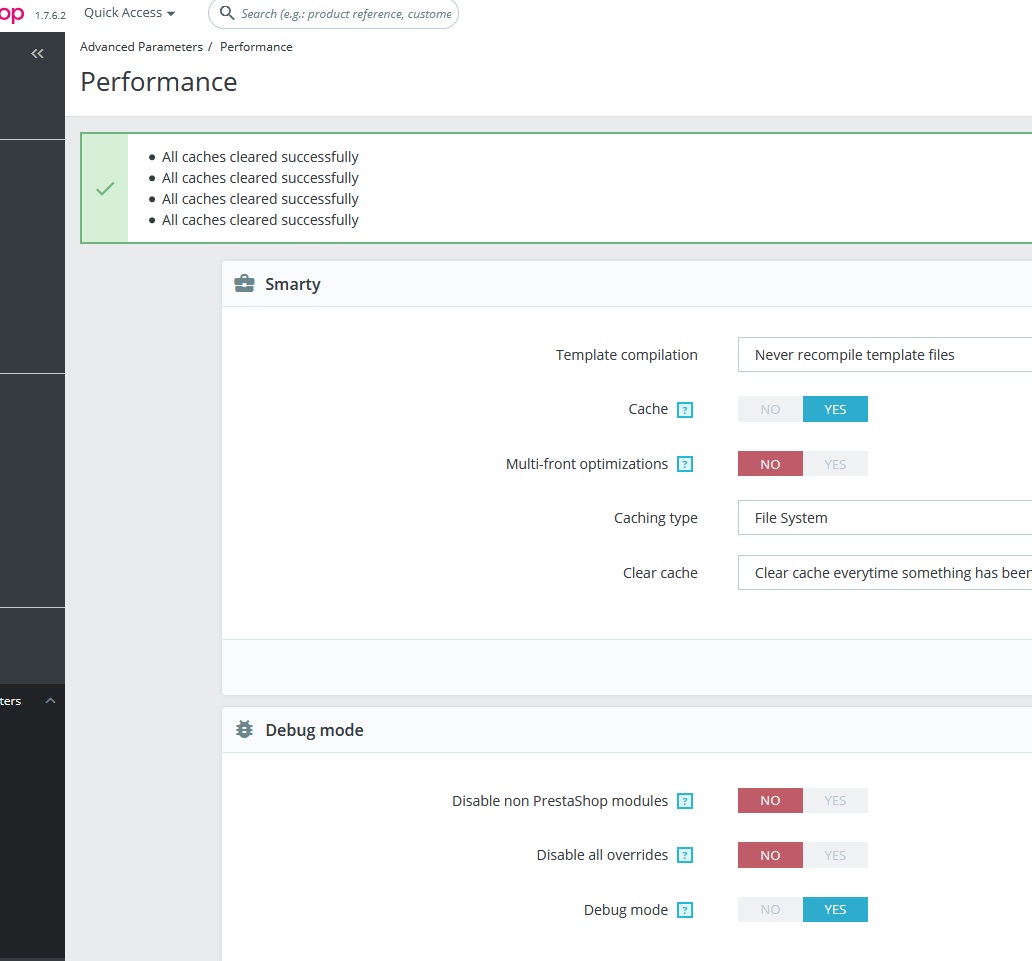
Any suggestions?
rss9090
on 2 Dec 2019
Some news about this problem:
it happens when there are a lot of request on a website: clear cache action are not terminated when new requests are launched and cache files aren't regenerated and their regeneration are blocked so: ERROR 500.
We found source of the problem in Symfony:
vendor/symfony/symfony/src/Symfony/Component/DependencyInjection/Dumper/PhpDumper.php
@@ -1132,7 +1132,7 @@ EOF;
             return '';
         }
         if ($this->asFiles) {
-            $code = "require \$this->containerDir.\\DIRECTORY_SEPARATOR.'removed-ids.php'";
+            $code = "\$this->containerDir.\\DIRECTORY_SEPARATOR.'removed-ids.php'";
         } else {
             $code = '';
             $ids = array_keys($ids);
@@ -1148,7 +1148,7 @@ EOF;
     public function getRemovedIds()
     {
-        return {$code};
+        return file_exists($code) ? require $code : 0;
     }
But it's not a good solution...
Any ideas to correct it?
bm-services
on 13 Feb 2020
This problem is maybe linked with this Symfony issue:
https://github.com/symfony/symfony/issues/25654
More precisely:
https://github.com/symfony/symfony/issues/25654#issuecomment-356894100
bm-services
on 13 Feb 2020
Same issue 1.7.6.7, phpfpm,nginx
Website is in maintenance mode without traffic..
 pixelicous
on 8 Jul 2020
pixelicous
on 8 Jul 2020
This "clear cache issue" is easily reproduced even on a prestashop.com backoffice demo website. When it will be fixed? I won't upgrade from 1.7.3 until then.
What's the sense of issuing new versions without making fully functional and stable current one.
@bm-services
it happens when there are a lot of request on a website: clear cache action are not terminated when new requests are launched and cache files aren't regenerated and their regeneration are blocked so: ERROR 500.
It happens in any case despite the load.
rss9090
on 29 Jul 2020
For everyone who's concerned by this bug. If you can have the time to try this fix https://github.com/PrestaShop/PrestaShop/pull/20689 and tell us if it's better :)
 PierreRambaud
on 24 Aug 2020
PierreRambaud
on 24 Aug 2020
@PierreRambaud Applied to all our 9 shops and cache cleared fine on all of them. Before, half would be OK, half would white-page. Soooo... promising? :-)
Just plz check that it didn't fuckup anything else and also clears theme/assets/cache etc. :-D 🚀
Hlavtox
on 24 Aug 2020
@PierreRambaud Applied to all our 9 shops and cache cleared fine on all of them. Before, half would be OK, half would white-page. Soooo... promising? :-)
Just plz check that it didn't fuckup anything else and also clears theme/assets/cache etc. :-D
Yes, we will do it :)
PierreRambaud
on 24 Aug 2020
@PierreRambaud Applied to all our 9 shops and cache cleared fine on all of them. Before, half would be OK, half would white-page. Soooo... promising? :-)
Just plz check that it didn't fuckup anything else and also clears theme/assets/cache etc. :-D
Could you use the new commit, it uses the cache:clear command instead of cache:pool:prune. It takes more time but looks good :)
PierreRambaud
on 25 Aug 2020
@PierreRambaud Also works, but takes a lot longer. With the original PR, it took like 1 second, now it takes 10
Hlavtox
on 25 Aug 2020
@Hlavtox Yes, but I check about themes, assets, etc and the first one was not clearing it all. Right now it really clear the whole cache directory, but a little more properly :)
PierreRambaud
on 25 Aug 2020
@PierreRambaud Ideally there should be more than one way to clear the cache, which is more or less destructive depending on what is needed. Clearing all cache (including Smarty & Twig) might be a little overkill in some cases because it's very slow to rebuild.
 eternoendless
on 2 Sep 2020
eternoendless
on 2 Sep 2020
@PierreRambaud Ideally there should be more than one way to clear the cache, which is more or less destructive depending on what is needed. Clearing all cache (including Smarty & Twig) might be a little overkill in some cases because it's very slow to rebuild.
It must be in another pull request/issue with more details and specifications to improve the original behavior.
PierreRambaud
on 2 Sep 2020
Related issues
 matks
·
3Comments
matks
·
3Comments
matks
·
3Comments
matks
·
3Comments
 zuk3975
·
3Comments
zuk3975
·
3Comments
 nrcjea001
·
3Comments
nrcjea001
·
3Comments
 rGaillard
·
3Comments
rGaillard
·
3Comments
Most helpful comment
Fatal error: require_once(): Failed opening required '/var/cache/dev/appParameters.php' (include_path='/vendor/pear/pear_exception:/vendor/pear/console_getopt:/vendor/pear/pear-core-minimal/src:/vendor/pear/archive_tar:.:/:/usr/local/php72/lib/pear') in /config/bootstrap.php on line 86
When save translations on non default theme. To resolve it manual flush of cache folder is needed.