Prestashop: Login Admin BO - error 500
Describe the bug
I'm trying to sign into the backend, with administration id and password, but I get a 500 error.
All the other users are logged in, but not the admin.
Screenshots
https://drive.google.com/open?id=1Jd7i5c2Ad4mwbn_QI4MgXHUggeATFO0L
Additionnal information
PrestaShop version: 1.7.3
PHP version: 5.5.38
Thank you in advance.
Giorgia
 nobodyelse84
All 19 comments
Same here with prestashop 1.6 or 1.7.2.. error 504 all the time..
 GaetanNaulin
on 16 Oct 2018
GaetanNaulin
on 16 Oct 2018
Hi @nobodyelse84,
Could you please try to rename the gamification module to gamification_off.
You can find it, in your Project_Folder/modules/
Thanks to check & feedback.
 khouloudbelguith
on 16 Oct 2018
khouloudbelguith
on 16 Oct 2018
This solution works for me, thanks !
GaetanNaulin
on 16 Oct 2018
Sorry, but I have no "gamification" folder... :(
nobodyelse84
on 16 Oct 2018
@nobodyelse84, could you please provide us with more info? We need more details to understand how we can reproduce your issue:
- host
- server setup and configuration
- debug mode report
- PHP error logs
- apache error log
- javascript console log
- screenshots
Don't you know how to get this information? Please read the following article:
http://build.prestashop.com/howtos/misc/how-to-create-bug-report/
Thanks!
khouloudbelguith
on 16 Oct 2018
- atribute folder: 755 / atribute files: 755
- debug error report

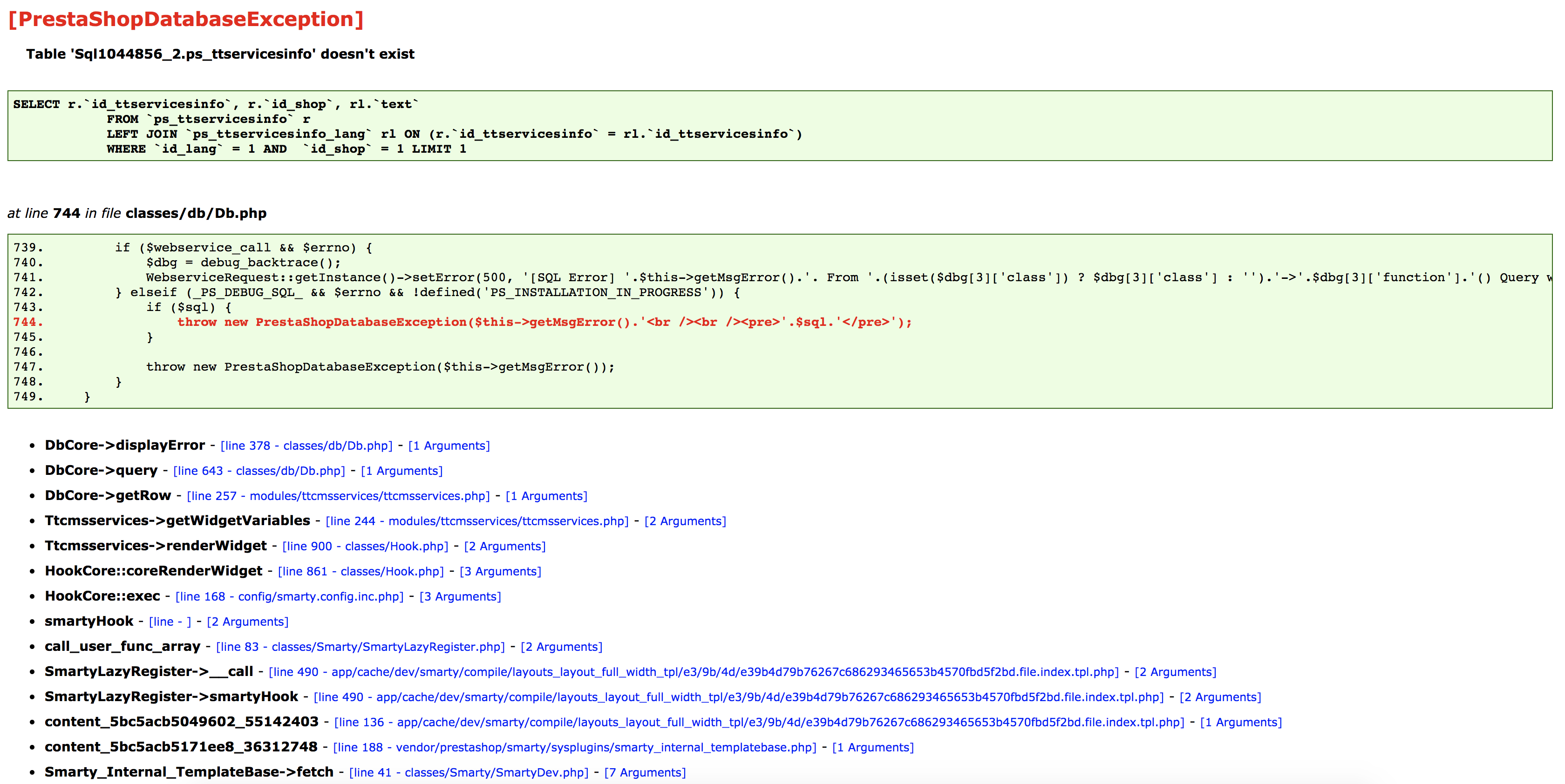
I hope all these infos will be helpfull.
Thank you in advcanfe.
Giorgia
nobodyelse84
on 16 Oct 2018
@nobodyelse84, Thanks for your feedback.
Could you please try to disable the ttcmsservices module in the Modules & Services pages.
You don't have access to the BO => You need to rename the ttcmsservices folder to ttcmsservices_off in the path Project_Folder/modules.
Could you please try to clear cache manually by deleting all the folder into app/cache (prod & dev).
Thanks to check and feedback.
khouloudbelguith
on 16 Oct 2018
I was trying to erase the prod into the cache folder, but it replace all the files.
I've tried to log in and it doesn't work :(
nobodyelse84
on 16 Oct 2018
@nobodyelse84 did you manage to rename the ttcmsservices folder?
khouloudbelguith
on 16 Oct 2018
Yes, I did! I've rename adding _off

nobodyelse84
on 16 Oct 2018
@nobodyelse84, Is there any other exceptions displayed?
khouloudbelguith
on 16 Oct 2018
Are getting replaced always these folders and files:
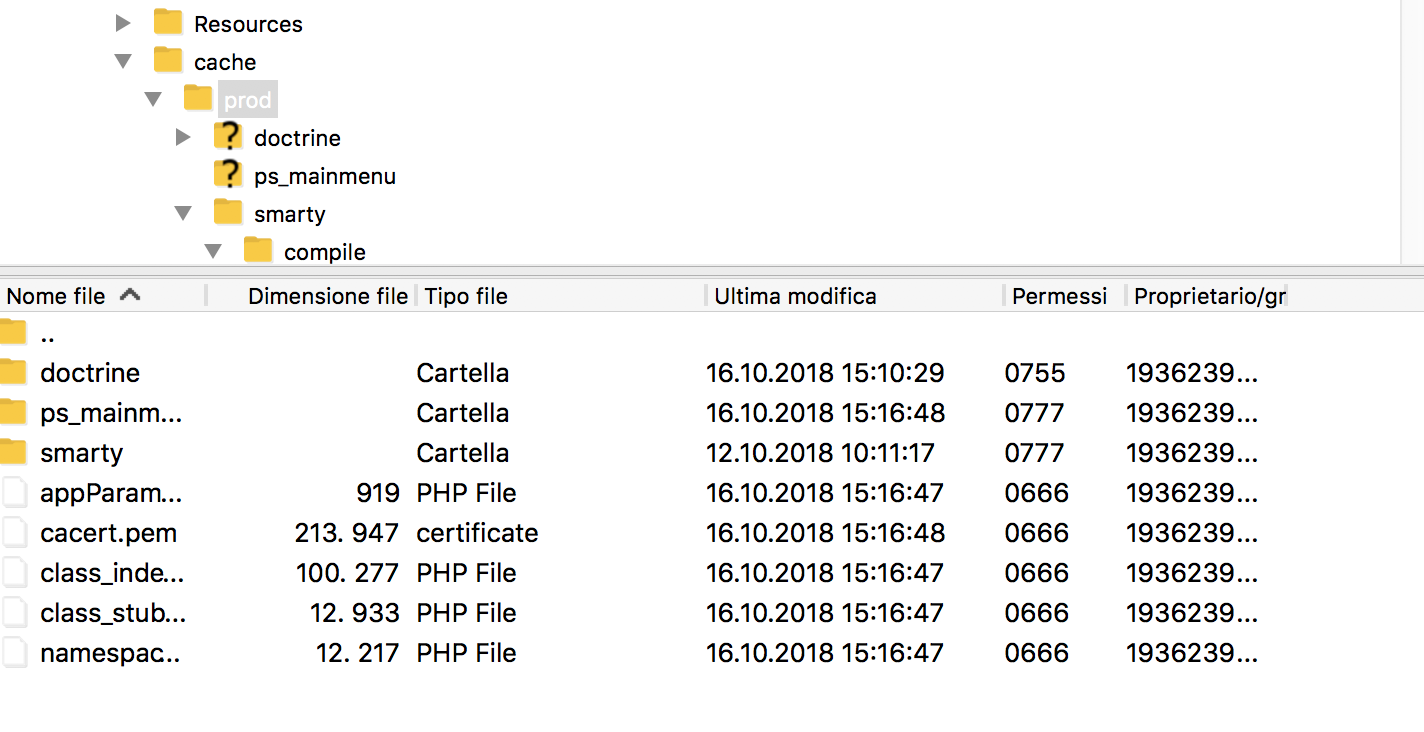
I was trying to replace the atribut to 777/755, but are getting replaced in this way.
nobodyelse84
on 16 Oct 2018
@nobodyelse84, it could be a server restriction, you need to check your host about this issue.
khouloudbelguith
on 16 Oct 2018
Thanks a lot!
Distinti saluti
Giorgia Bortesi
Cell. 366.1284643
Il giorno 16 ott 2018, alle ore 15:30, khouloudbelguith notifications@github.com ha scritto:
@nobodyelse84, it could be a server restriction, you need to check your host about this issue.
—
You are receiving this because you were mentioned.
Reply to this email directly, view it on GitHub, or mute the thread.
nobodyelse84
on 16 Oct 2018
@nobodyelse84, issue solved?
khouloudbelguith
on 16 Oct 2018
No, I’m going to contact the host owner.
I’ll let you know.
Thanks again
Distinti saluti
Giorgia Bortesi
Cell. 366.1284643
Il giorno 16 ott 2018, alle ore 15:30, khouloudbelguith notifications@github.com ha scritto:
@nobodyelse84, it could be a server restriction, you need to check your host about this issue.
—
You are receiving this because you were mentioned.
Reply to this email directly, view it on GitHub, or mute the thread.
nobodyelse84
on 16 Oct 2018
@nobodyelse84, thanks!
Waiting for your feedback.
khouloudbelguith
on 16 Oct 2018
Found the problem and risolve it: in the modules folder, I found two app that annoyed the structure:

Just disabled it and now everything it works perfectly.
Thanks!
nobodyelse84
on 17 Oct 2018
Hi @nobodyelse84,
Thanks for your feedback.
I close the issue, feel free to open a new one when needed.
Thanks!
khouloudbelguith
on 17 Oct 2018
Related issues
 esistgut
·
3Comments
esistgut
·
3Comments
 nrcjea001
·
3Comments
nrcjea001
·
3Comments
 sandra2n
·
3Comments
sandra2n
·
3Comments
 matks
·
3Comments
matks
·
3Comments
 Prestaworks
·
3Comments
Prestaworks
·
3Comments
Most helpful comment
This solution works for me, thanks !