Prestashop: [BOOM-5345] It is not possible to buy a product without stock when other combinations have stock
This issue has been migrated from the Forge. Read the original ticket here.
- _Reporter:_ JuanjoSC
- _Created at:_ Mon, 16 Apr 2018 18:12:27 +0200
I can not select a combination that has no stock when another has it.
If no combination has stock it works correctly.
- How to reproduce the issue ?
1-Create a product with combinations. Put stock in some combination but not in all.
2-Allow to buy products out of stock.
3-Disable the option "Display unavailable product attributes on the product page" in Product Settings page
4-In FO, combinations out of stock can not be selected
 prestonBot
All 26 comments
This comment has been migrated from the Forge. Read the original comment here.
- _Author:_ khouloud.belguith
- _Created at:_ Mon, 16 Apr 2018 18:23:09 +0200
Hi Juanjo,
I did not manage to reproduce the issue with the last version 1.7.3.1.
I attached a video record.
Apr 16 2018 6_20 PM.webm
Thanks to check and feedback.
Best regards, Khouloud
prestonBot
on 22 Aug 2018
This comment has been migrated from the Forge. Read the original comment here.
- _Author:_ juanjosc
- _Created at:_ Mon, 16 Apr 2018 18:40:24 +0200
Thanks for the quick reply.
Attached video of what he does to me.
prestonBot
on 22 Aug 2018
This comment has been migrated from the Forge. Read the original comment here.
- _Author:_ khouloud.belguith
- _Created at:_ Mon, 16 Apr 2018 19:03:58 +0200
Hi Juanjo,
Could you please provide me another screen record.
Your video is not accessible.
Best regards, Khouloud
prestonBot
on 22 Aug 2018
This comment has been migrated from the Forge. Read the original comment here.
- _Author:_ juanjosc
- _Created at:_ Mon, 16 Apr 2018 19:17:03 +0200
Let's see if now.
https://www.screencast.com/t/7onTEltf
prestonBot
on 22 Aug 2018
This comment has been migrated from the Forge. Read the original comment here.
- _Author:_ khouloud.belguith
- _Created at:_ Tue, 17 Apr 2018 11:43:54 +0200
Hi Juanjo Sánchez,
Could you please provide us with more info? We need more details to understand how we can reproduce your issue:
- host
- server setup and configuration
- PrestaShop version (source)
- debug mode report
- PHP error logs
- apache error log
- javascript console log
Don't you know how to get this information? Please read the following article:
http://build.prestashop.com/howtos/misc/how-to-create-bug-report/
Thanks!
Best regards, Khouloud
prestonBot
on 22 Aug 2018
This comment has been migrated from the Forge. Read the original comment here.
- _Author:_ juanjosc
- _Created at:_ Tue, 17 Apr 2018 12:37:50 +0200
Hi,
Host: dedicated server at OVH
Server:
CentOS Linux 7.4.1708 and Plesk Onyx 17.5.3
PHP: 7.1.16 FasctCGI apache server
Prestashop version 1.7.3.1
PHP errors: NO error.
Apache errors: NO error.
prestonBot
on 22 Aug 2018
This comment has been migrated from the Forge. Read the original comment here.
- _Author:_ khouloud.belguith
- _Created at:_ Tue, 17 Apr 2018 13:12:48 +0200
Hi Juanjo Sánchez,
Despite our several trials, we could not reproduce your issue with the provided information.
It seems that your issue is not a PrestaShop's core bug but most likely a server configuration or customization problem.
I invite you to contact our support team: http://addons.prestashop.com/en/388-support to help you solve your issue.
Best regards, Khouloud
prestonBot
on 22 Aug 2018
This comment has been migrated from the Forge. Read the original comment here.
- _Author:_ juanjosc
- _Created at:_ Wed, 18 Apr 2018 08:09:20 +0200
Hi,
SOLVED!!!

This behavior occurs when it is NOT selected in "Display unavailable product attributes on the product page"
It's a BUG.
prestonBot
on 22 Aug 2018
This comment has been migrated from the Forge. Read the original comment here.
- _Author:_ khouloud.belguith
- _Created at:_ Wed, 18 Apr 2018 11:46:02 +0200
Hi Juanjo,
Thanks for the clarification and for the feedback.
If the "Display unavailable product attributes on the product page" option is disabled, I manage to reproduce the issue with the last version 1.7.3.1.
We will see how to fix it.
Best regards, Khouloud
prestonBot
on 22 Aug 2018
This comment has been migrated from the Forge. Read the original comment here.
- _Author:_ zenerry
- _Created at:_ Thu, 26 Jul 2018 17:42:09 +0200
"Allow to buy products out of stock." is not a must to reproduce this error, with that option OFF it makes the same error.
prestonBot
on 22 Aug 2018
follow
 Thinkup
on 5 Sep 2018
Thinkup
on 5 Sep 2018
Some extra info: if all combinations are out of stock, the functionality works as intended. Then you can add the out of stock combination to the shopping cart. When one of the combinations is in stock, you cannot select the out of stock combination.
When will it be fixed? Because now I delete all the combinations that are out of stock, and add them again if they are in stock with all kinds of unwanted side effects (new id_product_attribute)
 twazerty
on 15 Sep 2018
twazerty
on 15 Sep 2018
I may have a possible solution, after some digging in the PHP code (as a non PHP developer and non prestashop expert) I stumbled upon the following code (controllers/front/ProductController.php) on line 961:
        if (!Configuration::get('PS_DISP_UNAVAILABLE_ATTR')) {
            $productAttributes = array_filter(
                $this->product->getAttributeCombinations(),
                function ($elem) {
                    return $elem['quantity'] > 0;
                 }
            );
Why filtering out the attributes without stock that should be displayed? After changing it to:
$productAttributes = $this->product->getAttributeCombinations();
the frontend works fine. I now can select the combination that is not available but allowed to order. Also the attributes are not shown when ordering is not allowed. If you want me to make a pull request I will install Git on my computer.
twazerty
on 16 Sep 2018
This issue is also present in 1.7.4.2
When the option to hide unavailable combinations is active, the unavailable options are not removed from the dropdown.
 Prestaworks
on 17 Oct 2018
Prestaworks
on 17 Oct 2018
Hi folks,
what version do you think this bug will be solved? I'm kind of desperate with this, and I can't find a temporary code correction for my 1.7.3.4 or 1.7.4.4.
Thanks mate.
 zenerry
on 16 Nov 2018
zenerry
on 16 Nov 2018
@zenerry, sorry for the delay, it is not fixed yet.
There are some major issues to solve before this one.
But PrestaShop is an open source project, so it can be solved before if someone submits a pull request to solve it.
Thanks for your understanding!
 khouloudbelguith
on 16 Nov 2018
khouloudbelguith
on 16 Nov 2018
Could somebody help me creating or teaching me how to create a "Pull Request" for this issue?
I'm very new to GitHub, and I don't want to mess it up.
Thanks!
zenerry
on 17 Nov 2018
Hi @zenerry, there is a awesome guide for this : https://github.com/firstcontributions/first-contributions 😉 I think it will be a great help
Also do not be afraid of "messing it up", we'll help you getting it right
 matks
on 19 Nov 2018
matks
on 19 Nov 2018
Hi guys,
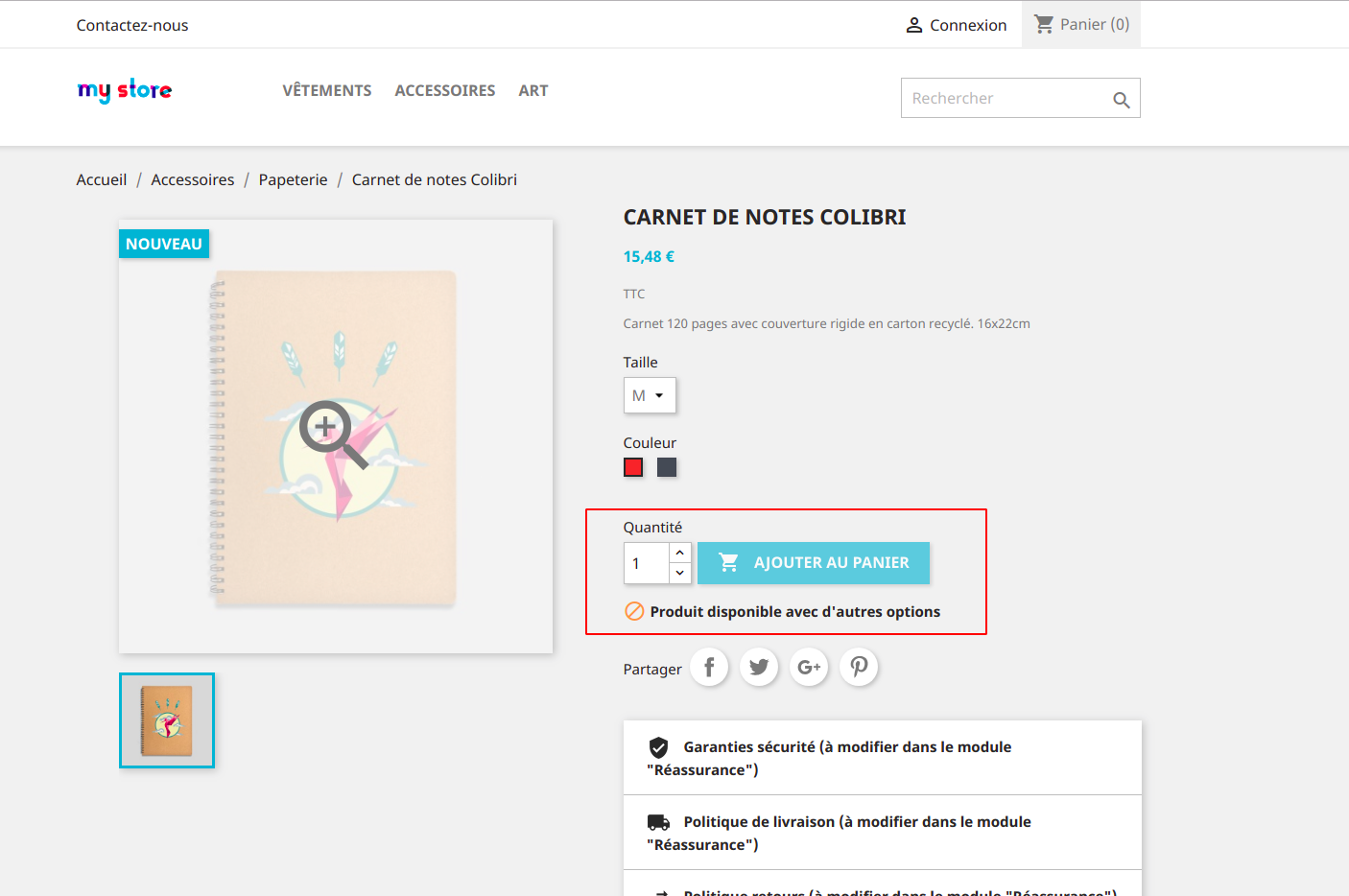
If "Display unavailable product attributes on the product page" option is disabled and if you allow to order out of stock combinations, they are still displayed in the product but can't be selected.
Question: Why you don't enable "Display unavailable product attributes on the product page" ? This way, you can see and order out of stock combinations.
And if you have a product for which one you have not allowed to order out of stock combinations, you have this:
 marionf
on 26 Apr 2019
marionf
on 26 Apr 2019
Hi @zenerry & @Prestaworks & @Thinkup,
Do you still have the problem?
 MatShir
on 9 May 2019
MatShir
on 9 May 2019
Hi @MatShir,
In my case, this issue not fixed yet.
I manage to reproduce it with PS1.7.5.2.
https://drive.google.com/file/d/1LHnhFzFMxxXlmycVfLgN92GMSNpTe8Ai/view
Thanks!
khouloudbelguith
on 9 May 2019
@khouloudbelguith
How is your configuration :
- Display unavailable product attributes on the product page ? Yes/No
- Allow to order out of stock combinations ?
marionf
on 9 May 2019
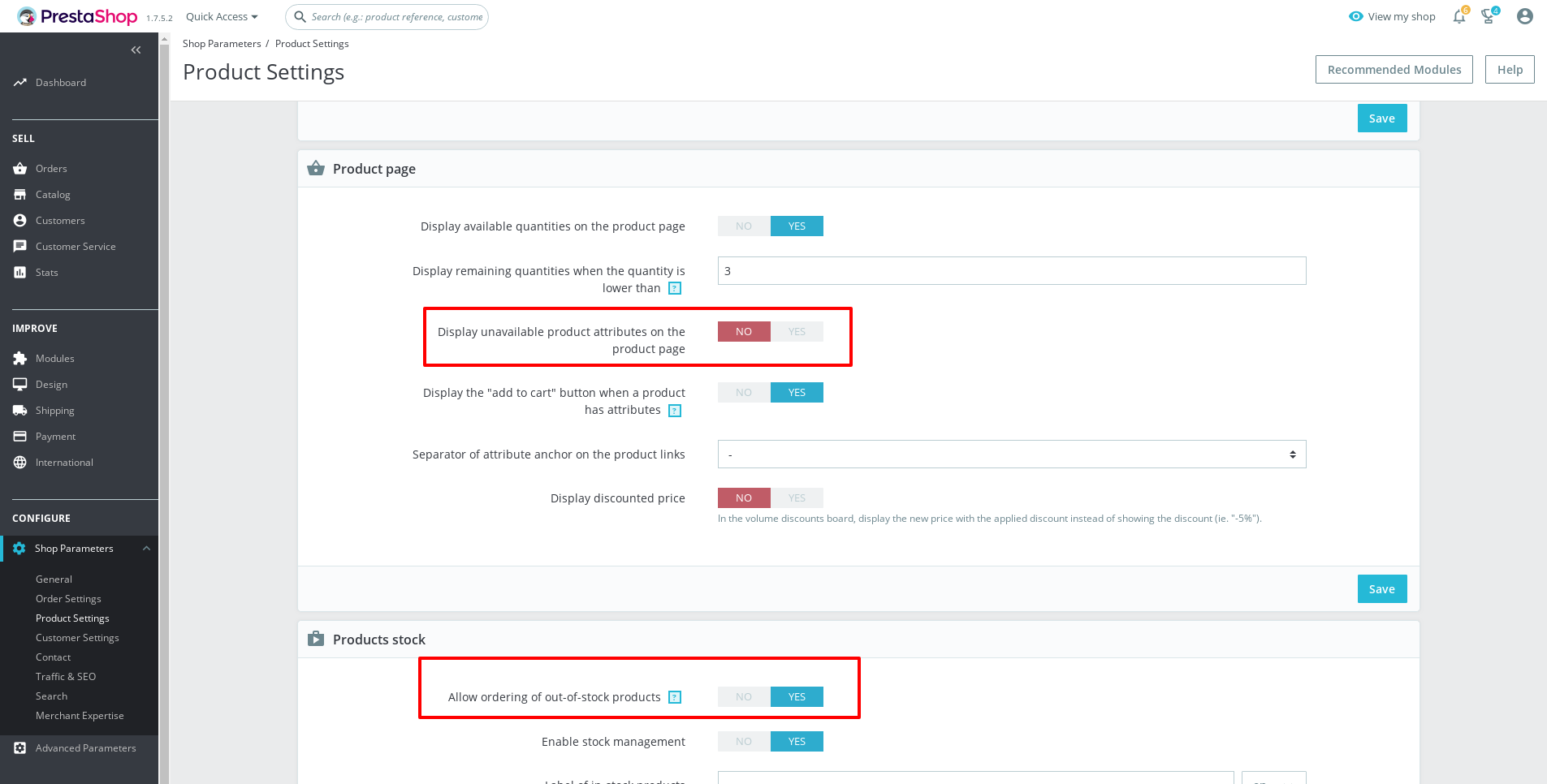
HI @marionf,
- Display unavailable product attributes on the product page => No
- Allow ordering of out-of-stock products => Yes
Thanks!
khouloudbelguith
on 10 May 2019
Hi @zenerry & @Prestaworks & @Thinkup,
Do you still have the problem?
Thank you @MatShir, this is solved for the moment.
I don't usually use this feature.
zenerry
on 10 May 2019
Thank you @khouloudbelguith
The out of stock combination is displayed in FO and can't be seleted
marionf
on 13 May 2019
matks
on 3 Jul 2019
Related issues
 nrcjea001
·
3Comments
nrcjea001
·
3Comments
 vincent-dp
·
3Comments
vincent-dp
·
3Comments
 rGaillard
·
3Comments
rGaillard
·
3Comments
 PrestaShark
·
3Comments
PrestaShark
·
3Comments
 Fabuloops
·
3Comments
Fabuloops
·
3Comments