Prestashop: 500 error duplicate entry for key 'product_default' in multistore when changing a product with combinations into a standard product and when creating combinations on the second shop
500 error duplicate entry for key 'product_default' in multistore when changing a product with combinations into a standard product
Steps to reproduce the issue:
- Enable the multistore
- Add a shop with virtual url
- Go to catalog > products, search for a product with combinations and switch it to "simple product"
- click on save
- See error 500 duplicate entry for key 'product_default' in the console


https://drive.google.com/file/d/1oIbBMvUMa_hTvSkDjdpuzZ02hgiSxkGj/view
500 error duplicate entry for key 'product_default' in multistore after changing a standard product into a product with combinations and while generating combinations for the 2nd shop
Steps to reproduce the issue:
- Enable Multishop
- Create two shops Shop A and shop Shop B
- All shops selected => create a standard product => save => NOK: error 500 in the console => save again => OK green alert
- Shop A selected => select product with combinations => generate combinations => OK => Click on save => OK green alert
- Shop B selected => select product with combinations => generate combinations => NOK: combinations are not displayed + error 500 duplicate entry for key 'product_default' in the console => refresh the page => combinations are displayed => Save => NOK: error 500 in the console
https://drive.google.com/file/d/1R3r7bbLgaV-IA8dKaabQxP5pRSXCmRXJ/view?usp=sharing
This issue has been migrated from the Forge. Read the original ticket here.
- _Reporter:_ Cameleon74
- _Created at:_ Wed, 18 Apr 2018 17:46:53 +0200
Bonjour,
Suite à un problème rencontré par un client sur un de mes modules qui gère les déclinaisons en masse, je me suis mi à déboguer l'origine du problème et cela m'a conduit à la découverte d'un bug lors de l'enregistrement d'un produit/déclinaison en mode multiboutique.
En détail, lorsque je crée une déclinaison pour un produit donnée pour la boutique 1, tout va bien, mais lorsque je change de boutique et que j'essaie de créer une déclinaison pour le même produit, voilà les erreurs rencontrées:
- En Prestashop version 1.6, je rencontre une erreur sql : Duplicate entry '108-1' for key 'product_default.
- Par contre, pour Prestashop 1.7, ca passe bien, mais lorsque j'essaie de marquer cette déclinaison comme par défaut, je recois la même erreur que cité ci-dessus.
En gros, c'est la clé unique product_default de la table product_attribute qui pose un problème, d'après mon humble avis, il faudrait ajouter aussi le id_shop dans cette même clé afin de permettre l'enregistrement de déclinaison par défaut pour chaque boutique.
J'espère que vous allez tenir compte de ce bug pour les prochaines version de prestashop. En tout cas, je vais apporter les corrections dans nos modules car c'est urgent.
En vous remerciant.
Wissem
Contributeur
- How to reproduce the issue ?
N/A
 prestonBot
All 18 comments
This comment has been migrated from the Forge. Read the original comment here.
- _Author:_ khouloud.belguith
- _Created at:_ Wed, 18 Apr 2018 17:58:17 +0200
Hi Wissem,
Please, send your request in English.
English is the norm on the Forge
Thanks!
Best regards, Khouloud
prestonBot
on 22 Aug 2018
This comment has been migrated from the Forge. Read the original comment here.
- _Author:_ khouloud.belguith
- _Created at:_ Thu, 19 Apr 2018 17:20:33 +0200
Hi wissem,
Could you please confirm these steps
Steps to reproduce the issue with the last version 1.7.3.1 :
- Enable Multishop
- Create two shops Shop A and shop Shop B
- All shops selected => create a standard product => save
- Shop A selected => edit the product created => generate combinations => OK => Click on save => green alert
- Shop B selected => edit the product created => generate combinations => NOK => you need to refresh page => Click on save => red alert => it is impossible to create combinations for the second shop
I attached a video record.
Best regards, Khouloud
prestonBot
on 22 Aug 2018
This comment has been migrated from the Forge. Read the original comment here.
- _Author:_ cameleon74
- _Created at:_ Sat, 21 Apr 2018 19:55:31 +0200
Hello Khouloud,
Yes I confirm, this is exactly what happen when I try to save a combination for shop B for a product which has yet combination(s) in shop A.
In PS 1.7.x versions, the exact problem was that the table product_attribute contain a unique key called "product_default" that prevents saving 2 combinations as default for the same product in multi-shops environment. So you can create combination for the same product in each shop, but you can't set as default (one combination can be set as default for all shops) Please see the attached print screen 
This issue occurs also in Prestashop 1.6 when I try to save the product, but the error was more critical, In Prestashop 1.6, you can't save the combination at all in shop B and I receive a red sql alert.
Hope this issue will be resolved for the next upgrade.
About my client problem, I will try to display an alert for him telling that is not allowed to set combination as default for the same product when it is yet defined for another shop.
Thanks
Best regards
Wissem
prestonBot
on 22 Aug 2018
This comment has been migrated from the Forge. Read the original comment here.
- _Author:_ khouloud.belguith
- _Created at:_ Mon, 23 Apr 2018 11:30:34 +0200
Hi wissem,
Here, only we fix bugs that we reproduce in the project 1.7.
For the 1.6 you need to create another ticket in this link http://forge.prestashop.com/projects/PSCSX
I manage to reproduce the issue with the last version 1.7.3.1.
Steps to reproduce the issue with the last version 1.7.3.1 :
- Enable Multishop
- Create two shops Shop A and shop Shop B
- All shops selected => create a standard product => save
- Shop A selected => edit the product created => generate combinations => OK => Click on save => green alert
- Shop B selected => edit the product created => generate combinations => NOK
 => you need to refresh page
=> Click on save => red alert => it is impossible to create combinations for the second shop


We will see how to fix it.
Best regards, Khouloud
prestonBot
on 22 Aug 2018
is there any fix for this problem?
 skacco
on 23 Oct 2018
skacco
on 23 Oct 2018
Hi @skacco,
Sorry not yet.
Thanks for your understanding.
 khouloudbelguith
on 23 Oct 2018
khouloudbelguith
on 23 Oct 2018
Hello. I just wanted to add that for my organization it is vital that this keeps working correctly because we do offer a live site and new products will not be accesible for shop B whereas for shop A it will be.
 demperador
on 22 Nov 2018
demperador
on 22 Nov 2018
@jocel1 i have the same issue, it seems related to 4c121d138259db7b8fe9edef420f15a1b106eb57. Do you think that i can rollback the commit without side effects?
 rGaillard
on 17 Jan 2019
rGaillard
on 17 Jan 2019
@rGaillard you'll have nasty side effects if you rollback this commit. It should be safer to move back the UNIQUE KEY on PREFIX_product_attribute to a standard KEY as in multishop you'll use the product_attribute_shop anyway
 jocel1
on 17 Jan 2019
jocel1
on 17 Jan 2019
@jocel1 thank you.
rGaillard
on 17 Jan 2019
Steps to reproduce the issue with the last version 1.7.5.1 :
- Enable Multishop
- Create two shops Shop A and shop Shop B
- All shops selected multistore context => create a standard product => save => OK
- Try to edit combinations multistore context, => save => SAVE ERROR RED
- Shop A selected => edit the product created => OK => Click on save => green alert OK
- Shop B selected => edit the product created => OK => Click on save => green alert OK
So basically you can create the product in multistore context, but to edit the product with Bulk actions context must be set to single shop. Only work around is to do all editing multiple times/once for each shop.
 unreviewed
on 10 Mar 2019
unreviewed
on 10 Mar 2019
Also this error when trying to save.
POST http://mysite/index.php/sell/catalog/products/20?_token=FLhiYgOQ-k1IqJct1YKTv-kq9W03QMwgpopN8vcDwBc 500 (Internal Server Error) main.bundle.js:313
unreviewed
on 10 Mar 2019
Found a fix that works for me,
Fix for me in PS 1.7.5.1
Table ps_attribute_group rename field "is_color_group" to anything you like > Save >
Then rename the field back to "is_color_group"
Not sure why this works, I assume it is related to a bad index.
unreviewed
on 10 Mar 2019
Spoke to soon. Something else is going on. Problem is back and repeating the rename of "is_color_group" dosen't work. So only work around is to do all editing multiple times/once for each shop.
unreviewed
on 10 Mar 2019
Hi @unreviewed,
I manage to reproduce the issue with PS1.7.5.1 also.
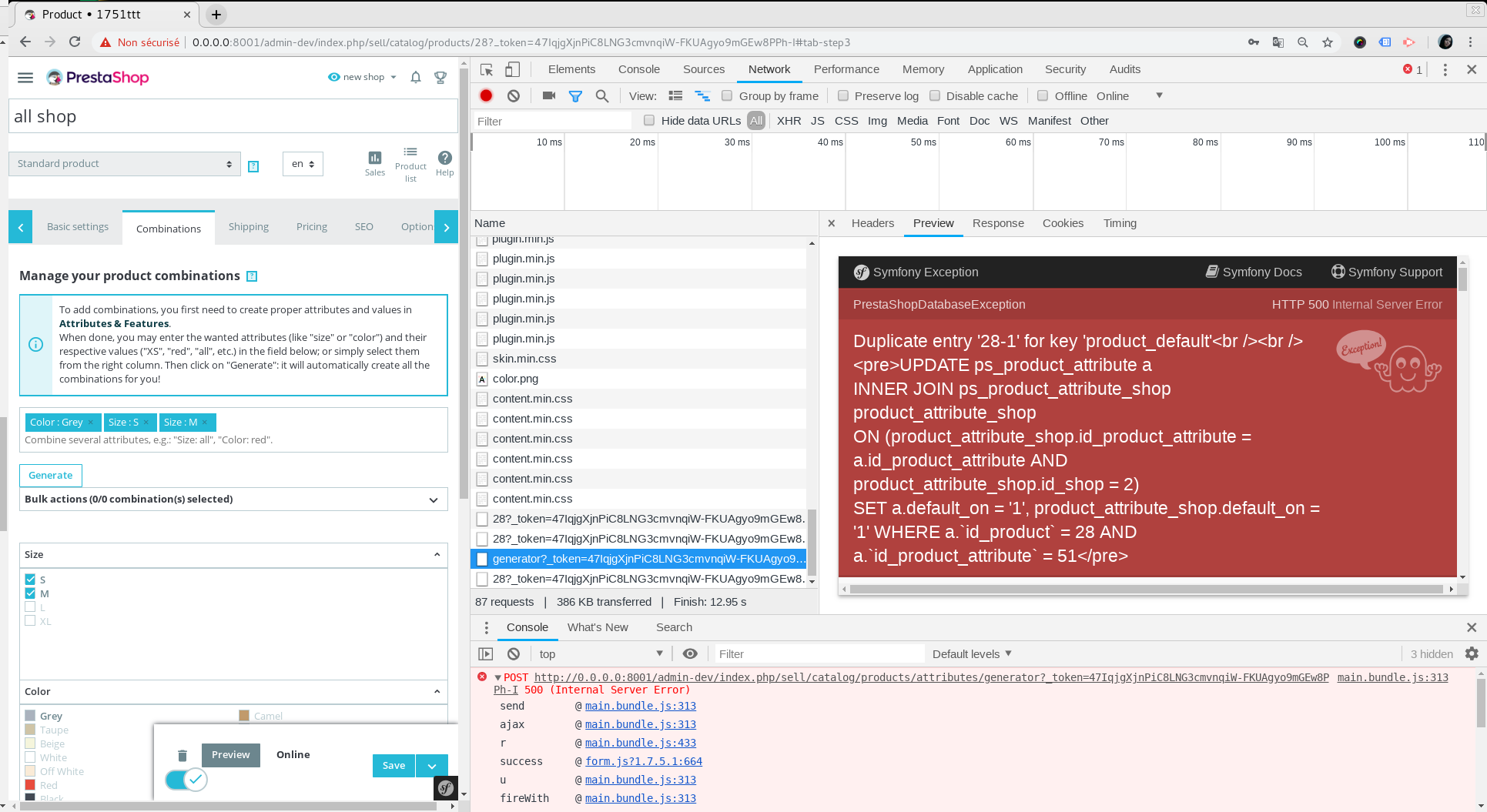
It is not fixed yet.
We are aware of this issue, it is added to our bug roadmap, If you have already fixed it on your end or if you think you can do it, please do send us a pull request!
Thanks!
khouloudbelguith
on 11 Mar 2019
Same issue with PS1.7.6.0
https://drive.google.com/file/d/1g0ld6oL3795w3zA8MDyEECIaZ6u4aJmI/view
Thanks!
khouloudbelguith
on 3 Sep 2019
In my case (1.7.6.5) in Combinations it was showing attributes from shop 1 when editing a product from shop 2. I fixed it in
src/PrestaShopBundle/Controller/Admin/ProductController.php :
diff ProductController.php.modified ProductController.php
614c614
<         $attributeGroups = $doctrine->getRepository('PrestaShopBundle:Attribute')->findByLangAndShop((int) $language['id_lang'], $shopContext->getContextListShopID()[0]); //(int) $language['id_shop']);
---
>         $attributeGroups = $doctrine->getRepository('PrestaShopBundle:Attribute')->findByLangAndShop((int) $language['id_lang'], (int) $language['id_shop']);
 Bugfunder
on 5 May 2020
Bugfunder
on 5 May 2020
Another scenario:
Describe the bug
I enable multistore, add a new shop + virtual url
Then I go to a products with combinations, switch to "simple product"
=> I can't save it and have errors in console
Steps to reproduce the behavior:
Go to multistore
Add a shop with virtual url
go to catalog>products, search for a product w combinations and switch it to "simple product"
click on save
=> see errors
Screenshots
https://drive.google.com/file/d/1oIbBMvUMa_hTvSkDjdpuzZ02hgiSxkGj/view
Additional information
PrestaShop version: 1.7.8.x
PHP version: 7.2
 ngodefroy
on 25 Sep 2020
ngodefroy
on 25 Sep 2020
Related issues
 matks
·
3Comments
rGaillard
·
3Comments
matks
·
3Comments
rGaillard
·
3Comments
 sandra2n
·
3Comments
khouloudbelguith
·
3Comments
sandra2n
·
3Comments
khouloudbelguith
·
3Comments
 zuk3975
·
3Comments
zuk3975
·
3Comments
Most helpful comment
Hi @unreviewed,
I manage to reproduce the issue with PS1.7.5.1 also.

It is not fixed yet.
We are aware of this issue, it is added to our bug roadmap, If you have already fixed it on your end or if you think you can do it, please do send us a pull request!
Thanks!