Prestashop: [BOOM-5916] Translate Mail - No Subject was found for account in the database.
This issue has been migrated from the Forge. Read the original ticket here.
- _Reporter:_ markobboy
- _Created at:_ Fri, 6 Jul 2018 14:59:11 +0200
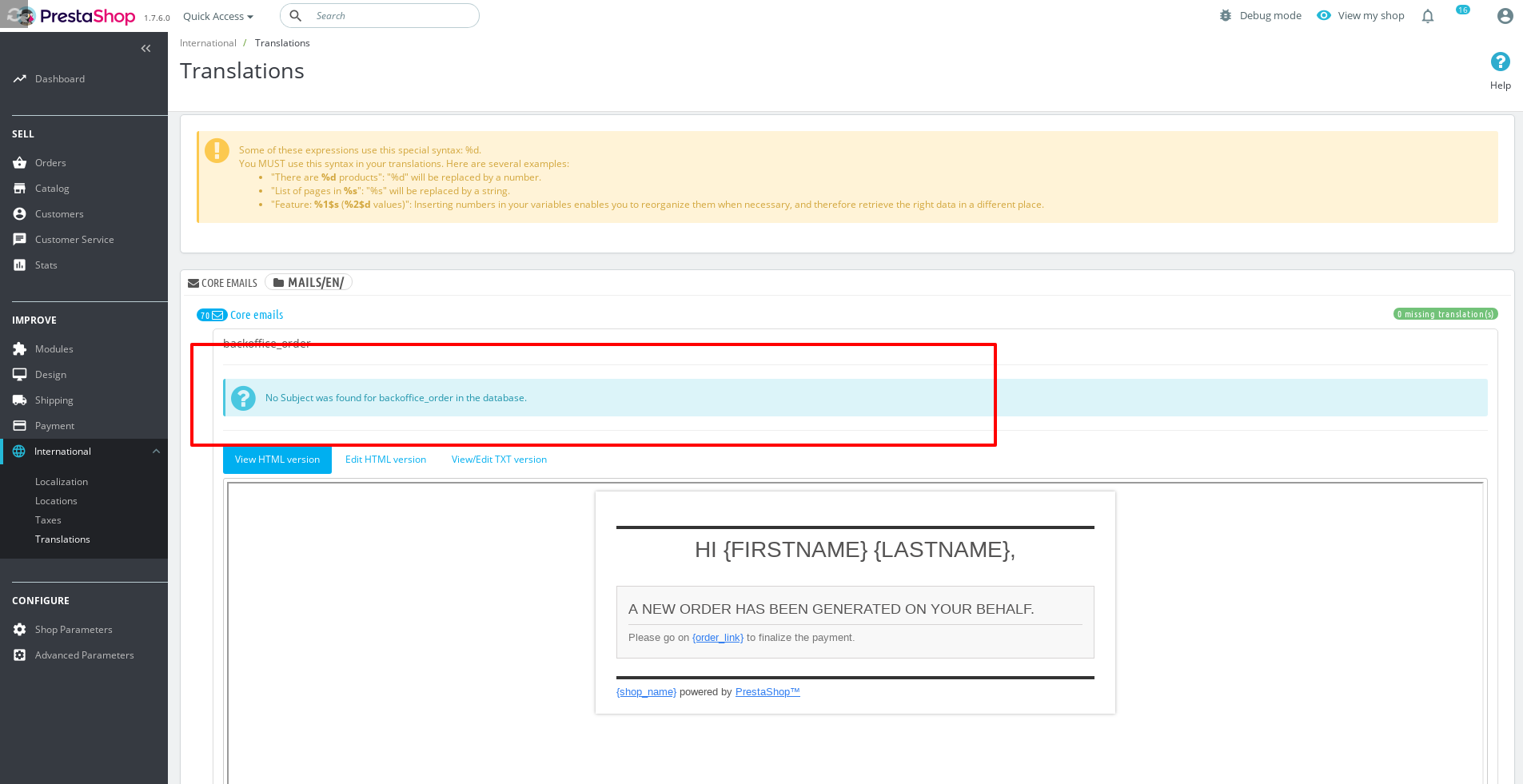
When I go into translations - email translations - body - core - english
You can not view and edit the subject of the email. The error reported is as follows:
No Subject was found for account in the database.
- How to reproduce the issue ?
translations - email translations - body - core - english
 prestonBot
All 18 comments
This comment has been migrated from the Forge. Read the original comment here.
- _Author:_ khouloud.belguith
- _Created at:_ Fri, 6 Jul 2018 17:36:13 +0200
Hi Marco,
Thanks for your report.
I manage to reproduce the issue with the ps1740.
We will see how o fix it.
Best regards, Khouloud
prestonBot
on 22 Aug 2018
This comment has been migrated from the Forge. Read the original comment here.
- _Author:_ netdrag
- _Created at:_ Fri, 13 Jul 2018 16:43:34 +0200
Thats not a minor issue.
All mails are sent with english subject (for example ps_reminder module). We are getting classified as spam 20% more because people don't understand and are scared to open the mails.
prestonBot
on 22 Aug 2018
This comment has been migrated from the Forge. Read the original comment here.
- _Author:_ netdrag
- _Created at:_ Fri, 13 Jul 2018 18:40:42 +0200
The Problem is in the AdminTranslationsController in the getSubjectMail function about line 2886.
The function is picky when you have whitespace or newline in your Mail::l function in your controller.
if (preg_match('/Mail::l(\''.PS_TRANS_PATTERN.'\')/Us', $tab3.')', $matches)) {
For example this is not matched:
Mail::l(
'You are one of our best customers',
(int)$email['id_lang']
),
The other problem is that even when you fix it, the translation is not saved.
prestonBot
on 22 Aug 2018
This comment has been migrated from the Forge. Read the original comment here.
- _Author:_ khouloud.belguith
- _Created at:_ Mon, 16 Jul 2018 11:21:16 +0200
Hi Thomas Andergassen,
About the second issue, the translation is not saved, we manage to reproduce the issue with the last version 1.7.4.0.
It is an issue related to the translation because of the upgrade of smarty.
Your ticket is a duplicate of http://forge.prestashop.com/browse/BOOM-5983
So, I close it. Please, follow BOOM-5983.
Best regards, Khouloud
prestonBot
on 22 Aug 2018
This comment has been migrated from the Forge. Read the original comment here.
- _Author:_ marion_francois
- _Created at:_ Mon, 16 Jul 2018 11:34:05 +0200
Thanks for diving into this Thomas Andergassen
If you know how to solve this, would you be willing to make a pull request on GitHub with your code suggestion?
https://github.com/PrestaShop/PrestaShop/tree/develop
Thank you!
prestonBot
on 22 Aug 2018
This comment has been migrated from the Forge. Read the original comment here.
- _Author:_ netdrag
- _Created at:_ Mon, 16 Jul 2018 12:30:27 +0200
There are a few possible solutions.
- Change the regex to match also whitespaces and newlines
- Strip whitespaces and newlines before trying to match with regex
- Change the templates and remove whitespaces and newlines (this was my quickfix, easy but not very reliable)
But I don't think any of the solutions is good:
If the templates translates with $this-> trans instead of Mail:trans then this doesn't work. (ps_emailsubscription does it like that)
If the text to translate is saved in a variable than this doesn't work..
if there are special chars in the text it doesn't work..
Every module developer would have to respect this(and other) rules.
I think there needs to be a better and more robust way then parsing a php file. Especially if you want to customize the subject in the feature like amazon does it (Your order containing article xy got shipped). Its a good way to reduce spam classification.
prestonBot
on 22 Aug 2018
This comment has been migrated from the Forge. Read the original comment here.
- _Author:_ marion_francois
- _Created at:_ Fri, 10 Aug 2018 16:20:21 +0200
Hi Marco Rubolini,
You can edit the subject of email if you go in International > Translations
Select Email translations
Select subject
Select your language
Click on Modify
prestonBot
on 22 Aug 2018
This comment has been migrated from the Forge. Read the original comment here.
* _**Author:**_ marion_francois

* _**Created at:**_ Fri, 10 Aug 2018 16:20:21 +0200
Hi Marco Rubolini,
You can edit the subject of email if you go in International > Translations
Select Email translations
Select subject
Select your language
Click on Modify
That way you have no control which emails subjects you're translating, there are only 24 email subjects - therefore some core emails are missing. Also, you have no control over native module subjects such as ps_emailalerts and finally in order to fight spam, order # or {firstname} must be supported.
 mrabsinthe
on 19 Nov 2018
mrabsinthe
on 19 Nov 2018
1.7.5.1 and the situation is still the same. These email subject lines are related to order status emails:
bankwire
cheque
employee_password
newsletter
order_canceled
order_conf_cart_rules
order_conf_product_list
outofstock
payment_error
payment
preparation
refund
shipped
voucher_new
That's quite a lot especially when you're unable to make friendly email subject for transaction emails! Because if you want to have nice and customer friendly email subject "Your order has been shipped", you also have to have the same order status in BO! Same goes for short, unfriendly "preparation".
Or perhaps I'm missing something and we are able to keep different order status and email subject???
I'm sorry but I don't think this is "minor" issue!
mrabsinthe
on 13 Apr 2019
Hi,
I don't know if it is already solved in 1.7.6 but I did some edit to make it work for me.
It works only for the mail that display the subject input field. Hope it can help.
In the file "controllers/admin/AdminTranslationsController.php"
protected function displayMailContent($mails, $all_subject_mail, $obj_lang, $id_html, $title, $name_for_module = false)
.
.
.

                if (array_key_exists('html', $mail_files) || array_key_exists('txt', $mail_files)) {
                    if (array_key_exists($mail_name, $all_subject_mail)) {
                        foreach ($all_subject_mail[$mail_name] as $subject_mail => $subject_trad) {
.
.
.

                            $str_return .= '</label><div class="col-lg-9">';
                            if (isset($subject_trad) && $subject_trad!="") {
                                $str_return .= '<input class="form-control" type="text" name="subject[' . Tools::htmlentitiesUTF8($group_name) . '][' . Tools::htmlentitiesUTF8($subject_mail) . ']" value="' . $subject_trad . '" />';
                            } else {
.
.
.
protected function getSubjectMail($dir, $file, $subject_mail)
.
.
.
if (preg_match('/Mail::l\(\'' . _PS_TRANS_PATTERN_ . '\'\)/Us', $tab3 . ')', $matches)) {
                                if (!isset($subject_mail[$template])) {
                                    $subject_mail[$template] = array();
                                }
                                if (!in_array($matches[1], $subject_mail[$template])&&$matches[1]!="") {

                                    $subject_mail[$template][$matches[1]] = Mail::l($matches[1],$this->lang_selected->id);
                                }
                            }
 kyle013
on 27 Jun 2019
kyle013
on 27 Jun 2019
Hi @kyle013,
Yes, I have the same issue with Branch 1.7.6.x
Would you be willing to make a pull request on GitHub with your code suggestion?
https://github.com/PrestaShop/PrestaShop/tree/develop
Thanks!
 khouloudbelguith
on 27 Jun 2019
khouloudbelguith
on 27 Jun 2019
Hi everyone …
I don't know if it's the right place, but I have an issue in the same place …
The problem is for module emails.
In my case, I can change the email subject :
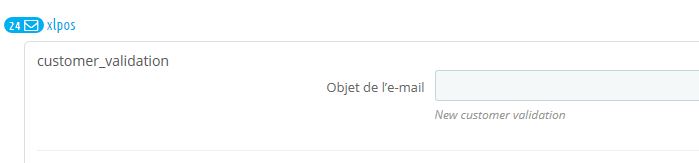
But after I saved it, it doesn't seem to be saved because it's not displayed …
After some investigations, it's saved but not showed up …
For some reason, this parts of code disappeared in AdminTranslationsController.php :
$core_mails['subject'] = $this->getSubjectMailContent($i18n_dir);
AND
$module_mails[$module_name]['subject'] = $core_mails['subject'];
If I change the code like this, the subject is displayed :
/**
     * @param array $subject_mail
     * @return array
     */
    protected function getSubjectMailContent($subject_mail)
    {
        $subject_mail_content = array();
        foreach ($subject_mail as $templateSubjects) {
            foreach ($templateSubjects as $subject) {
                $trad = Mail::l($subject, $this->lang_selected->id);
                if ($trad !== $subject) {
                    $subject_mail_content[$subject]['trad'] = Mail::l($subject, $this->lang_selected->id);
                    $subject_mail_content[$subject]['use_sprintf'] = $this->checkIfKeyUseSprintf($subject);
                }
            }
        }
        return $subject_mail_content;
    }

public function initFormMails($no_display = false)
    {
        [...]
        foreach ($modules_has_mails as $module_name => $module_path) {
            $module_path = rtrim($module_path, '/');
            $module_mails[$module_name] = $this->getMailFiles($module_path.'/mails/'.$this->lang_selected->iso_code.'/', 'module_mail');
            $module_mails[$module_name]['subject'] = $this->getSubjectMailContent($subject_mail);
            $module_mails[$module_name]['display'] = $this->displayMailContent($module_mails[$module_name], $subject_mail, $this->lang_selected, Tools::strtolower($module_name), $module_name, $module_name);
        }
        [...]
 BrunoJunior
on 30 Aug 2019
BrunoJunior
on 30 Aug 2019
Hi,
I don't know if it is already solved in 1.7.6 but I did some edit to make it work for me.
It works only for the mail that display the subject input field. Hope it can help.
In the file "controllers/admin/AdminTranslationsController.php"protected function displayMailContent($mails, $all_subject_mail, $obj_lang, $id_html, $title, $name_for_module = false) . . . if (array_key_exists('html', $mail_files) || array_key_exists('txt', $mail_files)) { if (array_key_exists($mail_name, $all_subject_mail)) { foreach ($all_subject_mail[$mail_name] as $subject_mail => $subject_trad) { . . . $str_return .= '</label><div class="col-lg-9">'; if (isset($subject_trad) && $subject_trad!="") { $str_return .= '<input class="form-control" type="text" name="subject[' . Tools::htmlentitiesUTF8($group_name) . '][' . Tools::htmlentitiesUTF8($subject_mail) . ']" value="' . $subject_trad . '" />'; } else { . . . protected function getSubjectMail($dir, $file, $subject_mail) . . . if (preg_match('/Mail::l\(\'' . _PS_TRANS_PATTERN_ . '\'\)/Us', $tab3 . ')', $matches)) { if (!isset($subject_mail[$template])) { $subject_mail[$template] = array(); } if (!in_array($matches[1], $subject_mail[$template])&&$matches[1]!="") { $subject_mail[$template][$matches[1]] = Mail::l($matches[1],$this->lang_selected->id); } }
Hi Kyle,
I don't quite understand the changes you made. Can you upload the complete file?
 gafonso10
on 17 Sep 2019
gafonso10
on 17 Sep 2019
It's not seems to be solved? I've use 1.7.6.4 and the problem is still there. So when I'm change the template, the changes are not saved. After a refresh of this page, the english text is already in the body.
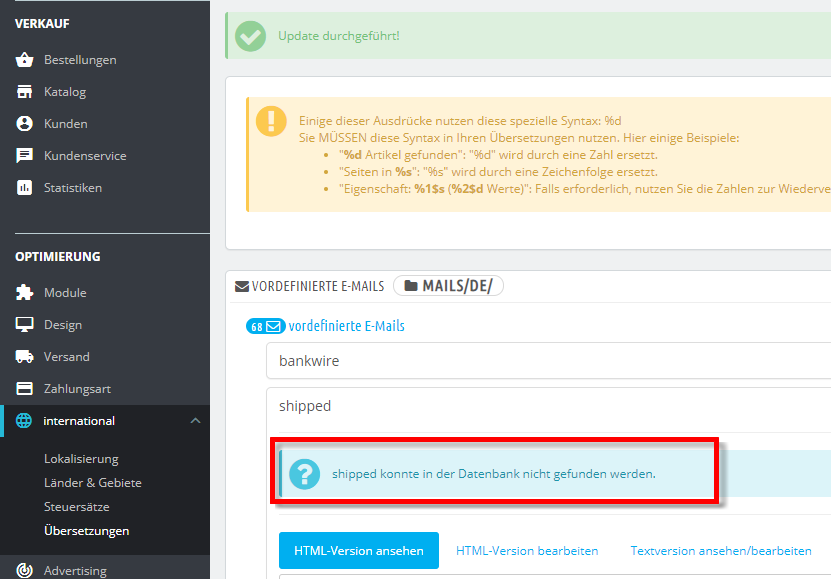
Any informations in this case available?
 pthoelken
on 19 Mar 2020
pthoelken
on 19 Mar 2020
1.7.4 > 1.7.5 > 1.7.6 > Still same Problem O_O
 matteolavaggi
on 11 Jun 2020
matteolavaggi
on 11 Jun 2020
Hi! PS 1.7.6.7 same problem. Any fix to apply?
 runningz
on 31 Aug 2020
runningz
on 31 Aug 2020
Hi @runningz,
Sorry, not fixed yet.
But PrestaShop is an open source project, so it can be solved before if someone submits a pull request to solve it.
Thanks!
khouloudbelguith
on 31 Aug 2020
@matteolavaggi I totally agree … But it seems a PR fixes the bug but will be available with PrestaShop 1.7.8.0 …
https://github.com/PrestaShop/PrestaShop/pull/19289
BrunoJunior
on 3 Sep 2020
Related issues
 centoasa
·
3Comments
centoasa
·
3Comments
 zuk3975
·
3Comments
prestonBot
·
3Comments
zuk3975
·
3Comments
zuk3975
·
3Comments
prestonBot
·
3Comments
zuk3975
·
3Comments
 hiousi
·
3Comments
hiousi
·
3Comments