Pptxgenjs: Pie Charts don't show decimal percentage
Hi
I want to show decimals on my pie charts, and I don't need integer numbers, I tried used the property 'dataLabelFormatCode' but it does not work.
Can help me please?
I would greatly appreciate it, thank you.
 Alexiz-Padilla
All 5 comments
Can you post your code and demonstrate the result you're looking for in a PowerPoint screencap?
 gitbrent
on 21 Sep 2019
gitbrent
on 21 Sep 2019
This is my pie.js file in this a pie chart will be created
const PptxGenJS = require('pptxgenjs');
const colors = require('./colors');
const unitLabels = require('./unitLabels');

const pptx = new PptxGenJS();

function addPie(slide, chart, position, size) {
  const { x, y } = position;
  const { data, unit } = chart;
  const { w, h } = size;
  const targets = data.map(data => data.name);
  let title = `${chart.title} (${targets})`;
  if (unit === 'index') title = `${chart.title} (${targets} indexed against Base Target)`;
  const options = {
    x,
    y,
    w,
    h,
    chartColors: colors,
    showLegend: true,
    legendPos: 'r',
    showTitle: true,
    title,
    titleFontSize: 10,
  };

  slide.addChart(pptx.charts.PIE, data, options);

  slide.addText(unitLabels[unit], { x: x + (w - 0.7), y: y + 0.18, w: 0.7, fontSize: 10, bold: true, align: 'right' });
}

module.exports = addPie;
Data I send :
[ { name: 'All Adults',
    targetIndex: 0,
    labels:
     [ 'None/ Don\'t know/ Refused',
       'Sunday Night Football',
       'Auto racing' ],
    values: [ 50.61, 42.39, 14.29 ] } ]
The powerpoint with pie chats download:
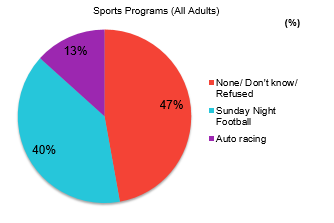
I need a pie with decimal percentage values don't need proximations, the correct way would be:
- None/ Don't know/Refused: 47.2%
- Sunday Night Football: 39.5%
- Auto racing: 13.3%
if you can help me, thanks
@gitbrent 💯
Alexiz-Padilla
on 21 Sep 2019
Hi @Alexiz-Padilla
What dataLabelFormatCode value are you using? That should be the key to achieving the formatting you're looking for.
gitbrent
on 23 Sep 2019
Hi @gitbrent ,
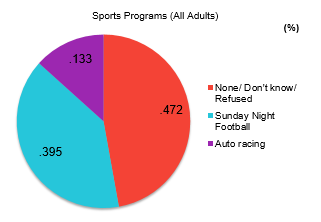
I'm using dataLabelFormatCode: '###.###' and dataLabelFormatCode: '000.00'
But it does not work.
Result:
Alexiz-Padilla
on 23 Sep 2019
I found the solution in support.office.com
They say in section - Currency, percentages, and scientific notation: "To display numbers as a percentage of 100 — for example, to display .08 as 8% or 2.8 as 280% — include the percent sign (%) in the number format."
Therefore, the property would be like this:
dataLabelFormatCode: '##.##%'
Thanks @ellisgl
Alexiz-Padilla
on 23 Sep 2019
Related issues
 TinkerJack-zz
·
6Comments
TinkerJack-zz
·
6Comments
 cwilkens
·
6Comments
cwilkens
·
6Comments
 Slidemagic
·
4Comments
Slidemagic
·
4Comments
 sangramjagtap
·
6Comments
sangramjagtap
·
6Comments
 colmben
·
6Comments
colmben
·
6Comments
Most helpful comment
I found the solution in support.office.com
They say in section
- Currency, percentages, and scientific notation: "To display numbers as a percentage of 100 — for example, to display .08 as 8% or 2.8 as 280% — include the percent sign (%) in the number format."Therefore, the property would be like this:
dataLabelFormatCode: '##.##%'Thanks @ellisgl