Pptxgenjs: Outputs varies for list element
Following are two text elements created in two different ways.
EXAMPLE 1
var pptx = new PptxGenJS();
pptx.setLayout('LAYOUT_WIDE');
var slide = pptx.addNewSlide();
slide.addText(
[
{text: 'Hello', options: { color:'393939', font_size:16 }},
{text: 'Line 1\nLine 2\nLine 3', options: { color:'393939', font_size:16, bullet:true }}
],
{x:2.0, y:1.0, w:'50%', h:1, fill:'F2F2F2'}
);
pptx.save('Demo-Text');

EXAMPLE 2
var pptx = new PptxGenJS();
pptx.setLayout('LAYOUT_WIDE');
var slide = pptx.addNewSlide();
slide.addText(
'Hello', { x:2.0, y:1.0, w:'50%', h:1, color:'393939', font_size:16, fill:'F2F2F2' }
);
slide.addText(
'Line 1\nLine 2\nLine 3', { x:2.0, y:2.0, w:'50%', h:1, color:'393939', font_size:16, fill:'F2F2F2', bullet:true }
);
pptx.save('Demo-Text');

I want to know why there outputs vary for bullets as per shown in images above, despite the conversion logic is same.
 sangramjagtap
All 6 comments
Hi @sangramjagtap ,
Thanks for opening an issue.
This issue is resolved already in the current branch of the code. It's not yet released to NPM though - it will be included in v1.3.0.
var pptx = new PptxGenJS();
pptx.setLayout('LAYOUT_WIDE');
var slide = pptx.addNewSlide();
slide.addText(
[
{text: 'Hello', options: { color:'393939', font_size:16 }},
{text: 'Line 1\nLine 2\nLine 3', options: { color:'393939', font_size:16, bullet:true }}
],
{x:2.0, y:1.0, w:'50%', h:1.5, fill:'F2F2F2'}
);
slide.addText(
'Line 1\nLine 2\nLine 3', { x:2.0, y:4.0, w:'50%', h:1.5, color:'393939', font_size:16, fill:'F2F2F2', bullet:true }
);
pptx.save('PptxGenJS-Sandbox');
Both of your examples together produce this with the current codebase:

 gitbrent
on 20 Mar 2017
gitbrent
on 20 Mar 2017
Could you please give me a code so as to get a desired output for example given below:

PS: Aim is to add bullet list in PPT, where each list item will have different styling, ie.bold, italic, underline.
But both lines must be inside a SAME TEXTBOX
sangramjagtap
on 25 May 2017

How to add bold, italic to the list highlighted in above image.
sangramjagtap
on 25 May 2017
hi @sangramjagtap
1- for only italic you can use the option:: italic:true
2- for styling some part of bullet see my code
var pptx = new PptxGenJS();
pptx.setLayout('LAYOUT_WIDE');
var slide = pptx.addNewSlide();
slide.addText(
[
{ text:'Line 1 - Good Morning', options:{bullet:true} },
{ text:'Test1', options:{} },
{ text:'Line ', options:{bullet:true} },
{ text:'2 -  Hello ', options:{bold:true} },
{ text:'World', options:{bold:true,italic:true,underline :true} }
 ],
{ x:0, y:0, w:'100%', h:'100%'}
);

pptx.save('PptxGenJS-Test_Bullet_styled');

 ZouhaierSebri
on 25 May 2017
ZouhaierSebri
on 25 May 2017
Thanks @ZouhaierSebri .
sangramjagtap
on 30 May 2017
@ZouhaierSebri , @gitbrent
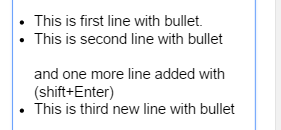
Referring to above image, in 2nd line which has bullet, I have added new line using shift+enter
How to export such text? So that there will be 3 bullet lines and 2 sub lines in 2nd one.
sangramjagtap
on 21 Jun 2017
Related issues
 colmben
·
6Comments
colmben
·
6Comments
 Skiizoo
·
6Comments
Skiizoo
·
6Comments
 Kirill71
·
4Comments
Kirill71
·
4Comments
 TinkerJack-zz
·
6Comments
TinkerJack-zz
·
6Comments
 adrienco88
·
3Comments
adrienco88
·
3Comments
Most helpful comment
hi @sangramjagtap
1- for only italic you can use the option:: italic:true
2- for styling some part of bullet see my code