@hrydgard
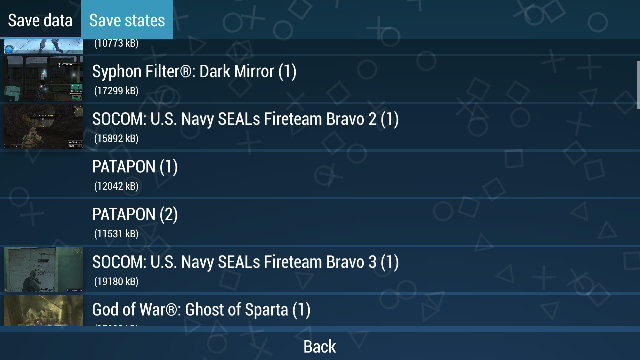
I noticed that some of my saved states didn't even have a screenshot! But I can swear I never deleted the images! They probably were never created! (3 of which are from the 3rd Birthday)
I noticed that Patapon has images but they appear black in the menu:

Here are the screenshots:


This one is black and from Assassin's Creed:

They all appear blank (not black!) in savedata manager.


What hardware and operating system are you running PPSSPP on? GPU might matter if it's a graphical issue.
Android 7.0
Vulkan
Snapdragon 821
 leopard20
All 18 comments
Can confirm this, sometimes, my Birth by Sleep savestate images are just...gone? Sometimes. I don't know how it happens. For now, it hasn't happened recently, perhaps a recent build did this?
Specs in: http://steamcommunity.com/id/AkiraPlays
 AkiraJkr
on 27 Mar 2018
AkiraJkr
on 27 Mar 2018
There is also a bug where the screenshots disappear if you switch away from the emulator and back on Android, but I'm fixing that in #10816.
 hrydgard
on 27 Mar 2018
hrydgard
on 27 Mar 2018
Weird. Because this happens to me too sometimes on Windows. I didn't know this was a Android problem too.
AkiraJkr
on 28 Mar 2018
Yeah i have this too, but when i use skip buffer effect
I dont have it when I use buffered rendering
Maybe this help?
 abdellahking
on 28 Mar 2018
abdellahking
on 28 Mar 2018
Could be. But in some of my games like Patapon I'm using buffered rendering and this still happens.
leopard20
on 28 Mar 2018
If you browse into the PSP/PPSSPP_STATE/ folder, do the images show up there (via a file browser), or no?
-[Unknown]
 unknownbrackets
on 28 Mar 2018
unknownbrackets
on 28 Mar 2018
Perhaps you didn't read my post carefully:
some of my saved states didn't even have a screenshot...3 of which are from the 3rd Birthday.
Other screenshots that you see have been uploaded directly from PSP/PPSSPP_STATE/.
leopard20
on 28 Mar 2018
@hrydgard
This ain't fixed yet!
leopard20
on 28 Mar 2018
@leopard20 Did I say it was?
hrydgard
on 28 Mar 2018
Sorry! I thought you said in https://github.com/hrydgard/ppsspp/pull/10816 that it'll fix this too. 😞
leopard20
on 28 Mar 2018
Sorry, it wasn't clear from that comment if the screenshots just weren't visible or if the files weren't created.
To confirm:
- This happens every time for you on Android with Patapon?
- This happens sometimes on Windows, but less frequently?
- You're not using the rewind functionality?
- Does "Failed to take a screenshot for the savestate" appear in your adb log when this happens?
Save states run all their operations together when running the CPU:
https://github.com/hrydgard/ppsspp/blob/70481c9444fa1f9abf00cdcec20e60423a9ad35d/Core/System.cpp#L410
And this just uses the display:
https://github.com/hrydgard/ppsspp/blob/0843e2cb980793b00e49a3dd5907b48249758928/GPU/GPUCommon.cpp#L2590
But, I could imagine this happening if you do the following:
- Play PPSSPP.
- Pause the game.
- Switch to another app.
- Switch back to PPSSPP, and without resuming the game, save state.
In this scenario, the FBO won't exist, and the memory will likely be outdated, so I can definitely see it failing to screenshot or saving black.
That wouldn't happen on Windows, though. However, it might happen on Windows if the save state is queued mid frame, and PSP_RunLoopUntil is called while the FBO is blank (e.g. because the last PSP_RunLoopUntil ended before CORE_NEXTFRAME?)
-[Unknown]
unknownbrackets
on 29 Mar 2018
@unknownbrackets
- No. Only that once.
- Yes
- No
- No, didn't see that in my logcat.
Following the four steps you mentioned caused the screenshots not to be saved, which was obvious.
I noticed a missing screenshot on Windows too, which might have been because of what you said.
I tested the latest version on Android and in many games but didn't encounter any issue in saving screenshots. It might've been a bug in v1.5.4 because all of those states were saved via that version. (maybe because of the memory leak issue I once mentioned because I save and load states a lot and maybe saved a state when my memory was full)
The only thing that still remains is the above screenshots not appearing in pause menu or savedata manager.
One question though. How can I restore a backup saved state? (minus the manual rename method!)
leopard20
on 29 Mar 2018
Well, it happened some time ago, a few builds ago, I don't remember which, but it DID happen to me sometimes while using the Windows version of PPSSPP.
I used the steps you suggested, and here is the result in different games:
Monster Hunter - 1st: Windowed Mode, Minimize, Return, Savestate - 2nd: Fullscreen, Desktop, Return, Savestate - 3rd: Fullscreen, Alt Tab, Return, Savestate
https://i.imgur.com/JFUI7do.png
Kingdom Hearts BBS FM - Same thing, but only once with the last savestate...

I guess the problem was fixed on Windows? Maybe it's prolonged playtime?
AkiraJkr
on 29 Mar 2018
This is happen to me if I change to skip buffered rendering only. Other than that, Nothing is wrong with the screenshot if I choose buffered rendering
 sephiroth0396
on 16 Apr 2018
sephiroth0396
on 16 Apr 2018
This happened to me before despite using skip buffer effects or using buffered rendering. So I don't think that is the issue.
AkiraJkr
on 16 Apr 2018
I suppose it might also happen if you change the rendering mode or certain other settings, and then without resuming the game beforehand, create a save state.
Basically, the save state won't currently include a screenshot if graphics are reset immediately before saving it. On Windows, this doesn't occur when switching apps, but it does when changing certain settings. On Android, this occurs when switching apps and when changing certain settings.
-[Unknown]
unknownbrackets
on 17 Apr 2018
@unknownbrackets
Another thing that makes the screenshots appear black in the UI is app update (this is the case with those black patapon screenshots). If I revert to the version they were created with, they display correctly.
It seems it's not the case with the latest builds though. Might've been a bug that's fixed now.
leopard20
on 22 Apr 2018
I suppose what we could do to fix this is, if there are no framebuffers, defer creating the screenshot until the very next frame. That would handle the majority of cases without impacting the actual save state.
The other option is deferring the entire save state, but that kinda impacts debugging...
-[Unknown]
unknownbrackets
on 11 Sep 2018
Related issues
 BenCosmos
·
3Comments
BenCosmos
·
3Comments
 oatmeal
·
6Comments
oatmeal
·
6Comments
 SwiftBMan
·
3Comments
SwiftBMan
·
3Comments
 joelolopez
·
3Comments
joelolopez
·
3Comments
 zminhquanz
·
6Comments
zminhquanz
·
6Comments