Powertoys: FancyZones v0.17.0 does not allow for overlapping zones in certain conditions / highlights one zone, but chooses another zone when window is dropped
Environment
Microsoft Windows [Version 10.0.18363.592]
PowerToys 0.17.0 (does not work) & PowerToys any earlier version up to and including 0.16.1 (works)
FancyZones module with a custom template that has zones overlapping each other (see below for example)
Steps to reproduce
- create two zones that overlap each other by just a tiny amount, eg. a row of pixels (see example below after '# Additional Information')
- Install PT v0.16.1
- Observe how each zone can be addressed by moving the window with the mouse to each zone in turn. Dropping the window will scale it to the size of the zone. Everything is just as expected and the way it has worked since PTs inception.
- Install PT v0.17.0
- Observe
a. overlapping zones are not displayed anymore, only the "topmost" ones
b. dropping the window will scale it to the INVISIBLE zone BENEATH the one being highlighted
Note that the zones addressed by moving the window with the mouse are not available as dropzones.
Note that the zones the windows scales to are not shown/highlighted when moving the mouse over them.
Expected behavior
Identical behavior to previous version of PowerToys.
If that is - for some reason - not possible, then
a. a check at startup/upgrade to inform user that the existing default zone will not work properly
b. scaling the windows to the zone highlighted with the mouse, not the underlying, invisible zone.
Actual behavior
See '# Steps to reproduce'
Not all zones are highlighted. Windows do not scale to highlighted zone.
Highlighted zone is not available to Window, instead invisible zone is used.
Screenshots
Two videos, illustrating the problem are available here:
PowerTools 0.16.1 FancyZones working great:
https://1drv.ms/v/s!AhGCFYhCh0AWhWMm_tjWxsnbC4h5?e=w9RuCN
PowerTools 0.17.0 FancyZones not working as expected:
https://1drv.ms/v/s!AhGCFYhCh0AWhWRxqmL2QaCaHOsm?e=yLCNgl
(Videos have been scaled down to a resolution of 1720x720)
Additional Information
This is (part of the) $env:LocalAppData\Microsoft\PowerToys\FancyZones\zones-settings.json defining the zones:
"custom-zone-sets": [
    {
        "uuid": "{FF554258-8753-4D27-9080-A6A6EE91BD8D}",
        "name": "3440x1440",
        "type": "canvas",
        "info": {
            "ref-width": 3440,
            "ref-height": 1410,
            "zones": [
                {
                    "X": 0,
                    "Y": 1,
                    "width": 873,
                    "height": 470
                },
                {
                    "X": 0,
                    "Y": 470,
                    "width": 873,
                    "height": 470
                },
                {
                    "X": 0,
                    "Y": 940,
                    "width": 873,
                    "height": 469
                },
                {
                    "X": 0,
                    "Y": 0,
                    "width": 872,
                    "height": 705
                },
                {
                    "X": 0,
                    "Y": 705,
                    "width": 872,
                    "height": 705
                },
                {
                    "X": 872,
                    "Y": 1,
                    "width": 1504,
                    "height": 1408
                },
                {
                    "X": 872,
                    "Y": 0,
                    "width": 1976,
                    "height": 1410
                },
                {
                    "X": 2376,
                    "Y": 0,
                    "width": 1064,
                    "height": 754
                },
                {
                    "X": 2375,
                    "Y": 656,
                    "width": 1064,
                    "height": 754
                },
                {
                    "X": 2375,
                    "Y": 0,
                    "width": 1065,
                    "height": 1410
                }
            ]
        }
    }
 maelcum
All 25 comments
The videos show the 10 zones and how they can be accessed.
The leftmost column has three zones of equal size, and another two zones of bigger size overlapping the three smaller ones.
The three small zones can be accessed by dragging the windows to the zones.
The two bigger zones can be accessed by pushing the window to the very top or very bottom of the screen.
The middle column has to big zones, stretching from top to bottom, overlapping each other, one zone extending to the right (great for VSCode). The bigger zone can be accessed by pushing the windows to the very top or bottom of the screen.
The rightmost column has two zones of equal size, and another bigger zone overlapping those, that can be accessed by dragging the window to the far right.
The second video shows how many of the zones are not available anymore. It also shows, how the windows are scaled to the zones not being displayed when dropped.
phew
I am not a good bug reporter, I know...
maelcum
on 1 May 2020
I noted some alternate uses for this previous behavior in issue #3077. I'd like to suggest an adjustment to the expected behavior note above.
Expected behavior
Identical behavior to previous version of PowerToys.
If that is - for some reason - not possible, then:
~a. a check at startup/upgrade to inform user that the existing default zone will not work properly~
~b. scaling the windows to the zone highlighted with the mouse, not the underlying, invisible zone.~add previous version behavior via options toggle
Note: I also closed issue #3077 since it's a duplicate of this issue.
 tmustaine
on 18 May 2020
tmustaine
on 18 May 2020
I'd like to suggest an adjustment to the expected behavior note above.
Sure, that is fine with me. I just tried to describe what FancyZones should do when it detects, that the previous behaviour is not possible - and one thing would be to inform the user (that was a) and behave in a consistent manner (that was b) ) which it currently is not doing.
If you could restore the old behaviour, that is even better. Much, much better. :)
maelcum
on 18 May 2020
Sad to see this pushed further and further back. :(
maelcum
on 1 Jul 2020
Yep, I'm still on 0.16.1 and waiting...
 Senjar
on 1 Jul 2020
Senjar
on 1 Jul 2020
Sad to see this pushed further and further back. :(
Yeah - pretty frustrating. My daily workflow made heavy use of this functionality, now it doesn't really work at all.
I might have to revert back to an older version that doesn't have this problem.
tmustaine
on 2 Jul 2020
Hi,
We had to change the behavior of mouse movement over zones to support snapping a window to more than one zone, since that feature has been requested many times. For now, you can try one of the following:
- Turn on the option to override Win + arrow keys and then use them to snap a window to one of the desired zones
- Create a layout with non-overlapping zones and snap a window to two adjacent zones which share an edge, or more than two zones which share a corner
We are currently working on a feature which will support snapping to any number of zones, even those which don't share an edge. This should be available in v0.20.
 ivan100sic
on 2 Jul 2020
ivan100sic
on 2 Jul 2020
"We had to change the behavior of mouse movement over zones to support snapping a window to more than one zone, since that feature has been requested many times. "
Please allow me to differ. You did not 'have to' change anything. Instead, you decided to implement a request - which is noble - but a different motivation. And by doing that you broke a functionality that existed. Things like that happen, but let's keep it straight and not try to muddle things up with trying to make it look like something that simply was unavoidable.
maelcum
on 2 Jul 2020
Thanks for the feedback and sorry for any inconvenience caused.
ivan100sic
on 2 Jul 2020
@maelcum
overlapping zones are not displayed anymore, only the "topmost" ones
The current logic to choose which zone to activate is based on the area of the zone, not on the "topmost".
 enricogior
on 2 Jul 2020
enricogior
on 2 Jul 2020
@tmustaine @Senjar
can you share your layouts? (a screenshot is OK)
Thanks.
enricogior
on 2 Jul 2020
We have a thread to discuss how to improve the zone activation logic https://github.com/microsoft/PowerToys/issues/1167
enricogior
on 2 Jul 2020
@maelcum
I would like to understand why a layout like this would not fit your needs. Do you use the mouse to snap the windows, right?
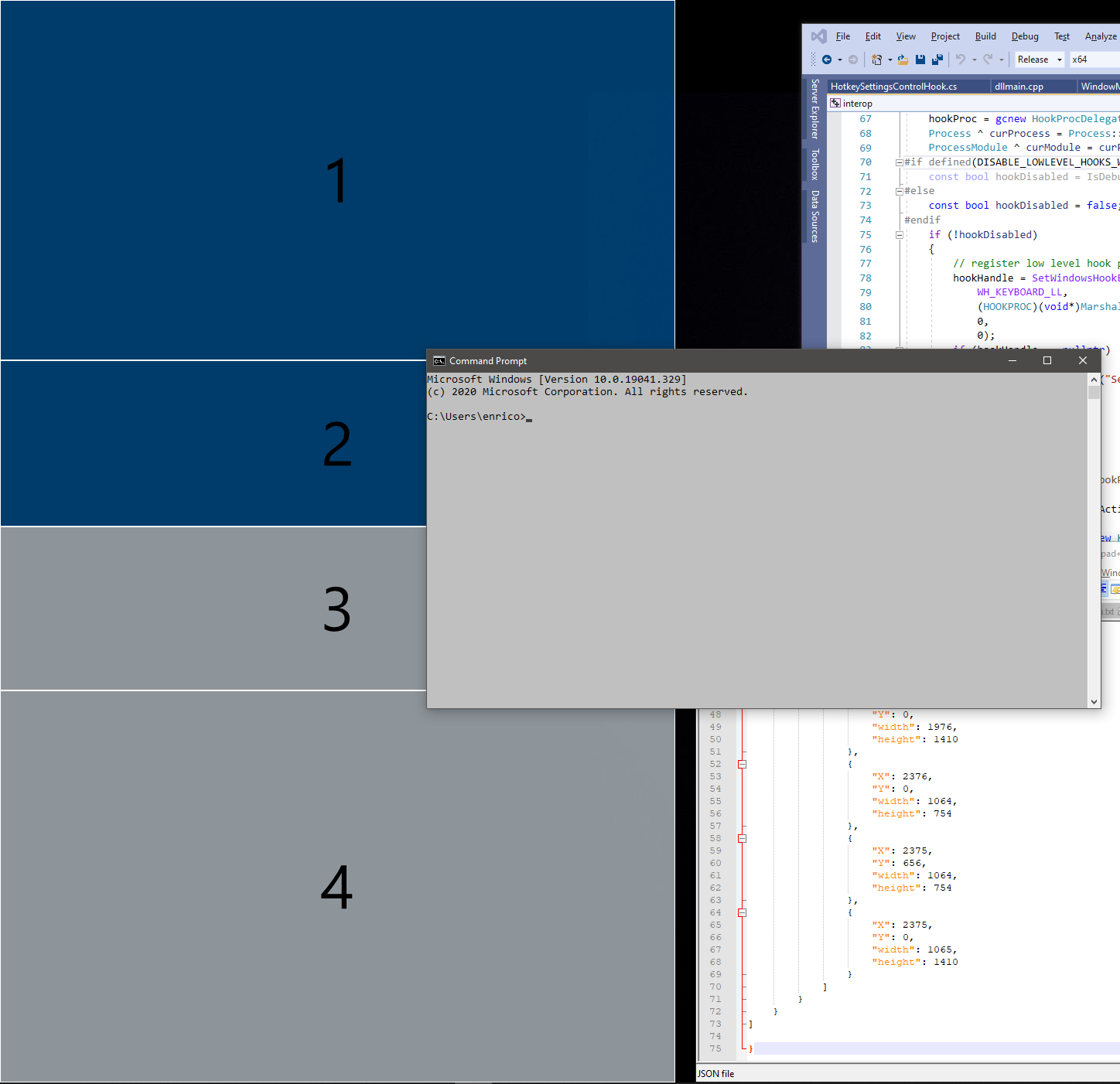
enricogior
on 2 Jul 2020
@maelcum
overlapping zones are not displayed anymore, only the "topmost" ones
The current logic to choose which zone to activate is based on the area of the zone, not on the "topmost".
English is not my mother tongue and I am trying hard to describe what I mean - even using the videos to illustrate that. I could not find a better word so put it in quotes.
That said - why did you comment? Just to be a little righteous and point out an error on my side, as I have the audacity to remark that things are pushed back again and again? I am very sorry if you feel offended by that.
I would like to understand why a layout like this would not fit your needs. Do you use the mouse to snap the windows, right?
I've rewritten my layout > in the meantime< as it became obvious that this will take time to be fixed. If at all. There are 11 zones now and I am using them with mouse and keyboard. Usually keyboard. But since you can not see me pushing keys, I've used the mouse in the video.
maelcum
on 2 Jul 2020
@ivan100sic
Thanks for the feedback and sorry for any inconvenience caused.
No need for an excuse. I hope you don't mind my post. PowerToys is still declared beta, so changes - even breaking ones - are to be expected. I've made this report - which took some effort - in good spirit, as I assumed that this is what devs expect from beta testers. The current posts from enricogior are more passive-aggressive than I enjoy, so this might be my last bug report.
maelcum
on 2 Jul 2020
@maelcum
why did you comment?
I commented to give you an information that can be useful to understand how FZ currently works and that can help designing the layout so that the zones can be activated.
We designed the adjacent zone activation in order to reduce the need of overlapping zones.
We know it's not solving the problems of all the users, but we got a lot of good feedback for that option.
Unfortunately it caused a regression that was not planned.
enricogior
on 2 Jul 2020
@tmustaine @Senjar
can you share your layouts? (a screenshot is OK)
Thanks.
I went into painful levels of detail in my post below about layouts. Many thanks for looking at this!
tmustaine
on 3 Jul 2020
@tmustaine
have you tried 0.19 using a six zones grid and the multiple zone snapping feature?
It allows to snap to one, two or four adjacent zones.
As @ivan100sic mentioned, in 0.20 it will be extended to any number of zones, for example if you have a 9 zones grid it will allow to snap also to three, six and nine zones. Would that fit your needs?
The goal is to provide a mechanism that doesn't require overlapping of zones to achieve the same functionality.
Overlapping is and will be supported, but we want to make it less a necessity since whatever logic we use to activate zones, some cases will always be problematic
enricogior
on 3 Jul 2020
@enricogior
Here is my Setup:
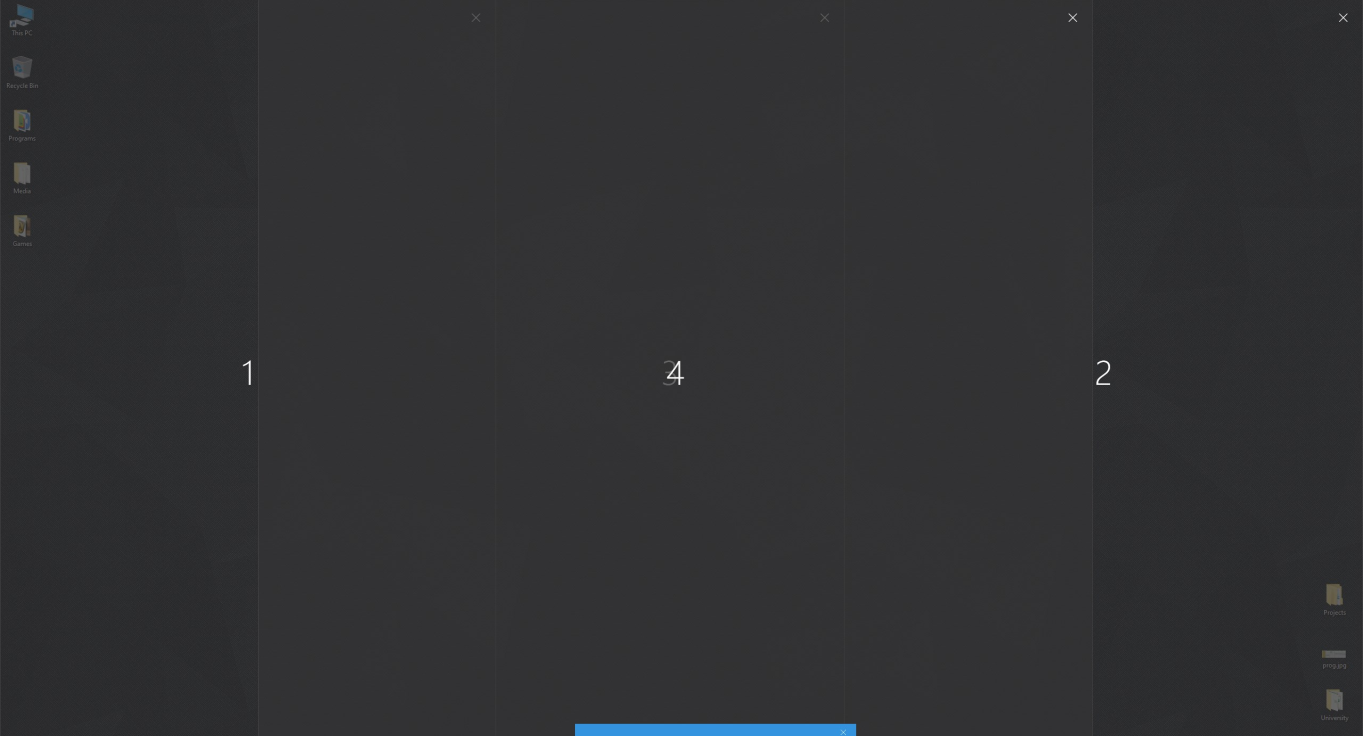
1--|--3--|--2
--[---4---]--
4 is over 1,3 and 2
If I try to do it with the new system I have to use 1 extra zone and flatten them all like this:
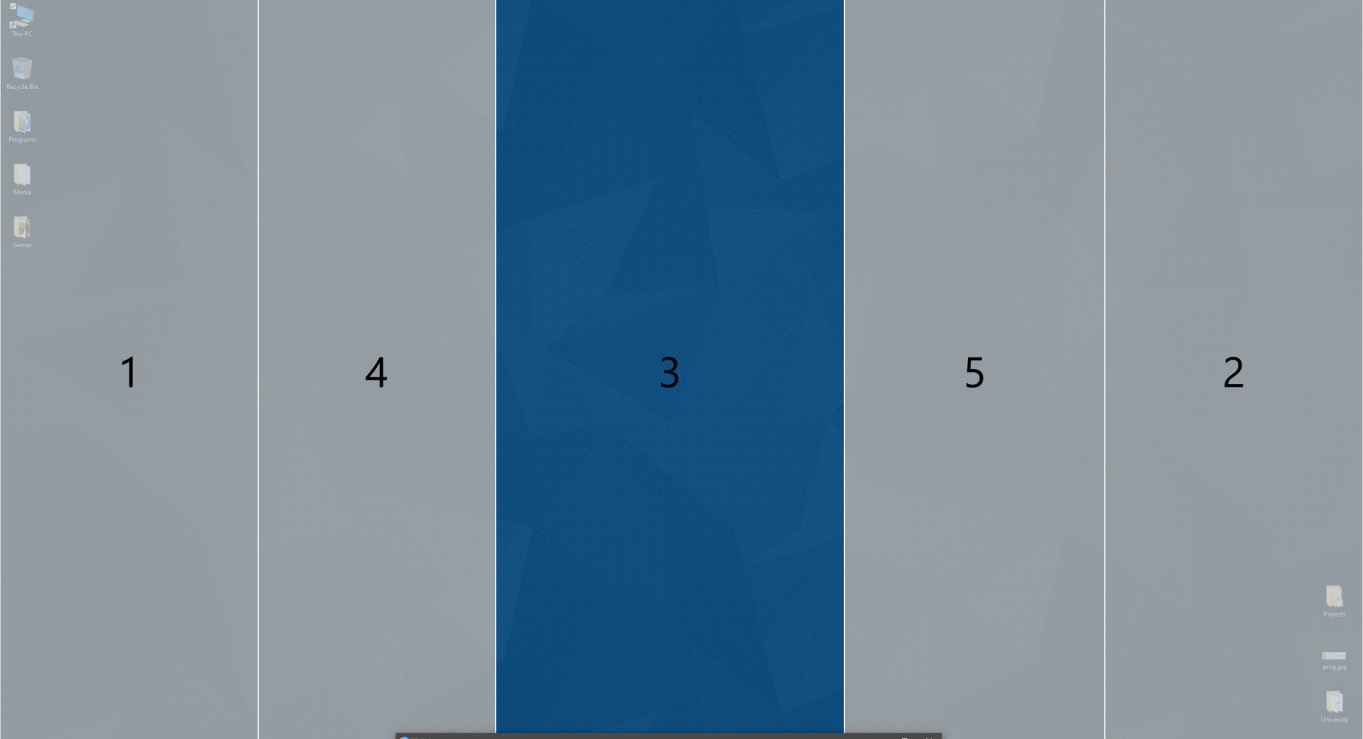
1old is now 1,4New
2old is now 5,2New
3old is now 3New
but 4old is impossible because I can't be at 2 borders at the same time
Also another thing is that you have to be VERY precise to point the window to the 10-pixel border to snap to both zones. It's very slow
If there is a better way please let me know.
Senjar
on 3 Jul 2020
@Senjar
Check out this layout:
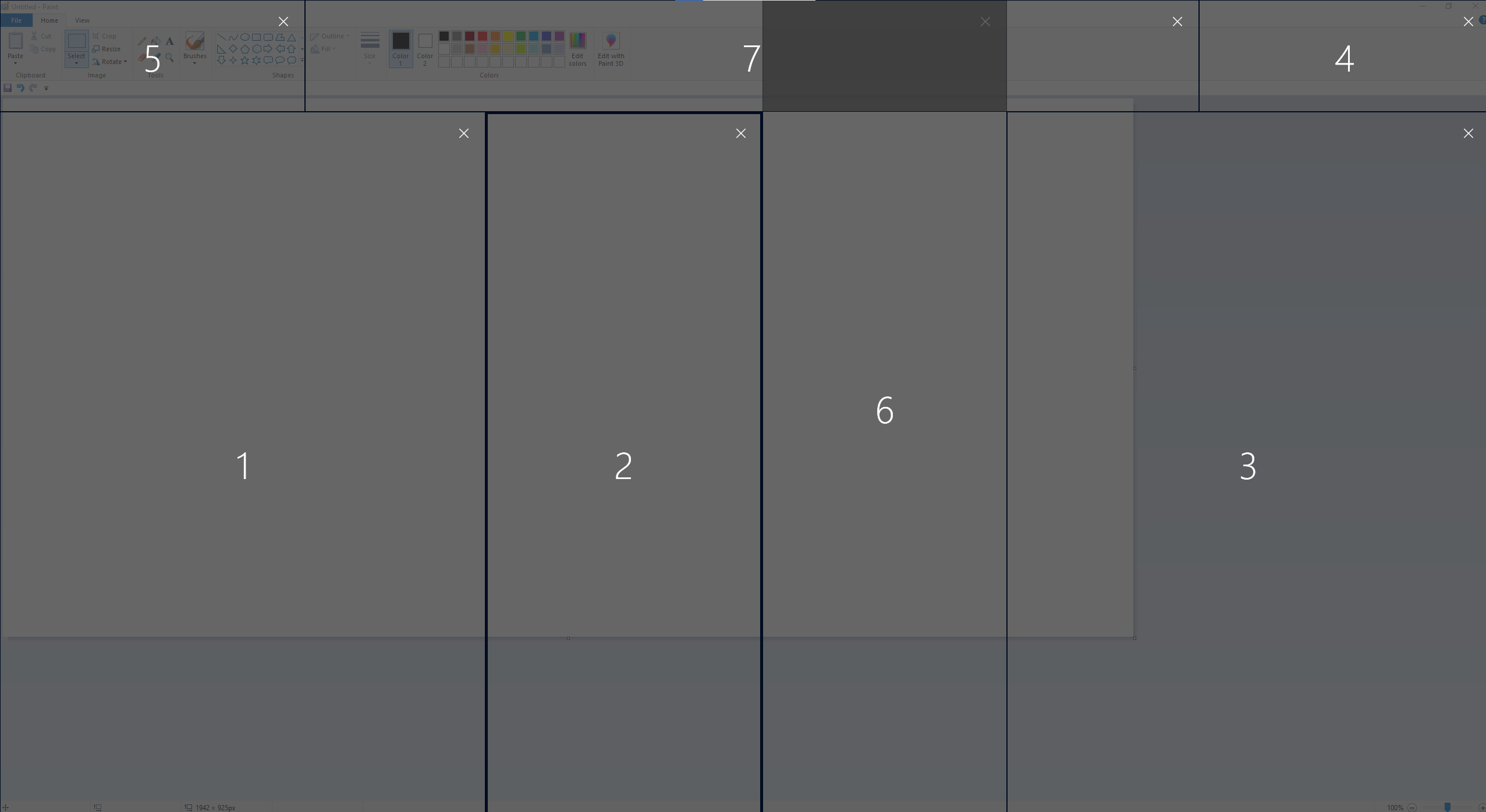
old1: 1+5
old2: 3+4
old3: 2+6
old4: 2+7
You can create even more complex layouts like this, but of course, it doesn't feel natural. As I said, we're working on improving this part of FZ and it should be available in v0.20.
ivan100sic
on 3 Jul 2020
@Senjar
thanks for the feedback, @ivan100sic's suggestion should do it until we release 0.20 where you will be able to snap to three+ zones.
enricogior
on 3 Jul 2020
I don't know how you will implement three+ zone snapping but maybe a good way is like this:
- Hold shift and left click to drag the window (like you do now).
2.1. If you want a single zone (or 2 zones), release left click above the zone (or border of 2 zones)(like you do now).
2.2. If you want multiple zones also hold right click to "paint" the zones you want to snap. Then release either click.
Senjar
on 3 Jul 2020
@Senjar
We have a feature branch which implements it the way you said, but instead we use Ctrl instead of RMB to "paint" the zones.
ivan100sic
on 3 Jul 2020
Maybe an option to select RMB instead of CTRL would be nice. Other than that I think that solution is good.
Senjar
on 3 Jul 2020
@Senjar
we can definitely use a non-primary mouse button too.
Currently it's used to toggle zones activation, but we can consider using it to activate the multi-zone selection.
Without having to hold it down, just click, since we already tried that behavior and it's not very user-friendly.
enricogior
on 3 Jul 2020
Related issues
 amorenew
·
3Comments
amorenew
·
3Comments
 21cpDev
·
3Comments
21cpDev
·
3Comments
 aminya
·
3Comments
aminya
·
3Comments
 patware
·
3Comments
patware
·
3Comments
 Martin-Hausleitner
·
3Comments
Martin-Hausleitner
·
3Comments
Most helpful comment
Yep, I'm still on 0.16.1 and waiting...