Powertoys: Office 365 Excel "DDE Server Window" error
Environment
Windows build number: v1909 build 18363.476
PowerToys version: 0.14.0
PowerToy module for which you are reporting the bug (if applicable): FancyZones (suspected)
Steps to reproduce
fully repeatable whenever I open any Excel spreadsheet, or simply the .exe, even with /safe
Expected behavior
no issues prior to installing v.014.0
Actual behavior
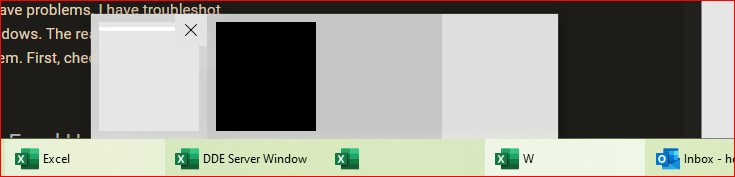
Excel freezes with 4 screens open, all blank. See screenshot
Screenshots
 ottogunter
All 7 comments
I should add that Excel opens and runs fine once I close PowerToys. No need to uninstall PowerToys, just closing it fixes the problem.
ottogunter
on 3 Dec 2019
Hi @ottogunter
thank you for reporting the problem. We stopped distributing 0.14 because of this bug.
We are planning to release the fix soon. In the meantime, if you have the FancyZones option "Move newly created windows to their last known zone" on, try turning it off, it may solve the problem.
 enricogior
on 3 Dec 2019
enricogior
on 3 Dec 2019
Thanks for your prompt reply. I can live without FancyZones for a while, but will be checking for the update…
Horst
From: Enrico Giordani notifications@github.com
Sent: December 3, 2019 2:06 PM
To: microsoft/PowerToys PowerToys@noreply.github.com
Cc: ottogunter horstrohde@live.ca; Mention mention@noreply.github.com
Subject: Re: [microsoft/PowerToys] Office 365 Excel "DDE Server Window" error (#851)
Hi @ottogunterhttps://apc01.safelinks.protection.outlook.com/?url=https%3A%2F%2Fgithub.com%2Fottogunter&data=02%7C01%7C%7C1e90015e69cd4528ee8c08d7783cfa4a%7C84df9e7fe9f640afb435aaaaaaaaaaaa%7C1%7C0%7C637110075597771698&sdata=oJQH1CCJRiuzsPtQx8gqId%2BQYMiLZB5sNZEpP3EPUg8%3D&reserved=0
thank you for reporting the problem. We stopped distributing 0.14 because of this bug.
We are planning to release the fix soon. In the meantime, if you have the FancyZones option "Move newly created windows to their last known zone" on, try turning it off, it may solve the problem.
—
You are receiving this because you were mentioned.
Reply to this email directly, view it on GitHubhttps://apc01.safelinks.protection.outlook.com/?url=https%3A%2F%2Fgithub.com%2Fmicrosoft%2FPowerToys%2Fissues%2F851%3Femail_source%3Dnotifications%26email_token%3DAKGXPFGVEAZFLAOH7IJ3IATQW3J4JA5CNFSM4JU6U272YY3PNVWWK3TUL52HS4DFVREXG43VMVBW63LNMVXHJKTDN5WW2ZLOORPWSZGOEF27IMY%23issuecomment-561378355&data=02%7C01%7C%7C1e90015e69cd4528ee8c08d7783cfa4a%7C84df9e7fe9f640afb435aaaaaaaaaaaa%7C1%7C0%7C637110075597781697&sdata=6HqRrfv6kqyBVAXnYzYAxG99FIXiNiRYxMvMLC7Nb1w%3D&reserved=0, or unsubscribehttps://apc01.safelinks.protection.outlook.com/?url=https%3A%2F%2Fgithub.com%2Fnotifications%2Funsubscribe-auth%2FAKGXPFAAUDA5ZRKEFPXDMJDQW3J4JANCNFSM4JU6U27Q&data=02%7C01%7C%7C1e90015e69cd4528ee8c08d7783cfa4a%7C84df9e7fe9f640afb435aaaaaaaaaaaa%7C1%7C0%7C637110075597791714&sdata=VxBQovCfGCclDD99VQjHIHPkkAQi7Pg2tCoh80mzZ80%3D&reserved=0.
ottogunter
on 3 Dec 2019
Had this happen yesterday (12/2/19) after updating to PowerToys version: 0.14.0 also. Had to sign out of my Windows user account and back in to fix problem.
 lotsacaffeine97
on 3 Dec 2019
lotsacaffeine97
on 3 Dec 2019
@ottogunter @lotsacaffeine97 could you try our new DLL and see if the problem persists. Here are the instructions and the download link.
 bzoz
on 4 Dec 2019
bzoz
on 4 Dec 2019
The new DLL has fixed the problem, Excel now opens properly. 👍
Thanx.
ottogunter
on 4 Dec 2019
The new release is available https://github.com/microsoft/PowerToys/releases/tag/v0.14.1
enricogior
on 5 Dec 2019
Related issues
 Marrib
·
3Comments
Marrib
·
3Comments
 amorenew
·
3Comments
amorenew
·
3Comments
 CombeeMike
·
3Comments
CombeeMike
·
3Comments
 anish-94
·
3Comments
anish-94
·
3Comments
 Martin-Hausleitner
·
3Comments
Martin-Hausleitner
·
3Comments
Most helpful comment
The new DLL has fixed the problem, Excel now opens properly. 👍
Thanx.