Powertoys: FancyZones - UWP apps restore to fullscreen instead of their previous zone
Environment
Windows build number: 10.0.18362.10024
PowerToys version: 0.12.0.0
PowerToy module for which you are reporting the bug (if applicable): FancyZones
Steps to reproduce
- Enable FancyZones
- Enable move newly created windows to their last zone setting
- Select a zone layout like priority grid
- Open an UWP app like Windows Mail
- Place Mail on one of the zones
- Close Mail (not minimize!)
- Open Mail again
Expected behavior
- Mail is placed inside the zone it was before
Actual behavior
- Mail is opened in fullscreen across the physical display
 totkeks
All 8 comments
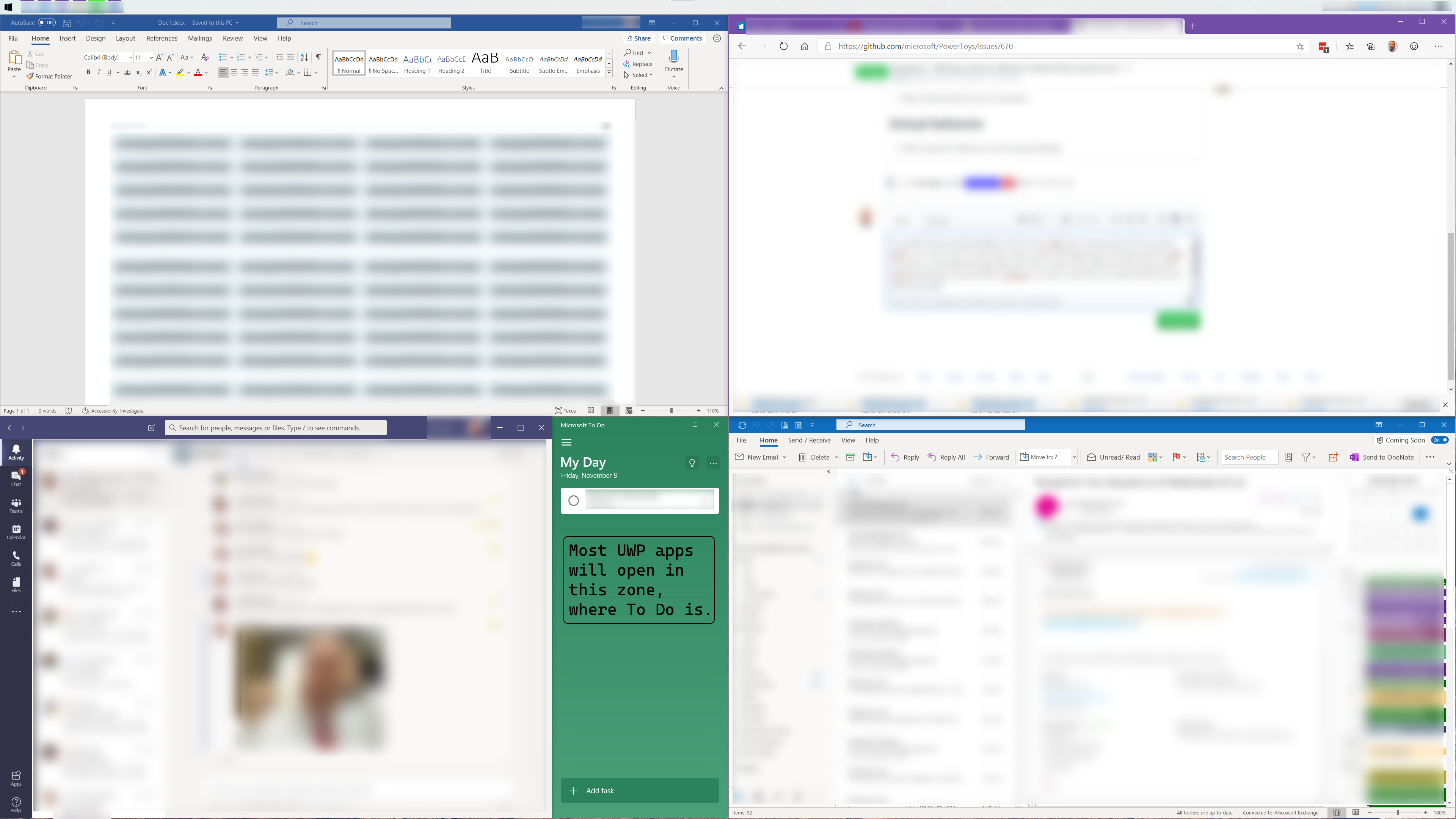
I'm actually seeing something similar, but a little different. Almost every UWP app is opening where the last opened UWP is in a "zone". Even if I move them, close, re-open, they always open in the last zone for a UWP. For instance, in the attached image, Microsoft To Do is open in the small zone at the bottom. Most UWP apps (Settings, Snip and Sketch, OneNote, Photos, etc.) open in that Zone, not matter where they were when last closed.
 VArterJr
on 8 Nov 2019
VArterJr
on 8 Nov 2019
Hi @VArterJr
what version of PowerToys are you running?
 enricogior
on 8 Nov 2019
enricogior
on 8 Nov 2019
The issue was fixed in https://github.com/microsoft/PowerToys/commit/0b86941a3bb75e74f9bcdab9225b0205f2747df4, please update to v0.13.
I'm going to close this. If however the issue still persist after an update, feel free to reopen it.
 bzoz
on 13 Nov 2019
bzoz
on 13 Nov 2019
Thanks for the info @bzoz. Unfortunately the issue persists even after updating to v0.13.
totkeks
on 13 Nov 2019
@totkeks sorry, I cannot reproduce this issue.
bzoz
on 13 Nov 2019
Maybe this video helps.
[.mp4 is not an allowed filetype, but .zip is. Doesn't compress much but allows me to upload here.]
The UWP app demonstrated is Microsoft ToDo. The behaviour is identical to most other UWP apps like OneNote, Windows Mail etc. *1
The zones defined with FancyZones are of different sizes. Two of them are full height. Whenever an UWP app is closed while being full height (not full screen) it will reopen in full screen (ignoring whatever zone boundaries it was closed in).
That said: What does the video show?
ToDo is opened in a small zone top right. Closed. Reopens in the same zone.
Moved to the middle left zone. Closed. Reopens in the same zone. Closed. Reopens in the same zone.
Moved to a full height middle zone. Closed. Reopens BAMM fullscreen.
Made smaller, moved to the lower left zone. Closed. Reopens in the same zone. Closed. Reopens in the same zone.
Moved to the lower right zone. Closed. Reopens in the same zone.
Moved to a full height right zone. Closed. Reopens BAMM fullscreen.
Made smaller. Moved to a full height middle zone. Closed. Reopens BAMM fullscreen.
Filmed on location with 10 fps to keep the filesize small. Sound effects curtesy of your imagination. ;)
*1 UWP apps that resize their window upon starting do not go fullscreen. But they don't follow FancyZones either. Microsoft Paint 3D being an example, or AnywaySoft Free Color Picker.
 maelcum
on 13 Nov 2019
maelcum
on 13 Nov 2019
Hi @maelcum
what you described happens regardless of FancyZones. Even if you are not running PowerToys, expanding a UWP app to the full height of the screen, will cause the app to reopen full screen.
We will look into it to see if FancyZones can workaround the issue, but it might be something that we cannot fix in PowerToys.
enricogior
on 13 Nov 2019
@maelcum thanks for the extensive video and analysis, it shows exactly the problem I'm having! You are also right, I only got 3 full height zones with the "priority grid" layout, which is why I got the same behavior independent of the zone I put the window in.
totkeks
on 13 Nov 2019
Related issues
 niels9001
·
3Comments
niels9001
·
3Comments
 Martin-Hausleitner
·
3Comments
Martin-Hausleitner
·
3Comments
 21cpDev
·
3Comments
21cpDev
·
3Comments
 ivadham
·
3Comments
ivadham
·
3Comments
 SWinxy
·
3Comments
SWinxy
·
3Comments