Powerlevel10k: Inconsistent behaviour and missing symbols
Hi there as per subject and as you can see in the following picture
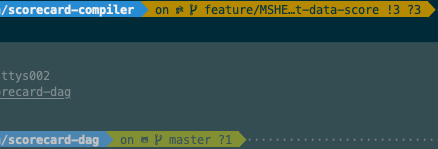
My icon/symbols seem to change depending by the folder where I'm in and I can't explain myself why, unless, just thinking about it now, one represents GitHub and the other one GitHub EE. Beyond that I also have issues with the missing symbols. I tried all possible POWERLEVEL9K_MODE values documented in the configuration file as well as the one described here but I don't seem to be able to show the awesome complete symbols. I'm sure I'm missing something possibly obvious but what?
I also had a look here and follow the suggestion but it makes it slightly worse.
Any help will be really appreciated, thanks.
 debo
debo
All 5 comments
My icon/symbols seem to change depending by the folder where I'm
The screenshot at the bottom shows GitHub logo. This means the remote of your current branch is pointing to github.com. You can see the url of the remote with git config --get remote.origin.url.
The screenshot at the top shows git icon. This means that either there is no remote for the current branch or it's not pointing to github, gitlab or bitbucket. Type git config --get remote.origin.url to see where the remote is pointing to.
There are no missing symbols on your screenshots.
Relevant FAQs:
In general, please refer to Powerlevel10k documentation instead of Powerlevel9k.
 romkatv
on 6 Mar 2020
romkatv
on 6 Mar 2020
Hi @romkatv thanks for the prompt reply. So ok as I thought the different icon is because one repo points to GitHub and the other points to GitHub Enterprise.
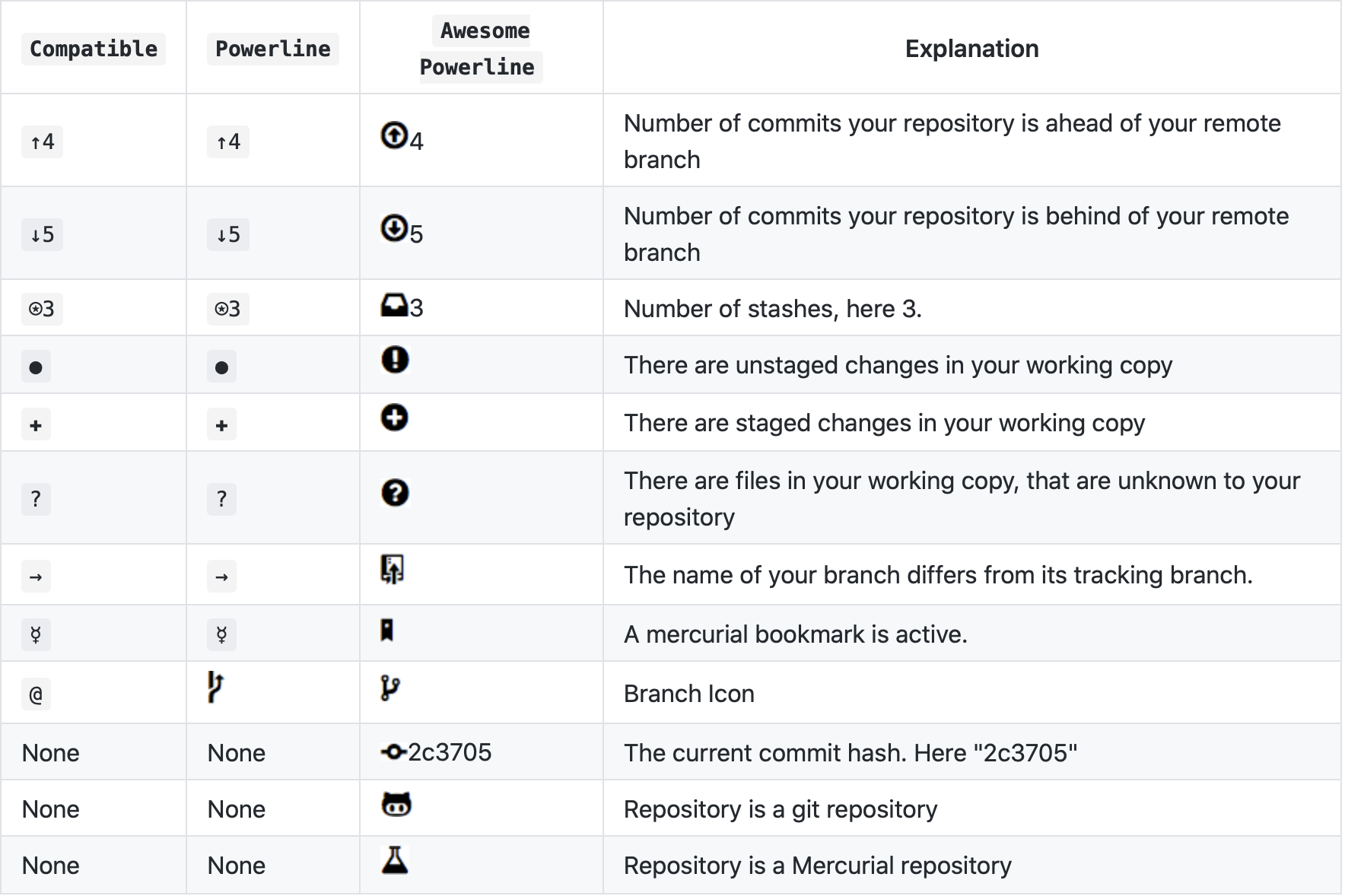
As per the other, I know about the status meaning, however, a colleague of mine who has powerlevel10k installed on this machine has his prompt should the same symbols glyphs shown in the powerlevel9k documentation hence why I was referring to their documentation as well. Do you have an idea of why that would be the case? Just to clarify I'm referring to the symbols/icons in the Awesome Powerline column in the following screenshot:
Thanks a lot for your help.
debo
on 6 Mar 2020
You can use powerlevel10k with a config for powerlevel9k. Your colleague is likely doing that. You can ask them for their config (ask them to execute typeset -pm 'POWERLEVEL9K_*' and send you the output) and use it in place of ~/.p10k.zsh. If you go this route, you should refer to powerlevel9k documentation. I don't recommend this approach because powerlevel9k configs are restricted to the functionality of powerlevel9k -- a small subset of what powerlevel10k can do. Basically, you'll get a fast powerlevel9k and nothing more.
You can also follow the FAQ I linked to earlier: How do I change the format of Git status?. Here's what it says:
To change the format of Git status, open
~/.p10k.zsh, search formy_git_formatterand edit its
source code.
For example, here's how that exclamation mark comes about:
# !42 if have unstaged changes.
(( VCS_STATUS_NUM_UNSTAGED )) && res+=" ${modified}!${VCS_STATUS_NUM_UNSTAGED}"
You can replace ! with anything else. For example, you can replace it with the exclamation mark in a circle, like in the screenshot you've posted above.
(( VCS_STATUS_NUM_UNSTAGED )) && res+=" ${modified}"$'\uF06A'"${VCS_STATUS_NUM_UNSTAGED}"
You can find unicode code points for various circled symbols by going to https://www.nerdfonts.com/cheat-sheet and searching for "circle". Note that circled explanation mark, question mark, plus and arrows may be significantly harder to distinguish than their uncircled variants. If your goal is productivity, it's better to keep the existing Git format.
romkatv
on 6 Mar 2020
Ha! Thanks a lot, that's super useful, I just needed that cheat-sheet then. Thanks thanks thanks.
debo
on 6 Mar 2020
By the way, you might want to check out how Git status looks in Lean style before you start manually customizing.
Closing as I believe you questions have been answered. Please reopen or open another issue if anything doesn't work the way you like.
romkatv
on 6 Mar 2020
Related issues
 dylanjm
·
3Comments
dylanjm
·
3Comments
 barthalion
·
3Comments
romkatv
·
5Comments
barthalion
·
3Comments
romkatv
·
5Comments
 lucascosti
·
5Comments
lucascosti
·
5Comments
 stevenguh
·
6Comments
stevenguh
·
6Comments
Most helpful comment
You can use powerlevel10k with a config for powerlevel9k. Your colleague is likely doing that. You can ask them for their config (ask them to execute
typeset -pm 'POWERLEVEL9K_*'and send you the output) and use it in place of~/.p10k.zsh. If you go this route, you should refer to powerlevel9k documentation. I don't recommend this approach because powerlevel9k configs are restricted to the functionality of powerlevel9k -- a small subset of what powerlevel10k can do. Basically, you'll get a fast powerlevel9k and nothing more.You can also follow the FAQ I linked to earlier: How do I change the format of Git status?. Here's what it says:
For example, here's how that exclamation mark comes about:
You can replace
!with anything else. For example, you can replace it with the exclamation mark in a circle, like in the screenshot you've posted above.You can find unicode code points for various circled symbols by going to https://www.nerdfonts.com/cheat-sheet and searching for "circle". Note that circled explanation mark, question mark, plus and arrows may be significantly harder to distinguish than their uncircled variants. If your goal is productivity, it's better to keep the existing Git format.