Powerlevel10k: "closing brace expected" output
Occasionally my prompt gets into this state:
Usually a zplugin update --all fixes things, which suggests it's something to do with some commits of p10k. I've seen it twice though, which is odd.
``` 2020-01-27 09:19:33 ⇡3 add_docs ~/w/r/ci
_p9k_reset_prompt:5: closing brace expected
2020-01-27 09:19:33 ⇡3 add_docs ~/w/r/ci
_p9k_reset_prompt:5: closing brace expected
2020-01-27 09:19:33 ⇡3 add_docs ~/w/r/ci
_p9k_reset_prompt:5: closing brace expected
-- console output produced during zsh initialization follows --
_p9k_maybe_dump:16: closing brace expected
_p9k_maybe_dump:16: closing brace expected
_p9k_maybe_dump:16: closing brace expected
_p9k_maybe_dump:16: closing brace expected
Updating plugin romkatv/powerlevel10k
...
Updating 9586e24..3bca7e8
```
Not the end of the world, as it has been fixable so far, just raising this in case it's useful to anyone.
 gibfahn
All 5 comments
Could you give me more details so that I can try to reproduce it?
- Which zplugin command do you use to load powerlevel10k?
- On which comment of p10k does it happen?
- What do you need to do to trigger this error?
- Can you reproduce it if you start zsh without sourcing regular configuration files (
zsh -df) and then manuallysourcep10k from there?
Updating 9586e24..3bca7e8
Does this mean that you've experienced errors quoted above while synced to 9586e24?
Here's how _p9k_reset_prompt looked like in that commit:
function _p9k_reset_prompt() {
  if zle && [[ -z $_p9k__line_finished ]]; then
    (( __p9k_ksh_arrays )) && setopt ksh_arrays
    (( __p9k_sh_glob )) && setopt sh_glob
    (( _p9k__can_hide_cursor )) && echoti civis
    zle .reset-prompt
    zle -R
    (( _p9k__can_hide_cursor )) && echoti cnorm
  fi
}
There is nothing on line 5 that could explain "closing brace expected" error. Also, this function looked this way for a very long time. Same story with _p9k_maybe_dump -- it hasn't changed in months.
 romkatv
on 27 Jan 2020
romkatv
on 27 Jan 2020
Which zplugin command do you use to load powerlevel10k?
zplugin ice depth=1
zplugin light romkatv/powerlevel10k
On which comment of p10k does it happen?
Updating 9586e24..3bca7e8
Does this mean that you've experienced errors quoted above while synced to 9586e24?
That seems to be what zplugin is telling me, yeah.
What do you need to do to trigger this error?
Can you reproduce it if you start zsh without sourcing regular configuration files (zsh -df) and then manually source p10k from there?
I'm not sure, it seems to happen randomly, without me having done anything.
The problem here is that I haven't been able to reproduce it on purpose. If I go back to that commit again I don't see this issue. Once I've fixed it I can't reproduce it again. The two times it has happened were weeks apart.
I'll close this for now as I can't reproduce. I can try to reproduce with the manual sourcing of p10k if it happens again. It seems quite possible that this is an issue elsewhere in the stack, that just manifests itself in p10k.
gibfahn
on 27 Jan 2020
When you start getting errors like this, they don't go away until you update powerlevel10k, right? If so, this means that either p10k.zsh or p10k.zwc gets corrupted. The first is a source file hosted on github. The second is the result of calling zcompile on the first file. When you see the error again, try to figure out what is corrupted and how. E.g., when the error mentions _p9k_reset_prompt, type functions _p9k_reset_prompt and store the result. Find p10k.zsh and p10k.zwc somewhere within zplugin cache directory and make a copy of each. See if p10k.zsh is changed (it should be within a git repository, so you can just use git status there). Try to zcompile it and check whether the result is the same as p10k.zwc you have there.
Another thing to try is to load powerlevel10k without zplugin. It's possible that these errors would stop then.
If you manage to get any additional information, please reopen this issue.
romkatv
on 27 Jan 2020
EDIT: In the process of writing this issue, I updated .oh-my-zsh and everything works again.
I figure I'll post it anyway just to provide some more info.
Original post:
Just wanted to say, I accidentally pasted a bunch of numbers in my prompt and in an attempt to stop it started spamming zsh: closing brace expected (see screenshot.png):
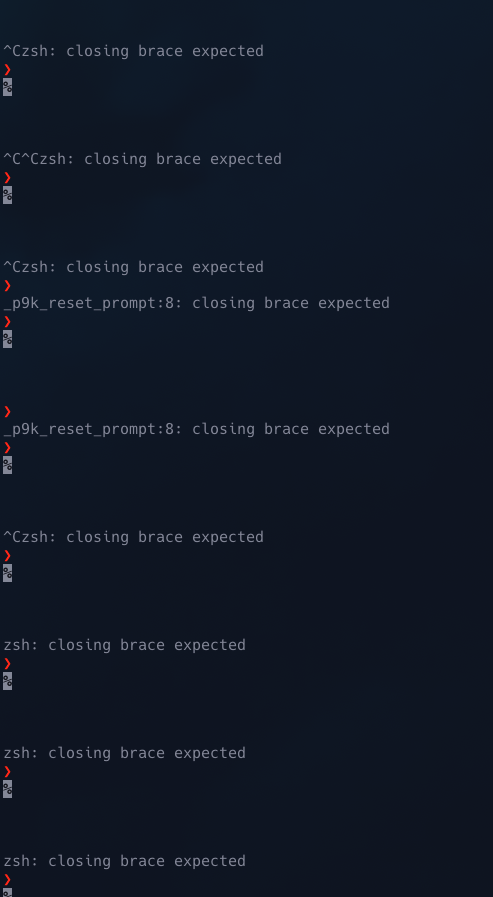
functions _p9k_reset_prompt:
_p9k_reset_prompt () {
        if (( __p9k_reset_state != 1 )) && zle && [[ -z $_p9k__line_finished ]]
        then
                __p9k_reset_state=0
                setopt prompt_subst
                (( __p9k_ksh_arrays )) && setopt ksh_arrays
                (( __p9k_sh_glob )) && setopt sh_glob
                (( _p9k__can_hide_cursor )) && echoti civis
                {
                        zle .reset-prompt
                        zle -R
                } always {
                        (( _p9k__can_hide_cursor )) && echoti cnorm
                        _p9k__cursor_hidden=0
                }
        fi
}
I use oh-my-zsh, and I'm on MacOS Catalina (10.15.3), iTerm2 3.3.9.
 Exr0n
on 19 Apr 2020
Exr0n
on 19 Apr 2020
Thanks @romkatv
zsh -df
source ~/powerlevel10k/powerlevel10k.zsh-theme
Then follow the configure to restart p10 configs. Then everything back to normal~
 h-jia
on 12 Jul 2020
h-jia
on 12 Jul 2020
Related issues
 dylanjm
·
3Comments
dylanjm
·
3Comments
 leeallen337
·
3Comments
leeallen337
·
3Comments
 debo
·
5Comments
debo
·
5Comments
 alex-popov-tech
·
4Comments
alex-popov-tech
·
4Comments
 zemuldo
·
4Comments
zemuldo
·
4Comments
Most helpful comment
When you start getting errors like this, they don't go away until you update powerlevel10k, right? If so, this means that either
p10k.zshorp10k.zwcgets corrupted. The first is a source file hosted on github. The second is the result of callingzcompileon the first file. When you see the error again, try to figure out what is corrupted and how. E.g., when the error mentions_p9k_reset_prompt, typefunctions _p9k_reset_promptand store the result. Findp10k.zshandp10k.zwcsomewhere within zplugin cache directory and make a copy of each. See ifp10k.zshis changed (it should be within a git repository, so you can just usegit statusthere). Try tozcompileit and check whether the result is the same asp10k.zwcyou have there.Another thing to try is to load powerlevel10k without zplugin. It's possible that these errors would stop then.
If you manage to get any additional information, please reopen this issue.